
JS-120 · Lesson 5 of 12 · 24 min
Async and await
▶ Video coming soon A video version of this lesson is on the way.
Promise chains solved Mira's worst problems with callbacks, but on the morning of the session planned for Thursday, March 11, 2027, she showed Gareth a chain she was not proud of. Placing an order needed the menu in the third step and the order number in the fifth, so values had to be passed down through every then, and a condition in the middle had split the chain into two branches. "It works," she said, "but I can't read it any more."
"Then you are ready for async and await," Gareth says. "They are promises with better grammar. The code you write looks like the synchronous code you have written all along, top to bottom, with ordinary variables, loops and try blocks, and underneath it is exactly the promise machinery from Tuesday."
Async functions
Putting the keyword async before a function changes two things. First, the function always returns a promise. If the body returns a value, the promise is fulfilled with it; if the body throws, the promise is rejected with the error. Second, inside the function you may use the keyword await. Async works with every kind of function: declarations, function expressions, arrow functions and methods in objects and classes.
async function getTip() {
  return 2.89;
}

async function fail() {
  throw new Error('No order open');
}

const p = getTip();
console.log('getTip returned a promise:', p instanceof Promise);
p.then((tip) => console.log('Tip:', tip));
fail().catch((err) => console.log('fail rejected:', err.message));
console.log('end of script');getTip returned a promise: true end of script Tip: 2.89 fail rejected: No order open
What this code does
getTip returns a plain number, but because it is async the caller receives a promise fulfilled with that number. fail throws, and the throw becomes a rejection that catch handles instead of an uncaught exception. Both results arrive after the script has finished, as microtasks.
Waiting with await
await takes a promise, or any value, and pauses the async function until the promise settles. If it is fulfilled, await gives back the value, so it can be stored in an ordinary variable. If it is rejected, await throws the reason at that point in the function, as if a throw statement were written there. While the function is paused, nothing is blocked: the async function has returned its own pending promise to its caller, the call stack has emptied, and the event loop is free to handle other tasks. When the awaited promise settles, the rest of the function continues as a microtask.
const wait = (ms, value) => new Promise((resolve) => setTimeout(() => resolve(value), ms));
const getMenu = () => wait(50, { SOUP: 550, DRINK: 200 });
const checkStock = (code) => wait(50, code !== 'EGG');
const sendOrder = (lines) => wait(50, { number: 41, lines });
const getReceipt = (number) => wait(50, 'Receipt for order ' + number);

async function placeOrder(code, qty) {
  const menu = await getMenu();
  const inStock = await checkStock(code);
  if (!inStock) return code + ' is sold out';
  const order = await sendOrder([{ code, qty, price: menu[code] }]);
  const receipt = await getReceipt(order.number);
  return receipt + ', total ' + ((menu[code] * qty) / 100).toFixed(2);
}

placeOrder('SOUP', 2).then((msg) => console.log(msg));
placeOrder('EGG', 1).then((msg) => console.log(msg));
console.log('Both orders started');Both orders started EGG is sold out Receipt for order 41, total 11.00
What this code does
Each await pauses placeOrder until that pretend request answers and then hands back its value, so menu and order are ordinary variables that later lines can use. The sold-out check is a plain if with an early return, with no branching chain. Both calls start immediately, and the script's last line runs before either finishes.
Compare this with the callback pyramid of Lesson 3 and the chain of Lesson 4. The steps, the pretend server and the timing are the same. What has changed is that the code reads like a recipe: get the menu, check the stock, send the order, fetch the receipt. Values from early steps are simply in scope later.
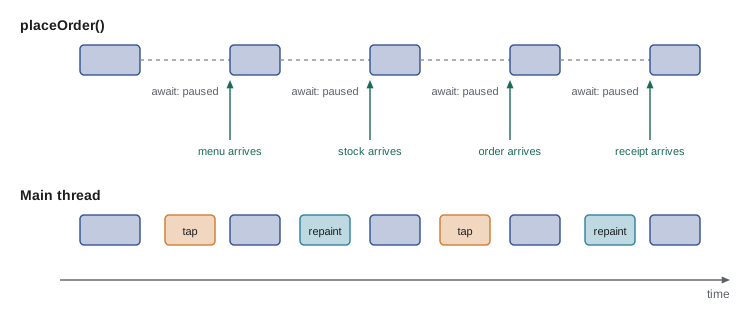
It helps to know exactly what await does to the order of events. Code before the first await runs synchronously, as part of the call. At the first await the function returns its promise to the caller, and the caller carries on. Everything after the await runs later.
async function show() {
  console.log('2 inside show, before await');
  await null;
  console.log('4 inside show, after await');
}

console.log('1 before calling show');
show();
console.log('3 after calling show');1 before calling show 2 inside show, before await 3 after calling show 4 inside show, after await
What this code does
The call to show runs its first line straight away, as ordinary synchronous code. At await the function pauses and control goes back to the caller, which prints line 3. Even awaiting a value that is not a promise, here null, pauses until the next microtask, so line 4 comes last.
Errors with try and catch
Because a rejected promise makes await throw, ordinary try, catch and finally work again, which was impossible with callbacks. A try block can surround several awaits, and a rejection at any of them jumps to the catch. finally runs whether the steps succeeded or failed, which makes it the place to hide a spinner or re-enable the Place order button.
const wait = (ms, value) => new Promise((resolve) => setTimeout(() => resolve(value), ms));
async function sendOrder(lines) {
  await wait(80);
  if (lines.length === 0) throw new Error('The order is empty');
  return { number: 42 };
}

async function onPlaceOrder(lines) {
  console.log('Button disabled, spinner shown');
  try {
    const order = await sendOrder(lines);
    console.log('Order', order.number, 'placed');
  } catch (err) {
    console.log('Could not place order:', err.message);
  } finally {
    console.log('Button enabled, spinner hidden');
  }
}

await onPlaceOrder([]);
await onPlaceOrder([{ code: 'SOUP', qty: 1 }]);Button disabled, spinner shown Could not place order: The order is empty Button enabled, spinner hidden Button disabled, spinner shown Order 42 placed Button enabled, spinner hidden
What this code does
The first call sends an empty order, so sendOrder throws and the catch block shows the reason. The second call succeeds. In both cases finally restores the button, so the page can never be left with a spinner that never stops.
The two calls at the bottom use top-level await: await outside any function. It is allowed in JavaScript modules, the kind of script loaded with type="module" that you used in The DOM and Browser Events, and in this course's runner. In a classic script it is a syntax error, and inside an ordinary function so is any await; the function must be async.
| Where | Is await allowed? | Notes |
|---|---|---|
| Inside an async function or async arrow function | Yes | The usual place |
| At the top level of a module | Yes | The module waits; modules that import it wait too |
| At the top level of a classic script | No | SyntaxError |
| Inside an ordinary function, even within an async one | No | SyntaxError; make that function async too |
| Inside a forEach or map callback in an async function | Only if the callback is async, and then it does not make forEach wait | Use for...of instead |
Awaiting in loops
An await inside a for loop or a for...of loop pauses the whole function, so the iterations run one after another: the second starts only when the first has finished. That is right when each step depends on the previous one, or when the server should receive requests in order. Array methods such as forEach are different. They call their callback for each element and ignore what it returns, so an async callback's promises are thrown away, forEach finishes at once, and the code after it runs before any of the work is done.
const wait = (ms, value) => new Promise((resolve) => setTimeout(() => resolve(value), ms));
const orders = [{ n: 41, ms: 90 }, { n: 42, ms: 30 }, { n: 43, ms: 60 }];

async function withForEach() {
  orders.forEach(async (o) => {
    await wait(o.ms);
    console.log('  forEach finished order', o.n);
  });
  console.log('forEach version says: all sent');
}

async function withForOf() {
  for (const o of orders) {
    await wait(o.ms);
    console.log('  for...of finished order', o.n);
  }
  console.log('for...of version says: all sent');
}

await withForEach();
await wait(120);
await withForOf();forEach version says: all sent forEach finished order 42 forEach finished order 43 forEach finished order 41 for...of finished order 41 for...of finished order 42 for...of finished order 43 for...of version says: all sent
What this code does
In the forEach version, the claim that all orders were sent is printed before any have finished, and the orders then finish in order of their delays, not the list. The for...of version waits at each await, so the orders finish in list order and the final message is true. The pause in the middle simply lets the first version's timers finish before the second starts.
Running steps one at a time is not always what you want. If three requests do not depend on each other, waiting for each before starting the next wastes time. Lesson 9 shows how to start them together and wait for all of them with Promise.all. For now, the rule is: one await per step means one step at a time.
Async iteration
Some data arrives in pieces: a long list of shifts fetched a page at a time, or messages arriving from a stream. An async iterable is an object whose items are delivered as promises, and the for await...of loop reads it, awaiting each item before running the body. The easiest way to create one is an async generator function, written async function*, which can both await and yield.
const wait = (ms, value) => new Promise((resolve) => setTimeout(() => resolve(value), ms));
const pages = [
  ['K1 Kitchen 09:00', 'K2 Kitchen 13:00'],
  ['L1 Lunch counter 11:00', 'G1 Garden 10:00'],
  ['G2 Garden 14:00'],
];

async function* allShifts() {
  for (let page = 0; page < pages.length; page++) {
    const rows = await wait(60, pages[page]);   // pretend to fetch one page
    console.log('(fetched page', page + 1 + ')');
    yield* rows;
  }
}

for await (const shift of allShifts()) {
  console.log(shift);
}
console.log('All shifts listed');(fetched page 1) K1 Kitchen 09:00 K2 Kitchen 13:00 (fetched page 2) L1 Lunch counter 11:00 G1 Garden 10:00 (fetched page 3) G2 Garden 14:00 All shifts listed
What this code does
allShifts fetches one pretend page at a time and yields its rows one by one; yield* hands over every item of an array. The for await loop asks for the next shift, waiting when a new page has to be fetched. The caller never needs to know about pages, which keeps the paging logic in one place.
To collect every item of an async iterable into an array, Array.fromAsync(iterable) returns a promise for the array. It has been Baseline Widely available since July 2026. Browsers also expose some streams as async iterables, so a for await loop can read the body of a large download chunk by chunk.
const wait = (ms, value) => new Promise((resolve) => setTimeout(() => resolve(value), ms));

async function* ordersToday() {
  yield await wait(40, { n: 41, cents: 1100 });
  yield await wait(40, { n: 42, cents: 845 });
  yield await wait(40, { n: 43, cents: 1325 });
}

const all = await Array.fromAsync(ordersToday());
const total = all.reduce((sum, o) => sum + o.cents, 0);
console.log(all.length, 'orders, total', (total / 100).toFixed(2));3 orders, total 32.70
What this code does
Array.fromAsync reads the async generator to the end and fulfils its promise with an array of everything it yielded. With await, the result is an ordinary array that reduce can add up. Use it only when the whole collection is small enough to hold at once.
Common mistakes
Most bugs in async code come from a handful of slips, and each has a recognizable symptom.
| Mistake | Symptom | Fix |
|---|---|---|
| Forgetting await before a call | A variable holds Promise { <pending> } instead of a value, or a check like if (result.ok) is always undefined | Add await, or handle the promise with then |
| Forgetting that the function is async | The caller uses the return value as if it were the result | The caller must await it too |
| await inside forEach | Code after the loop runs before the work is done | Use for...of, or Promise.all for parallel work |
| Calling an async function and ignoring the promise | Errors become unhandled rejections | Await it, return it, or add a catch |
| Awaiting independent requests one by one | The page is slower than it needs to be | Start them together and use Promise.all (Lesson 9) |
const wait = (ms, value) => new Promise((resolve) => setTimeout(() => resolve(value), ms));
async function getTotal() { await wait(30); return 1925; }

async function wrong() {
  const total = getTotal();            // missing await
  console.log('wrong:', typeof total, total instanceof Promise);
  await total;                         // tidy up so nothing is left pending
}

async function right() {
  const total = await getTotal();
  console.log('right:', typeof total, (total / 100).toFixed(2));
}

await wrong();
await right();wrong: object true right: number 19.25
What this code does
Without await, total holds the promise returned by getTotal, not the number, so any arithmetic or formatting on it would go wrong. With await, the function pauses and total is the number 1925. When a value prints as a Promise or as an object where you expected a number, look for a missing await.
Mixing await and then
Async functions and promise chains are the same machinery, so they mix freely. An async function returns a promise, which you can handle with then and catch in code that is not async, for example at the top of a classic script. And you can await any promise, including one returned by a library that was written with then. In a single function, though, pick one style. A function that awaits some steps and chains others is harder to follow than either style on its own.
// In a classic script, without top-level await
loadMenu()
  .then((menu) => renderMenu(menu))
  .catch((err) => showProblem('Menu not loaded: ' + err.message));

// The same with async and await inside a function
async function start() {
  try {
    renderMenu(await loadMenu());
  } catch (err) {
    showProblem('Menu not loaded: ' + err.message);
  }
}
start();
What this code does
Both versions call the same async loadMenu function and handle its result and its failure. The first uses then and catch, which works anywhere. The second wraps the same steps in an async function so it can use await with try and catch.
Try it yourself
From then to await
Rewrite showReceipt as an async function using await and try/catch instead of then and catch. It should print Order 41: 2 SOUP and then Could not load order 99: Not found.
Keep the pretend getOrder as it is.
const wait = (ms, value) => new Promise((resolve) => setTimeout(() => resolve(value), ms));
async function getOrder(n) {
  await wait(40);
  if (n !== 41) throw new Error('Not found');
  return { number: 41, qty: 2, code: 'SOUP' };
}

function showReceipt(n) {
  return getOrder(n)
    .then((o) => console.log('Order ' + o.number + ':', o.qty, o.code))
    .catch((err) => console.log('Could not load order', n + ':', err));
}

await showReceipt(41);
await showReceipt(99);
Try it yourself
One order at a time
Complete sendAll(orders) so that it sends the orders one at a time, in list order, using for...of and await sendOrder(order), prints sent <n> after each, and returns the total cents of the orders sent.
The last line should print Total sent: 32.70.
const wait = (ms, value) => new Promise((resolve) => setTimeout(() => resolve(value), ms));
const sendOrder = (o) => wait(o.n === 42 ? 20 : 60, o.n);

async function sendAll(orders) {
  let total = 0;
  orders.forEach(async (o) => {
    const n = await sendOrder(o);
    console.log('sent', n);
    total += o.cents;
  });
  return total;
}

const total = await sendAll([{ n: 41, cents: 1100 }, { n: 42, cents: 845 }, { n: 43, cents: 1325 }]);
console.log('Total sent:', (total / 100).toFixed(2));
await wait(100);
Common mistakes
Mistakeawait blocks the main thread until the promise settles.
InsteadIt pauses only the async function; the main thread is free to run other tasks meanwhile.
MistakeAn async function returns its value directly.
InsteadIt always returns a promise; callers must await it or use then.
Mistakeawait works inside forEach the same way as in a for loop.
InsteadforEach ignores the promises its callback returns and does not wait. Use for...of.
Mistaketry and catch cannot handle errors from asynchronous code.
InsteadWith await they can: a rejected promise makes await throw inside the try.
MistakeEvery independent request should be awaited one after another.
InsteadThat runs them in sequence; start them together and wait with Promise.all when they do not depend on each other.
Summary and key terms
- async before a function makes it return a promise: fulfilled with what it returns, rejected with what it throws. await pauses an async function until a promise settles and gives back its value, or throws its reason.
- While the function is paused, the main thread is free; the rest of the function resumes as a microtask.
- Code before the first await runs synchronously as part of the call. try, catch and finally work around awaits, with finally for cleanup.
- Top-level await works in modules but not in classic scripts. await in a for or for...of loop runs iterations one after another, while forEach does not wait for async callbacks.
- Async generators and for await...of handle data that arrives in pieces, and Array.fromAsync collects it into an array.
- A missing await leaves a promise where a value was expected. await and then use the same promises and can be mixed, but one style per function is clearer.
- async function
- A function declared with async, which always returns a promise and may use await.
- await
- An operator that pauses an async function until a promise settles and gives its value or throws its reason.
- top-level await
- Using await outside any function, allowed in JavaScript modules.
- async iterable
- An object whose items are delivered as promises, read with for await...of.
- for await...of
- A loop that awaits each item of an async iterable before running its body.
- async generator
- A function written async function* that can await and yield, producing an async iterable.
- Array.fromAsync
- A method that returns a promise for an array of every item of an async iterable.
- sequential
- Running steps one after another, each waiting for the last to finish.
Practice problems
Work each problem on paper first, then reveal the answer to check.
What does an async function return if its body returns 5?
Show answer
A promise fulfilled with 5.
What happens at await when the promise is rejected?
Show answer
The rejection reason is thrown at that point in the async function.
Why does code after orders.forEach(async ...) run too early?
Show answer
forEach does not wait for the promises its callback returns.
Where is top-level await allowed?
Show answer
At the top level of a JavaScript module, not in a classic script.
What symptom suggests a missing await?
Show answer
A variable prints as a Promise, or a property you expected is undefined.
Lesson quiz · 5 questions
Score 60% or more to complete this lesson.
Create a free account to save your progress, take quizzes and earn a certificate.