
JAVA-280 · Lesson 6 of 12 · 25 min
Deploying to the cloud
▶ Video coming soon A video version of this lesson is on the way.
On Thursday, March 2, after reading week, Leif came with a printout of four options and a question for Hamza: where should the booking API run? "The cloud" was not an answer, he said, because the word covers everything from renting a bare virtual machine to handing a container to a service that runs it for you and never tells you which machine it is on. The right choice for a bank is rarely the right choice for a bike shop. This lesson compares the options, makes Second Gear's choice, and builds the deployment for it.
What the cloud offers
Cloud computing means renting computing resources from a provider over the internet, paying for what you use, instead of owning machines. The offers are usually sorted by how much the provider manages for you. With infrastructure as a service, IaaS, you rent virtual machines, disks and networks, and you look after the operating system and everything above it. With a managed container service, you hand over an image and its settings and the provider runs, restarts and scales it. With platform as a service, PaaS, you hand over code or a JAR and the platform builds and runs it. And Kubernetes, offered as a managed service by every large provider, is a general system for running many containers across many machines, powerful and correspondingly complex.
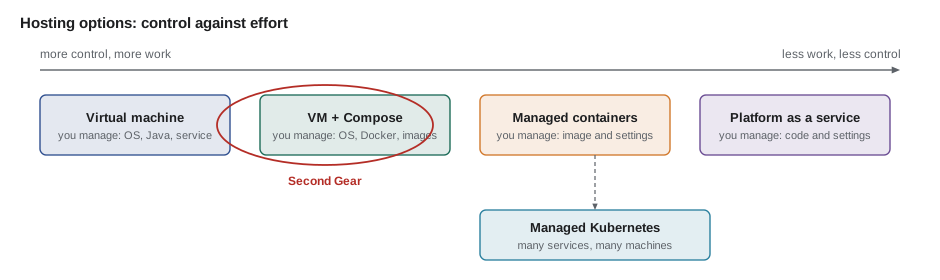
| Option | You manage | The provider manages | Fits |
|---|---|---|---|
| Virtual machine (IaaS) | Operating system, Java, the service, updates | Hardware, network, disks | Full control, steady load |
| Containers on a VM | Operating system, Docker, the service | Hardware, network, disks | A few services, one admin |
| Managed container service | The image and its settings | Machines, restarts, scaling, TLS | Variable load, small teams |
| Platform as a service | The code and its settings | Build, runtime, machines | Simple apps, fastest start |
| Managed Kubernetes | Manifests, cluster add-ons | Control plane, machines | Many services, platform team |
Choosing for Second Gear
Leif's printout scored the options on what mattered to the shop: how much it would cost each month, how much of his time it would take, how far the setup would carry them, and whether customers' data stayed in the right country. Customer phone numbers and names are personal information, and Odile wanted them stored in Canada, under Canadian privacy law. The example ranks the options with weights for each criterion, a decision method that makes the reasoning visible rather than settling the question by whoever argues loudest.
import java.util.*;

public class Main {
    record Option(String name, int cost, int effort, int growth, int residency) {}

    public static void main(String[] args) {
        Map<String, Integer> weight = Map.of("cost", 4, "effort", 3, "growth", 1, "residency", 5);
        List<Option> options = List.of(
            new Option("containers on the existing VM", 5, 3, 3, 5),
            new Option("managed container service", 3, 4, 4, 5),
            new Option("platform as a service", 2, 5, 3, 3),
            new Option("managed Kubernetes", 1, 1, 5, 5));

        record Scored(String name, int score) {}
        List<Scored> ranked = new ArrayList<>();
        for (Option o : options) {
            int s = o.cost() * weight.get("cost") + o.effort() * weight.get("effort")
                  + o.growth() * weight.get("growth") + o.residency() * weight.get("residency");
            ranked.add(new Scored(o.name(), s));
        }
        ranked.sort(Comparator.comparingInt(Scored::score).reversed());
        int max = 5 * weight.values().stream().mapToInt(Integer::intValue).sum();
        ranked.forEach(r -> System.out.printf("%-30s %2d of %d%n", r.name(), r.score(), max));
    }
}containers on the existing VM 57 of 65 managed container service 53 of 65 platform as a service 41 of 65 managed Kubernetes 37 of 65
What this code does
Each option gets a score from 1 to 5 on each criterion, where 5 is best, so a cheap option scores 5 on cost. Multiplying by the weights and adding gives a total out of 65, the score an option would get with 5 everywhere. Kubernetes scores highest on growth but lowest on cost and effort, which is exactly the trade-off for a shop with one part-time administrator.
The scores are judgments, and changing a weight can change the winner, which is useful: the conversation moves to whether, say, growth matters more than Leif's evenings. For Second Gear the answer was clear. The shop already paid for the virtual machine, it was in the right country, and Leif knew it well. The booking API would run there as containers managed by Docker Compose, behind a reverse proxy, and a managed container service would be the next step if traffic ever outgrew the machine. Because everything would be a container image, that move would not require changing the service.
The production layout
Leif drew the machine as it would be in May. A reverse proxy receives all traffic on ports 80 and 443, holds the TLS certificates and forwards each request to the right container by its host name. The booking API runs as one container, the website's pages as another, and PostgreSQL in a third with its data on a volume that survives container replacement. Only the proxy is reachable from the internet; the management port 9090 is reachable only from the shop's network, as JAVA-260 required.
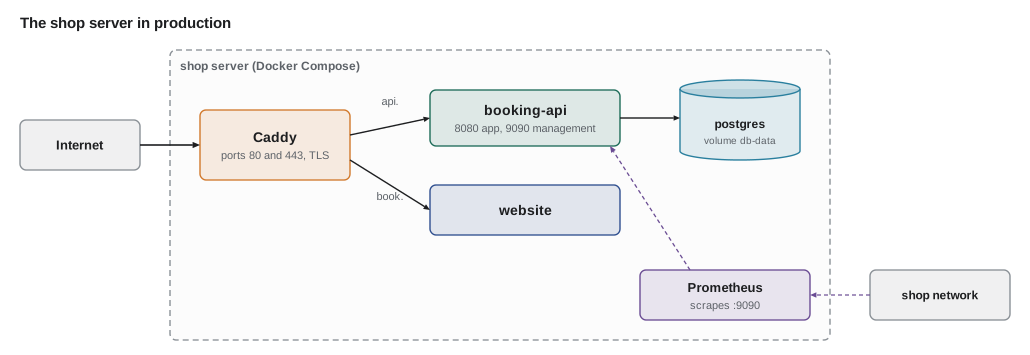
Leif chose Caddy as the reverse proxy because it obtains and renews TLS certificates from Let's Encrypt by itself, which removes a whole class of three-in-the-morning failures. Its configuration for the two sites is four lines.
api.secondgear.org {
    reverse_proxy booking-api:8080
}

book.secondgear.org {
    reverse_proxy website:80
}
What this code does
Each block names a site, and Caddy fetches a certificate for that name the first time it is requested. reverse_proxy forwards requests to a container by its Compose service name, which Docker's internal network resolves. Health checks and load balancing between several copies can be added to the same directive later.
The routing itself is simple: look at the Host header and pick an upstream. The example does that for a few requests, including one for a name the proxy does not serve.
import java.util.*;

public class Main {
    static final Map<String, String> SITES = Map.of(
        "api.secondgear.org", "booking-api:8080",
        "book.secondgear.org", "website:80");

    static String route(String host, String path) {
        String h = host.toLowerCase(Locale.ROOT).replaceFirst(":\\d+$", "");
        String upstream = SITES.get(h);
        if (upstream == null) return "421 Misdirected Request (no site for " + h + ")";
        if (h.startsWith("api.") && path.startsWith("/actuator")) return "404 Not Found (management is on port 9090 only)";
        return "-> " + upstream + path;
    }

    public static void main(String[] args) {
        String[][] requests = {
            {"api.secondgear.org", "/api/v1/repair-slots?date=2028-05-06"},
            {"book.secondgear.org", "/"},
            {"API.SecondGear.org:443", "/api/v1/parts/TUBE-700x25/availability"},
            {"api.secondgear.org", "/actuator/env"},
            {"203.0.113.7", "/"}};
        for (String[] r : requests) System.out.println(r[0] + r[1] + "\n  " + route(r[0], r[1]));
    }
}api.secondgear.org/api/v1/repair-slots?date=2028-05-06 -> booking-api:8080/api/v1/repair-slots?date=2028-05-06 book.secondgear.org/ -> website:80/ API.SecondGear.org:443/api/v1/parts/TUBE-700x25/availability -> booking-api:8080/api/v1/parts/TUBE-700x25/availability api.secondgear.org/actuator/env 404 Not Found (management is on port 9090 only) 203.0.113.7/ 421 Misdirected Request (no site for 203.0.113.7)
What this code does
Host names are case-insensitive and may carry a port, so route lowers the case and removes any port before looking the name up. A request for an address the proxy has no site for, such as a scanner probing the bare IP, gets an error instead of reaching a service. The extra rule for paths under /actuator is defense in depth: management already listens on another port, but the proxy refuses those paths too in case a setting ever changes.
Compose: the whole machine in one file
Docker Compose describes several containers, their networks and volumes in one YAML file, and starts or replaces them with one command. Each service names its image by version tag, so the file in the repository says exactly which version is meant to run. Secrets are files on the server that Compose mounts into /run/secrets, read by Spring Boot's configuration tree from lesson 5.
services:
  proxy:
    image: caddy:2
    ports: ["80:80", "443:443"]
    volumes: ["./Caddyfile:/etc/caddy/Caddyfile:ro", "caddy-data:/data"]
    restart: unless-stopped

  booking-api:
    image: ghcr.io/second-gear/booking-api:${BOOKING_API_VERSION}
    env_file: booking-api.env
    environment:
      SPRING_CONFIG_IMPORT: "optional:configtree:/run/secrets/"
    secrets: [spring.datasource.password, shop.sms.api-key]
    ports: ["10.8.0.1:9090:9090"]
    mem_limit: 768m
    depends_on:
      db: { condition: service_healthy }
    restart: unless-stopped

  db:
    image: postgres:17
    environment:
      POSTGRES_DB: stockstore
      POSTGRES_PASSWORD_FILE: /run/secrets/postgres-password
    secrets: [postgres-password]
    volumes: ["db-data:/var/lib/postgresql/data"]
    healthcheck:
      test: ["CMD", "pg_isready", "-U", "postgres"]
      interval: 10s
    restart: unless-stopped

secrets:
  spring.datasource.password: { file: ./secrets/booking-db-password }
  shop.sms.api-key: { file: ./secrets/sms-api-key }
  postgres-password: { file: ./secrets/postgres-password }

volumes:
  caddy-data:
  db-data:
What this code does
The booking API's version comes from a variable, so deploying a new version means changing one value and running Compose again. Port 9090 is published only on the address of the shop's private network link, not on the public interface, and the memory limit of 768 megabytes matches lesson 3's budget. depends_on with service_healthy makes Compose wait for PostgreSQL's own health check before starting the API, and restart: unless-stopped brings every container back after a crash or a reboot.
Waiting for a dependency to be ready, rather than merely started, is a pattern that appears at every level of a deployment. The deployment script waits for the new container's health endpoint before telling the proxy to use it. The example shows the waiting loop, with the clock simulated so that it runs instantly: it polls, doubles the delay after each failure up to a cap, and gives up after a deadline.
import java.util.*;
import java.util.function.IntPredicate;

public class Main {
    static boolean waitUntilReady(IntPredicate healthyAt, int deadlineSeconds) {
        int t = 0, delay = 1;
        while (t <= deadlineSeconds) {
            boolean ok = healthyAt.test(t);
            System.out.println("  t=" + t + "s " + (ok ? "UP" : "not ready"));
            if (ok) return true;
            t += delay;
            delay = Math.min(delay * 2, 8);
        }
        return false;
    }

    public static void main(String[] args) {
        System.out.println("new container, ready after 11 s:");
        System.out.println(waitUntilReady(t -> t >= 11, 60) ? "switch traffic" : "abort and keep the old one");
        System.out.println("broken container, never ready:");
        System.out.println(waitUntilReady(t -> false, 30) ? "switch traffic" : "abort and keep the old one");
    }
}new container, ready after 11 s: t=0s not ready t=1s not ready t=3s not ready t=7s not ready t=15s UP switch traffic broken container, never ready: t=0s not ready t=1s not ready t=3s not ready t=7s not ready t=15s not ready t=23s not ready abort and keep the old one
What this code does
The predicate stands in for an HTTP call to the health endpoint at time t, so the example needs no real server or waiting. Delays of 1, 2, 4 and then 8 seconds avoid hammering a slow starter while still noticing quickly when it is ready. The broken container is abandoned after its deadline, and the old version, still running, keeps serving customers.
How the pipeline deploys
With the layout fixed, deployment becomes a short, repeatable script on the server, run by the pipeline over SSH with a key that can do nothing else. Leif created a user called deploy on the server whose SSH key is restricted to one command, the deployment script, so that a leaked pipeline key could deploy a published image and nothing more. The pipeline's key is a secret in the GitHub environment called production, which requires Hamza's or Leif's approval before a job can use it.
#!/bin/sh
# deploy.sh VERSION : run on the shop server by the deploy user
set -eu
cd /srv/secondgear
VERSION="$1"
export BOOKING_API_VERSION="$VERSION"
docker compose pull booking-api
docker compose up -d --no-deps booking-api
for i in 1 2 3 4 5 6 7 8 9 10 11 12; do
  if curl -fsS http://10.8.0.1:9090/actuator/health/readiness >/dev/null; then
    echo "$VERSION" > deployed-version
    echo "booking-api $VERSION is ready"
    exit 0
  fi
  sleep 5
done
echo "booking-api $VERSION did not become ready; previous version: $(cat deployed-version)" >&2
exit 1
What this code does
set -eu stops the script at the first failing command or unset variable. Compose pulls the requested image and replaces only the booking-api container, leaving the database and proxy alone. The script then waits up to a minute for the readiness endpoint and records the version that is running, which lesson 11 uses to roll back.
This first version has a short gap: between stopping the old container and the new one becoming ready, requests fail. For a shop whose booking traffic is a few requests a minute, a gap of fifteen seconds at a quiet time was acceptable at first, and lesson 11 removes it with a blue-green switch.
ssh deploy@shop-server 1.0.0[+] Pulling 1/1 ✔ booking-api Pulled [+] Running 1/1 ✔ Container secondgear-booking-api-1 Started booking-api 1.0.0 is ready
What this code does
The deploy user's key is restricted, so whatever command is sent, the server runs deploy.sh with the version as its argument. Compose pulls only the layers that changed, and the readiness probe answered on the third try. The output is representative: the shop server was not reachable from the course machine.
What Kubernetes would add
Hamza wanted to know what the Kubernetes branch of the printout looked like, so Leif sketched the same service as a Deployment: a description of the desired state, three copies of the container, that the cluster keeps true by starting, stopping and replacing containers. Probes tell the cluster when a container is alive and when it is ready for traffic, and a rolling update replaces copies a few at a time.
apiVersion: apps/v1
kind: Deployment
metadata:
  name: booking-api
spec:
  replicas: 3
  strategy:
    rollingUpdate: { maxSurge: 1, maxUnavailable: 0 }
  selector:
    matchLabels: { app: booking-api }
  template:
    metadata:
      labels: { app: booking-api }
    spec:
      containers:
        - name: booking-api
          image: ghcr.io/second-gear/booking-api:1.0.0
          resources:
            requests: { memory: 768Mi, cpu: 250m }
            limits: { memory: 768Mi }
          ports: [{ containerPort: 8080 }, { containerPort: 9090 }]
          readinessProbe:
            httpGet: { path: /actuator/health/readiness, port: 9090 }
          livenessProbe:
            httpGet: { path: /actuator/health/liveness, port: 9090 }
What this code does
The cluster keeps three copies running and, on an update, adds at most one new copy above three and never drops below three ready ones. The memory limit plays the role of Compose's mem_limit, and the JVM sizes its heap from it as in lesson 3. Spring Boot's liveness and readiness groups, from JAVA-260, map directly onto the two probes.
The rolling update rule is easier to see than to read. The example steps through an update of three copies with maxSurge 1 and maxUnavailable 0, as the cluster would.
import java.util.*;

public class Main {
    public static void main(String[] args) {
        int replicas = 3, maxSurge = 1, maxUnavailable = 0;
        int oldReady = replicas, newReady = 0, step = 0;
        System.out.println("step  old  new  ready  total");
        System.out.printf("%4d %4d %4d %6d %6d%n", step, oldReady, newReady, oldReady + newReady, oldReady + newReady);
        while (newReady < replicas) {
            int canAdd = replicas + maxSurge - (oldReady + newReady);
            newReady += Math.min(canAdd, replicas - newReady);
            step++;
            System.out.printf("%4d %4d %4d %6d %6d  (new copies started and ready)%n", step, oldReady, newReady, oldReady + newReady, oldReady + newReady);
            int canRemove = (oldReady + newReady) - (replicas - maxUnavailable);
            int removed = Math.min(canRemove, oldReady);
            oldReady -= removed;
            step++;
            System.out.printf("%4d %4d %4d %6d %6d  (%d old copy stopped)%n", step, oldReady, newReady, oldReady + newReady, oldReady + newReady, removed);
        }
    }
}step old new ready total 0 3 0 3 3 1 3 1 4 4 (new copies started and ready) 2 2 1 3 3 (1 old copy stopped) 3 2 2 4 4 (new copies started and ready) 4 1 2 3 3 (1 old copy stopped) 5 1 3 4 4 (new copies started and ready) 6 0 3 3 3 (1 old copy stopped)
What this code does
With maxSurge 1, the cluster may run one copy above the desired three, so it starts one new copy and waits for it to be ready. With maxUnavailable 0, it may stop an old copy only when that leaves at least three ready, so the number of ready copies never falls below three during the whole update. The update takes six steps, and at no point is the service short of capacity.
For one service on one machine, all this would be machinery without a purpose. Leif's summary was that Kubernetes solves the problems of having many services and many machines, and Second Gear had neither.
Exercises
Try it yourself
Downtime budget
An availability target such as 99.9 (out of 100) allows the service to be unavailable for the rest of the time. Complete allowedMinutes so that it returns the minutes of allowed downtime in a 30-day month, rounded to one decimal place, and print it for each target.
public class Main {
    static double allowedMinutes(double target) {
        return 0;
    }

    public static void main(String[] args) {
        for (double t : new double[] {99.0, 99.5, 99.9, 99.99})
            System.out.printf("%.2f -> %.1f minutes a month%n", t, allowedMinutes(t));
    }
}
Try it yourself
Pick a region
Complete choose so that it returns the name of the cheapest region whose country is in the allowed set, or none if no region qualifies. Prices are rough monthly estimates in whole dollars.
import java.util.*;

public class Main {
    record Region(String name, String country, int monthly) {}

    static String choose(List<Region> regions, Set<String> allowed) {
        return regions.get(0).name();
    }

    public static void main(String[] args) {
        List<Region> r = List.of(
            new Region("us-east-ohio", "US", 31), new Region("ca-central-montreal", "CA", 34),
            new Region("ca-toronto", "CA", 33), new Region("eu-frankfurt", "DE", 29));
        System.out.println(choose(r, Set.of("CA")));
        System.out.println(choose(r, Set.of("US")));
        System.out.println(choose(r, Set.of("US", "CA")));
        System.out.println(choose(r, Set.of("JP")));
    }
}
Before the evening ended, Leif installed Docker and Compose on the shop server and moved the health service from lesson 2 into a container behind Caddy, at ops.secondgear.org. It got its certificate in four seconds. The booking API would follow in April, once Ingrid's course had finished it.
Common mistakes
MistakeChoosing a platform because it is popular.
InsteadScore the options on the shop's own criteria, with the weights written down.
MistakeExposing every container's port to the internet.
InsteadPut a reverse proxy in front and publish only ports 80 and 443; keep management ports private.
MistakeStarting the new version and hoping it works.
InsteadWait for its readiness endpoint, with a deadline, before sending it traffic.
MistakeGiving the pipeline full SSH access to the server.
InsteadUse a deploy user whose key can only run the deployment script, behind an approval.
MistakeAdopting Kubernetes for one service on one machine.
InsteadUse Compose until there are many services or machines to manage.
Summary and key terms
- Cloud hosting ranges from virtual machines, where you manage the operating system and everything above it, through managed container services and platforms as a service, to managed Kubernetes for many services.
- A weighted comparison of cost, effort, growth and data residency made Second Gear choose containers on its existing virtual machine, run by Docker Compose behind a Caddy reverse proxy that routes by host name and manages TLS certificates.
- The Compose file pins images by version, mounts secrets as files, limits memory and waits for the database to be healthy.
- The pipeline deploys over SSH with a restricted deploy user and an approval, and the script waits for readiness with backoff and a deadline.
- Kubernetes Deployments add replicas, probes and rolling updates, which matter when there are many services and machines.
- Infrastructure as a service
- Renting virtual machines, disks and networks and managing the rest yourself.
- Managed container service
- A cloud service that runs, restarts and scales container images for you.
- Platform as a service
- A service that builds and runs your code for you.
- Kubernetes
- A system for running and managing many containers across many machines.
- Reverse proxy
- A server that receives requests and forwards them to the right service.
- Docker Compose
- A tool that defines and runs several containers from one YAML file.
- Data residency
- Keeping data stored in a particular country or region.
- Readiness
- Whether a service is ready to receive traffic, as opposed to merely running.
- Rolling update
- Replacing copies of a service a few at a time to avoid downtime.
- Deploy user
- A server account whose only permission is running the deployment.
Practice problems
Work each problem on paper first, then reveal the answer to check.
Why did Second Gear choose Compose on its existing VM?
Show answer
It was already paid for, in the right country, and Leif knew it; images keep the move to a managed service open.
What does Caddy do besides forwarding requests?
Show answer
It obtains and renews TLS certificates by itself.
Why is port 9090 published only on the private address?
Show answer
So that management endpoints are reachable only from the shop network.
What does maxUnavailable: 0 guarantee during an update?
Show answer
The number of ready copies never drops below the desired count.
What can the pipeline's SSH key do on the server?
Show answer
Only run the deployment script.
Lesson quiz · 5 questions
Score 60% or more to complete this lesson.
Create a free account to save your progress, take quizzes and earn a certificate.