
JAVA-280 · Lesson 4 of 12 · 25 min
Continuous integration pipelines
▶ Video coming soon A video version of this lesson is on the way.
On Thursday, February 3, Kofi joined the session for the first half hour. In the autumn, during the testing course, he had set up GitHub Actions for the shop's secondgear repository, so that every pull request ran the PartsDesk tests and nobody could merge a red build into main. The booking API lived in the same repository, in its own Gradle project called booking-api, and it was not yet in the workflow at all. Leif's goal for the evening was a pipeline that, on every push, would build the booking API, run its tests and, on main, produce the container image from lesson 3, with no human hand touching the artifact.
What continuous integration is
Continuous integration means that everyone's changes are merged into the main branch often, at least daily, and that every merge is built and tested automatically on a shared machine. The shared machine matters more than it seems. Hamza's laptop had a Gradle cache, a local database and environment variables that nobody else had; a build that passes there proves only that it passes there. A CI runner starts from a clean machine every time, so the build must declare everything it needs.
Continuous delivery goes one step further: every change that passes the pipeline produces an artifact that could be deployed to production with one decision, and continuous deployment removes the decision, deploying every passing change automatically. Second Gear chose continuous delivery. The pipeline would build and publish an image for every commit on main, and deploying to production would stay a deliberate step, because Odile did not want a new version arriving in the middle of a Saturday rush.
| Practice | What is automatic | What a person decides |
|---|---|---|
| Continuous integration | Build and test every change | Whether to merge |
| Continuous delivery | Build, test and publish a deployable artifact | When to deploy to production |
| Continuous deployment | Build, test, publish and deploy | Nothing per change; only whether to stop the line |
A GitHub Actions workflow
A workflow is a YAML file in the repository's .github/workflows folder. It says which events start it, such as a push or a pull request, and which jobs to run. Each job runs on a fresh runner, a virtual machine provided by GitHub, and consists of steps: shell commands, or actions, reusable steps published by others and referred to by name and version. Jobs run in parallel unless one needs another, in which case it waits for it and is skipped if it fails.
Leif wrote the first version with Hamza line by line. The versions of the actions match the ones Kofi used in the autumn for PartsDesk, so that the whole repository moves to new versions together.
name: booking-api

on:
  pull_request:
    paths: ["booking-api/**", ".github/workflows/booking-api.yml"]
  push:
    branches: [main]
    paths: ["booking-api/**", ".github/workflows/booking-api.yml"]

permissions:
  contents: read

jobs:
  build:
    runs-on: ubuntu-latest
    timeout-minutes: 15
    defaults:
      run:
        working-directory: booking-api
    steps:
      - uses: actions/checkout@v6
      - uses: actions/setup-java@v5
        with:
          distribution: temurin
          java-version: "25"
      - uses: gradle/actions/setup-gradle@v6
      - run: ./gradlew build
      - uses: actions/upload-artifact@v4
        if: always()
        with:
          name: test-reports
          path: booking-api/build/reports/tests/
      - uses: actions/upload-artifact@v4
        with:
          name: booking-api-jar
          path: booking-api/build/libs/booking-api-*.jar
          retention-days: 7
What this code does
The paths filters start the workflow only when something in the booking API or the workflow itself changes, so a PartsDesk change does not rebuild it. setup-java installs Temurin 25 on the runner, and setup-gradle caches Gradle's downloads between runs. The test reports are uploaded even when the build fails, which is what if: always() means, so that a failure can be read in the browser.
The permissions block is a safety habit. Every job receives a token, GITHUB_TOKEN, that can act on the repository, and by default its powers may be broad. Declaring contents: read at the top limits every job to reading the code, and a job that needs more, such as pushing an image, asks for exactly that.
Workflows start from events, and the same workflow can behave differently for each. The example decides which workflows run for a few events, using the branch and path rules from the file above: a push to main or a pull request, and only when a changed file is under booking-api or is the workflow itself.
import java.nio.file.*;
import java.util.*;

public class Main {
    record Event(String kind, String branch, List<String> changed) {}

    static final List<PathMatcher> PATHS = List.of(
        FileSystems.getDefault().getPathMatcher("glob:booking-api/**"),
        FileSystems.getDefault().getPathMatcher("glob:.github/workflows/booking-api.yml"));

    static boolean runs(Event e) {
        boolean eventOk = e.kind().equals("pull_request") || (e.kind().equals("push") && e.branch().equals("main"));
        boolean pathOk = e.changed().stream().anyMatch(f -> PATHS.stream().anyMatch(m -> m.matches(Path.of(f))));
        return eventOk && pathOk;
    }

    public static void main(String[] args) {
        List<Event> events = List.of(
            new Event("pull_request", "slots-page", List.of("booking-api/src/main/java/org/secondgear/booking/SlotCalendar.java")),
            new Event("push", "main", List.of("partsdesk/src/main/java/org/secondgear/partsdesk/App.java")),
            new Event("push", "slots-page", List.of("booking-api/build.gradle.kts")),
            new Event("push", "main", List.of("README.md", ".github/workflows/booking-api.yml")));
        for (Event e : events)
            System.out.println(e.kind() + " on " + e.branch() + " " + e.changed().size() + " file(s): " + (runs(e) ? "runs" : "skipped"));
    }
}pull_request on slots-page 1 file(s): runs push on main 1 file(s): skipped push on slots-page 1 file(s): skipped push on main 2 file(s): runs
What this code does
A PathMatcher with the glob syntax matches paths the way GitHub's paths filter does, where two stars match any number of folders. A workflow runs only when both the event and at least one changed path pass. The push to a feature branch is skipped even though it changes the booking API, because that change will be checked when its pull request opens.
What the runner does
Each step's output appears in the browser, line by line. The log below is representative: GitHub's runners could not be reached from the course machine, so it shows the shape of a passing build with timings that will vary.
Run ./gradlew buildDownloading https://services.gradle.org/distributions/gradle-9.2.1-bin.zip > Task :compileJava > Task :processResources > Task :classes > Task :bootJar > Task :jar SKIPPED > Task :assemble > Task :compileTestJava > Task :test > Task :check > Task :build BUILD SUCCESSFUL in 1m 12s 7 actionable tasks: 7 executed
What this code does
The runner shows each step as a collapsible group, and this is the build step expanded. Gradle restored its cache from an earlier run, which is why the compile tasks finished in seconds. The test count is the booking API's suite at the time, before the slice and full tests were added.
When a test fails, Gradle writes a report in two forms: HTML for people and JUnit XML for tools. Most CI systems read the XML to show which tests failed. The format is simple, and the JDK can read it without any libraries, as the example shows.
import javax.xml.parsers.DocumentBuilderFactory;
import org.w3c.dom.*;
import java.io.ByteArrayInputStream;
public class Main {
public static void main(String[] args) throws Exception {
String xml = "<testsuite name=\"org.secondgear.booking.SlotCalendarTest\" tests=\"4\" failures=\"1\" errors=\"0\" skipped=\"0\" time=\"0.084\">"
+ "<testcase name=\"thirteenStartsOnSaturday()\" time=\"0.012\"/>"
+ "<testcase name=\"noStartsOnMonday()\" time=\"0.003\"/>"
+ "<testcase name=\"pastStartsAreHidden()\" time=\"0.004\"/>"
+ "<testcase name=\"lastStartIsThreeOClock()\" time=\"0.006\">"
+ "<failure message=\"expected: <15:00> but was: <15:30>\" type=\"org.opentest4j.AssertionFailedError\"/>"
+ "</testcase></testsuite>";
Document doc = DocumentBuilderFactory.newInstance().newDocumentBuilder()
.parse(new ByteArrayInputStream(xml.getBytes()));
Element suite = doc.getDocumentElement();
System.out.println(suite.getAttribute("name") + ": " + suite.getAttribute("tests") + " tests, "
+ suite.getAttribute("failures") + " failed");
NodeList cases = suite.getElementsByTagName("testcase");
for (int i = 0; i < cases.getLength(); i++) {
Element c = (Element) cases.item(i);
NodeList f = c.getElementsByTagName("failure");
if (f.getLength() > 0)
System.out.println(" FAILED " + c.getAttribute("name") + ": " + ((Element) f.item(0)).getAttribute("message"));
}
}
}org.secondgear.booking.SlotCalendarTest: 4 tests, 1 failed FAILED lastStartIsThreeOClock(): expected: <15:00> but was: <15:30>
What this code does
The java.xml module's DOM parser reads the report into a tree of elements, and the suite element carries the totals as attributes. Each testcase that failed has a failure child whose message attribute is the assertion's text, with the angle brackets written as entities in the XML and decoded by the parser. The failing test is a real kind of bug: an off-by-one that offers a slot at 15:30 when the last start should be 15:00.
Caching and speed
A pipeline that takes twenty minutes is a pipeline people learn to ignore. The main costs are downloading dependencies and compiling, and both can be cached. setup-gradle saves Gradle's dependency cache and build cache at the end of a run and restores them at the start of the next, keyed by a hash of the files that decide what is downloaded: the build scripts, the version catalog and the Gradle wrapper's properties. If none of them has changed, the key is the same and the cache is reused.
import java.nio.charset.StandardCharsets;
import java.security.MessageDigest;
import java.util.*;

public class Main {
    static String key(Map<String, String> files) throws Exception {
        MessageDigest md = MessageDigest.getInstance("SHA-256");
        for (var e : new TreeMap<>(files).entrySet()) {
            md.update(e.getKey().getBytes(StandardCharsets.UTF_8));
            md.update(e.getValue().getBytes(StandardCharsets.UTF_8));
        }
        return "gradle-linux-" + HexFormat.of().formatHex(md.digest()).substring(0, 12);
    }

    public static void main(String[] args) throws Exception {
        Map<String, String> files = new HashMap<>();
        files.put("booking-api/build.gradle.kts", "plugins { id(\"org.springframework.boot\") version \"4.1.1\" }");
        files.put("gradle/libs.versions.toml", "postgresql = \"42.7.8\"");
        files.put("gradle/wrapper/gradle-wrapper.properties", "distributionUrl=gradle-9.2.1-bin.zip");
        String monday = key(files);

        Map<String, String> sameDeps = new HashMap<>(files);
        String tuesday = key(sameDeps);

        Map<String, String> upgraded = new HashMap<>(files);
        upgraded.put("gradle/libs.versions.toml", "postgresql = \"42.7.9\"");
        String wednesday = key(upgraded);

        System.out.println("monday    " + monday);
        System.out.println("tuesday   " + tuesday + (tuesday.equals(monday) ? "  cache hit" : "  cache miss"));
        System.out.println("wednesday " + wednesday + (wednesday.equals(tuesday) ? "  cache hit" : "  cache miss"));
    }
}monday gradle-linux-2f5647ac08f5 tuesday gradle-linux-2f5647ac08f5 cache hit wednesday gradle-linux-f5120188fe95 cache miss
What this code does
The key is a hash of the names and contents of the files that decide the dependencies, taken in sorted order so that the result does not depend on map order. A day with only code changes produces the same key and reuses the cache. Upgrading the PostgreSQL driver changes one line of the version catalog, which changes the key and forces a fresh download, exactly when one is needed.
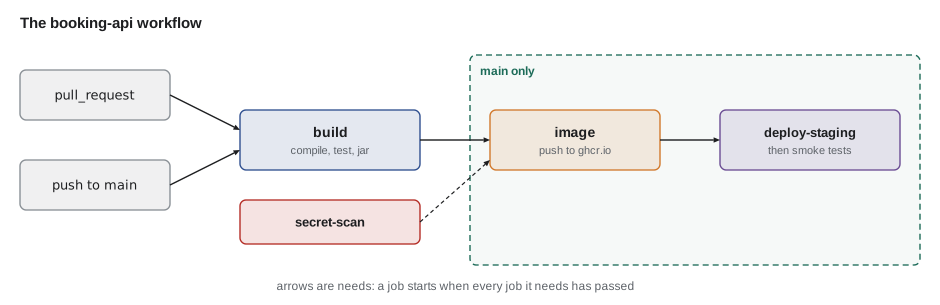
Splitting work into parallel jobs is the other speed tool. A job's start depends on the jobs it needs, so the pipeline's total time is the longest chain of needs, the critical path, not the sum of all jobs. The next example orders the jobs and computes that time.
import java.util.*;

public class Main {
    public static void main(String[] args) {
        Map<String, Integer> minutes = new LinkedHashMap<>();
        minutes.put("build", 3); minutes.put("lint-openapi", 1); minutes.put("secret-scan", 1);
        minutes.put("image", 2); minutes.put("deploy-staging", 1); minutes.put("smoke-test", 1);
        Map<String, List<String>> needs = Map.of(
            "image", List.of("build", "secret-scan"),
            "deploy-staging", List.of("image", "lint-openapi"),
            "smoke-test", List.of("deploy-staging"));

        Map<String, Integer> finish = new LinkedHashMap<>();
        List<String> order = new ArrayList<>();
        while (finish.size() < minutes.size()) {
            for (String job : minutes.keySet()) {
                if (finish.containsKey(job)) continue;
                List<String> deps = needs.getOrDefault(job, List.of());
                if (!finish.keySet().containsAll(deps)) continue;
                int start = deps.stream().mapToInt(finish::get).max().orElse(0);
                finish.put(job, start + minutes.get(job));
                order.add(job + " (" + start + "-" + finish.get(job) + ")");
            }
        }
        System.out.println("order: " + String.join(", ", order));
        System.out.println("sum of jobs: " + minutes.values().stream().mapToInt(Integer::intValue).sum() + " min");
        System.out.println("wall clock:  " + Collections.max(finish.values()) + " min");
    }
}order: build (0-3), lint-openapi (0-1), secret-scan (0-1), image (3-5), deploy-staging (5-6), smoke-test (6-7) sum of jobs: 9 min wall clock: 7 min
What this code does
Each pass over the jobs schedules any job whose needs have all finished, starting it when the last of them ends, which is a simple topological sort. The build, the OpenAPI check and the secret scan have no needs and start together at minute 0. The jobs add up to nine minutes, but the longest chain, build then image then staging then smoke test, takes seven.
Building and pushing the image
On main, the pipeline goes on to build the container image and push it to the GitHub Container Registry, ghcr.io, which keeps images next to the repository and uses the same permissions. The image job downloads the JAR that the build job uploaded rather than building it again, which is build once, deploy many inside the pipeline itself.
  image:
    if: github.event_name == 'push' && github.ref == 'refs/heads/main'
    needs: build
    runs-on: ubuntu-latest
    permissions:
      contents: read
      packages: write
    steps:
      - uses: actions/checkout@v6
      - uses: actions/download-artifact@v4
        with:
          name: booking-api-jar
          path: booking-api/build/libs
      - uses: docker/setup-buildx-action@v4
      - uses: docker/login-action@v4
        with:
          registry: ghcr.io
          username: ${{ github.actor }}
          password: ${{ secrets.GITHUB_TOKEN }}
      - uses: docker/build-push-action@v7
        with:
          context: booking-api
          push: true
          tags: |
            ghcr.io/second-gear/booking-api:sha-${{ github.sha }}
          cache-from: type=gha
          cache-to: type=gha,mode=max
What this code does
The if line keeps this job to pushes on main, so pull requests from anyone cannot publish images. packages: write is the one extra permission the job needs, and the token that logs in to the registry is the job's own GITHUB_TOKEN, so no password is stored anywhere. The gha cache type keeps Docker's layer cache in GitHub's cache between runs, so the libraries layer is not rebuilt for a code change.
Third-party actions run with the job's token and can read the code, so Leif also wanted them pinned. A version tag such as v7 can be moved by the action's owner; a full commit hash cannot. Large organizations pin every action to a hash and let a bot propose updates. Second Gear pinned the docker actions to hashes and kept the GitHub-owned actions on major-version tags, a compromise they wrote down in the repository's README.
Branch protection and required checks
A pipeline only protects main if a red build cannot be merged. Kofi had already set branch protection on main for PartsDesk: changes arrive by pull request, at least one review is required, and named status checks must pass. He added booking-api / build to the list, so that from that evening a pull request that broke the booking API's tests could not be merged, even by an administrator in a hurry.
| Rule on main | What it prevents |
|---|---|
| Require a pull request before merging | Pushing untested changes straight to main |
| Require one approving review | Changes nobody else has read |
| Require status checks: build, secret-scan | Merging a change that fails tests or contains a secret |
| Require branches to be up to date | Merging a change tested against an old main |
| Do not allow bypassing the rules | The hurry exception that causes most incidents |
A failing pipeline should also be fixed first, before new work. Leif's rule from his day job was simple: when main is red, the next commit is the one that makes it green, or the revert of the one that made it red.
Exercises
Try it yourself
Wall-clock time of a pipeline
Jobs a, b and c have no needs. Job d needs a and b; job e needs d and c. Complete finish so that it returns the minute at which a job finishes: its own duration plus the latest finish of the jobs it needs (0 if none).
Use recursion; the jobs are given in no particular order.
import java.util.*;

public class Main {
    static final Map<String, Integer> MIN = Map.of("a", 3, "b", 1, "c", 5, "d", 2, "e", 1);
    static final Map<String, List<String>> NEEDS = Map.of("d", List.of("a", "b"), "e", List.of("d", "c"));

    static int finish(String job) {
        return MIN.get(job);
    }

    public static void main(String[] args) {
        for (String j : List.of("a", "b", "c", "d", "e"))
            System.out.println(j + " finishes at " + finish(j));
    }
}
Try it yourself
Count the failures
Each line below summarizes one test: PASS or FAIL, a space, and the test's name. Complete summary so that it prints 4 tests, 1 failed (with the right numbers) and then one line failed: name for each failure, in order. If nothing failed, print all green instead of the failure lines.
import java.util.*;

public class Main {
    static void summary(List<String> results) {
        System.out.println(results.size() + " tests");
    }

    public static void main(String[] args) {
        summary(List.of("PASS thirteenStartsOnSaturday", "PASS noStartsOnMonday",
                        "FAIL lastStartIsThreeOClock", "PASS pastStartsAreHidden"));
        summary(List.of("PASS bookingNeedsPhone", "PASS referenceHasEightCharacters"));
    }
}
The first run on main took six minutes and pushed an image tagged with the commit hash. The second, after a one-line change, took two, because both caches hit. Kofi watched the green check appear next to Hamza's commit and said that it was the same check as PartsDesk, which was the point. There was no session the next Thursday, February 10, because Leif was away, and Hamza used the week to move the secret scan into the pipeline as its own job.
Common mistakes
MistakeBuilding on a developer's machine and calling it CI.
InsteadBuild and test on a clean runner on every push and pull request.
MistakeGiving every job broad token permissions.
InsteadSet contents: read at the top and grant packages: write only to the job that pushes images.
MistakeBuilding the JAR again in the image job.
InsteadUpload the JAR from the build job and download it in the image job.
MistakeLetting pull requests from any branch publish images.
InsteadPush images only from main, with an if condition on the job.
MistakeLeaving main red while new work continues.
InsteadFix or revert first; the next commit makes main green.
Summary and key terms
- Continuous integration builds and tests every change on a clean, shared runner; continuous delivery also publishes a deployable artifact, and continuous deployment deploys it automatically.
- A GitHub Actions workflow in .github/workflows lists events, jobs and steps; jobs run in parallel unless they need one another, and the pipeline's time is its critical path.
- Path filters limit a workflow to the files it concerns, and top-level permissions keep the job token minimal.
- Gradle and Docker caches are keyed by hashes of the files that determine their contents.
- On main the image job downloads the tested JAR, logs in to ghcr.io with the job's token and pushes an image tagged with the commit.
- Branch protection with required status checks stops red builds reaching main.
- Continuous integration
- Merging often and building and testing every change automatically.
- Continuous delivery
- Producing a deployable artifact from every passing change, with deployment a deliberate step.
- Continuous deployment
- Deploying every passing change automatically.
- Workflow
- A GitHub Actions YAML file of events and jobs.
- Runner
- The fresh machine that runs a job.
- Job
- A group of steps run on one runner; jobs can need other jobs.
- Action
- A reusable step referred to by owner, name and version.
- Critical path
- The longest chain of dependent jobs, which sets the pipeline time.
- Status check
- A pipeline result that branch protection can require before merging.
- GITHUB_TOKEN
- The short-lived token GitHub gives each job, limited by the permissions block.
Practice problems
Work each problem on paper first, then reveal the answer to check.
Why does a CI runner start from a clean machine?
Show answer
So that the build must declare everything it needs and does not depend on one person's setup.
Which permission does the image job need beyond reading the code?
Show answer
packages: write.
What decides whether the Gradle cache is reused?
Show answer
A key made from a hash of the build files, catalog and wrapper properties.
Why does the image job download the JAR instead of building it?
Show answer
So the image contains exactly the artifact that passed the tests.
What does branch protection add to a pipeline?
Show answer
It stops changes with failing required checks from being merged.
Lesson quiz · 5 questions
Score 60% or more to complete this lesson.
Create a free account to save your progress, take quizzes and earn a certificate.