
JAVA-280 · Lesson 2 of 12 · 26 min
Packaging executable JARs
▶ Video coming soon A video version of this lesson is on the way.
On Thursday, January 20, Leif brought a USB stick with nothing on it but a Java runtime. "Give me something I can run with one command," he said, "and tell me which version it is without opening it." The booking API was still changing every Wednesday, so Hamza practiced on something smaller: a one-class health service that answers GET /health with its status and version. Leif wanted the same health endpoint on everything he ran, and it is the right size to learn packaging on before Spring Boot adds its own layers.
What a JAR is
A JAR, a Java archive, is a ZIP file with a particular layout. It holds compiled .class files in folders that match their packages, any resources such as configuration templates or SQL migrations, and a folder called META-INF containing a text file called MANIFEST.MF. The manifest describes the archive: which class to start, which version this is, who built it. The java launcher reads the manifest when you run java -jar file.jar.
Hamza's health service is one class, org.secondgear.ops.Health. It reads the port from the PORT environment variable, defaulting to 8080, and reads its own version from the manifest with Package.getImplementationVersion, so the version is written once, at build time, and the running program reports it.
package org.secondgear.ops;

import com.sun.net.httpserver.HttpServer;
import java.io.IOException;
import java.net.InetSocketAddress;
import java.nio.charset.StandardCharsets;

/** A tiny health endpoint used to practice packaging and deployment. */
public class Health {
    public static void main(String[] args) throws IOException {
        int port = Integer.parseInt(System.getenv().getOrDefault("PORT", "8080"));
        String version = Health.class.getPackage().getImplementationVersion();
        HttpServer server = HttpServer.create(new InetSocketAddress(port), 0);
        server.createContext("/health", ex -> {
            byte[] body = ("{\"status\":\"UP\",\"version\":\"" + version + "\"}").getBytes(StandardCharsets.UTF_8);
            ex.getResponseHeaders().add("Content-Type", "application/json");
            ex.sendResponseHeaders(200, body.length);
            try (var out = ex.getResponseBody()) { out.write(body); }
        });
        server.start();
        System.out.println("health check listening on port " + port + ", version " + version);
    }
}
What this code does
The port comes from the environment, which is the twelve-factor port binding habit: the program listens wherever it is told to. The version is not a constant in the code; it is read from the JAR's manifest when the program runs. The JDK's built-in HttpServer is enough for one endpoint, so the JAR needs no libraries.
Building a JAR by hand
The JDK's jar tool creates archives. Hamza wrote a three-line manifest, compiled the class into a folder called out and packed the folder with the manifest. Every command below was run for real, and its output is shown unchanged.
$ javac -d out src/org/secondgear/ops/Health.java
$ jar --create --file health.jar --manifest manifest.txt -C out .
$ jar --list --file health.jar
META-INF/
META-INF/MANIFEST.MF
org/
org/secondgear/
org/secondgear/ops/
org/secondgear/ops/Health.class
$ unzip -p health.jar META-INF/MANIFEST.MF
Manifest-Version: 1.0
Main-Class: org.secondgear.ops.Health
Implementation-Title: secondgear-ops
Implementation-Version: 0.2.0
Created-By: 21.0.12.1 (Ubuntu)
What this code does
javac -d out writes the compiled class into out, in folders matching its package. jar --create packs out together with the manifest file, and jar --list shows what went in: the manifest and the class in its package folders. The final manifest has the three lines Hamza wrote plus two the tool added, Manifest-Version and Created-By, which records the JDK that built it.
The Main-Class attribute is what makes the JAR executable. Without it, java -jar fails with the message that there is no main manifest attribute, and the only way to run the program is to name the class: java -cp health.jar org.secondgear.ops.Health. Leif's test was the one-command run.
$ PORT=8081 java -jar health.jar &
health check listening on port 8081, version 0.2.0
$ curl -s http://localhost:8081/health
{"status":"UP","version":"0.2.0"}
What this code does
The PORT variable sets the port for this one command, and the trailing ampersand runs the server in the background so that curl can call it from the same terminal. The server printed the version it read from its own manifest, 0.2.0, and the health response carries the same number. Nothing in the source code says 0.2.0, which was the point of the exercise.
Reading a manifest
A manifest is a list of lines of the form Name: value. Lines are limited to 72 bytes, so a long value continues on the next line, which starts with a single space. The JDK has a class for reading and writing manifests, java.util.jar.Manifest, which handles those rules. The example parses a manifest from text and reads the attributes that a deployment script cares about.
import java.io.*;
import java.nio.charset.StandardCharsets;
import java.util.jar.*;

public class Main {
    public static void main(String[] args) throws IOException {
        String text = """
            Manifest-Version: 1.0
            Main-Class: org.secondgear.ops.Health
            Implementation-Title: secondgear-ops
            Implementation-Version: 0.2.0
            Build-Commit: 4f2a9c1e0b7d55aa31c9e8f2b6d4a10c7e3f9b21 built on the CI server for th
             e booking service practice project
            """;
        Manifest mf = new Manifest(new ByteArrayInputStream(text.getBytes(StandardCharsets.UTF_8)));
        Attributes a = mf.getMainAttributes();
        System.out.println("start class: " + a.getValue(Attributes.Name.MAIN_CLASS));
        System.out.println("title:       " + a.getValue("Implementation-Title"));
        System.out.println("version:     " + a.getValue(Attributes.Name.IMPLEMENTATION_VERSION));
        System.out.println("commit note: " + a.getValue("Build-Commit"));
        System.out.println("attributes:  " + a.size());
    }
}start class: org.secondgear.ops.Health title: secondgear-ops version: 0.2.0 commit note: 4f2a9c1e0b7d55aa31c9e8f2b6d4a10c7e3f9b21 built on the CI server for the booking service practice project attributes: 5
What this code does
The text block holds a manifest exactly as it would appear in a JAR, including a value that is too long for one line and continues on a line starting with a space. Manifest joins the continuation back on, which is why the commit note prints as one line. Standard names such as Main-Class have constants in Attributes.Name, and custom attributes like Build-Commit are read by their text name.
The same class can write a JAR, through JarOutputStream. Gradle and Maven do this for you, but writing one once shows that nothing magic is involved: a JAR is entries in a ZIP file, with the manifest first.
import java.io.*;
import java.nio.file.*;
import java.util.jar.*;

public class Main {
    public static void main(String[] args) throws IOException {
        Manifest mf = new Manifest();
        mf.getMainAttributes().put(Attributes.Name.MANIFEST_VERSION, "1.0");
        mf.getMainAttributes().put(Attributes.Name.MAIN_CLASS, "org.secondgear.ops.Health");
        mf.getMainAttributes().put(Attributes.Name.IMPLEMENTATION_VERSION, "0.2.0");

        Path jar = Files.createTempFile("demo", ".jar");
        try (JarOutputStream out = new JarOutputStream(Files.newOutputStream(jar), mf)) {
            out.putNextEntry(new JarEntry("org/secondgear/ops/Health.class"));
            out.write(new byte[] {(byte) 0xCA, (byte) 0xFE, (byte) 0xBA, (byte) 0xBE});
            out.closeEntry();
            out.putNextEntry(new JarEntry("db/migration/V1__parts.sql"));
            out.write("create table parts (code text primary key);".getBytes());
            out.closeEntry();
        }

        try (JarFile jf = new JarFile(jar.toFile())) {
            jf.stream().forEach(e -> System.out.println(e.getName() + "  " + e.getSize() + " bytes"));
            System.out.println("Main-Class = " + jf.getManifest().getMainAttributes().getValue("Main-Class"));
        }
        Files.delete(jar);
    }
}META-INF/MANIFEST.MF 95 bytes org/secondgear/ops/Health.class 4 bytes db/migration/V1__parts.sql 43 bytes Main-Class = org.secondgear.ops.Health
What this code does
JarOutputStream writes the manifest as the first entry, then each entry added with putNextEntry. The class file here is only its four magic bytes, CAFEBABE, which is enough to show the layout but would not run. Reading the file back with JarFile lists the entries in the order they were written and finds the manifest attribute.
Building it with Gradle
Typing jar commands does not scale past one class. Hamza had used Gradle since the first-year build course, and the application plugin adds two things to a Java project: a jar whose manifest can name the main class, and a distribution, an archive with the JAR, its library JARs and start scripts for Linux and Windows. The build sets the version once, and the jar task copies it into the manifest.
plugins {
    application
}

group = "org.secondgear"
version = "0.2.0"

java {
    toolchain { languageVersion = JavaLanguageVersion.of(21) }
}

application {
    mainClass = "org.secondgear.ops.Health"
}

tasks.jar {
    manifest {
        attributes(
            "Implementation-Title" to project.name,
            "Implementation-Version" to project.version,
        )
    }
}
What this code does
The toolchain line asks Gradle to compile with Java 21 whatever JDK runs Gradle itself, so every machine produces the same class files. The application block names the main class for the start scripts. The manifest attributes take the project's name and version, which is how the version written in this file reaches the running program.
$ ./gradlew build
> Task :compileJava
> Task :processResources NO-SOURCE
> Task :classes
> Task :jar
> Task :startScripts
> Task :distTar
> Task :distZip
> Task :assemble
> Task :compileTestJava NO-SOURCE
> Task :processTestResources NO-SOURCE
> Task :testClasses UP-TO-DATE
> Task :test NO-SOURCE
> Task :check UP-TO-DATE
> Task :build

BUILD SUCCESSFUL in 1s
5 actionable tasks: 5 executed
$ ls build/libs build/distributions
build/distributions:
booking-ops-0.2.0.tar
booking-ops-0.2.0.zip

build/libs:
booking-ops-0.2.0.jar
$ unzip -p build/libs/booking-ops-0.2.0.jar META-INF/MANIFEST.MF
Manifest-Version: 1.0
Implementation-Title: booking-ops
Implementation-Version: 0.2.0

$ tar -tf build/distributions/booking-ops-0.2.0.tar
booking-ops-0.2.0/
booking-ops-0.2.0/lib/
booking-ops-0.2.0/lib/booking-ops-0.2.0.jar
booking-ops-0.2.0/bin/
booking-ops-0.2.0/bin/booking-ops.bat
booking-ops-0.2.0/bin/booking-ops
What this code does
The build ran each task once: compile, jar, start scripts and the two distribution archives; test reported NO-SOURCE because the practice project has no tests yet. The JAR's name includes the version, and the tar file holds a lib folder with the JAR and a bin folder with the start scripts. This JAR's manifest has no Main-Class, because the application plugin's start scripts name the class themselves.
That last point surprised Hamza. A distribution is started with bin/booking-ops, not with java -jar, and the script builds the class path from everything in lib. To make the plain JAR executable as well, add Main-Class to the manifest attributes. For a JAR with dependencies, that is still not enough, because java -jar uses only the class path written in the manifest, and the libraries are separate files.
Thin JARs, fat JARs and Spring Boot JARs
A program with dependencies can be shipped in three ways. A thin JAR holds only your own classes and expects its libraries next to it, listed in a Class-Path manifest attribute or a start script. A fat JAR, also called an uber-JAR, unpacks every library and repacks all the classes into one archive, which works for small programs but can break libraries that keep files with the same name, such as service registration files in META-INF. A Spring Boot JAR takes a third way: it keeps each library as a JAR inside the JAR, in BOOT-INF/lib, with your classes in BOOT-INF/classes, and adds a small launcher that knows how to load classes from nested JARs.
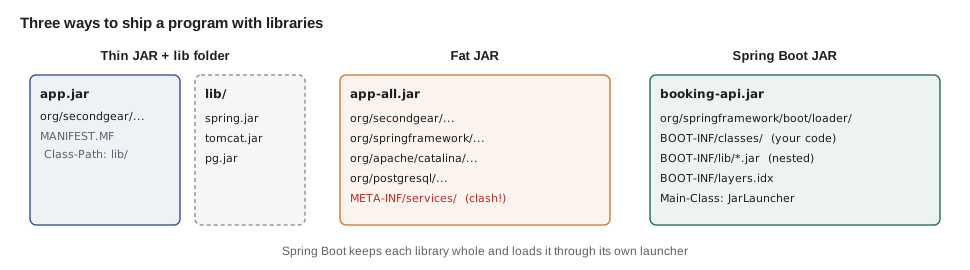
In a Spring Boot JAR the manifest's Main-Class is the launcher, org.springframework.boot.loader.launch.JarLauncher, and a second attribute, Start-Class, names your application class. The JAR also contains a layers index, BOOT-INF/layers.idx, which groups its contents by how often they change. Lesson 3 uses the layers to make container images rebuild quickly.
Manifest-Version: 1.0
Main-Class: org.springframework.boot.loader.launch.JarLauncher
Start-Class: org.secondgear.booking.BookingApplication
Spring-Boot-Version: 4.1.1
Spring-Boot-Classes: BOOT-INF/classes/
Spring-Boot-Lib: BOOT-INF/lib/
Spring-Boot-Classpath-Index: BOOT-INF/classpath.idx
Spring-Boot-Layers-Index: BOOT-INF/layers.idx
Build-Jdk-Spec: 25
Implementation-Title: booking-api
Implementation-Version: 1.0.0
What this code does
This is the manifest of the booking API's JAR as Spring Boot's bootJar task writes it. The launcher is the Main-Class, and it reads Start-Class to find the application once it has set up a class loader for the nested JARs. The index files tell the launcher the class path order and tell container tools which files belong to which layer.
The layers index is a short text file. The next example reads one and counts the entries in each layer, the same grouping that a container build uses.
import java.util.*;

public class Main {
    public static void main(String[] args) {
        String index = """
            - "dependencies":
              - "BOOT-INF/lib/spring-core-7.0.3.jar"
              - "BOOT-INF/lib/spring-web-7.0.3.jar"
              - "BOOT-INF/lib/tomcat-embed-core-11.0.15.jar"
              - "BOOT-INF/lib/postgresql-42.7.8.jar"
            - "spring-boot-loader":
              - "org/"
            - "snapshot-dependencies":
            - "application":
              - "BOOT-INF/classes/"
              - "BOOT-INF/classpath.idx"
              - "BOOT-INF/layers.idx"
              - "META-INF/"
            """;
        Map<String, List<String>> layers = new LinkedHashMap<>();
        String current = null;
        for (String line : index.lines().toList()) {
            String t = line.strip();
            if (line.startsWith("- ")) {
                current = t.substring(3, t.length() - 2);
                layers.put(current, new ArrayList<>());
            } else if (t.startsWith("- ")) {
                layers.get(current).add(t.substring(3, t.length() - 1));
            }
        }
        layers.forEach((name, entries) -> System.out.println(name + ": " + entries.size() + " entries"));
        System.out.println("changes most often: " + layers.keySet().stream().reduce((a, b) -> b).orElseThrow());
    }
}dependencies: 4 entries spring-boot-loader: 1 entries snapshot-dependencies: 0 entries application: 4 entries changes most often: application
What this code does
A line that starts with a dash in the first column names a layer, and an indented dash line adds an entry to the current layer; the substring calls strip the dash, the quotes and the trailing colon. The layers are listed from the one that changes least, the libraries, to the one that changes most, the application's own classes. The library versions in the index are illustrative, and the real file lists every JAR.
Spring Boot 3.3 and later can unpack such a JAR into ordinary folders with a tools mode built into the JAR itself, which is faster to start than nested JARs and is what lesson 3's container build uses.
java -Djarmode=tools -jar build/libs/booking-api-1.0.0.jar extract --layers --launcher --destination extracted
ls extractedapplication dependencies snapshot-dependencies spring-boot-loader
What this code does
The tools jar mode is part of every Spring Boot JAR built with layers enabled, which is the default. With --layers it writes one folder per layer, and with --launcher it keeps the launcher so the result still starts with JarLauncher. A container build copies the folders in order, libraries first.
Making the version visible
Leif's second request, knowing the version without opening the file, has three answers that work together. The file name carries it, because Gradle puts the version in the JAR's name. The manifest carries it, and the program reads it at run time. And the running service reports it on a health or info endpoint, so someone looking at production can see which version is live. The example shows the fallback that keeps the code honest when it is run from a folder of classes, as tests and IDEs do, rather than from a JAR.
public class Main {
    static String version() {
        String v = Main.class.getPackage().getImplementationVersion();
        return v != null ? v : "dev";
    }

    public static void main(String[] args) {
        System.out.println("booking-ops version " + version());
        System.out.println("java " + Runtime.version().feature());
    }
}booking-ops version dev java 21
What this code does
Run from compiled classes rather than a JAR, there is no manifest, so getImplementationVersion returns null and the method reports dev. The same code inside a JAR built by Gradle would print the version from the manifest. Runtime.version().feature() is the Java release number, which is useful in the same start-up line.
For Spring Boot, the bootJar task writes the same attributes, and Spring Boot's build info goes further: the springBoot { buildInfo() } block in the Gradle build writes a META-INF/build-info.properties file with the group, artifact, version and build time, and the Actuator info endpoint shows it. Hamza added it to the booking API that weekend.
springBoot {
    buildInfo {
        excludes = setOf("time")
    }
}

tasks.bootJar {
    archiveFileName = "booking-api-${project.version}.jar"
    manifest {
        attributes("Implementation-Title" to "booking-api",
                   "Implementation-Version" to project.version)
    }
}
What this code does
buildInfo writes the build information file that Actuator's info endpoint reports. Excluding the time keeps the build **reproducible**: building the same commit twice gives byte-for-byte the same JAR, which makes it possible to check that an artifact really came from a given commit. The bootJar block fixes the file name and the manifest version.
Exercises
Try it yourself
Join manifest lines
In a manifest, a line that starts with a single space continues the line before it. Complete unwrap so that it joins continuation lines (removing the leading space) and returns the logical lines, then main prints each as name = value.
Do not use java.util.jar.Manifest; work with the text.
import java.util.*;

public class Main {
    static List<String> unwrap(String text) {
        return text.lines().toList();
    }

    public static void main(String[] args) {
        String mf = "Manifest-Version: 1.0\n"
                  + "Main-Class: org.secondgear.ops.Hea\n"
                  + " lth\n"
                  + "Implementation-Version: 0.2.0\n"
                  + "Build-Note: built on the CI server from th\n"
                  + " e main branch after all tests pa\n"
                  + " ssed\n";
        for (String line : unwrap(mf)) {
            int c = line.indexOf(": ");
            if (c < 0) { System.out.println("not an attribute: " + line); continue; }
            System.out.println(line.substring(0, c) + " = " + line.substring(c + 2));
        }
    }
}
Try it yourself
Name the artifact
Complete fileName so that it returns the JAR name Gradle would produce: the project name, a dash, the version and .jar. If a classifier is given (not empty), it goes after the version with another dash, as in booking-api-1.0.0-plain.jar.
Then complete isRelease, which is false for versions ending in -SNAPSHOT.
public class Main {
    static String fileName(String project, String version, String classifier) {
        return project + ".jar";
    }

    static boolean isRelease(String version) {
        return true;
    }

    public static void main(String[] args) {
        System.out.println(fileName("booking-ops", "0.2.0", "") + " release=" + isRelease("0.2.0"));
        System.out.println(fileName("booking-api", "1.0.0", "plain") + " release=" + isRelease("1.0.0"));
        System.out.println(fileName("booking-api", "1.1.0-SNAPSHOT", "") + " release=" + isRelease("1.1.0-SNAPSHOT"));
    }
}
Spring Boot's Gradle plugin also builds a second, thin JAR with the classifier plain, alongside the executable one. Leif asked Hamza to turn it off with tasks.jar { enabled = false } so that nobody could deploy the wrong file. When Hamza left, Leif's USB stick held booking-ops-0.2.0.jar, and on the shop's server it started with one command and said which version it was.
Common mistakes
MistakeRunning java -jar on a JAR without a Main-Class attribute.
InsteadAdd Main-Class to the manifest, or use the start scripts of an application distribution.
MistakeWriting the version number in the source code as well as in the build.
InsteadSet it once in the build and read it from the manifest or build info at run time.
MistakeBuilding a fat JAR by merging libraries that share META-INF files.
InsteadUse the Spring Boot JAR, which keeps libraries as nested JARs, or a distribution with a lib folder.
MistakeLeaving the plain JAR next to the executable one.
InsteadDisable it, so only one deployable artifact is produced.
MistakeIncluding the build time in every artifact.
InsteadExclude it, so the same commit always produces the same bytes.
Summary and key terms
- A JAR is a ZIP archive of class files and resources with a manifest in META-INF/MANIFEST.MF.
- The Main-Class attribute makes it executable with java -jar, and Implementation-Version lets the program read its own version at run time.
- The jar tool, java.util.jar classes and Gradle all produce the same structure; Gradle's application plugin also builds a distribution with start scripts and a lib folder.
- Programs with dependencies ship as thin JARs with separate libraries, fat JARs with merged classes, or Spring Boot JARs with nested library JARs, a launcher as Main-Class and Start-Class naming the application.
- Spring Boot's layers index groups files by how often they change, and the tools jar mode extracts them for container builds.
- The version belongs in the file name, the manifest and a health or info endpoint.
- JAR
- A Java archive: a ZIP file of classes and resources with a manifest.
- Manifest
- The META-INF/MANIFEST.MF file of attributes describing a JAR.
- Main-Class
- The manifest attribute naming the class that java -jar starts.
- Implementation-Version
- A manifest attribute holding the version, readable through Package.getImplementationVersion.
- Distribution
- An archive with a program, its libraries and start scripts.
- Thin JAR
- A JAR holding only the application's own classes, with libraries kept separately.
- Fat JAR
- A JAR with the classes of all libraries merged into it.
- Start-Class
- The Spring Boot manifest attribute naming the application's main class.
- Layers index
- The Spring Boot file that groups JAR contents by how often they change.
- Reproducible build
- A build that produces identical bytes from the same source.
Practice problems
Work each problem on paper first, then reveal the answer to check.
What does java -jar need in the manifest?
Show answer
A Main-Class attribute.
Where does a Spring Boot JAR keep its libraries?
Show answer
As nested JARs in BOOT-INF/lib.
Why did Hamza's Gradle-built JAR have no Main-Class?
Show answer
The application plugin's start scripts name the class; the manifest only got the attributes he added.
What does getImplementationVersion return when the code runs from a folder of classes?
Show answer
null, because there is no manifest.
Why exclude the time from build info?
Show answer
So that builds of the same commit are byte-for-byte identical.
Lesson quiz · 5 questions
Score 60% or more to complete this lesson.
Create a free account to save your progress, take quizzes and earn a certificate.