
JAVA-280 · Lesson 3 of 12 · 28 min
Containers with Docker
▶ Video coming soon A video version of this lesson is on the way.
On Thursday, January 27, Hamza arrived with a problem he had already solved once. The health service ran on the shop's server, but only because Leif had installed a Java runtime there by hand, and the booking API would need Java 25, while a reporting script Kofi used needed Java 21. "Every program on that machine wants its own world," Leif said. "So we give each one a world." That world is a container, and this lesson builds one for the health service and then for the booking API.
What a container is
A container is an ordinary process on a Linux machine that the kernel isolates from other processes. It sees its own file system, its own process list and its own network interfaces, and the kernel can cap how much memory and processor time it uses. Unlike a virtual machine, a container does not run its own operating system kernel; it shares the host's, which is why it starts in a fraction of a second and uses little memory beyond the program itself.
The file system a container starts from is an image: a read-only stack of layers, each a set of file changes, plus settings such as which command to run and which user to run it as. An image is built from a recipe called a Dockerfile, stored in a registry such as Docker Hub or the GitHub Container Registry, and pulled to any machine that runs containers. Because the image carries the Java runtime and every file the program needs, the machine only needs a container runtime, and the same image runs the same way on Hamza's laptop, on the CI server and on Leif's server. That is the dev/prod parity of lesson 1, delivered as a file.
| Term | Meaning | Example at Second Gear |
|---|---|---|
| Image | A read-only file system and start settings | ghcr.io/second-gear/booking-api:1.0.0 |
| Container | A running, isolated process started from an image | booking-api on the shop server |
| Layer | One step of file changes inside an image | The JRE, the libraries, the classes |
| Dockerfile | The recipe that builds an image | Dockerfile in the booking-api repository |
| Registry | A server that stores and serves images | GitHub Container Registry (ghcr.io) |
| Tag | A readable name for one image version | 1.0.0, or the commit hash |
A Dockerfile for the health service
The health service needs a Java runtime and one JAR. The Eclipse Temurin images, built by the Adoptium project, provide OpenJDK runtimes on Ubuntu; the tag eclipse-temurin:21-jre is the Java 21 runtime without the compiler, and 25-jre is the same for Java 25. A JRE image is smaller than a JDK image and gives an attacker fewer tools if the container is ever broken into.
FROM eclipse-temurin:21-jre

RUN useradd --system --uid 10001 app
WORKDIR /app
COPY build/libs/booking-ops-0.2.0.jar app.jar

USER app
ENV PORT=8080
EXPOSE 8080
HEALTHCHECK --interval=30s --timeout=3s --retries=3 \
  CMD curl -fsS http://localhost:8080/health || exit 1

ENTRYPOINT ["java", "-jar", "app.jar"]
What this code does
Each instruction adds a layer or a setting: FROM picks the base image, RUN creates a system user, COPY adds the JAR, and USER makes the program run as that user instead of root. HEALTHCHECK tells Docker how to ask the service whether it is well, every thirty seconds. ENTRYPOINT is written as a list so that java is the container's main process and receives the stop signal directly.
The work machine in this course could not run containers, so the build and run below show representative output: what Docker prints, trimmed, with hashes and timings that will differ on every machine.
docker build -t booking-ops:0.2.0 .
docker run -d --name ops -p 8080:8080 --memory 256m booking-ops:0.2.0
docker ps --format '{{.Names}}  {{.Image}}  {{.Status}}'
curl -s http://localhost:8080/health[+] Building 6.8s (9/9) FINISHED
=> [internal] load build definition from Dockerfile
=> [1/4] FROM docker.io/library/eclipse-temurin:21-jre
=> [2/4] RUN useradd --system --uid 10001 app
=> [3/4] WORKDIR /app
=> [4/4] COPY build/libs/booking-ops-0.2.0.jar app.jar
=> exporting to image
=> => naming to docker.io/library/booking-ops:0.2.0
3f9c2d1e8a4b...
ops booking-ops:0.2.0 Up 41 seconds (healthy)
{"status":"UP","version":"0.2.0"}What this code does
docker build reads the Dockerfile in the current folder and tags the result, and docker run starts a container in the background with port 8080 of the host forwarded to port 8080 inside and a memory limit of 256 megabytes. docker ps shows the health status that the HEALTHCHECK maintains. The curl call is the same as on the bare server, which is the point: the service does not know it is in a container.
The health check in the Dockerfile uses curl, which the Temurin images include because they are based on Ubuntu. A smaller base image without curl would need a different check, such as a tiny Java program, and lesson 6 shows that the platform running the container often does its own checks anyway. The next example is that tiny program: it starts a server like the health service, then probes it the way Docker's health check does and exits with 0 for healthy or 1 for unhealthy.
import com.sun.net.httpserver.HttpServer;
import java.net.*;
import java.net.http.*;
import java.time.Duration;

public class Main {
    static int probe(URI uri) {
        HttpClient client = HttpClient.newBuilder().connectTimeout(Duration.ofSeconds(1)).build();
        try {
            HttpResponse<String> r = client.send(HttpRequest.newBuilder(uri).timeout(Duration.ofSeconds(3)).build(),
                    HttpResponse.BodyHandlers.ofString());
            boolean up = r.statusCode() == 200 && r.body().contains("\"UP\"");
            System.out.println("probe " + uri.getPath() + ": HTTP " + r.statusCode() + " -> " + (up ? "healthy" : "unhealthy"));
            return up ? 0 : 1;
        } catch (Exception e) {
            System.out.println("probe " + uri.getPath() + ": " + e.getClass().getSimpleName() + " -> unhealthy");
            return 1;
        }
    }

    public static void main(String[] args) throws Exception {
        HttpServer server = HttpServer.create(new InetSocketAddress("127.0.0.1", 0), 0);
        server.createContext("/health", ex -> {
            byte[] b = "{\"status\":\"UP\"}".getBytes();
            ex.sendResponseHeaders(200, b.length);
            try (var o = ex.getResponseBody()) { o.write(b); }
        });
        server.start();
        int port = server.getAddress().getPort();
        int code = probe(URI.create("http://127.0.0.1:" + port + "/health"));
        System.out.println("exit code " + code);
        server.stop(0);
        code = probe(URI.create("http://127.0.0.1:" + port + "/health"));
        System.out.println("exit code " + code);
    }
}probe /health: HTTP 200 -> healthy exit code 0 probe /health: ConnectException -> unhealthy exit code 1
What this code does
The probe treats only a 200 response whose body says UP as healthy, and turns every exception, such as a refused connection, into unhealthy rather than a crash. Both timeouts are short because a health check that hangs is worse than one that fails. After the server is stopped, the same probe fails with a ConnectException, which is what Docker would see from a container whose program had died.
How layers are cached
Docker builds an image one instruction at a time and caches each resulting layer. On the next build, it reuses a layer if the instruction and everything it depends on are unchanged; as soon as one layer changes, every layer after it is rebuilt. Order therefore matters: put what changes rarely first and what changes often last. For a Spring Boot service, the libraries are about 30 megabytes and change perhaps once a month, while the application's own classes are a few hundred kilobytes and change with every commit.
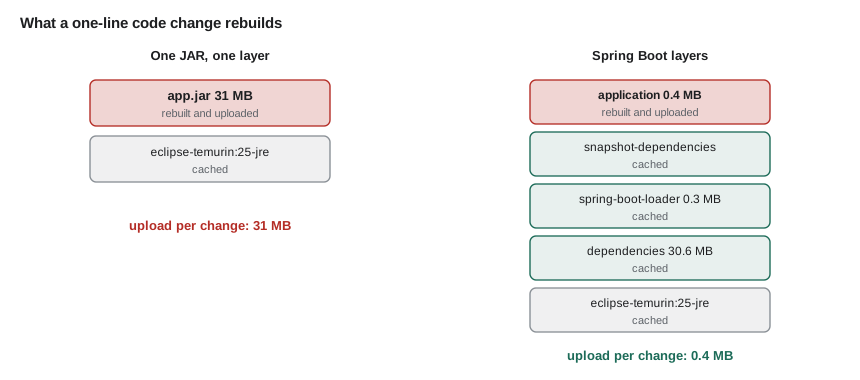
The example simulates the cache. Each step has a name and a fingerprint of its inputs; if a step's fingerprint matches the last build and no earlier step was rebuilt, it is reused.
import java.util.*;

public class Main {
    record Step(String instruction, String inputs, double megabytes) {}

    static void build(String label, List<Step> steps, Map<String, String> cache) {
        System.out.println(label);
        boolean rebuilding = false;
        double pushed = 0;
        for (Step s : steps) {
            String previous = cache.get(s.instruction());
            if (!rebuilding && s.inputs().equals(previous)) {
                System.out.println("  CACHED  " + s.instruction());
            } else {
                rebuilding = true;
                pushed += s.megabytes();
                System.out.println("  BUILD   " + s.instruction());
            }
            cache.put(s.instruction(), s.inputs());
        }
        System.out.printf("  layers to upload: %.1f MB%n", pushed);
    }

    public static void main(String[] args) {
        Map<String, String> cache = new HashMap<>();
        List<Step> v1 = List.of(
            new Step("FROM eclipse-temurin:25-jre", "base-2028-01", 0),
            new Step("COPY dependencies/", "libs-a1", 30.6),
            new Step("COPY spring-boot-loader/", "loader-4.1.1", 0.3),
            new Step("COPY application/", "classes-4f2a9c1", 0.4));
        build("first build", v1, cache);
        List<Step> v2 = new ArrayList<>(v1);
        v2.set(3, new Step("COPY application/", "classes-7b31e08", 0.4));
        build("after a code change", v2, cache);
        List<Step> v3 = new ArrayList<>(v2);
        v3.set(1, new Step("COPY dependencies/", "libs-b2", 30.8));
        build("after a library upgrade", v3, cache);
    }
}first build BUILD FROM eclipse-temurin:25-jre BUILD COPY dependencies/ BUILD COPY spring-boot-loader/ BUILD COPY application/ layers to upload: 31.3 MB after a code change CACHED FROM eclipse-temurin:25-jre CACHED COPY dependencies/ CACHED COPY spring-boot-loader/ BUILD COPY application/ layers to upload: 0.4 MB after a library upgrade CACHED FROM eclipse-temurin:25-jre BUILD COPY dependencies/ BUILD COPY spring-boot-loader/ BUILD COPY application/ layers to upload: 31.5 MB
What this code does
Once one step is rebuilt, the rebuilding flag stays true, so every later step is rebuilt too, which is how Docker's cache behaves. A code change rebuilds only the last, smallest layer, while a library upgrade rebuilds the dependencies and everything after them. The base image counts as zero here because it is already on the server and never needs uploading.
A multi-stage Dockerfile for the booking API
The booking API's Dockerfile has two stages. The first starts from a full JDK image, copies the Spring Boot JAR in and extracts its layers with the tools jar mode from lesson 2. The second starts from the small JRE image and copies the extracted folders from the first stage, one COPY per layer, in order. Only the second stage becomes the image; the first is thrown away.
# Stage 1: unpack the Spring Boot JAR into its layers
FROM eclipse-temurin:25-jdk AS extract
WORKDIR /build
COPY build/libs/booking-api-*.jar app.jar
RUN java -Djarmode=tools -jar app.jar extract --layers --launcher --destination extracted

# Stage 2: the runtime image
FROM eclipse-temurin:25-jre
RUN useradd --system --uid 10001 app
WORKDIR /app
COPY --from=extract /build/extracted/dependencies/ ./
COPY --from=extract /build/extracted/spring-boot-loader/ ./
COPY --from=extract /build/extracted/snapshot-dependencies/ ./
COPY --from=extract /build/extracted/application/ ./
USER app
ENV JAVA_TOOL_OPTIONS="-XX:MaxRAMPercentage=75 -XX:+UseG1GC -XX:+ExitOnOutOfMemoryError"
EXPOSE 8080 9090
ENTRYPOINT ["java", "org.springframework.boot.loader.launch.JarLauncher"]
What this code does
The JAR is built by Gradle before docker build runs, on the CI server, so the image contains exactly the tested artifact. Each COPY from the extract stage becomes its own layer in the order of the layers index. JAVA_TOOL_OPTIONS passes JVM flags that size the heap from the container's memory limit, choose G1 and make the JVM exit, so that the container is restarted, if it ever runs out of memory.
A .dockerignore file lists what the build must not send to Docker, such as the .git folder, local configuration and the Gradle cache. It speeds up builds and, more importantly, stops a local .env file with passwords from ending up inside an image.
.git
.gradle
.idea
*.iml
.env
application-local.yml
build/*
!build/libs/booking-api-*.jar
What this code does
Each line is a pattern, and a line starting with an exclamation mark makes an exception to an earlier one. Everything under build is ignored except the JAR that the Dockerfile copies. The .env and application-local.yml entries match the .gitignore lines Hamza will add in lesson 5.
The JVM inside a container
A JVM decides its heap size and garbage collector at start-up from the memory and processors it can see, which is called ergonomics. Before Java 10, a JVM in a container saw the whole host machine and could size its heap far beyond the container's limit, and the kernel would kill it. Modern JVMs read the container's limits from Linux control groups, so they size themselves to the container. The default maximum heap is a quarter of the available memory, the setting MaxRAMPercentage of 25, which suits a desktop shared with many programs but wastes memory in a container that runs one.
Hamza could not start containers on the course machine, but the JVM has a flag, MaxRAM, that tells it to behave as if it had a given amount of memory, and ActiveProcessorCount does the same for processors. These runs are real.
$ java -XX:MaxRAM=1g -XX:ActiveProcessorCount=1 -XX:+PrintFlagsFinal -version 2>/dev/null | grep -E ' (MaxHeapSize|MaxRAMPercentage|UseSerialGC|UseG1GC) '
   size_t MaxHeapSize                              = 268435456                                 {product} {ergonomic}
   double MaxRAMPercentage                         = 25.000000                                 {product} {default}
     bool UseG1GC                                  = false                                     {product} {default}
     bool UseSerialGC                              = true                                      {product} {ergonomic}
$ java -XX:MaxRAM=1g -XX:ActiveProcessorCount=2 -XX:MaxRAMPercentage=75 -XX:+PrintFlagsFinal -version 2>/dev/null | grep -E ' (MaxHeapSize|MaxRAMPercentage|UseSerialGC|UseG1GC) '
   size_t MaxHeapSize                              = 805306368                                 {product} {ergonomic}
   double MaxRAMPercentage                         = 75.000000                                 {product} {command line}
     bool UseG1GC                                  = true                                      {product} {ergonomic}
     bool UseSerialGC                              = false                                     {product} {default}
What this code does
With one gigabyte and one processor, the JVM chose a maximum heap of 268,435,456 bytes, a quarter of the memory, and picked the Serial collector, because it treats a one-processor machine as too small for G1. With two processors and MaxRAMPercentage set to 75, the heap rose to 805,306,368 bytes, three quarters of a gigabyte, and the collector became G1. MaxRAM changes the heap calculation but not the JVM's separate check of the machine's real memory, which is why G1 appeared here, on a large machine.
That separate check matters in a real container. The JVM chooses G1 only on what it calls a server-class machine, with at least two processors and about 1.8 gigabytes of memory; in a smaller container it picks Serial even with two processors. Leif therefore asked for G1 explicitly with -XX:+UseG1GC, which lesson 7 explains. Three quarters is a common heap choice for a service in a container, but not the whole of it: the JVM also needs memory outside the heap for loaded classes, compiled code, thread stacks and network buffers, which lesson 7 measures. The example works out the budget for the limits Leif was considering.
public class Main {
    public static void main(String[] args) {
        int[] limitsMb = {256, 512, 768};
        int[] percents = {50, 75};
        int threads = 30, stackKb = 1024, metaspaceMb = 80, codeCacheMb = 32;
        System.out.println("limit  heap% heap MB  other JVM MB  spare MB");
        for (int limit : limitsMb) {
            for (int pct : percents) {
                int heap = limit * pct / 100;
                int other = metaspaceMb + codeCacheMb + threads * stackKb / 1024;
                int spare = limit - heap - other;
                System.out.printf("%5d  %5d %7d  %12d  %8d%s%n", limit, pct, heap, other, spare, spare < 0 ? "  too small" : "");
            }
        }
    }
}limit heap% heap MB other JVM MB spare MB 256 50 128 142 -14 too small 256 75 192 142 -78 too small 512 50 256 142 114 512 75 384 142 -14 too small 768 50 384 142 242 768 75 576 142 50
What this code does
The heap is the limit times the percentage, and the rest of the JVM is estimated as metaspace, code cache and one megabyte of stack per thread, rough figures for a small Spring Boot service. At 256 and 512 megabytes, three quarters for the heap leaves a negative spare amount, so the container would be killed under load. At 768 megabytes, 75 leaves a margin of about 50 megabytes for buffers and growth, which is why Leif chose 768 for the booking API.
Smaller runtimes with jlink
A JRE image contains the whole Java runtime, about 70 modules, though the health service uses only two. The JDK's jdeps tool lists the modules a JAR needs, and jlink builds a custom runtime with only those. Hamza tried it on the health service, again for real.
$ jdeps --print-module-deps health.jar
java.base,jdk.httpserver
$ jdeps -summary health.jar
health.jar -> java.base
health.jar -> jdk.httpserver
$ jlink --add-modules java.base,jdk.httpserver --strip-debug --no-header-files --no-man-pages --output runtime
$ du -sh runtime
53M	runtime
$ du -sh $(dirname $(dirname $(readlink -f $(which java))))
286M	/usr/lib/jvm/java-21-openjdk-amd64
$ runtime/bin/java --list-modules
java.base@21.0.12.1
jdk.httpserver@21.0.12.1
What this code does
jdeps found that the JAR needs only java.base and jdk.httpserver. jlink built a runtime with just those two modules, without debug information, header files or manual pages, and it takes 53 megabytes against 286 for the full JDK on the machine. The custom runtime's java lists only the two modules it contains.
For a Spring Boot service the saving is smaller, because Spring uses many modules, and Leif preferred the standard Temurin JRE image, which is patched regularly by its maintainers. A custom runtime is something you then have to keep up to date yourself. They noted jlink as an option for small tools.
Images, tags and digests
A tag such as 1.0.0 is a label that can be moved to a different image, while a digest, written sha256: followed by 64 hexadecimal characters, is a hash of the image's contents and can never change. Leif's rule was that the pipeline tags each image twice, with the release version and with the short commit hash, and that production deployments record the digest, so that what is running can always be traced to a commit. The tag latest is never used in production, because it says nothing about which version it points to.
import java.nio.charset.StandardCharsets;
import java.security.MessageDigest;
import java.util.*;

public class Main {
    static String sha256(String content) throws Exception {
        byte[] h = MessageDigest.getInstance("SHA-256").digest(content.getBytes(StandardCharsets.UTF_8));
        return "sha256:" + HexFormat.of().formatHex(h);
    }

    public static void main(String[] args) throws Exception {
        String image = "layers: temurin-25-jre, libs-a1, loader-4.1.1, classes-4f2a9c1";
        String digest = sha256(image);
        String repo = "ghcr.io/second-gear/booking-api";
        List<String> tags = List.of(repo + ":1.0.0", repo + ":sha-4f2a9c1");
        tags.forEach(t -> System.out.println("tag    " + t));
        System.out.println("digest " + digest.substring(0, 19) + "...");
        System.out.println("deploy " + repo + "@" + digest.substring(0, 19) + "...");
        String rebuilt = sha256(image.replace("4f2a9c1", "7b31e08"));
        System.out.println("same digest after a code change? " + digest.equals(rebuilt));
    }
}tag ghcr.io/second-gear/booking-api:1.0.0 tag ghcr.io/second-gear/booking-api:sha-4f2a9c1 digest sha256:bbcc40ba5d04... deploy ghcr.io/second-gear/booking-api@sha256:bbcc40ba5d04... same digest after a code change? false
What this code does
A real digest is the SHA-256 hash of the image manifest, and here a string describing the layers stands in for it. Both tags point at the same image, while the digest identifies its contents exactly, and a deployment by digest uses the at sign instead of a colon. Changing one layer changes the digest completely, which is why a digest cannot be moved the way a tag can.
Exercises
Try it yourself
Tag the image
Complete tags so that it returns the tags the pipeline should push for a build: always sha- followed by the first 7 characters of the commit; and, when the version is a release (it does not end in -SNAPSHOT), also the version itself, first.
Each tag is prefixed with the repository and a colon.
import java.util.*;

public class Main {
    static List<String> tags(String repo, String version, String commit) {
        return List.of(repo + ":latest");
    }

    public static void main(String[] args) {
        String repo = "ghcr.io/second-gear/booking-api";
        System.out.println(tags(repo, "1.0.0", "4f2a9c1e0b7d55aa"));
        System.out.println(tags(repo, "1.1.0-SNAPSHOT", "9d0e7aa31c2b4f6e"));
    }
}
Try it yourself
Which layers are rebuilt?
The image has layers in this order: jre, dependencies, loader, application. Complete rebuilt so that, given the name of the first layer whose inputs changed, it returns that layer and every layer after it; for none it returns an empty list.
Then print the number of megabytes to upload using the sizes in the map (the JRE is never uploaded, so count it as 0).
import java.util.*;

public class Main {
    static final List<String> ORDER = List.of("jre", "dependencies", "loader", "application");
    static final Map<String, Double> MB = Map.of("jre", 0.0, "dependencies", 30.6, "loader", 0.3, "application", 0.4);

    static List<String> rebuilt(String firstChanged) {
        return ORDER;
    }

    public static void main(String[] args) {
        for (String c : List.of("application", "dependencies", "none")) {
            List<String> r = rebuilt(c);
            double up = r.stream().mapToDouble(MB::get).sum();
            System.out.printf("%s changed: %s, upload %.1f MB%n", c, r, up);
        }
    }
}
At the end of the evening the booking API's image was 247 megabytes, almost all of it the Temurin JRE and the libraries, and a code change uploaded under half a megabyte. Leif pushed nothing to the server yet. "Next week," he said, "a machine builds this, not you."
Common mistakes
MistakeRunning the service as root inside the container.
InsteadCreate a system user in the Dockerfile and switch to it with USER.
MistakeCopying the whole Spring Boot JAR as one layer.
InsteadExtract its layers and copy each one separately, libraries first.
MistakeLeaving the JVM's default heap of a quarter of the container's memory.
InsteadSet MaxRAMPercentage, around 75 for a single-service container, and leave room for memory outside the heap.
MistakeDeploying the image tagged latest.
InsteadDeploy a version tag, and record the image digest.
MistakeBuilding the JAR on a laptop and copying it into the image.
InsteadBuild the JAR in CI and copy that exact artifact in the Dockerfile.
Summary and key terms
- A container is an isolated process that shares the host's kernel and starts from an image, a read-only stack of layers built from a Dockerfile and stored in a registry.
- Eclipse Temurin JRE images provide the Java runtime; the Dockerfile should create a non-root user, copy the tested artifact, declare a health check and use the list form of ENTRYPOINT.
- Docker caches layers, rebuilding a changed layer and everything after it, so a multi-stage build copies Spring Boot's extracted layers separately, libraries before application classes.
- Modern JVMs size themselves from the container's limits, with a default maximum heap of a quarter of the memory, so a service sets MaxRAMPercentage and leaves room for memory outside the heap. jdeps and jlink can build a smaller runtime.
- Tags are movable labels and digests identify image contents exactly.
- Container
- An isolated process that shares the host's kernel and runs from an image.
- Image
- A read-only stack of file-system layers with start settings.
- Layer
- One cached set of file changes in an image.
- Dockerfile
- The list of instructions that builds an image.
- Multi-stage build
- A Dockerfile with several FROM stages where only the last becomes the image.
- Registry
- A server that stores and serves images, such as ghcr.io.
- Ergonomics
- The JVM choosing heap size and collector from the memory and processors it sees.
- MaxRAMPercentage
- The share of available memory the JVM may use for its maximum heap.
- jlink
- The JDK tool that builds a custom runtime with only the modules a program needs.
- Digest
- A content hash that identifies an image exactly and cannot be moved like a tag.
Practice problems
Work each problem on paper first, then reveal the answer to check.
How does a container differ from a virtual machine?
Show answer
It shares the host's kernel instead of running its own operating system.
Why copy dependencies before application classes?
Show answer
Docker rebuilds every layer after a changed one, and libraries change least often.
What maximum heap does a JVM choose by default in a 1 GB container?
Show answer
A quarter, about 256 MB.
Why is the ENTRYPOINT written as a list?
Show answer
So that java is the main process and receives the stop signal.
What does a deployment by digest guarantee?
Show answer
That exactly the image with that content runs.
Lesson quiz · 5 questions
Score 60% or more to complete this lesson.
Create a free account to save your progress, take quizzes and earn a certificate.