
HSE-342 · Lesson 10 of 12 · 25 min
Lockout for balers, compactors and conveyors
Lesson 9 drew a line: if any part of your body has to go inside a baler, compactor or other machine that could move, the machine must be locked out first. Switching it off is not enough. Lockout means isolating the machine from every source of energy, putting your own lock on each isolating device so nobody else can turn it back on, releasing or blocking any energy still stored in the machine, and proving it cannot move before you reach in. This lesson applies lockout to the machines found in a store backroom: the baler, the compactor and powered conveyors.
HSE-210 covers lockout in depth for every kind of workplace: types of hazardous energy, the law, energy control programs, locks and tags, the full lockout sequence, verifying zero energy, group lockout, restoring equipment and alternative methods. This lesson does not repeat that material. It shows what a machine-specific lockout procedure for a store baler looks like and how a small store crew can follow it every time.
Why switching off is not enough
Most baler deaths and many compactor injuries have happened to workers who believed the machine was safe. The machine was stopped, or switched off at its control panel, or the gate was open. Then someone else started it without knowing anyone was inside, or a fault restarted it, or the platen, held up by hydraulic pressure, drifted or dropped when a part was moved. A control switch, a stop button or an open gate is not an energy isolating device. It can be overridden, it can fail and it can be turned back on by someone across the room.
Lockout solves this by putting control of the machine in the hands of the person at risk. Only their own lock, with their own key, keeps the energy off, and the lock comes off only when they remove it.
Energy in a store baler
A vertical baler has more energy sources than most people realize:
- Electrical: the power supply to the motor and controls, usually through a disconnect switch on the wall or the machine.
- Hydraulic: the pump builds pressure that drives the platen. Pressure can remain in the cylinders and lines after the motor stops.
- Gravity: a raised platen is a heavy steel plate held up by hydraulic pressure or a mechanical latch. If the pressure bleeds off or the latch is released, it can fall.
- Mechanical: compressed cardboard pushes back against the platen and the gate; ejection chains and tilting mechanisms can move when released.
A self-contained compactor has electrical and hydraulic energy and a ram that can move. A powered conveyor has electrical energy and can store mechanical energy in belts and rollers under tension or jammed product.
A machine-specific procedure for the baler
Each machine needs its own written lockout procedure that names its energy sources, isolating devices and steps. The general sequence below is from HSE-210; Northfield's baler procedure fills in the specific details.
| Step | Northfield baler procedure |
|---|---|
| 1. Prepare | Know why you are locking out (for example, to clear a jam in the chamber). Get your personal lock, tag and the baler procedure card. |
| 2. Notify | Tell the supervisor and anyone working nearby that the baler is being locked out. |
| 3. Shut down | Raise the platen to its fully up position if it is safe to do so, then stop the baler with its normal controls and remove the key. |
| 4. Isolate | Turn the electrical disconnect beside the baler to OFF. |
| 5. Lock and tag | Put your personal lock and tag on the disconnect. Each person who will reach into the machine adds their own lock. |
| 6. Release or block stored energy | Engage the platen safety latch or blocks as the manufacturer specifies, so the platen cannot drop. Release hydraulic pressure as the procedure card describes. |
| 7. Verify | Make sure everyone is clear, then insert the key and press START. Nothing should move. Return the controls to off and remove the key again. Check the pressure gauge reads zero, if fitted. |
| 8. Do the work | Clear the jam, using tools where possible. Keep the gate open while working. |
| 9. Restore | Remove tools and debris, close the gate, check everyone is clear, remove the platen latch or blocks, remove your lock and tag, and tell the supervisor the baler is back in service. |
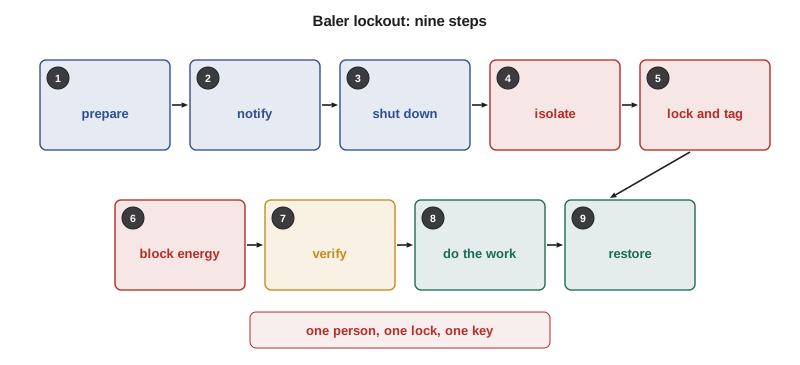
Personal locks, one key
Each worker who will put any part of their body into the machine uses their own lock, with one key that only they hold. Locks used for lockout should be used for nothing else, should be identified with the worker's name or a number on a list, and should be different from ordinary padlocks so nobody mistakes them. A tag on the lock says who applied it, when and why. Nobody removes another person's lock. If a worker goes home and forgets to remove their lock, the store follows a written procedure for removing it: making every effort to contact the worker, checking that the machine is safe, and having a manager remove it and tell the worker before they return to work.
Northfield bought a small lockout station for the backroom with six personal locks, tags, a hasp that lets several people lock one disconnect, and the baler and compactor procedure cards. Each authorized operator has a lock with their name on it.
Jams that can be cleared without lockout
Not every jam needs lockout. If a jam can be cleared from outside the chamber, with a tool, while the machine is stopped and the platen is up, and no part of the body enters the danger zone, lockout may not be needed. British Columbia's OHS Regulation allows lockout to be replaced by other effective safeguards only in limited situations, and those situations must be covered by written procedures; clearing a baler chamber by hand is not one of them. Northfield's rule is simple: hands, arms, heads or bodies in the chamber means lockout. A tool through the open gate with the machine stopped does not.
Many jams come from the same few causes: unflattened boxes, overfilling, mixed materials such as plastic or wood, and wet cardboard. Fixing those reduces how often anyone needs to lock out at all, which is good for safety and for the crew's patience with the procedure.
The compactor
The compactor procedure follows the same steps with different details. Its disconnect is on the outside wall beside the unit. Before anyone reaches into the chute or the hopper, the ram is returned to its home position, the unit is stopped, the disconnect is locked off, and the start button is pressed to verify. Retrieving an item that has fallen into the compactor, clearing a blocked chute and cleaning the ram area all need lockout. Hauler drivers who service the container follow their own employer's procedure and must coordinate with the store before working on the unit.
Conveyors
Powered conveyors in the receiving area need lockout before anyone reaches into a pinch point, removes a guard, clears a jam between rollers and the frame or works on the drive. The emergency stop stops the conveyor, but like the baler's stop button it is not an isolating device. Each powered conveyor should have a disconnect that can be locked, and its own short procedure. Gravity roller conveyors have no power, but rollers under jammed cases can still spring and pinch; clear them carefully with the load removed.
Contractors and group lockout
When a service technician repairs the baler or compactor, more than one person may be working on the machine, and the work may last longer than a shift. Group lockout lets everyone be protected by one isolation: the technician locks the disconnect, and each worker involved puts their own lock on a group lockbox or on a hasp, so the machine stays locked until the last person removes their lock. HSE-210 Lesson 7 covers group lockout in detail. At Northfield, a contractor working on the baler checks in with the manager on duty, follows a lockout procedure at least as strict as the store's, and the store adds its own lock while the work is going on so nobody on the crew can restart the machine by mistake.
Checking a lockout
Lockout steps are easy to remember on a good day and easy to skip on a rushed one. The program below checks a record of the steps a worker took against the baler procedure: that every required step is there, in the right order, and that the verify step came before any work in the chamber. Northfield uses a version of this as a training exercise and to review lockout records.
# Check a lockout record against the baler procedure (training exercise).
procedure = ["prepare", "notify", "shut down", "isolate", "lock and tag",
             "block stored energy", "verify", "work", "restore"]
must_precede = {"work": ["isolate", "lock and tag", "block stored energy", "verify"]}

def check(record):
    problems = []
    missing = [s for s in procedure if s not in record]
    problems += [f"missing: {s}" for s in missing]
    pos = {s: i for i, s in enumerate(record)}
    for later, earlier in must_precede.items():
        for e in earlier:
            if later in pos and e in pos and pos[e] > pos[later]:
                problems.append(f"'{e}' came after '{later}'")
    order = [s for s in record if s in procedure]
    if not problems and order != procedure:
        problems.append("steps out of order")
    return problems or ["OK"]

records = {
    "Omar, Tuesday": ["prepare", "notify", "shut down", "isolate", "lock and tag",
                      "block stored energy", "verify", "work", "restore"],
    "Night crew, Friday": ["shut down", "isolate", "lock and tag", "work", "restore"],
    "Lee, Sunday": ["prepare", "notify", "shut down", "isolate", "lock and tag",
                    "work", "verify", "block stored energy", "restore"],
}
for who, rec in records.items():
print(f"{who}: " + "; ".join(check(rec)))Omar, Tuesday: OK Night crew, Friday: missing: prepare; missing: notify; missing: block stored energy; missing: verify Lee, Sunday: 'block stored energy' came after 'work'; 'verify' came after 'work'
Omar's record is complete. The Friday night record skips preparing, notifying, blocking stored energy and verifying, which is the shortcut that kills people: the machine was isolated and locked, but nobody proved it could not move and nothing stopped the platen dropping. Lee did every step but verified and blocked the platen only after he had already reached in. Both are coached, and the Friday crew's case is reviewed with Hana to find out why steps were skipped.
For supervisors: make lockout easy and expected
Workers skip lockout when it is slow, when locks are missing, when they do not understand why it matters, or when they think nobody cares. Keep the lockout station stocked and next to the machines. Post the procedure card on the baler and compactor. Walk through a lockout with every new operator, and repeat it at least once a year. Ask about the last time someone locked out the baler; if the answer is never, jams are being cleared some other way. Treat a skipped lockout as a serious event, not a paperwork problem.
Worked problem
Retrieving a phone from the compactor chute
Rosa drops her phone into the compactor chute while throwing away damaged produce. It is sitting on top of the garbage just beyond the chute door. She asks Omar to reach in and grab it quickly before the next cycle. What should Omar do?
Show solution
- Do not reach in. The ram could cycle, or someone outside could start it.
- Tell the supervisor that the compactor needs to be locked out.
- Follow the compactor procedure: return the ram to home, stop the unit, lock the disconnect with a personal lock and tag, and verify by pressing start.
- Retrieve the phone with a grabber tool if possible, keeping the body out of the chute.
- Restore the compactor, remove the lock and tell the supervisor it is back in service. If the phone cannot be reached safely, leave it for the hauler or the service technician.
Answer: Lock out the compactor using its procedure, retrieve the phone with a tool, then restore it. A phone is not worth an arm.
Common mistakes
MistakeTreating the stop button or an open gate as safe enough to reach in.
InsteadLock out the energy isolating device with your own lock before any body part goes inside.
MistakeForgetting that a raised platen can drop.
InsteadBlock or latch the platen and release hydraulic pressure as the procedure says.
MistakeSkipping the verify step.
InsteadPress start after locking out to prove nothing moves, then return the controls to off.
MistakeUsing one lock for a group of workers.
InsteadEach person puts on their own lock, using a hasp or group lockbox.
MistakeRemoving someone else's lock because they forgot it.
InsteadFollow the written procedure for removing an absent worker's lock.
Summary and key terms
- Lockout puts control of the machine with the person at risk; switching off or opening a gate is not enough.
- A baler has electrical, hydraulic, gravity and mechanical energy; compactors and conveyors have their own.
- Each machine needs a written procedure: prepare, notify, shut down, isolate, lock and tag, release or block stored energy, verify, work, restore.
- One person, one lock, one key; nobody removes another person's lock.
- Hands in the chamber means lockout; a tool from outside with the machine stopped may not.
- Contractors use group lockout and coordinate with the store.
- Make lockout easy with a stocked station and posted procedures, and treat skipped lockout as serious.
- Lockout
- Isolating a machine from its energy sources and locking the isolating devices in the safe position.
- Energy isolating device
- A device, such as a disconnect switch or valve, that physically stops energy reaching a machine.
- Stored energy
- Energy that remains in a machine after it is isolated, such as hydraulic pressure or a raised platen.
- Verification
- Testing that a locked-out machine cannot start or move before work begins.
- Hasp
- A device that lets several padlocks be placed on one isolating device.
- Group lockout
- A method that protects several workers with one isolation, each adding their own lock.
Practice problems
Work each problem on paper first, then reveal the answer to check.
Why is a stop button not an energy isolating device?
Show answer
It can be overridden, fail or be turned back on by someone else.
Name the four kinds of energy in a vertical baler.
Show answer
Electrical, hydraulic, gravity and mechanical.
List the nine steps of the baler lockout procedure.
Show answer
Prepare, notify, shut down, isolate, lock and tag, release or block stored energy, verify, do the work, restore.
How do you verify a lockout on the baler?
Show answer
With everyone clear, insert the key and press start; nothing should move. Then return the controls to off.
What is Northfield's simple rule for when lockout is needed?
Show answer
Hands, arms, heads or bodies in the chamber means lockout.
In the record check, what was wrong with the Friday night record?
Show answer
It skipped preparing, notifying, blocking stored energy and verifying.
What should happen if a worker leaves their lock on and goes home?
Show answer
Follow the written removal procedure: try to contact them, check the machine, have a manager remove it and tell the worker.
How does group lockout protect several workers?
Show answer
Each adds their own lock to a hasp or lockbox, so the machine stays locked until the last lock is removed.
Lesson quiz · 5 questions
Score 60% or more to complete this lesson.
Create a free account to save your progress, take quizzes and earn a certificate.