
HSE-320 · Lesson 9 of 12 · 28 min
Change control, methods of procedure and maintenance windows
In most workplaces, a maintenance task begins with a work order and a conversation. In a data centre, a task on critical infrastructure begins weeks earlier with a change request, a written method of procedure, a review by several people, an approval, a customer notification and a scheduled maintenance window. Newcomers sometimes see this as bureaucracy. It is in fact one of the most effective safety controls in the facility. A large share of both outages and injuries in critical facilities happen when someone does the right task on the wrong equipment, does the steps in the wrong order, misses a source of energy or improvises when something unexpected happens. Formal change control is designed to stop exactly those failures.
This lesson explains change management from a safety point of view: the kinds of changes, the documents used to plan them, what a good method of procedure contains, how it should be reviewed, how maintenance windows work and how work is carried out on the night. The IT service management side of change, including change authorities and the relationship to incident and problem management, is covered in ITIL-140, ITIL Practices I: Service Support. Operations practices more broadly are covered in DCE-450.
Kinds of change
ITIL 4, the most widely used IT service management framework, calls the practice change enablement and recognizes three types of change. Standard changes are low-risk, pre-authorized changes that follow a tested procedure, such as replacing a failed drive or adding a patch cable to an empty port. Normal changes need to be assessed and authorized individually, by a change authority or change advisory board, before they are scheduled. Emergency changes must be made as quickly as possible, for example to restore a failed system or prevent an imminent failure, and follow an expedited process. Data centre facilities teams use the same ideas for work on power, cooling and fire protection systems, even if they use different names.
The safety lesson in these categories is that the paperwork scales with the risk, but the thinking never stops. A standard change is safe because someone already worked out the hazards and wrote a procedure; if the conditions are not standard, for example the drive bay is next to an open busway tap-off box, it is no longer a standard change. An emergency change still needs the hazards identified and controlled; facilities prepare emergency operating procedures in advance so that urgent work does not mean improvised work.
The documents
Facilities teams use several kinds of procedure. A method of procedure (MOP) is a detailed, step-by-step document for a specific, planned task on critical infrastructure, written for that task and approved before it starts, such as transferring a UPS to maintenance bypass, replacing a breaker in a PDU or isolating a chilled water loop. A standard operating procedure (SOP) covers routine operations that are performed regularly, such as daily rounds, generator test runs or filter changes. An emergency operating procedure (EOP) covers how to respond to a specific failure, such as a utility outage, a UPS alarm, a chiller trip or a water leak. Many sites also have alarm response procedures that tell operators what to check when a particular alarm appears.
What a good MOP contains
There is no single template, and operators have their own, but good MOPs share a common structure. The table below lists the usual sections and the safety purpose of each.
| Section | Contents | Safety purpose |
|---|---|---|
| Scope and purpose | What will be done, why, and what is out of scope | Prevents scope creep into unplanned work |
| Systems and equipment affected | Exact equipment identifiers matching field labels, with drawing references | Prevents working on the wrong equipment |
| Risk assessment | Hazards to people, risks to the load, redundancy during the work, single points of failure | Makes the hazards and controls explicit |
| Prerequisites | Approvals, permits, lockout, energized work permit if any, customer notice, spares on hand, weather or utility conditions | Ensures nothing starts until conditions are right |
| Roles | MOP lead, performers, verifier, operations contact, safety contact, escalation contacts | Everyone knows who decides and who checks |
| Tools, equipment and PPE | Tools, test instruments, arc-rated clothing, locks and tags, radios | Right protection is ready before work starts |
| Steps | Numbered actions, each with the expected result, hold points and sign-off | Controls sequence and catches surprises early |
| Backout plan | How to return to a safe, stable state from defined points, and when to decide | Gives a safe way out when things go wrong |
| Post-checks and close-out | Verification that systems are normal, alarms cleared, locks removed, documents updated | Leaves the facility safe for the next shift |
Each step should be a single action, written so that the person doing it cannot misunderstand it, with the expected result stated so that the performer knows immediately if something is wrong. For example, 'Open breaker 2B-14 on PDU-2B (label: PDU-2B, Bkr 14). Verify PDU-2B output display shows 0 A on circuit 14 and rack 7B strip B display goes dark. Verify rack 7B servers remain online on A-side.' Steps that change the state of energized equipment should require a second person to verify the equipment identity and position before the action, and the performer and verifier should initial each step as it is done.
Reviewing a MOP
A MOP should be reviewed by people who did not write it. Typical reviewers include the facility's operations lead, an engineer who knows the system, a safety representative and, in colocation, the customer if their equipment is affected. Each brings a different eye. Lesson 12 asks you to carry out such a review, so it is worth knowing what reviewers look for.
- Equipment identifiers: do they match the field labels and the current drawings exactly? Mismatched labels are one of the most common causes of wrong-equipment errors.
- Redundancy: what is the facility's redundancy during each step? Is there any step where a single failure would drop the load, and if so, is it acknowledged and minimized?
- Energy sources: does the isolation cover every source, including bypasses, generators, batteries, the B path and stored energy?
- Safety controls: are the lockout points, permits, approach boundaries and PPE stated? Is energized work proposed, and if so is it justified?
- Sequence: are the steps in a safe order, with verification before irreversible actions?
- Expected results and hold points: does each critical step say what should happen and what to do if it does not?
- Backout: is there a clear backout plan from each stage, with decision points tied to time and conditions?
- Time: is the schedule realistic, with time for verification and for backing out within the window?
- Communication: who must be told what, and when, including the NOC, security and customers?
Worked problem
Finding the faults in a draft MOP
A draft MOP to replace a failed fan in a computer room air handler, CRAH-3, reads: 'Step 1: Turn off CRAH-3 at the unit. Step 2: Open the fan access panel. Step 3: Replace fan. Step 4: Turn CRAH-3 back on.' The hall has five CRAHs, and four are needed to carry the current load. What should the reviewer ask for?
Show solution
- Redundancy: confirm that the other four units can carry the load and that none of them is in alarm or maintenance; add a hold point to check hall temperatures before and during the work.
- Isolation: switching the unit off at its controls is not lockout. Add isolation at the electrical disconnect with lock and tag, and confirm that the fans have stopped and cannot restart from the building management system.
- Verification: add a test for absence of voltage at the fan motor terminals by a qualified person, and a check that the fan has stopped rotating before opening the panel.
- Hazards: add PPE for sharp edges, the lift or support needed for the fan's weight, and the location of any condensate or water connections.
- Backout and restart: add steps to remove locks, check the area is clear, restore power, confirm normal operation and clear alarms, and a backout if the new fan does not run correctly.
Answer: The reviewer should send the MOP back for a redundancy check with hold points, proper lockout and verification of zero energy, the specific hazards and PPE, and complete restart and backout steps.
Maintenance windows
A maintenance window is a scheduled period during which planned work that carries some risk to the service is allowed. Windows are usually set when the business impact of a problem would be lowest, often overnight or at weekends, and they are agreed in advance with customers or internal service owners. Colocation contracts often require advance notice of maintenance that affects a customer's power or cooling redundancy. Some organizations declare freeze periods, such as the busiest retail season, when only emergency changes are allowed.
Maintenance windows protect the service, and they can also protect workers, because they create the time and conditions to de-energize equipment and work safely. They also create pressure. A window has an end time; customers have been told that work will be finished; the crew may have travelled to the site; and nobody wants to schedule the work again. That pressure is exactly what pushes people to skip steps, work faster than is safe or press on when something unexpected happens. Good practice deals with it in several ways.
- Hold a go or no-go meeting before the window opens, confirming that people, parts, permits, approvals and conditions are ready, that the redundant systems are healthy and that nothing else, such as severe weather or an unstable utility, makes the work unwise.
- Build decision points into the schedule: if a stage is not complete by a set time, back out, so that the facility is returned to normal before the window closes.
- Put the riskiest steps early in the window, when people are most alert, as Lesson 6 noted.
- Make it clear that backing out is a success, not a failure. A team that stops and backs out safely has done its job.
- Never deviate from the approved MOP to save time. If a change is needed, use the site's deviation process, which normally requires stopping, consulting the MOP lead and getting approval for the change before continuing.
import random

# Simulate step durations in a maintenance window and apply a backout decision point
random.seed(9)
window_start = 0          # minutes from 01:00
window_end = 240
decision_point = 150      # if stage 2 is not complete by this time, back out
backout_time = 60         # minutes needed to back out safely
stages = {"stage 1: transfer to bypass": (45, 70),
          "stage 2: replace breaker": (50, 110),
          "stage 3: return to normal": (35, 50)}
for trial in range(1, 6):
    t = window_start
    outcome = "completed"
    for name, (low, high) in stages.items():
        t += random.randint(low, high)
        if name.startswith("stage 2") and t > decision_point:
            t += backout_time
            outcome = "backed out at decision point"
            break
    late = " - over window!" if t > window_end else ""
print(f"trial {trial}: {outcome}, finished at minute {t}{late}")trial 1: completed, finished at minute 194 trial 2: completed, finished at minute 151 trial 3: completed, finished at minute 161 trial 4: completed, finished at minute 177 trial 5: completed, finished at minute 176
In this illustrative simulation, the decision point at minute 150 combined with a 60-minute backout time keeps every trial inside the 240-minute window, whether the work completes or backs out. Planning the window means checking that the latest possible backout still finishes on time.
On the night
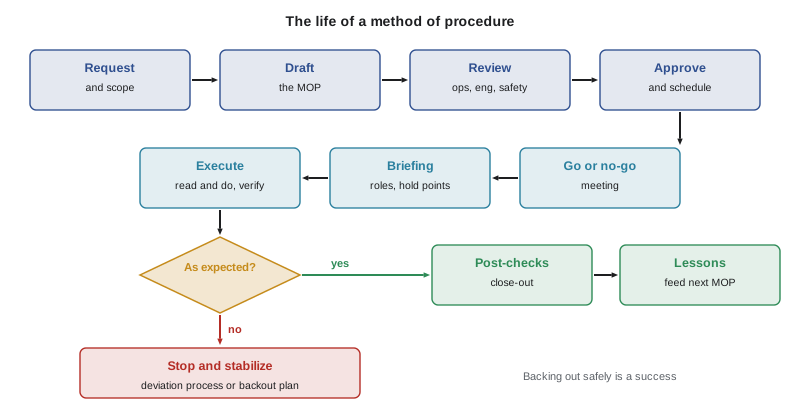
The way a MOP is carried out matters as much as how it is written. Before work starts, the MOP lead holds a pre-task briefing with everyone involved: the purpose, the steps, the hazards and controls, the roles, the hold points, the backout criteria and how to stop the work. Everyone should have the chance to ask questions and should know that anyone can call a stop.
During the work, the team reads each step aloud, performs it, confirms the expected result and marks it complete before moving on, a practice sometimes called read and do. Place-keeping, by marking each completed step, prevents skipped or repeated steps when people are interrupted. Before any action on energized equipment, the performer and verifier both confirm the equipment label and the device to be operated, often by pointing at it and stating the identifier aloud. Three-way communication is used on radios and phones: the sender gives the instruction, the receiver repeats it back, and the sender confirms it is correct.
If anything unexpected happens, such as an unexpected alarm, a reading that does not match, a label that differs from the MOP or equipment in a different state than expected, the team stops, places the system in a stable state if it can do so safely and consults the MOP lead. Pressing on in the hope that it will sort itself out is how small surprises become outages and injuries. After the work, the team completes the post-checks, removes locks and tags under the lockout procedure, confirms that alarms are cleared and systems are normal, hands over to operations and records any lessons for future MOPs.
Change control connects to other safety systems covered in this curriculum. Permits to work, including hot work and energized electrical work permits, are covered in HSE-221; lockout in HSE-210; electrical work in HSE-224 and HSE-321.
Common mistakes
MistakeTreating a task as a standard change even though conditions on the day are not standard.
InsteadStop and reassess; non-standard conditions need a normal change and a proper plan.
MistakeWriting MOP steps with equipment names that do not match the field labels.
InsteadUse identifiers that match the labels and current drawings exactly, and verify them in the field.
MistakeTreating switching a unit off at its controls as isolation.
InsteadIsolate at the energy-isolating device with lock and tag, and verify zero energy.
MistakeSkipping verification steps to finish within the window.
InsteadUse the decision points and back out if the work cannot be completed safely in time.
MistakeContinuing after an unexpected alarm because the next step should fix it.
InsteadStop, stabilize and consult the MOP lead before continuing.
Summary and key terms
- Change control is a safety control as well as an uptime control; it targets wrong-equipment, wrong-sequence and improvisation errors.
- ITIL 4 recognizes standard, normal and emergency changes; facilities apply the same ideas to power, cooling and fire protection work.
- MOPs cover specific planned tasks, SOPs cover routine tasks and EOPs cover responses to failures.
- A good MOP has a clear scope, exact equipment identifiers, a risk assessment, prerequisites, roles, steps with expected results, a backout plan and post-checks.
- MOP reviewers check labels, redundancy, energy sources, safety controls, sequence, hold points, backout, timing and communication.
- Maintenance windows need go or no-go meetings, decision points and the freedom to back out.
- On the night, use briefings, read and do, place-keeping, peer verification, three-way communication and stop when unexpected.
- Change enablement
- The ITIL 4 practice of maximizing successful changes by assessing risk, authorizing changes and managing the change schedule.
- Standard change
- A low-risk, pre-authorized change that follows a tested procedure.
- Normal change
- A change that must be assessed and authorized individually.
- Emergency change
- A change that must be made as quickly as possible, using an expedited process.
- Method of procedure
- A detailed, task-specific, step-by-step plan for work on critical infrastructure.
- Emergency operating procedure
- A prepared procedure for responding to a specific failure.
- Maintenance window
- A scheduled period during which planned work with some risk to the service is allowed.
- Backout plan
- The steps for returning systems to a safe, stable state if the work cannot be completed.
- Hold point
- A step at which work stops until a check is completed or approval is given.
- Three-way communication
- A method in which an instruction is given, repeated back and confirmed.
Practice problems
Work each problem on paper first, then reveal the answer to check.
Name the three ITIL 4 change types.
Show answer
Standard, normal and emergency.
What is the difference between a MOP and an EOP?
Show answer
A MOP plans a specific task; an EOP sets out the response to a specific failure.
Why must MOP equipment identifiers match field labels?
Show answer
Mismatches lead to work on the wrong equipment.
What should every critical MOP step state besides the action?
Show answer
The expected result, and what to do if it does not occur.
Who typically reviews a MOP?
Show answer
Operations, engineering, safety and, in colocation, affected customers.
What is the purpose of a go or no-go meeting?
Show answer
To confirm that people, parts, permits, approvals and conditions are ready before the window opens.
What is a decision point in a maintenance window?
Show answer
A time by which a stage must be complete, or the team backs out.
Describe three-way communication.
Show answer
The sender gives the instruction, the receiver repeats it, and the sender confirms.
What should the team do when an unexpected alarm appears during a MOP?
Show answer
Stop, stabilize the system if safe and consult the MOP lead.
Why is backing out described as a success?
Show answer
It returns the facility to a safe, stable state rather than pressing on unsafely.
Lesson quiz · 5 questions
Score 60% or more to complete this lesson.
Create a free account to save your progress, take quizzes and earn a certificate.