
HSE-320 · Lesson 5 of 12 · 26 min
Data hall hazards II: cables, clutter, noise and airflow
Lesson 4 dealt with the floor. This lesson deals with everything around you once you are standing on it: the cables that run overhead, underfoot and through every rack; the clutter that builds up during installations; the constant noise of thousands of fans; and the moving air that cools the equipment. None of these hazards is dramatic. Together they cause a steady stream of trips, cuts, strains, eye injuries and gradual hearing loss, and they make it harder to hear alarms or get out quickly in an emergency.
How a data hall is arranged
Most air-cooled data halls use a hot aisle and cold aisle layout. Racks stand in rows with their fronts facing each other across a cold aisle, where cool air is supplied, and their backs facing each other across a hot aisle, where the equipment exhausts heated air. To stop hot and cold air mixing, many halls add containment: doors at the ends of an aisle and panels or a roof over it. In cold aisle containment the cold aisle is enclosed and the rest of the hall runs warm; in hot aisle containment the hot aisle is enclosed and its air is ducted back to the cooling units, leaving the rest of the hall cool. DCE-330 explains the engineering.
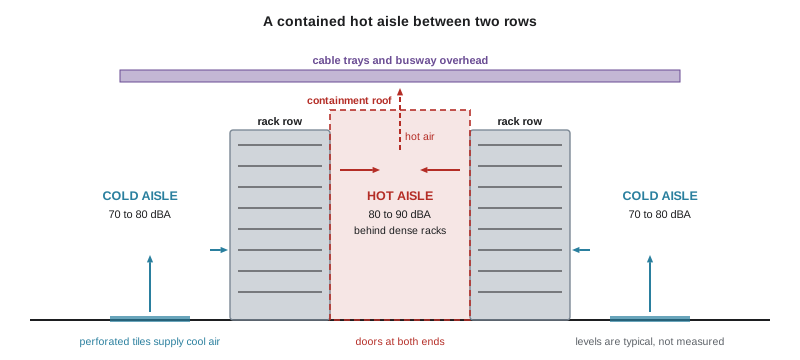
This layout shapes the hazards. Work on the front of equipment happens in the cold aisle, which can be chilly and windy. Work on the back, where most power and network connections are, happens in the hot aisle, which can be very hot and noisy. Containment doors and panels create enclosed spaces with self-closing doors. Overhead, cable trays, ladder racks, busway and containment structures crowd the space above the racks.
Cables underfoot and overhead
A data hall can contain thousands of kilometres of copper and fibre cabling. Most of it should be in trays, ladder racks and cable managers, but during installations and troubleshooting cables are often laid temporarily across aisles, draped over rack tops or left coiled on the floor. Each of those is a trip hazard, and a trip in a data hall can mean a fall against a rack edge, a fall into an open tile, or a cord pulled out of a running server.
- Never run a cable across an aisle at floor level. If a temporary cable must cross a walkway, use a proper cable cover and mark it.
- Keep patch cables inside cable managers and rack spaces, not hanging in loops into the aisle.
- Coil and remove spare cable at the end of each shift.
- Keep cable trays and ladder racks within their fill and load limits; overloaded trays can sag or fall.
- Report damaged trays, loose cable ties hanging at head height and cables with damaged jackets.
Overhead cable work brings its own hazards. Installers work from ladders or platforms above live equipment, pull long cable runs through trays and drop tools, cable ties and offcuts. Falling objects can strike people below and land on or inside equipment. Use tool tethers, keep a clear zone under overhead work when you can, and use a drop cloth or catch tray above open equipment. Never stand on a rack, a cable tray or a containment roof. Cable pulling can also strain shoulders and backs, especially when pulling heavy bundles through crowded trays; plan the pull, use enough people and use rollers or pulling equipment for long runs. HSE-212 covers working at heights and ladder selection.
Fibre optic hazards
Fibre optic cabling is everywhere in modern halls and brings two hazards that copper does not. The first is glass fibre shards. When fibre is cleaved, stripped or broken, it produces tiny slivers of glass that can pierce skin, lodge in eyes or be swallowed if they get onto food or hands. Work on a dark mat so that shards can be seen, put offcuts in a labelled, sealed shard container, never brush shards away with your hand, wear safety glasses, and wash your hands before eating. Food and drink are not allowed in data halls anyway.
The second is invisible light. Optical transceivers, especially long-reach and high-power types, emit infrared laser light that you cannot see. Looking into the end of a live fibre or an open transceiver port can injure the eye, and magnifying devices make the risk worse. Never look into a fibre end or a port; treat every fibre as live; use an inspection scope with an appropriate filter or a camera-based scope; and cap unused ports and connectors. DCE-320 covers fibre plant design, testing and laser classes in more detail.
Clutter and housekeeping
Installations create clutter: empty server boxes, rails and screws, spare blanking panels, cable spools, tools, laptops and carts. In a data hall, clutter does more than cause trips. Cardboard and plastic packaging add fire load and shed dust that can set off very sensitive aspirating smoke detectors. Carts and equipment parked in aisles block exits. Tools left on top of racks fall when doors are opened. Missing blanking panels let hot air recirculate, raising inlet temperatures. NFPA 75 and most site rules limit combustible materials in IT spaces, and HSE-106, Slips, Trips, Falls and Housekeeping, covers the general principles.
Good practice is to keep the hall as clean as you found it at all times, not just at the end of the job. Unpack in the staging room; bring into the hall only what you need for the next task; keep aisles clear to their full width; never block exits, fire extinguishers, emergency power off buttons or electrical panels; and leave no tools, parts or offcuts behind. Rack doors that open into a narrow aisle can block it; close them when you step away.
Containment hazards
Contained aisles are small enclosed spaces, and the hot ones can be hot enough to cause heat stress within a short time; Lesson 6 covers heat. They also have doors that close automatically to keep the air separated, and some have roofs or panels designed to drop or open when the fire alarm activates, so that sprinkler water or clean agent can reach the aisle. Those panels can fall on people below if they release while someone is working, and dropped panels can block the aisle. Know how the containment in your hall behaves in an alarm, keep the aisle doors clear so they can open, and never prop containment doors with equipment or tie them open without approval, because that defeats the airflow design.
Noise
Data halls are loud because thousands of small fans in servers, switches and power supplies push air through the equipment, and cooling units, fan walls and rear-door heat exchangers add more. Typical levels in an air-cooled hall are roughly 70 to 85 dBA, and they can exceed 85 dBA in hot aisles behind high-density equipment. Grey space can be louder: UPS rooms, chiller plant and pump rooms often reach 85 to 95 dBA, and running generators can exceed 100 dBA close by. These are typical ranges, not measurements for your site; only a noise survey tells you the actual levels.
| Area | Typical level (illustrative) | Notes |
|---|---|---|
| Office or NOC | 45 to 60 dBA | Normal conversation is easy |
| Cold aisle, air-cooled hall | 70 to 80 dBA | Raised voice needed at 1 m (3 ft) |
| Hot aisle behind high-density racks | 80 to 90 dBA | Hearing protection often required |
| UPS room or pump room | 80 to 95 dBA | Varies with load and equipment |
| Chiller plant | 85 to 95 dBA | Rotating machinery |
| Generator enclosure while running | 95 to 110 dBA | Hearing protection required; exhaust and heat hazards too |
In most Canadian provinces the occupational exposure limit is 85 dBA averaged over eight hours, with a 3 dB exchange rate: for every 3 dB increase, the allowed time halves. Federally regulated workplaces and a few provinces use different values, so check your jurisdiction. In the United States, OSHA sets a permissible exposure limit of 90 dBA over eight hours with a 5 dB exchange rate, and requires a hearing conservation program, including monitoring, audiometric testing, training and hearing protectors, when exposure reaches an action level of 85 dBA averaged over eight hours. HSE-241, Noise and Hearing Conservation, covers the details.
Worked problem
A long day in the hot aisle
A technician spends 4 hours recabling in a hot aisle at 88 dBA, 2 hours in a cold aisle at 80 dBA, and 2 hours in a generator enclosure at 95 dBA during a test run. What is her noise exposure?
Show solution
- Use the Canadian criterion of 85 dBA with a 3 dB exchange rate. The allowed time at level L is 8 ÷ 2 raised to the power (L − 85) ÷ 3 hours.
- At 88 dBA, the allowed time is 4 h, so 4 h uses 4 ÷ 4 = 1.00 of the daily dose.
- At 80 dBA, the allowed time is about 25.4 h, so 2 h uses about 0.08.
- At 95 dBA, the allowed time is about 0.79 h, so 2 h uses about 2.52.
- The total dose is about 3.60, or 360%, equal to an eight-hour level of about 90.6 dBA: well over the limit.
Answer: Her exposure is far over the Canadian limit, mostly because of the two hours near the running generator. Hearing protection is needed in the generator enclosure and in the hot aisle, and the work could be rearranged to cut the time near the generator.
import math

def dose(exposures, criterion, exchange):
    """Daily noise dose as a fraction of the limit."""
    return sum(hours / (8 / 2 ** ((level - criterion) / exchange))
               for hours, level in exposures)

day = [(4, 88), (2, 80), (2, 95)]   # (hours, dBA)
d_ca = dose(day, 85, 3)
d_us = dose(day, 90, 5)
print(f"85 dBA / 3 dB rule: dose {d_ca * 100:4.0f}%  "
      f"eight-hour level {85 + 10 * math.log10(d_ca):.1f} dBA")
print(f"90 dBA / 5 dB rule: dose {d_us * 100:4.0f}%  "
      f"eight-hour average {90 + 16.61 * math.log10(d_us):.1f} dBA")

# Effect of cutting generator time to 30 minutes and adding an hour in the cold aisle
day2 = [(4, 88), (3.5, 80), (0.5, 95)]
print(f"Revised day, 85/3 rule: {dose(day2, 85, 3) * 100:.0f}%")
print(f"Revised day, 90/5 rule: {dose(day2, 90, 5) * 100:.0f}%")85 dBA / 3 dB rule: dose 360% eight-hour level 90.6 dBA 90 dBA / 5 dB rule: dose 94% eight-hour average 89.6 dBA Revised day, 85/3 rule: 177% Revised day, 90/5 rule: 61%
The output shows how much the exchange rate matters and how strongly short periods at high levels drive the dose. Cutting generator time from two hours to half an hour removes most of the dose under both rules.
Noise matters for more than hearing. In a loud hall it is hard to hear verbal instructions, a colleague calling for help, or the pre-discharge alarm of a fire suppression system. Agree on hand signals or use radios with headsets for coordinated work, make sure alarm strobes are visible from work areas, and do not wear music earbuds in place of proper hearing protection, because they add noise and block alarms.
Moving air
The air that cools the equipment is itself a hazard. Perforated tiles and grates in cold aisles blow cool air upward at speed; loose papers, labels and dust can be lifted into your face, and long hair or loose clothing can be drawn toward fan inlets. Cold aisles can be cold and breezy enough to cause discomfort over long periods. Hot aisles have hot, fast exhaust air. Pressure differences between contained aisles, rooms and corridors can make doors hard to open or cause them to slam, catching fingers.
Cooling equipment in and around the hall has fans that can start automatically. Computer room air handlers, fan walls and in-row coolers should be opened only by authorized people, after following the site's lockout procedure and confirming that the fans have stopped; HSE-210 covers lockout. Never put your hands near a fan guard, and never remove a guard on running equipment.
Common mistakes
MistakeRunning a temporary patch cable across an aisle at floor level.
InsteadRoute it through cable managers or overhead, or use a marked cable cover.
MistakeBrushing fibre shards off the work surface with your hand.
InsteadUse a dark mat, tape or tweezers and put shards in a sealed shard container.
MistakeLooking into a fibre end to check whether it is lit.
InsteadTreat every fibre as live and use a filtered inspection scope or power meter.
MistakeLeaving boxes, tools and carts in the aisle until the end of the job.
InsteadKeep aisles and exits clear throughout and unpack in the staging room.
MistakeRelying on music earbuds in a loud hot aisle.
InsteadWear proper hearing protection and keep alarms audible and visible.
Summary and key terms
- Hot and cold aisle layouts, often with containment, shape where heat, noise and enclosed spaces occur.
- Cables on floors and draped in aisles cause trips; keep cables managed and use covers for temporary crossings.
- Overhead cable work needs tool tethers, clear zones and safe access; never stand on racks or trays.
- Fibre work produces glass shards and invisible laser light; never look into a fibre or port.
- Clutter adds fire load and dust, blocks exits and causes falling objects; keep the hall clean throughout.
- Data halls are typically 70 to 85 dBA and can be louder; plant rooms and generators are louder still.
- Noise limits and exchange rates differ between Canada and the United States; short loud periods drive the dose.
- Moving air, pressure differences and automatic fans create further hazards.
- Hot aisle
- The aisle behind racks where equipment exhausts heated air.
- Cold aisle
- The aisle in front of racks where cool air is supplied.
- Containment
- Doors, panels and roofs that separate hot and cold air in a data hall.
- Exchange rate
- The increase in noise level that halves the allowed exposure time, such as 3 dB or 5 dB.
- Noise dose
- A worker's noise exposure expressed as a percentage of the allowed daily limit.
- Action level
- Under OSHA, an eight-hour average of 85 dBA that triggers a hearing conservation program.
- Fibre shard
- A small sliver of glass produced when optical fibre is cut or broken.
- Blanking panel
- A panel that fills an empty rack space to stop hot air recirculating to equipment inlets.
- Aspirating smoke detector
- A very sensitive detector that continuously samples air through pipes.
- Tool tether
- A lanyard that attaches a tool to the worker or a structure to prevent drops.
Practice problems
Work each problem on paper first, then reveal the answer to check.
Which aisle usually contains most power and network connections?
Show answer
The hot aisle, behind the racks.
Give two rules for cables in walkways.
Show answer
Never run them across aisles at floor level; use a marked cable cover if a temporary crossing is unavoidable.
How should fibre shards be disposed of?
Show answer
In a labelled, sealed shard container, never brushed away by hand.
Why must you never look into a fibre end?
Show answer
It may carry invisible infrared laser light that can injure the eye.
Why is cardboard a problem in the data hall?
Show answer
It adds fire load and sheds dust that can set off sensitive detectors.
What may happen to some containment roof panels in a fire alarm?
Show answer
They may drop or open, which can strike people or block the aisle.
What noise level range is typical in an air-cooled data hall?
Show answer
Roughly 70 to 85 dBA, higher behind high-density equipment.
Under an 85 dBA, 3 dB rule, what is the allowed time at 91 dBA?
Show answer
2 hours.
Under a 90 dBA, 5 dB rule, what is the allowed time at 95 dBA?
Show answer
4 hours.
Why is noise a hazard beyond hearing loss?
Show answer
It masks instructions, calls for help and alarms.
Lesson quiz · 5 questions
Score 60% or more to complete this lesson.
Create a free account to save your progress, take quizzes and earn a certificate.