
HSE-320 · Lesson 1 of 12 · 30 min
How data centres differ from other workplaces
A data centre looks calm. The lights are bright, the floors are clean, the racks stand in tidy rows and most of the time nobody seems to be doing anything. That calm is misleading. Behind the cabinet doors and under the floor tiles is one of the densest concentrations of electrical energy in any commercial building, cooled by air and water systems that run every hour of every year, protected by fire suppression systems that can change the air in a room in seconds, and watched by security systems that record every door that opens. The people who work there handle heavy equipment, work near energized distribution, lift floor tiles over deep voids, spend hours in loud and hot aisles and make changes to systems that thousands of businesses depend on.
This course is the entry point to the data centre sites track of HSM University. It is written for anyone who will work in or visit a live data centre: technicians, electricians, mechanical trades, cabling installers, IT staff, security officers, cleaners, contractors, project managers and the safety professionals who support them. It assumes you have completed HSE-103, Hazard Recognition and Risk Assessment, or have equivalent experience with identifying hazards and choosing controls. It does not teach you how to design a data centre; the DCE courses, starting with DCE-200, Introduction to Data Centre Engineering, do that. Here the focus is on the hazards you will meet and the rules you will be asked to follow, and on why those rules exist.
In this first lesson you will learn what makes a data centre different from an office, a factory or a construction site, how the building is laid out, which spaces carry which hazards and why the two goals of a data centre, keeping people safe and keeping the service running, usually point in the same direction but sometimes pull against each other.
What a data centre is
A data centre is a building, or part of a building, that houses computing, storage and network equipment and the power, cooling, fire protection and security systems that keep it running. Sizes range from a single server room in an office tower to hyperscale campuses with several buildings, each drawing tens or hundreds of megawatts. DCE-200 explains the main types: enterprise data centres owned by a single organization, colocation facilities that rent space, power and cooling to many customers, hyperscale facilities built by large cloud and AI companies, edge sites placed close to users, and telecommunications central offices and carrier hotels where networks interconnect.
From a safety point of view, the type matters less than three facts that are true of almost all of them. First, the facility is live: the IT load runs continuously, so most work happens while power, cooling and fire protection systems are in service around you. Second, the facility is mission-critical: an outage can stop payment systems, hospitals, emergency dispatch or the operations of thousands of customers, so the organization controls change very tightly. Third, the facility is dense: a great deal of energy, heat, weight and noise is packed into a small floor area, and the density is rising quickly as AI equipment arrives.
White space and grey space
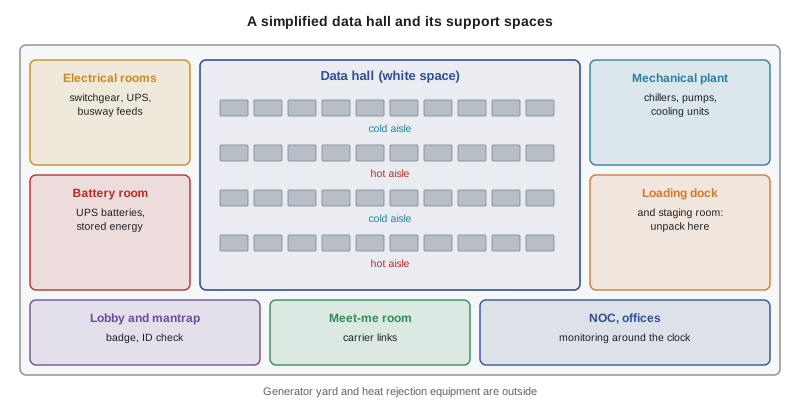
People who work in data centres divide the building into white space and grey space. The white space is where the IT equipment lives: the data halls, computer rooms or suites filled with racks and cabinets. It is called white space because of the raised-floor computer rooms of the past, which were often painted white and kept very clean. The grey space is everything that supports the white space: electrical rooms, uninterruptible power supply (UPS) rooms, battery rooms, switchgear rooms, mechanical rooms, chiller plants, pump rooms, generator enclosures, fuel storage, fire suppression cylinder rooms and the roof or yard where heat rejection equipment sits.
Other spaces matter too. The loading dock and staging or build room are where equipment arrives, is unpacked and is prepared for installation, and they see a lot of material handling. The meet-me room is where telecommunications carriers bring in their fibre and connect to customers. The network operations centre (NOC) or security operations centre (SOC) is where staff watch alarms and cameras. Offices, break rooms and washrooms are ordinary workplaces, though they are usually inside the secure perimeter.
| Space | What it contains | Main hazards |
|---|---|---|
| Data hall (white space) | Racks, cabinets, cabling, cooling units, power distribution units | Floor openings, trips, noise, heat in hot aisles, lifting, energized equipment |
| Electrical rooms | Switchgear, switchboards, transformers, UPS modules, busway | Shock, arc flash, restricted access, noise from transformers |
| Battery rooms | Lead-acid or lithium-ion battery strings and cabinets | Stored energy, chemical burns, off-gassing, thermal runaway |
| Mechanical rooms and plant | Chillers, pumps, piping, cooling distribution units | Rotating equipment, pressure, hot and cold surfaces, water on floors, noise |
| Generator yard | Diesel or gas generators, fuel tanks, transfer equipment | Noise, exhaust, fuel, hot surfaces, automatic start |
| Loading dock and staging | Pallets, crates, packaging, pallet jacks, lifts | Struck-by, crushing, manual handling, cuts, dock edges |
| Meet-me room | Carrier racks, fibre panels | Fibre shards, laser light, tight spaces |
| Roof and yard | Heat rejection equipment, dry coolers, condensers | Falls, weather, fans, hot exhaust air |
What makes a data centre different
Every workplace has hazards. What sets the data centre apart is a particular combination of them, together with a culture and set of rules shaped by the need for continuous operation. The table below compares a data centre with two workplaces you may know better: an office and an industrial plant.
| Feature | Office | Industrial plant | Data centre |
|---|---|---|---|
| Energy density | Low | Medium to high in process areas | Very high throughout, with megawatts in a single hall |
| Operating pattern | Business hours | Shifts, with planned shutdowns | Continuous; shutdowns are rare and planned months ahead |
| Access control | Badge at the front door | Gate and badge | Several layers, often with biometrics, mantraps and escorts |
| Change control | Informal | Work orders and permits | Formal change management, methods of procedure and approvals for almost every task |
| Noise | Quiet | Loud in production areas | Constant fan noise in halls, louder plant rooms |
| Temperature | Comfortable | Varies with process | Cool aisles and very hot exhaust aisles side by side |
| Fire protection | Sprinklers | Sprinklers, some special hazards | Very early detection, pre-action sprinklers and sometimes clean agent systems |
| Who is on site | Employees | Employees and contractors | Small operations staff, many contractors and customer technicians |
Several of these differences shape the rest of the course. The very high energy density means electrical hazards are never far away, even for people who will never open a panel; Lesson 7 builds the awareness every worker needs, and HSE-321 goes further for those who work on the power system. The continuous operating pattern means work happens in live spaces, so the rules about access, escorts, change control and maintenance windows in Lessons 3 and 9 are as much about safety as about uptime. The mix of people on site means that a large share of the workforce on any given day does not work for the facility operator, which is why contractor management is the subject of Lesson 10.
Density is rising
For most of the history of the industry, a typical rack drew a few kilowatts, and a high-density rack might draw 10 to 15 kW. That has changed. Equipment built for training and running large AI models packs many accelerators into a single rack, and as of 2026 racks drawing roughly 40 kW to more than 100 kW are common in new AI halls, with the densest liquid-cooled systems shipping at around 120 to 140 kW per rack and vendors announcing designs for several hundred kilowatts. These figures change quickly, so treat them as a snapshot, not a rule.
Higher density matters to safety in several ways. More power per rack means larger conductors, higher fault currents and more arc flash energy at the point of use. More heat per rack means hotter exhaust air and a shift to liquid cooling, which brings coolant, pressure and leak hazards into the white space; HSE-323 covers those. Heavier racks, often well over a tonne when fully loaded, put more load on floors and make moving equipment more dangerous; Lessons 4 and 8 deal with that. Larger battery systems bring more stored energy and, with lithium-ion, thermal runaway hazards that HSE-322 addresses.
Worked problem
Spotting the hazards on a first walk-through
A new cabling technician joins a contractor crew installing fibre in an existing colocation data hall. On the first morning she is escorted from the lobby through a mantrap, along a corridor past a door labelled 'Electrical Room 2: Authorized Persons Only', into a data hall with a raised floor, past a cart of rack servers being unloaded, and into a cold aisle where a floor tile has been lifted for cable work. What hazards should she notice before she starts work?
Show solution
- Access and escort rules: she must stay with her escort and badge in individually, without tailgating.
- The electrical room: a restricted space she must not enter, with energized switchgear behind the door.
- The equipment cart: a struck-by and crushing hazard while servers are unloaded, and a reminder to keep clear of moving loads.
- The open floor tile: a fall and trip hazard that should be guarded, and a sign that work is happening under the floor near power cabling.
- The data hall environment: constant fan noise and hot exhaust air in the hot aisles behind the racks.
Answer: Before starting work she should note the access and escort rules, the restricted electrical room, the moving equipment, the open floor tile and the noise and heat of the hall, and confirm the controls for each with her supervisor.
Two goals that usually agree
The people who run data centres care intensely about uptime, the fraction of time the service is available. Facilities are designed with redundant power and cooling paths so that equipment can be maintained without an outage, and operators measure themselves on avoiding unplanned downtime. You will hear about tiers, N+1 and 2N designs, and concurrent maintainability; DCE-200 and DCE-340 explain those ideas.
Most of the time, safety and uptime point in the same direction. A worker who drops a tool into an energized busway, trips over a cable and pulls a power cord out of a server, or opens the wrong breaker causes both an injury risk and an outage risk. The careful planning, checklists and peer checks that protect the service also protect the worker. Uptime Institute's 2025 outage analysis reported that close to 40% of organizations had suffered a major outage caused by human error in the previous three years, and that about 85% of those incidents came from staff not following procedures or from flaws in the procedures themselves. The same habits prevent injuries.
Sometimes the goals pull apart. The safest way to work on electrical equipment is to de-energize it, but de-energizing may mean shifting load to another path, accepting reduced redundancy or asking a customer to accept a shutdown. There can be pressure to work energized, to skip a step to finish within a maintenance window, or to keep working in a hot aisle rather than wait for cooling to be restored. This course takes a clear position: when safety and uptime conflict, safety wins, and the organization's procedures should be built so that workers never have to choose. Lesson 9 explains how good methods of procedure and maintenance windows make that possible.
import random

# Illustrative: how rack density changes heat, airflow and weight in one row
random.seed(320)
racks_per_row = 10
scenarios = {"legacy enterprise": 6, "high-density": 15, "AI training": 120}
for name, kw in scenarios.items():
    row_kw = kw * racks_per_row
    # Airflow for air cooling at a 12 K rise: P / (density * cp * rise)
    airflow = kw * 1000 / (1.2 * 1005 * 12)
    print(f"{name:18s} {kw:4d} kW/rack  row {row_kw:5d} kW  "
          f"air needed {airflow:5.1f} m3/s per rack")

# A random sample of rack weights in an AI row (kg), seeded for repeatability
weights = [round(random.uniform(1200, 1500)) for _ in range(racks_per_row)]
print("AI row rack weights (kg):", weights)
print("Heaviest rack:", max(weights), "kg")legacy enterprise 6 kW/rack row 60 kW air needed 0.4 m3/s per rack high-density 15 kW/rack row 150 kW air needed 1.0 m3/s per rack AI training 120 kW/rack row 1200 kW air needed 8.3 m3/s per rack AI row rack weights (kg): [1334, 1389, 1331, 1297, 1326, 1227, 1354, 1436, 1307, 1387] Heaviest rack: 1436 kg
The output shows why air cooling alone stops being practical at AI densities: the airflow needed per rack becomes enormous, which is why those halls bring liquid to the rack. The weights are illustrative, but racks of well over a tonne are normal for liquid-cooled AI systems, and they change how floors are designed and how equipment is moved.
Who is on site
A large data centre may have only a few dozen operations staff, but on a busy day hundreds of people may pass through: construction crews on an expansion, electricians and mechanical contractors doing maintenance, cabling installers, equipment vendors, customer technicians installing their own servers in a colocation cage, cleaners, security guards and visitors. Many of them are new to the site and some are new to data centres altogether. Each group brings different skills and different assumptions. An experienced industrial electrician may be unfamiliar with the change control culture; an experienced server technician may never have thought about floor loading or arc flash.
This mix is why site orientation matters so much, and why this course ends with a capstone in which you prepare an orientation and review a method of procedure for an invented colocation facility. It is also why the law places duties on more than one party. The owner, the operator, the customer and each contractor all have responsibilities, and Lesson 2 maps how those duties work under Canadian and US law.
A tour of the course
The remaining lessons follow the path of a worker through a facility. Lesson 2 covers the law, the roles of the parties and the safety programs a data centre should have. Lesson 3 covers site rules, access control and escorts. Lessons 4 and 5 cover the hazards of the data hall itself: raised floors and floor loading, then cables, clutter, noise and airflow. Lesson 6 covers heat, cold and the work environment. Lesson 7 builds electrical awareness for people who work near, not on, the power system. Lesson 8 covers lifting, moving and installing heavy equipment. Lesson 9 covers change control, methods of procedure and maintenance windows. Lesson 10 covers contractors and construction in live facilities. Lesson 11 covers emergencies. Lesson 12 brings it together in a capstone.
After this course, the data centre sites track continues with three specialist courses. HSE-321, Electrical Safety in Critical Facilities, covers arc flash, UPS and switchgear hazards and energized work rules. HSE-322, Battery Rooms and Lithium-Ion Hazards, covers stored energy, chemical hazards and thermal runaway. HSE-323, Fire Suppression and Liquid Cooling Hazards, covers clean agent and sprinkler systems and the hazards of coolant in the white space. Where this course touches those topics, it gives you awareness and points you to the right course rather than repeating it.
Common mistakes
MistakeTreating a quiet, clean data hall as a low-hazard office space.
InsteadRecognize the high energy density, floor openings, noise, heat and heavy equipment behind the calm appearance.
MistakeAssuming only electricians need to think about electrical hazards in a data centre.
InsteadGive every worker basic electrical awareness, because energized equipment is present in almost every space.
MistakeSeeing change control as paperwork for the IT department only.
InsteadTreat change control and methods of procedure as safety controls that also protect uptime.
MistakeUsing rack weights and densities from a few years ago when planning work in a new AI hall.
InsteadCheck current equipment data, because racks now weigh far more and draw far more power.
MistakeAccepting pressure to skip a step or work energized to protect uptime.
InsteadStop and escalate; when safety and uptime conflict, safety comes first.
Summary and key terms
- Data centres are live, mission-critical and dense, which shapes both their hazards and their rules.
- The white space holds the IT equipment; the grey space holds the power, cooling, fire protection and security systems.
- Each space has typical hazards, from floor openings and noise in the data hall to arc flash in electrical rooms and thermal runaway in battery rooms.
- Rack densities are rising quickly with AI equipment, bringing heavier racks, liquid cooling and more electrical energy at the rack.
- Safety and uptime usually agree, because the same careful habits prevent injuries and outages.
- When they conflict, safety comes first, and procedures should be designed so workers never have to choose.
- HSE-321, HSE-322 and HSE-323 continue the data centre sites track.
- White space
- The areas of a data centre that house IT equipment, such as data halls and computer rooms.
- Grey space
- The supporting areas of a data centre, such as electrical, mechanical, battery and generator spaces.
- Mission-critical facility
- A facility whose failure would seriously harm the organization or the people who depend on it.
- Colocation
- A data centre business that rents space, power and cooling to many customers.
- Hyperscale
- Very large data centres built and operated by major cloud and AI companies.
- Rack density
- The electrical power drawn by the equipment in one rack, usually in kilowatts.
- Uptime
- The proportion of time a system or service is available.
- Meet-me room
- The room where telecommunications carriers connect their networks to the facility and its customers.
- Staging room
- A room where equipment is unpacked, inspected and prepared before installation.
- Network operations centre
- The room where staff monitor systems, alarms and events around the clock.
Practice problems
Work each problem on paper first, then reveal the answer to check.
Name three facts about data centres that shape their hazards and rules.
Show answer
They are live, mission-critical and dense.
What is the difference between white space and grey space?
Show answer
White space houses IT equipment; grey space houses the systems that power, cool and protect it.
List two hazards typical of a battery room.
Show answer
Stored electrical energy and chemical or thermal runaway hazards; also off-gassing.
Why does rising rack density matter to people moving equipment?
Show answer
Racks are much heavier, raising floor loading and crushing or tip-over risks.
Why do data centres bring liquid cooling into AI halls?
Show answer
At very high densities the airflow needed for air cooling becomes impractical.
Give an example where safety and uptime agree.
Show answer
A peer-checked procedure prevents both an injury and an accidental outage.
Give an example where safety and uptime may pull apart.
Show answer
Pressure to work on equipment energized to avoid shifting load or a shutdown.
What did Uptime Institute report about human error in its 2025 outage analysis?
Show answer
Close to 40% of organizations had a major outage from human error in three years, and about 85% of those came from not following procedures or flawed procedures.
Why is contractor management especially important in data centres?
Show answer
A large share of the people on site on any day are contractors, vendors or customer technicians.
Which course covers lithium-ion thermal runaway in depth?
Show answer
HSE-322, Battery Rooms and Lithium-Ion Hazards.
Lesson quiz · 5 questions
Score 60% or more to complete this lesson.
Create a free account to save your progress, take quizzes and earn a certificate.