
GCP-221 · Lesson 7 of 12 · 19 min
Gemini in BigQuery
▶ Video coming soon A video version of this lesson is on the way.
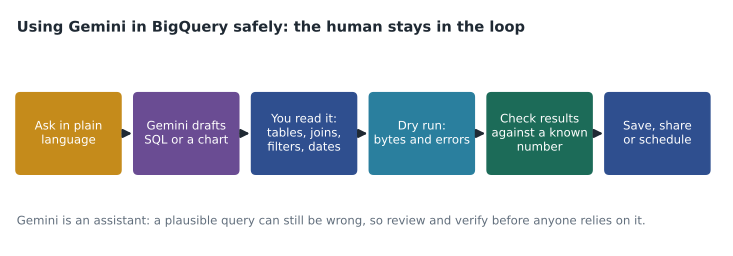
On Wednesday, October 28, Ravi does something unusual: he asks Mateo not to write any SQL himself. Instead, Mateo is to answer three of Lena's questions using Gemini in BigQuery, the AI assistance built into BigQuery Studio, and then check every answer as if a new colleague had written it. The point of the session is not that the assistant is good or bad, but that an analyst remains responsible for every number, whoever or whatever drafted the query.
What Gemini in BigQuery does
Gemini in BigQuery is part of Gemini for Google Cloud. Once an administrator enables it for a project and grants the right roles, it adds assistance at several points in an analyst's work. Google's documentation lists the features, some generally available and some in preview, and the list changes often.
| Feature | What it does | Typical use |
|---|---|---|
| SQL generation from a prompt | Writes a query from a plain-language request, using table schemas | "Total net sales by region for September" |
| SQL completion | Suggests the rest of a query as you type | Finishing a long GROUP BY or join condition |
| SQL explanation | Describes in words what a query does | Understanding a query inherited from someone else |
| Data insights | Suggests questions and ready-made queries for a table, based on its profile | Getting started with an unfamiliar table |
| Data canvas | A visual, graph-like workspace that chains natural-language steps: find tables, query, join, chart | Exploratory analysis without writing all the SQL |
| Python code generation in notebooks | Writes Python or BigQuery DataFrames code in Colab Enterprise | Charts and transformations in a notebook |
| Data preparation | Suggests cleaning steps that become SQL | Covered in GCP-220 |
| Conversational analytics | Data agents that answer questions about chosen tables in chat | Business users asking repeated questions of curated data |
Two practical facts belong in any exam answer about these features. First, they must be set up: the Gemini for Google Cloud API is enabled, and users need roles that permit Gemini assistance, so a user who sees no assistant icon may simply lack the setting or role. Second, Gemini works from metadata and the data it is allowed to read: table and column names, descriptions and, for some features, query history and profiles. Clear names and descriptions, the habits from lesson 5, make its suggestions noticeably better.
Question one: generating SQL from a prompt
Mateo's first question from Lena is: "What were net store sales by region in the first half of October, and how did that compare with the same period last year?" He types it as a prompt in the editor, with the curated dataset selected. Gemini produces a query within seconds.
-- Generated from: net store sales by region, Oct 1-15 2026 vs same period 2025
SELECT
  st.region,
  SUM(CASE WHEN s.sale_date BETWEEN '2026-10-01' AND '2026-10-15' THEN s.net_sales END) AS sales_2026,
  SUM(CASE WHEN s.sale_date BETWEEN '2025-10-01' AND '2025-10-15' THEN s.net_sales END) AS sales_2025
FROM `bl-data-prod.curated.sales` AS s
JOIN `bl-data-prod.reference.stores` AS st ON s.store_id = st.store_id
GROUP BY st.region;
The query looks right, and it would run. Ravi asks Mateo to review it with a checklist, the same one the team uses for any query a person writes.
| Check | Finding in the generated query |
|---|---|
| Right tables? | Yes: curated.sales and reference.stores. |
| Right filters? | No channel filter, so web orders are included; Lena asked for store sales. |
| Partition pruning? | No WHERE clause on sale_date, so the query scans every partition, almost four years of data. |
| Joins and grain? | Inner join to stores; web orders have a store_id of 0 for the online store, which exists in the reference table, so they are counted. |
| Definitions? | Uses net_sales directly, consistent with the shared view. |
| Fair comparison? | October 1 to 15 in both years is 15 days, but 2026 has three Thursdays and 2025 has two. |
Two findings change the answer. Without the channel filter, the numbers include web orders, so every region looks larger than Lena's store figures. Without a date filter, the query scans the whole table instead of two short ranges. Mateo adds WHERE s.channel = "store" AND (s.sale_date BETWEEN ... OR s.sale_date BETWEEN ...), the dry run estimate falls from about 6 GiB to under 100 MiB, and the totals now match v_store_daily for the same dates. The weekday difference does not need a code change, but it goes into the note to Lena.
Question two: explaining an inherited query
The second task is a 90-line query from a former team member that calculates "comparable store sales", the growth in sales from stores that were open in both periods. Nobody remembers exactly how it decides which stores count. Mateo selects the query and asks Gemini to explain it. The explanation is clear and mostly right: it describes the CTEs, the join to stores, and the comparison of two years. It also says the query "includes stores open for at least 12 months", but when Mateo reads the filter himself, it checks open_date <= "2025-01-01", a fixed date that someone forgot to update. Stores opened in 2025 are wrongly excluded from this year's figures. An explanation tool helps you read faster; it does not replace reading.
Question three: exploring in data canvas
Lena's third question is open-ended: "Is anything unusual happening with returns this autumn?" This is where data canvas shines. Mateo starts a canvas, searches for tables about returns, and adds curated.returns_by_product_day from GCP-220's pipeline. Each step is a node in a graph: a prompt such as "returns per day by category since August" produces a SQL node, and "chart this as lines" produces a chart node. He branches the graph to try a second view by region without losing the first. The canvas also suggests a summary in plain language beneath each chart.
The canvas surfaces a clear pattern: returns of footwear jumped in the second week of October and stayed high. Gemini's summary attributes the rise to "seasonal demand". Mateo checks the detail: almost all the extra returns are one boot model whose size chart on the website changed on October 6. The pattern is real; the suggested explanation is a guess. He writes the finding up with the evidence, and the merchandising team corrects the size chart that afternoon.
Checking generated SQL automatically
For queries that will run every day, Ravi adds one more safety net: compare the result of a generated or edited query with a trusted reference on a small sample before switching. The SQLite example below compares the original generated query and the corrected one on a handful of rows, alongside the trusted figure from the shared view.
import sqlite3
db = sqlite3.connect(":memory:")
db.executescript("""
CREATE TABLE sales (store_id INT, channel TEXT, sale_date TEXT, net_sales REAL);
INSERT INTO sales VALUES
 (12, 'store', '2026-10-03', 900), (12, 'web', '2026-10-03', 250),
 (15, 'store', '2026-10-09', 1200), (0, 'web', '2026-10-10', 400),
 (12, 'store', '2025-10-04', 850), (15, 'store', '2025-10-08', 1100);
CREATE TABLE stores (store_id INT, region TEXT);
INSERT INTO stores VALUES (0, 'Online'), (12, 'East'), (15, 'East');
""")
generated = """SELECT st.region, SUM(net_sales) FROM sales s JOIN stores st USING (store_id)
               WHERE sale_date BETWEEN '2026-10-01' AND '2026-10-15' GROUP BY st.region"""
corrected = generated.replace("WHERE", "WHERE channel = 'store' AND")
trusted = {"East": 2100.0}   # from the shared view for the same dates

for name, sql in [("generated", generated), ("corrected", corrected)]:
    result = dict(db.execute(sql).fetchall())
    status = "matches" if result == trusted else "differs"
print(f"{name:9} {result} {status} the trusted figure")generated {'East': 2350.0, 'Online': 400.0} differs the trusted figure
corrected {'East': 2100.0} matches the trusted figureWhat this code does
Testing a drafted query against a trusted figure before relying on it. A few sample sales from store and web channels are loaded with a small store table. The drafted query and the corrected one, which adds the store-channel filter, are both run on the same rows. The output shows that the drafted query also counts web sales and an online region, so it does not match the figure from the shared view, while the corrected query does.
Governance, privacy and cost
Organizations often ask what happens to their data when Gemini is used. Google states that Gemini for Google Cloud does not use customers' prompts or data to train its models, and that data stays within the protections of the customer's project; an administrator should still confirm the current terms and the compliance programs that cover the feature before enabling it for sensitive data, because Google notes that some compliance offerings are not supported. Gemini respects the user's own permissions: it cannot query a table the user cannot read. Pricing is part of Gemini for Google Cloud, and Google's packaging of these features has changed more than once, so check the current pricing page rather than relying on a course.
There is also a cost risk that is easy to miss. Generated queries are written to be correct, not cheap, and as the first example showed, they may omit partition filters. Under on-demand pricing, a habit of running generated SQL without reading the bytes estimate can be expensive. The maximum bytes billed setting and custom quotas from lesson 4 apply to generated queries just as to hand-written ones.
| Good uses | Use with care | Avoid |
|---|---|---|
| First drafts of routine queries | Explanations of complex inherited SQL | Sending results to stakeholders without review |
| Learning unfamiliar functions | Natural-language summaries of charts | Prompts containing personal data that should not leave its table |
| Exploring a new table with data insights | Generated joins across tables with unclear keys | Treating a suggested explanation as a finding |
Common mistakes
MistakeRunning generated SQL without reading it.
InsteadReview tables, filters, joins, dates and definitions as you would a colleague's query.
MistakeTrusting a generated query because it runs without errors.
InsteadA query can run and still be wrong; compare results with a known figure.
MistakeAccepting the assistant's explanation of a pattern as the cause.
InsteadCheck the detail; record the suggestion as a hypothesis until evidence supports it.
MistakeIgnoring the bytes estimate on generated queries.
InsteadCheck for partition filters and the dry run estimate before running.
Ravi ends the session by asking Mateo what he would tell a new analyst about the assistant. Mateo's answer goes into the team's onboarding notes: use it to get started faster and to read unfamiliar SQL, write a clear prompt that names the tables, the period and the definition you want, and never send a number onward that you have not checked yourself. The assistant changes how quickly an analyst drafts work, not who is accountable for it.
Worked problem
Spotting the problem in a generated query
A generated query for "store sales by region, first half of October 2026" has no channel filter and no date filter in WHERE; the dates appear only inside CASE expressions. The table holds about 6 GiB across all dates, and the two 15-day periods hold about 70 MiB. What is wrong, and what does the fix save under on-demand pricing at 6.25 US dollars per TiB?
Show solution
- Without a channel filter, web sales are included, so the totals are too high for a store-sales question.
- Dates inside CASE do not prune partitions, so the query scans about 6 GiB.
- Adding the channel filter and the two date ranges to WHERE reduces the scan to about 70 MiB.
- Cost before: 6 / 1,024 x 6.25 = 0.037 US dollars. After: 0.07 / 1,024 x 6.25 = 0.0004 US dollars.
Answer: The query counts web sales and scans every partition. The fix makes the totals correct and cuts the scan by a factor of about 88, from almost 4 cents to well under a tenth of a cent per run.
Summary and key terms
- Gemini in BigQuery adds AI assistance: SQL generation, completion and explanation, data insights, data canvas, Python generation in notebooks, data preparation and conversational analytics.
- It must be enabled and users need the right roles, and it works best with clear names and descriptions.
- Every generated query should be reviewed for tables, filters, joins, partition pruning, definitions and fairness, estimated with a dry run, and checked against a known number.
- Explanations and summaries speed up reading but can be wrong.
- Gemini respects user permissions; check current terms, compliance coverage and pricing before using it with sensitive data, and keep cost controls in place.
- Gemini in BigQuery
- AI assistance in BigQuery Studio, part of Gemini for Google Cloud.
- Prompt
- A plain-language request given to an AI assistant.
- Data canvas
- A visual workspace that chains natural-language steps into queries and charts.
- Data insights
- Suggested questions and queries generated from a table's profile.
- Conversational analytics
- Chat-based question answering over chosen tables using data agents.
- Human in the loop
- A person reviews and approves AI output before it is used.
- Hypothesis
- A suggested explanation that has not yet been confirmed by evidence.
- Comparable store sales
- Sales growth measured only for stores open in both periods.
Practice problems
Work each problem on paper first, then reveal the answer to check.
A user cannot see the Gemini assistant in BigQuery Studio. What are two likely reasons?
Show answer
The feature is not enabled for the project, or the user lacks the role that permits Gemini assistance.
Why might a generated query cost far more than a hand-written one?
Show answer
It may omit partition filters, putting dates only in CASE expressions or not at all.
Can Gemini query a table the user has no access to?
Show answer
No, it works within the user's permissions.
What should an analyst do with an AI-suggested reason for a trend?
Show answer
Treat it as a hypothesis and check the underlying detail before reporting it.
Lesson quiz · 5 questions
Score 60% or more to complete this lesson.
Create a free account to save your progress, take quizzes and earn a certificate.