
GCP-221 · Lesson 10 of 12 · 19 min
Sharing data and reports securely
▶ Video coming soon A video version of this lesson is on the way.
Friday, November 6, is about access. The store manager dashboard is nearly ready, and Lena's next question is a careful one: each manager should see their own store in detail and only regional totals for the others, and nobody outside Finance should see individual transaction lines, which include payment types. Ravi uses the request to walk through BigQuery's layers of access control and how they combine with Data Studio's sharing.
The principle: least privilege, granted to groups
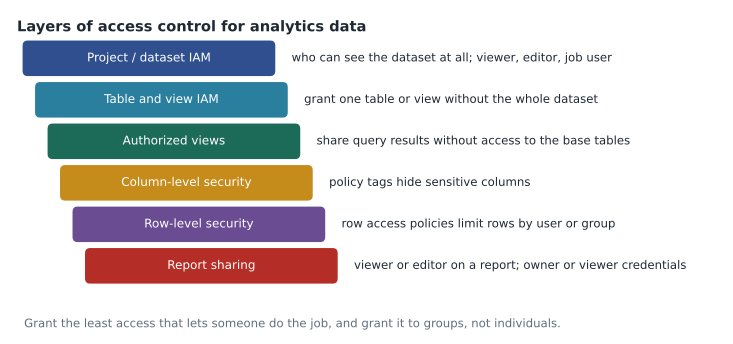
Every access decision follows one principle: give people the least access that lets them do their job, and no more. A second rule makes that manageable: grant access to groups, not individuals. Birchline has Google groups such as store-managers@, analytics-team@ and finance-reporting@. When a manager joins or leaves, the identity team changes group membership, and every grant follows automatically. Grants to individual accounts are hard to audit and tend to outlive the job they were made for.
IAM roles for BigQuery
BigQuery access is controlled with Identity and Access Management (IAM) roles, granted at the level of the organization, a project, a dataset, or a single table or view. Access to data and permission to run queries are separate. To query a table, a person needs permission to read the data, such as BigQuery Data Viewer on the dataset, and permission to run jobs in some project, such as BigQuery Job User, because every query is a job that is billed to a project.
| Role | Grants | Typical holder |
|---|---|---|
| BigQuery Data Viewer | Read tables and views, and their metadata | Analysts who query curated data |
| BigQuery Data Editor | Read and change data; create tables in a dataset | Pipelines and data engineers |
| BigQuery Data Owner | Full control of a dataset, including its access | The dataset's owning team, sparingly |
| BigQuery Job User | Run jobs, including queries, in a project | Anyone who runs queries in that project |
| BigQuery User | Run jobs and create datasets in a project | Analysts who need their own scratch datasets |
| BigQuery Metadata Viewer | See dataset and table metadata, not data | Catalog browsing |
| BigQuery Admin | Everything in BigQuery | A few platform administrators |
Birchline grants analytics-team@ Data Viewer on curated and reference, Job User on the analytics project, and BigQuery User on a separate sandbox project for experiments. Finance gets Data Viewer on a finance dataset that includes the transaction lines. Store managers get nothing on the raw or curated datasets at all; what they see comes through the reporting layer described below.
Sharing results, not tables: authorized views and datasets
Lesson 5 introduced authorized views. Ravi creates a dataset called shared_reporting in the same location as curated, creates the view v_store_daily_reporting there, and authorizes it on the curated dataset. Store managers receive Data Viewer on shared_reporting only. They can query the view, which returns daily totals per store, but they cannot read curated.sales, see its transaction lines or write their own query against it. An authorized dataset extends the same idea: every view in an authorized dataset is allowed to read the source dataset, which saves authorizing views one at a time.
Row-level security
Lena's first requirement, detail for your own store and totals for others, needs rows filtered by who is asking. Row-level security in BigQuery uses row access policies attached to a table. Each policy names a set of users or groups and a filter; a user sees only the rows matching the filters of the policies that include them. Once any row access policy exists on a table, users who are not covered by any policy see no rows at all.
-- Each store's managers see their own store's rows in the detail table
CREATE ROW ACCESS POLICY store_12_managers
ON `bl-data-prod.shared_reporting.store_daily_detail`
GRANT TO ("group:store-012-managers@birchline.example")
FILTER USING (store_id = 12);

-- Regional managers see every store in their region
CREATE ROW ACCESS POLICY east_region
ON `bl-data-prod.shared_reporting.store_daily_detail`
GRANT TO ("group:region-east-managers@birchline.example")
FILTER USING (region = "East");

-- Analysts and finance see everything
CREATE ROW ACCESS POLICY all_rows
ON `bl-data-prod.shared_reporting.store_daily_detail`
GRANT TO ("group:analytics-team@birchline.example", "group:finance-reporting@birchline.example")
FILTER USING (TRUE);
Writing a policy for each of forty stores is repetitive, so Ravi uses a common alternative: a mapping table that lists each manager's email and store, and a filter that uses SESSION_USER() to look up the current user. Either way, the important property is the same. The filter is applied by BigQuery itself, so it holds in every tool: the console, a notebook, Connected Sheets or a report using viewer's credentials.
Mateo models the policy logic in Python to make sure he understands what each person will see, including the person no policy covers.
rows = [  # (store_id, region, net_sales) for one day
    (12, "East", 9100), (15, "East", 7800), (22, "Central", 6600), (31, "West", 9400),
]
policies = {   # group -> filter
    "store-012-managers": lambda r: r[0] == 12,
    "region-east-managers": lambda r: r[1] == "East",
    "analytics-team": lambda r: True,
}
users = {
    "manager of store 12": ["store-012-managers"],
    "East regional manager": ["region-east-managers"],
    "analyst": ["analytics-team"],
    "new hire, no group yet": [],
}
for user, groups in users.items():
    visible = [r for r in rows if any(policies[g](r) for g in groups)]
    total = sum(r[2] for r in visible)
print(f"{user:24} sees {len(visible)} rows, total {total:,}")manager of store 12 sees 1 rows, total 9,100 East regional manager sees 2 rows, total 16,900 analyst sees 4 rows, total 32,900 new hire, no group yet sees 0 rows, total 0
What this code does
Simulating which rows each person can see under row access policies. Each policy is a group with a filter, and each person belongs to some groups. A person sees a row if any of their groups' filters allows it. The output shows the store manager seeing one store, the regional manager two, the analyst all four, and the new hire, who is in no group yet, seeing nothing at all, which is how BigQuery behaves once a table has row access policies.
Column-level security and masking
Lena's second requirement, no transaction lines or payment types outside Finance, is about columns. Column-level security uses policy tags from a taxonomy managed in Dataplex. An administrator tags sensitive columns, such as tender_type or customer_email, and grants the Fine-Grained Reader role on each tag to the groups allowed to see it. A user without that role who queries the column gets an access error. Dynamic data masking goes one step further: instead of an error, users without access see a masked value, such as NULL, a hash or only the last four characters, according to a masking rule. Masking lets one table serve everyone while protecting the sensitive values.
| Requirement | Feature | Behaviour |
|---|---|---|
| Share only some rows | Row access policy | Users see only rows matching their policies |
| Hide a sensitive column | Policy tag with column-level security | Unauthorized queries on the column fail |
| Show a sensitive column partly | Dynamic data masking | Unauthorized users see a masked value |
| Share results without base tables | Authorized view or authorized dataset | Users query the view; base tables stay private |
| Share a dataset with another organization | BigQuery sharing (formerly Analytics Hub) | Subscribers get a linked, read-only dataset |
For sharing data outside the organization, BigQuery offers data exchanges and listings, a feature long called Analytics Hub and now presented in the console as BigQuery sharing. A publisher lists a dataset; a subscriber in another organization gets a linked dataset that reads the publisher's data in place, without copying it, and queries are billed to the subscriber. Birchline uses it to receive weather data from a provider and plans to share sell-through figures with its two largest suppliers.
Sharing reports
Data Studio sharing works like Google Drive. A report can be shared with people or groups as viewers or editors, and link sharing can be restricted to the organization or turned off. Sharing the report and sharing the data are separate: what a viewer sees depends on the data source's credentials. With owner's credentials, viewers see whatever the source returns to its owner; with viewer's credentials, they see what their own BigQuery permissions allow, including row access policies.
Ravi's design uses both deliberately. The overview page reads a summary of regional totals through owner's credentials, because every manager may see regional totals and nobody needs BigQuery access for that. The store detail page reads store_daily_detail through viewer's credentials, so the row access policies decide which store each manager sees. Editors are limited to the analytics team, and the report is owned by a Data Studio Pro team workspace, not by Ravi's personal account.
Connected Sheets gives business users another route: from Google Sheets, they can pivot, chart and filter BigQuery tables of billions of rows, with the queries running in BigQuery under their own credentials. Finance's month-end workbook uses Connected Sheets on the governed finance views, so the familiar spreadsheet layout reads warehouse data directly instead of exported copies. Exported copies are the most common way data escapes its controls, which is why Birchline discourages downloading curated data to files.
Privacy obligations and auditing
Access control is also a legal matter when personal information is involved. Under PIPEDA, Canada's federal private-sector privacy law, personal information should be limited to what is needed for the purpose and protected by safeguards suited to its sensitivity, which in practice means masking, minimizing and restricting customer columns. Ravi's rule is that curated sales carry no customer names or emails at all; the customer key is a pseudonymous ID, and the mapping to real customers lives in a separate, tightly restricted dataset.
Finally, Cloud Audit Logs record who changed access and, through data access logs, who read which tables. BigQuery's INFORMATION_SCHEMA views show grants and jobs. A quarterly review of who has access to what, run by the data owners, catches the grants that should have been removed.
Common mistakes
MistakeGranting BigQuery Data Viewer to individual managers.
InsteadGrant roles to groups so membership changes keep access correct.
MistakeGiving store managers access to the base table so a report works.
InsteadUse an authorized view or dataset, and row access policies on a reporting table.
MistakeAssuming a report shared as viewer-only protects the data.
InsteadWith owner's credentials, every viewer sees what the source returns; limit the source or use viewer's credentials.
MistakeForgetting that a table with row access policies hides all rows from uncovered users.
InsteadAdd a policy for every group that needs access, including analysts and service accounts.
Service accounts deserve the same care as people. The Data Studio Pro workspace, the scheduled queries and the Looker connection each run as a service account with only the roles they need, and none of them holds BigQuery Admin.
Worked problem
Designing access for the store dashboard
Managers must see their own store's daily detail, regional totals for all regions, and no payment types. Finance must see everything. What combination of features meets this?
Show solution
- Create shared_reporting with a regional totals view, authorized on curated; grant store-managers@ Data Viewer on shared_reporting.
- Build store_daily_detail in shared_reporting with row access policies per store group, plus a policy for analytics and finance.
- Leave payment types out of the reporting tables entirely; in curated, protect tender_type with a policy tag readable by finance-reporting@.
- In Data Studio, use owner's credentials for the regional overview and viewer's credentials for the store detail page.
Answer: Authorized views for totals, row access policies for store detail, policy tags for payment types, and the right credentials on each Data Studio data source, all granted to groups.
Summary and key terms
- Grant the least access needed, to groups rather than individuals.
- BigQuery IAM separates reading data, such as Data Viewer, from running jobs, such as Job User, and roles can be granted on projects, datasets, tables and views.
- Authorized views and datasets share results without exposing base tables.
- Row access policies filter rows by user or group in every tool, and users not covered by any policy see nothing.
- Policy tags provide column-level security, and dynamic data masking shows masked values instead of errors.
- BigQuery sharing, formerly Analytics Hub, shares datasets across organizations without copying.
- Data Studio sharing is separate from data access: owner's credentials expose what the source returns, viewer's credentials apply each viewer's permissions.
- Connected Sheets keeps spreadsheet users on governed data, and audit logs support regular access reviews.
- Least privilege
- Granting only the access needed to do a job.
- IAM role
- A named set of permissions granted to a principal on a resource.
- BigQuery Job User
- A role that lets a principal run queries and other jobs in a project.
- Authorized dataset
- A dataset whose views are all allowed to read a source dataset.
- Row access policy
- A BigQuery rule that limits which rows a user or group can see.
- Policy tag
- A label on a column that controls who can read it.
- Dynamic data masking
- Showing masked values to users without access to a sensitive column.
- Connected Sheets
- A Google Sheets feature for analyzing BigQuery data directly.
Practice problems
Work each problem on paper first, then reveal the answer to check.
Which two roles does an analyst usually need to query a curated table?
Show answer
Data Viewer on the dataset and Job User on a project to run the query.
What does a user with no matching row access policy see?
Show answer
No rows at all from that table.
How can a column be visible to everyone but show real values only to Finance?
Show answer
Use dynamic data masking with a policy tag that Finance can read.
Why might a viewer-only Data Studio report still expose sensitive data?
Show answer
With owner's credentials, viewers see whatever the data source returns to its owner.
Lesson quiz · 5 questions
Score 60% or more to complete this lesson.
Create a free account to save your progress, take quizzes and earn a certificate.