
GCP-221 · Lesson 5 of 12 · 19 min
Views, materialized views and saved queries
▶ Video coming soon A video version of this lesson is on the way.
By Wednesday, October 21, Mateo has written the same daily-sales-by-store query four times for four different requests, each slightly different. Two of them disagree by a few hundred dollars because one excluded refunds and the other did not. Ravi calls this the most common problem in analytics teams: not wrong queries, but many right-looking queries that define the same number differently. This session is about saving logic once, in the warehouse, so that everyone reuses it.
Saved queries
The simplest way to keep a query is to save it in BigQuery Studio. A saved query can be private, shared with specific people, or shared with everyone in the project, and the console keeps its versions. Saved queries are good for personal work and for one-off analyses that others may want to rerun. They are not objects that other queries can build on: you cannot SELECT from a saved query. For shared definitions, the warehouse offers views.
Logical views
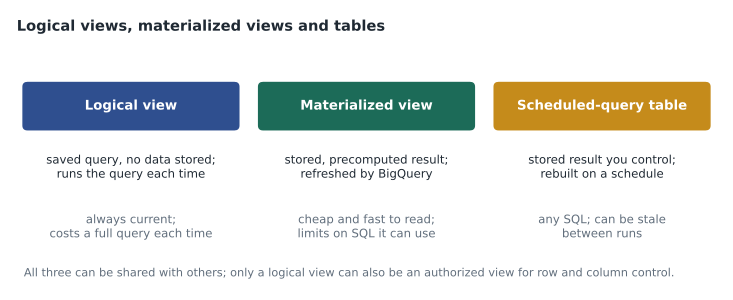
A logical view, usually just called a view, is a saved SELECT statement stored in a dataset. Other queries and tools can query it as if it were a table. A view stores no data. Each time someone queries it, BigQuery runs the view's SQL, combined with the outer query, against the current base tables. That means a view is always up to date, and it costs whatever its underlying query scans.
CREATE OR REPLACE VIEW `bl-data-prod.curated.v_store_daily`
OPTIONS (description = "Net store-channel sales per store per local day. Refunds included as negative sales. Owner: analytics.")
AS
SELECT
  s.sale_date,
  s.store_id,
  st.store_name,
  st.region,
  SUM(s.net_sales)                         AS net_sales,
  SUM(IF(s.is_refund, -s.net_sales, 0))    AS refunds,
  COUNT(DISTINCT s.txn_id)                 AS baskets
FROM `bl-data-prod.curated.sales` AS s
JOIN `bl-data-prod.reference.stores` AS st USING (store_id)
WHERE s.channel = "store"
GROUP BY s.sale_date, s.store_id, st.store_name, st.region;
Because the outer query's filters are pushed into the view's SQL, a query such as SELECT * FROM v_store_daily WHERE sale_date = "2026-10-20" still prunes partitions of curated.sales. Views therefore do not have to be expensive, as long as the people using them filter on the date.
The decision that ended Mateo's disagreement was in the view's description: refunds are included as negative sales, so net_sales is what the store actually kept. Writing the definition into the object, rather than into an email, is half the value of a view. The other half is that when the definition changes, it changes in one place.
Views have limits worth knowing. A view cannot reference itself, and deeply nested views, views built on views built on views, become slow to understand and sometimes slow to run. BigQuery allows views to be nested, but Ravi keeps Birchline's to two levels at most. A view is also tied to its dataset's location, like any other object.
Authorized views
A view can also be used to share data that the viewer could not otherwise see. An authorized view is a view that has been granted access to its source dataset. A user given access to the view can query it, and see exactly what it returns, without having any access to the underlying tables. This is the classic way to share a subset of rows or columns with another team.
Birchline's store managers will eventually need their own store's daily figures without seeing sales lines, which include transaction IDs and payment types. Ravi plans to create v_store_daily in a separate dataset called shared_reporting, authorize that view on the curated dataset, and grant store managers access only to shared_reporting. Lesson 10 returns to authorized views alongside row-level security.
Materialized views
A materialized view stores the precomputed result of its query and keeps it up to date automatically. When the base table changes, BigQuery refreshes the materialized view in the background, usually incrementally, processing only the changed data. Queries against a materialized view read the stored result, which is much smaller and faster than recomputing it.
Materialized views have two further features. First, BigQuery can use a materialized view automatically, a feature called smart tuning: if a query on the base table could be answered from the materialized view, BigQuery rewrites it to read the view instead, even though the query never mentions it. Second, if the materialized view is partly out of date, BigQuery combines the stored result with the changes since the last refresh, so results are always current.
The trade-off is that materialized views support a restricted set of SQL. Aggregations such as SUM, COUNT and AVG, filters, and some joins are supported; many other features, such as most window functions and some kinds of joins, are not, though BigQuery has widened the list over time. When the query you want is not supported, the alternative is a table built by a scheduled query.
CREATE MATERIALIZED VIEW `bl-data-prod.curated.mv_web_daily_device`
PARTITION BY event_date
CLUSTER BY device
OPTIONS (enable_refresh = true, refresh_interval_minutes = 60)
AS
SELECT event_date, device, region, COUNT(*) AS events, APPROX_COUNT_DISTINCT(session_id) AS sessions
FROM `bl-data-prod.curated.web_events`
GROUP BY event_date, device, region;
The marketing dashboard from lesson 4 now reads this materialized view, which holds a few thousand rows per day instead of more than two million events. Each tile reads kilobytes rather than gigabytes, and the dashboard opens noticeably faster.
Tables built by scheduled queries
A scheduled query runs SQL on a schedule and writes the result to a destination table, either replacing it or appending to it. Scheduled queries are managed through the BigQuery Data Transfer Service, run as a chosen identity, and can use parameters such as @run_date so each run processes the right day. They support any SQL, and the destination table can be partitioned and clustered like any other.
The cost of a scheduled table is the query that builds it plus storage, and its weakness is staleness: between runs, the table does not reflect new data. For a daily summary used in a morning dashboard, a run at 05:30 local time, after the overnight loads, is ideal. The companion pipelines course, GCP-222, covers scheduling and dependencies in more depth.
| Option | Stores data | Always current | SQL allowed | Typical cost |
|---|---|---|---|---|
| Saved query | No | Yes, when run | Any | The query, each time someone runs it |
| Logical view | No | Yes | Any | The underlying query, each time it is queried |
| Authorized view | No | Yes | Any | As a logical view, plus a way to share safely |
| Materialized view | Yes | Yes, with background refresh | Restricted | Small reads, plus refresh processing and storage |
| Scheduled-query table | Yes | No, as of the last run | Any | One run per schedule, plus storage |
Choosing among them
Ravi gives Mateo three questions to ask. Does anyone else need this logic? If not, a saved query is enough. Is the result small, read often and expensive to compute? Then store it, as a materialized view if the SQL is supported or as a scheduled table if not. Does the definition need to be shared with people who should not see the raw tables? Then use an authorized view. Everything else that defines a shared number should be a logical view with a clear description.
To see the effect of materializing, Mateo estimates the daily cost of the marketing dashboard three ways: querying the raw events through a logical view, reading a materialized view, and reading a scheduled table. The numbers are illustrative but follow the real price.
price_per_tib = 6.25
views_per_day = 40          # dashboard opens; each open runs 5 tiles
tiles = 5

def daily_cost(gib_per_tile, extra_gib_per_day=0):
    gib = views_per_day * tiles * gib_per_tile + extra_gib_per_day
    return gib / 1024 * price_per_tib

options = {
    "logical view over raw events": daily_cost(0.9),
    "materialized view (plus refresh)": daily_cost(0.002, extra_gib_per_day=1.0),
    "scheduled table (one 6 GiB run)": daily_cost(0.002, extra_gib_per_day=6.0),
}
for name, usd in options.items():
print(f"{name:34} {usd:7.3f} US dollars a day")logical view over raw events 1.099 US dollars a day materialized view (plus refresh) 0.009 US dollars a day scheduled table (one 6 GiB run) 0.039 US dollars a day
What this code does
Estimating what the dashboard costs per day under three designs. Each design is described by how much data each tile reads and how much extra processing happens each day to keep stored results up to date. The function adds these up for 40 dashboard opens with 5 tiles each and converts gibibytes into dollars. The output shows that reading stored results costs a small fraction of querying the raw events every time, even after paying for refreshes or a nightly rebuild.
Through the logical view the dashboard costs about 1.10 US dollars a day; with stored results, it costs a few cents. The view still matters, though: the materialized view and the scheduled table are both built from the same definitions, so the numbers agree everywhere.
Documenting shared objects
Every view, materialized view and shared table at Birchline carries a description, column descriptions for anything that is not obvious, and labels such as owner:analytics and tier:gold. Descriptions appear in the console and in Dataplex's catalog search, so the next analyst can find the official daily sales view instead of writing a fifth version. Ravi asks Mateo to add one more habit: when a definition changes, add a line to the description with the date and the reason.
Common mistakes
MistakeWriting the same metric in several saved queries.
InsteadDefine it once in a view with a description, and have everyone query the view.
MistakeAssuming a view stores data or makes queries cheaper by itself.
InsteadA logical view stores no data; its cost is the underlying query. Store results in a materialized view or table when needed.
MistakeExpecting any SQL to work in a materialized view.
InsteadMaterialized views support a restricted set of SQL; use a scheduled-query table otherwise.
MistakeGranting access to base tables so someone can use a view.
InsteadUse an authorized view, which lets users query the view without access to the underlying tables.
Snapshots and table clones
Two more objects are worth knowing because exam questions sometimes offer them alongside views. A table snapshot is a read-only copy of a table as it was at a point in time, stored cheaply because BigQuery keeps only the data that later changes. Finance asks for a snapshot of curated.sales at each month end, so that last month's reported figures can always be reproduced even after late refunds change the live table. A table clone is a writable copy that also shares storage with its source until it is modified, which makes it a cheap way to give an analyst a full copy of a table to experiment on without touching production.
Neither is a substitute for a view. Snapshots and clones freeze or copy data; views define logic. Mateo's rule of thumb from the session is short: define numbers with views, store results that are expensive to compute, and keep snapshots when you must be able to reproduce what a past report said.
Worked problem
Choosing the right object
Finance wants a daily table of net sales by region for a month-end report. The query uses a window function to compute month-to-date totals, the result is small, and it is read about twenty times a day. Which object fits best?
Show solution
- The result is small and read often, so storing it is worthwhile.
- The query uses a window function, which materialized views do not generally support.
- A logical view would recompute the window over sales twenty times a day.
- A table built by a scheduled query after the overnight loads supports any SQL and is current each morning.
Answer: A scheduled-query table, refreshed each morning, built from the shared v_store_daily view so its numbers match everything else.
Summary and key terms
- Saved queries keep personal or one-off work and cannot be queried by other SQL.
- A logical view is a saved SELECT that stores no data, is always current and costs its underlying query; filters on the outer query are pushed down, so partition pruning still works.
- An authorized view lets people query a view without access to its base tables.
- A materialized view stores a precomputed result that BigQuery refreshes in the background and can use automatically through smart tuning, but supports only some SQL.
- A scheduled query writes any SQL result to a table on a schedule, which can be stale between runs.
- Define shared metrics once, describe them, and label them.
- Saved query
- A query stored in BigQuery Studio for rerunning, which other SQL cannot reference.
- Logical view
- A saved SELECT stored in a dataset that runs each time it is queried.
- Authorized view
- A view granted access to its source dataset so users need access only to the view.
- Materialized view
- A view whose result is stored and refreshed automatically.
- Smart tuning
- BigQuery rewriting a query to read a materialized view automatically.
- Scheduled query
- A query run on a schedule that writes its result to a table.
- Label
- A key-value tag on a BigQuery resource, used for search and cost tracking.
- Staleness
- How far a stored result lags behind its source data.
Practice problems
Work each problem on paper first, then reveal the answer to check.
Does querying a logical view cost less than querying its base table directly?
Show answer
No; it runs the same underlying query, so the cost is the same.
What does smart tuning do?
Show answer
It rewrites queries on a base table to read a matching materialized view automatically.
A metric needs a window function and is read often. Materialized view or scheduled table?
Show answer
A scheduled table, because materialized views generally do not support window functions.
How can a team share a subset of rows without giving access to the base table?
Show answer
With an authorized view, granted access to the source dataset.
Lesson quiz · 5 questions
Score 60% or more to complete this lesson.
Create a free account to save your progress, take quizzes and earn a certificate.