
GCP-212 · Lesson 5 of 12 · 19 min
Data regions and client-side encryption
▶ Video coming soon A video version of this lesson is on the way.
Two questions reach Owen from the board in the same week. Dana Leclair, the chief financial officer, asks where Birchline's documents will physically be stored. And the People and culture director, Marguerite Lavoie, asks whether Google can read the files about staff investigations and disability accommodations that her team will keep in Drive. Both questions are reasonable, and both have answers that are more specific than "in the cloud" and "no". This lesson covers how Google protects Workspace data by default, what data regions can and cannot do, and when client-side encryption is worth its costs.
What Google does by default
Every Workspace customer gets encryption without configuring anything. Data is encrypted in transit between users' browsers and Google, and between Google's data centres, and at rest on Google's storage. Google manages those keys. Mail between Gmail and other mail systems is encrypted with TLS when the other system supports it, and the second course showed how to require TLS for chosen partners. This default protects against someone stealing a disk or tapping a network cable. It does not, by design, stop Google's own systems from processing the content: that processing is what makes search, spam filtering, DLP rules and Gemini features work.
The contract and Google's published terms govern what Google may do with the data; Workspace customer data is processed to provide the services the customer has bought. For most of Birchline's information, that combination of default encryption and contractual limits is the right level. The question is which information needs more.
Data regions
A data regions policy lets administrators choose where certain data is stored at rest, by OU or group. Google's help pages describe two choices for Workspace data regions: the United States or Europe, or no preference. The policy covers the primary data at rest for a documented list of services, such as Gmail messages, Drive files and Calendar data, and the list of covered data and services is published and changes over time. It does not cover everything: some data, such as certain logs and indexes, and data processed temporarily, may be handled elsewhere.
For a Canadian company the important fact is the one GCP-210 noted: there is no Canada option. Birchline cannot pin Workspace data to Canadian data centres the way it pinned its Google Cloud workloads to northamerica-northeast2 in Toronto. PIPEDA does not require personal information to stay in Canada, but it does require Birchline to protect information it transfers to a service provider through contracts and safeguards, and to be open with people about it. Quebec's Law 25 goes further for information about Quebec residents: before communicating personal information outside Quebec, an organization must assess the privacy impact, including the legal framework in the destination, and confirm the information will be adequately protected. Teresa's decision is to set no data region, record the privacy impact assessment for Law 25, and update the privacy notice to say that staff and customer documents in Workspace may be stored outside Canada.
| Question | Data regions answer |
|---|---|
| Where can data be stored? | United States, Europe, or no preference |
| Is there a Canada option? | No |
| Does it cover all data? | No; it covers primary data at rest for a published list of services |
| Can it differ by OU or group? | Yes |
| Does it stop Google processing the data? | No; it controls location, not access |
Client-side encryption
Client-side encryption (CSE) is a different kind of control. With CSE, files, messages, events and meetings are encrypted in the user's browser before they reach Google, using keys that the customer controls through an external key service. Google stores only the encrypted content and cannot decrypt it. When an authorized user opens a CSE file, the browser asks the key service for the key, the key service checks the user's identity with the customer's identity provider, and only then is the content decrypted on the user's device.
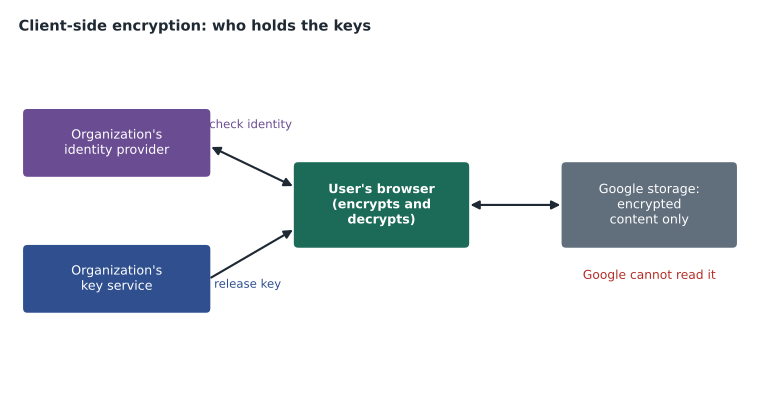
Google's help pages list the services that support CSE, including Drive files, Gmail, Calendar and Meet, and describe a setup with several stages: choose a key service, either from a Google partner or built on Google's CSE API; connect Workspace to an identity provider; add the key service to the Admin console; assign it to OUs or groups; and turn CSE on for users. Only super administrators can manage CSE.
What CSE costs
CSE is powerful and expensive, in money and in features. Google's help pages list the editions that let users create encrypted content: Enterprise Plus, Frontline Plus and some Education editions. Users on other editions can view and edit encrypted content they are given access to but cannot create it. Birchline's Enterprise Standard and Frontline Standard licences therefore cannot create encrypted files. There are also limits that follow from the design itself.
- Google cannot read the content, so features that need to read it do not work on CSE files: full-text search inside the files, Gemini features, many add-ons, and DLP content scanning.
- Browsers only. Viewing and editing CSE files needs a supported browser, Chrome or Edge, and many mobile and offline uses are limited.
- Outside users need a way to authenticate to the key service; Gmail CSE with outsiders relies on S/MIME certificates, and consumer accounts such as personal Gmail cannot open encrypted content.
- The key service is now critical. If it is down, nobody can open encrypted content; if the keys are lost, the content is lost for good.
Owen works out what it would cost to give CSE to the people who need it. Only Marguerite's investigations team, 6 people, and the 4 people on the board's finance committee who handle acquisition plans are candidates.
# Illustrative per-user monthly prices for an upgrade, in dollars (quotes vary).
upgrade_per_user = 9          # difference between Enterprise Standard and Enterprise Plus
key_service_per_month = 450   # partner key service, flat fee
people = {"Investigations team": 6, "Finance committee": 4}

users = sum(people.values())
yearly_upgrades = users * upgrade_per_user * 12
yearly_key_service = key_service_per_month * 12
print(f"Users needing CSE: {users}")
print(f"Edition upgrades per year: {yearly_upgrades:,} dollars")
print(f"Key service per year: {yearly_key_service:,} dollars")
print(f"Total per year: {yearly_upgrades + yearly_key_service:,} dollars")
print(f"Per CSE user per year: {round((yearly_upgrades + yearly_key_service) / users):,} dollars")Users needing CSE: 10 Edition upgrades per year: 1,080 dollars Key service per year: 5,400 dollars Total per year: 6,480 dollars Per CSE user per year: 648 dollars
What this code does
The calculation uses illustrative prices: an extra monthly amount per person to move from Enterprise Standard to Enterprise Plus, and a flat monthly fee for a partner key service. It counts the ten people who would need client-side encryption, then works out the yearly cost of the licence upgrades and of the key service, the total, and the cost per person. The point is that the key service dominates when only a few people need encryption.
The total is 6,480 dollars a year, 648 dollars per person, and the key service is most of it. Teresa's recommendation to the board is to wait: start with tight sharing, a Restricted label, DLP rules and a dedicated shared drive for the investigations team with access limited to managed devices, and revisit CSE if the risk assessment changes or a regulator or contract demands that Google must not be able to read the content. Owen records the decision and its reasons in the baseline, so the question does not have to be reopened from scratch.
Choosing the right control
| Concern | Right control |
|---|---|
| A disk or network cable is stolen | Default encryption at rest and in transit |
| A partner contract requires US storage | Data regions policy of United States, for the services it covers |
| Data must not be readable by the provider at all | Client-side encryption with customer-held keys |
| Sensitive files shared with the wrong person | Sharing settings, labels and DLP (lesson 4) |
| Access from untrusted devices | Context-aware access (lesson 3) |
| Records must be kept or deleted on schedule | Vault retention (lesson 6) |
The table answers both of the board's questions. Dana's answer is the data regions row and the privacy notice. Marguerite's answer has two parts: Google's systems process the content to provide the service, under the contract, but Google staff do not browse customer files, and if her team needs a guarantee that Google cannot read particular files at all, CSE provides it at the cost of features and money.
Seeing when Google staff access data
Marguerite's question has a second half: even if Google's systems process the content, can a Google employee open it? Google's published terms limit staff access to customer data to what is needed, such as resolving a support case the customer opened or meeting a legal obligation. On some editions, Access Transparency logs record when Google staff access customer content and why, and Access Approvals can require the customer to approve such access in advance; Google's help pages list which editions include each. Neither is in Birchline's current editions, so Owen records them in the baseline as options that come with an upgrade to Enterprise Plus, alongside CSE, rather than as controls Birchline has today.
For everyday reassurance, Owen points Marguerite to something Birchline does control: its own administrators. The Admin log records every administrator action, and an administrator who changes a sharing setting or resets a password leaves a trail (lesson 8). In practice, staff data is more often exposed by an over-broad share inside the organization than by anyone at the provider, so the investigations shared drive gets its membership reviewed monthly and its access limited to managed devices.
If CSE is adopted later
Teresa asks Owen to write down what would have to be true before CSE goes live, so the decision can be made quickly if the board changes its mind. His list has five items.
- A key service with high availability, run by a partner under contract or by Birchline on infrastructure that has its own recovery plan, because an outage locks everyone out of encrypted content.
- Key backup and recovery tested before the first encrypted file is created, with the procedure kept outside Workspace.
- Identity provider configuration for the key service, using Birchline's Google identity or its existing identity provider, with 2SV enforced.
- A short list of people and a clear rule for what goes into encrypted files, so that ordinary work does not lose search and Gemini for no reason.
- A plan for outsiders, such as external counsel who must read encrypted files, including how they authenticate to the key service.
With that list in the baseline, the CSE question becomes a matter of budget and need rather than research, which is exactly where Teresa wants it.
One more point belongs in the record for both board members. These controls are not either-or. A file in the investigations shared drive is encrypted at rest by default, stored in whatever location the data regions policy allows, reachable only from managed devices, blocked by DLP from leaving, kept or purged by Vault on schedule, and logged every time it is opened. Each control answers one question; together they answer the board's.
Common mistakes
MistakePromising a partner that all data stays in one country because a data region is set.
InsteadCheck the published list of covered data and say exactly what the policy covers.
MistakeExpecting a Canada option in data regions.
InsteadPlan for storage outside Canada and meet PIPEDA and Law 25 duties with contracts, assessments and notices.
MistakeTurning on CSE for a whole department to be safe.
InsteadUse CSE only where the need justifies losing search, Gemini and DLP scanning, and the cost.
MistakeTreating the key service as an ordinary app.
InsteadPlan its availability and key backup like any critical system.
Worked problem
A supplier demands proof of where data is stored
A large supplier asks Birchline to confirm in writing that their shared price files are stored only in Birchline's country. How should Owen answer?
Show solution
- Check the data regions options: only the United States and Europe are offered, so storage only in Canada cannot be promised.
- Explain the safeguards instead: default encryption, the contract terms, sharing limited to the supplier's domain, and access limited to managed devices.
- Offer to keep the price files in a shared drive labelled Confidential with DLP blocking further sharing.
- If the supplier insists on in-country storage, escalate to Teresa: the files may need to stay in a system that can meet the requirement.
- Record the supplier's requirement and Birchline's answer in the baseline exceptions register.
Answer: Explain that Workspace cannot store data only in Canada, describe the safeguards, and escalate if in-country storage is a hard requirement.
Summary and key terms
- Google encrypts Workspace data in transit and at rest by default, with Google-managed keys.
- Data regions control where primary data at rest is stored for a published list of services; the options are the United States, Europe or no preference, and there is no Canada option.
- Client-side encryption encrypts content in the browser with keys from a customer key service, after checking identity with the customer's identity provider, so Google cannot read it.
- CSE needs editions that support creating encrypted content, works in supported browsers, blocks features that read content and makes the key service critical.
- Match each concern to the control that addresses it.
- Encryption at rest
- Encryption of stored data on the provider's disks.
- Encryption in transit
- Encryption of data as it moves across networks.
- Data regions policy
- A setting that chooses where certain data is stored at rest.
- Client-side encryption (CSE)
- Encryption in the user's browser with customer-controlled keys, so the provider cannot read the content.
- Key service
- The external service that holds and releases CSE keys.
- Identity provider (IdP)
- The system that confirms who a user is before keys are released.
- S/MIME
- A standard for encrypted and signed email using certificates.
- Privacy impact assessment
- A documented review of risks before handling or transferring personal information.
Practice problems
Work each problem on paper first, then reveal the answer to check.
Does a data regions policy stop Google from processing the data?
Show answer
No; it controls where data is stored, not who can process it.
Why do Gemini features not work on CSE files?
Show answer
Google cannot read the content, and those features need to.
Can Birchline's Enterprise Standard users create CSE files?
Show answer
No; creating encrypted content needs an edition such as Enterprise Plus.
Lesson quiz · 5 questions
Score 60% or more to complete this lesson.
Create a free account to save your progress, take quizzes and earn a certificate.