
GCP-212 · Lesson 1 of 12 · 19 min
Security baselines for Google Workspace
▶ Video coming soon A video version of this lesson is on the way.
The third Workspace course begins on a grey Monday at Birchline's head office in Toronto. The pilot for the IT team, 14 people, is planned to start on Monday, November 30, and the head office wave follows in February. Mail routing and the services are configured, as the second course showed. What is not yet settled is how the new tenant will be protected. Teresa Okonjo, the information security manager, joins Sofia Marchetti and Owen Mitchell for the first session, carrying a printout of the security health page with most of its rows marked in amber. "Before a single store manager signs in," she says, "I want a written baseline: what we turn on for everyone, what we lock down for admins, and how we know it stays that way." This lesson builds that baseline.
What a baseline is, and why it comes first
A security baseline is the minimum set of settings that every user, device and service in the tenant must meet, written down so it can be checked. It is not a wish list. Each line in a baseline says what is configured, for whom, and how anyone can confirm it. A baseline matters most before a migration, because every setting that is loose on the first day becomes harder to tighten later: people build habits, outside partners start depending on open sharing, and a change that would have been invisible to 14 pilot users becomes a project for 1,100.
Sofia frames the work with a simple question for every setting: who could misuse this, and what would it cost us? Automatic forwarding of mail to outside addresses, for example, is convenient for a few people and dangerous in the hands of anyone whose password is stolen, because an attacker can quietly copy every incoming invoice to an outside mailbox. Link sharing set to anyone with the link is handy for marketing images and disastrous for payroll files. A baseline records the decision once, so the same argument does not have to be won again in every department.
The layers of protection
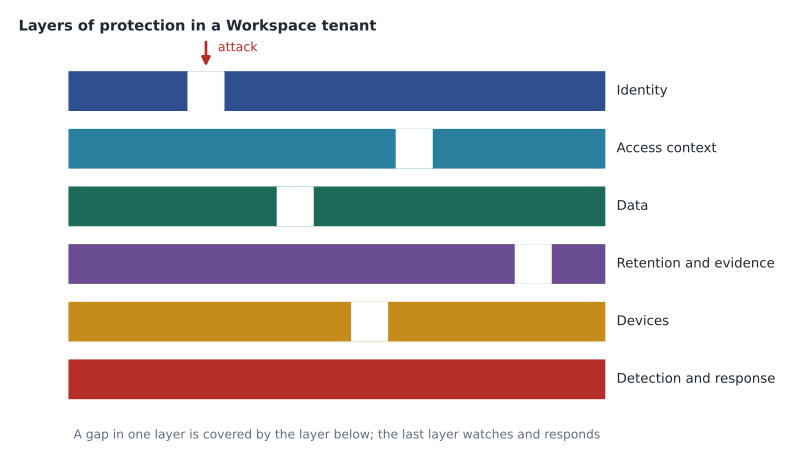
Google Workspace security settings fall into a few layers. Thinking in layers helps Owen see that no single setting protects the tenant on its own; each layer catches what the one before it misses.
| Layer | What it protects against | Main settings (lesson) |
|---|---|---|
| Identity | Stolen or guessed passwords, phishing of sign-in details | Password policy, 2-step verification, passkeys, admin account rules (lesson 2) |
| Access context | Sign-ins from unmanaged devices or unexpected places | Context-aware access levels (lesson 3) |
| Data | Sensitive information leaving the organization | Sharing settings, data loss prevention, labels, encryption choices (lessons 4 and 5) |
| Retention and evidence | Loss of records the law requires; deletion to hide wrongdoing | Google Vault retention rules and holds (lesson 6) |
| Devices | Lost phones, unencrypted laptops, compromised tablets | Endpoint management and device policies (lesson 9) |
| Detection and response | Attacks that get past the other layers | Alert center, investigation tool, audit logs (lessons 7 and 8) |
Where the settings live
Most security settings are under Security in the Admin console, with app-specific settings under Apps, Google Workspace for each service. Settings apply per organizational unit (OU), and many can also be applied to configuration groups, as the first course explained. A baseline is therefore usually written at the top-level OU, with deliberate exceptions for child OUs and groups. Owen lists the places he will visit most often.
- Security, Overview shows a summary of the tenant's security posture and links to the other pages.
- Security, Authentication holds 2-step verification, password management, passwordless sign-in with passkeys, and login challenges.
- Security, Access and data control holds context-aware access, data protection (DLP rules), API controls and Google session control.
- Security, Security center (on editions that include it) holds the security dashboard, the security health page and the investigation tool.
- Security, Alert center lists alerts and lets administrators assign, investigate and close them.
- Reporting, Audit and investigation gives the activity logs for admin actions, sign-ins, Drive, Gmail and other services.
The security health page
The security health page compares many Admin console settings with Google's recommendations and shows each one's status in a single list, with a link to the setting and the OU it applies to. Google's help pages describe it as part of the security center and list the editions that include it; Birchline's Enterprise Standard and Frontline Standard licences both do. The page covers settings such as automatic forwarding of mail, device encryption, external sharing in Drive and 2-step verification enrollment. The exact rows depend on the edition.
The health page is a checklist, not a judge. A row marked as open may be a deliberate exception, such as external sharing allowed for the Marketing OU so that agencies can review artwork. What matters is that every exception is written in the baseline with a reason and an owner. Teresa's rule for the review is short: a recommendation can be accepted, or rejected with a reason, but never ignored.
| Security health row (example) | Status on the printout | Baseline decision |
|---|---|---|
| Automatic email forwarding | Allowed for all users | Turn off for everyone; exceptions only by request, for named addresses |
| 2-step verification enrollment | Users can enroll; not enforced | Enforce for all users, with an enrollment period (lesson 2) |
| Drive sharing outside the domain | Allowed for all users | Allowlisted domains for head office; off for stores (second course, lesson 6) |
| Device encryption on Android | Not required | Require on company tablets and on personal phones with a work profile (lesson 9) |
| Less secure app access | Not applicable | No action: Google removed access for apps that sign in with only a password |
| Super admin accounts using 2SV | 3 of 3 enrolled | Keep: require security keys for super admins |
The last row matters more than its size suggests. Google is rolling out a requirement that every administrator account use 2-step verification, with notices sent to super admins about 90 days ahead and other admins about 60 days ahead, and with access to apps removed in stages for admins who do not enroll. Birchline's admins already use it, so the requirement changes nothing for them, but it is a useful reminder that some baseline decisions are no longer optional.
Admin accounts get their own rules
Administrator accounts are the most valuable accounts in the tenant, because one stolen super admin password can undo every other control. The baseline treats them separately. Following the first course, Birchline keeps separate admin accounts: Owen signs in to his everyday account owen.mitchell@birchline.example for mail and files, and to admin-owen@birchline.example, in the Admin accounts OU, only to administer. The admin account has no mailbox licence beyond what is needed, never reads mail and never browses the web.
- Few super admins. Three super admin accounts: two in IT, one held sealed by Teresa for emergencies. Everyone else gets the narrowest built-in or custom role that does the job (first course, lesson 9).
- Strongest sign-in. Super admins must use security keys as the second step; codes sent by text message are not allowed for them.
- Restricted access context. The Admin console requires a company-managed computer (lesson 3).
- Recovery planned. Each super admin has a recovery phone and recovery email outside the tenant, and at least two super admins exist so that one can reset the other.
- Watched. An alert goes to Teresa's team whenever a role is granted or a super admin signs in from a new device (lessons 7 and 8).
Measuring the baseline
Teresa wants a number she can report each month: how many baseline checks pass. Owen writes a short check list in a spreadsheet, one row per control, with the expected value and the value he finds. Before the pilot, he scores it by hand; later the security dashboard and the audit logs will help him confirm the values. A small calculation shows the starting point and what is left to do before November 30.
# Baseline checks: (control, passes today?, weight). Weight 3 = critical, 2 = important, 1 = good practice.
checks = [
    ("Super admins use security keys", True, 3),
    ("2SV enforced for all users", False, 3),
    ("Automatic forwarding off", False, 3),
    ("Admin console needs a company device", False, 2),
    ("External sharing limited by OU", True, 2),
    ("Android encryption required", False, 2),
    ("Alerts routed to the security team", True, 2),
    ("Vault default retention rules set", False, 2),
    ("Third-party apps restricted", True, 1),
    ("Marketplace allowlist in place", True, 1),
]
total = sum(w for _, _, w in checks)
passed = sum(w for _, ok, w in checks if ok)
print(f"Weighted score: {passed} of {total} points")
print(f"That is {round(100 * passed / total)} points out of every 100")
print("Critical items still open:")
for name, ok, w in checks:
    if not ok and w == 3:
print(" -", name)Weighted score: 9 of 21 points That is 43 points out of every 100 Critical items still open: - 2SV enforced for all users - Automatic forwarding off
What this code does
The list holds ten baseline controls, each marked as passing or not and given a weight: 3 for critical, 2 for important and 1 for good practice. The calculation adds up the weights of all controls and of the passing ones, then shows the passing share as a number out of 100 so that it can be reported each month. It then lists the critical controls that still fail, which are the ones to finish first.
The weighted score is 10 of 21 points, about 48 out of every 100. Two critical items, enforcing 2-step verification and turning off automatic forwarding, must be done before the pilot. Owen schedules both for the week of November 16 and sets a target of every critical and important item passing by the head office wave in February. Weighting matters: a baseline where every row counts the same would make adding a Marketplace allowlist look as valuable as stopping silent mail forwarding.
Writing it down
The baseline document lives in a shared drive called IT security, owned by Teresa's team. Each control has six fields: the control, the setting path in the Admin console, the OU or group it applies to, the reason, the owner, and how to verify it. Owen also adds a seventh field after Sofia's advice: the date it was last checked. A baseline that nobody checks drifts, because administrators change settings to solve urgent problems and forget to change them back.
Control:      Automatic forwarding off
Setting path: Apps > Google Workspace > Gmail > End user access > Automatic forwarding
Applies to:   / (top-level OU); exception group cfg-forwarding-approved
Reason:       Stops silent copying of mail by anyone who steals a password
Owner:        Messaging (Owen Mitchell)
Verify:       Security health page row; Gmail log search for forwarding rules
Last checked: (date of each monthly review)
The exception group cfg-forwarding-approved starts empty. If a department needs forwarding, for example to a ticketing system that cannot be reached any other way, the request names the address, the reason and an end date, and Teresa approves it. Exceptions expire: each one is reviewed at the monthly check and removed if it is no longer needed.
Privacy law and the baseline
Teresa connects the baseline to the law as well as to risk. Under PIPEDA, Birchline must protect personal information with safeguards suited to its sensitivity, and it must report breaches of security safeguards that create a real risk of significant harm to the Office of the Privacy Commissioner, notify the affected people and keep a record of every breach for 24 months. Quebec's Law 25 adds its own duties for information about Quebec residents, including a register of confidentiality incidents. A written baseline is part of the evidence that safeguards were reasonable, and good logging is what makes the 24-month record possible.
Common mistakes
MistakeTurning on every recommended setting at once on the day of the migration.
InsteadWrite the baseline first, test it with the pilot, and roll it out with the waves.
MistakeLeaving an open setting because one team asked for it once.
InsteadRecord the exception with a reason, an owner and an end date, and review it monthly.
MistakeUsing the same account for daily work and administration.
InsteadKeep separate admin accounts that never read mail or browse.
MistakeTreating the security health page as a score to maximize.
InsteadUse it as a checklist; deliberate exceptions are fine when they are written down.
Worked problem
Deciding the forwarding exception
The returns team in head office wants mail sent to returns@birchline.example forwarded automatically to an outside ticketing service, help.returnsdesk.example. Forwarding is off in the baseline. How should Owen handle it?
Show solution
- Ask whether the ticketing service can collect mail itself or receive it through a routing rule instead of user forwarding, because routing is controlled centrally.
- If a routing rule can do it, add a Gmail routing setting for the group address that sends a copy to the service, and keep user forwarding off.
- If only forwarding will work, add the group's address to the exception group with the reason, an owner in the returns team and an end date one year away.
- Record the exception in the baseline document and check that the security health page shows the exception for that group only.
- Review it at the monthly check and remove it when the ticketing project ends.
Answer: Prefer a central routing rule; if forwarding is the only option, grant a narrow, recorded, expiring exception.
Summary and key terms
- A security baseline is the minimum set of settings every user, device and service must meet, written so it can be checked.
- Workspace security works in layers: identity, access context, data, retention, devices, and detection and response.
- Most settings are under Security in the Admin console and apply per OU or group.
- The security health page lists settings against Google's recommendations; accept each or reject it with a reason.
- Admin accounts are separate, few, protected by the strongest sign-in and watched.
- Weighted scores show progress, and every exception needs a reason, an owner and an end date.
- Security baseline
- The written minimum settings that every user, device and service must meet.
- Security health page
- A page in the security center that lists settings and their status against recommendations.
- Security center
- The part of the Admin console with the security dashboard, health page and investigation tool.
- Exception
- A deliberate, recorded departure from the baseline for a named OU, group or address.
- Separate admin account
- An account used only for administration, never for mail or browsing.
- Automatic forwarding
- A Gmail setting that lets users send copies of incoming mail to another address.
- Weighted score
- A total in which critical controls count more than minor ones.
- Admin 2SV requirement
- Google's staged rule that administrator accounts must use 2-step verification.
Practice problems
Work each problem on paper first, then reveal the answer to check.
Why does the baseline come before the migration?
Show answer
Loose settings are hard to tighten once people and partners depend on them.
What three things must every exception record?
Show answer
A reason, an owner and an end date (plus how to verify it).
Why is automatic forwarding turned off for everyone?
Show answer
Anyone who steals a password could silently copy incoming mail to an outside address.
Lesson quiz · 5 questions
Score 60% or more to complete this lesson.
Create a free account to save your progress, take quizzes and earn a certificate.