
GCP-212 · Lesson 4 of 12 · 19 min
Data loss prevention rules
▶ Video coming soon A video version of this lesson is on the way.
Birchline handles three kinds of information that must never leave by accident: payment card numbers from the online shop's refund and chargeback work, social insurance numbers on payroll and new-hire forms, and supplier price lists that competitors would love to see. In the second course, sharing settings limited who files can be shared with. In the fourth session Teresa asks for something sharper: rules that look at what a file or message contains and act on it. That is data loss prevention (DLP). This lesson covers how DLP rules are built, the actions they can take in Drive, Chat and Gmail, and how to roll them out without flooding people with warnings.
How a DLP rule works
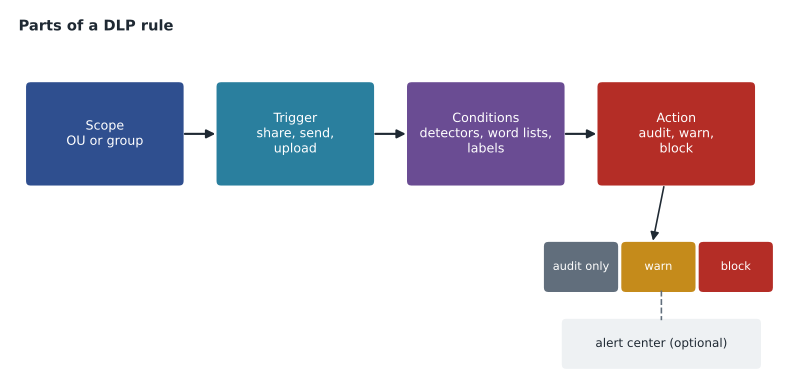
A DLP rule has four parts. The scope says whose content it applies to: an OU, a group or the whole organization. The apps and triggers say where and when it runs, such as when a Drive file is shared or modified, when a Chat message is sent or a file uploaded, or when a Gmail message is sent. The conditions describe what to look for. The actions say what happens on a match, and whether an alert is raised. Rules are created under Security, Access and data control, Data protection.
| Condition type | Example at Birchline | Notes |
|---|---|---|
| Predefined data type (detector) | Credit card number; Canada social insurance number | Google maintains detectors for many countries; some check digits and context words, which cuts false matches |
| Word list | Supplier names on the confidential price list | Matches any word in the list |
| Regular expression | Birchline supplier contract numbers, such as SC-2026-0417 | Precise, but test it on real samples |
| Drive label | Classification is Confidential | Uses the labels from the second course |
| File properties | File type, name or extension | Useful for blocking exports such as .csv from Finance |
Conditions can be combined with AND, OR and NOT. A rule that looks for a credit card number OR a social insurance number catches either; a rule that looks for a card number AND the label Confidential catches only labelled files. Google's help pages note that some detectors look for several matches before they trigger, and detectors can be set to a likelihood threshold and a minimum match count, so a single number that happens to look like a card number does not cause an alert.
Actions by app
The available actions depend on the app, and Google's help pages list them for each one. The main options are shown here; check the current list before writing rules, because Google adds actions over time.
| App | Main actions | What the user sees |
|---|---|---|
| Drive | Audit only; warn on external sharing; block external sharing; apply a label; disable download, print and copy for viewers | A warning or a message that sharing is blocked |
| Chat | Audit only; warn; block the message or upload | A warning they can override, or a block |
| Gmail | Audit only; warn; block the message; send to quarantine for review, where the edition supports it | A warning or a notice that the message was not sent |
When more than one rule matches the same content, Google applies the stricter action. Google's help pages for Chat also describe what is not scanned: incoming messages from outside, linked content and password-protected files are not, and files shared in Chat as Drive links fall under the Drive rules instead. Password-protected archives are a known gap in every DLP system, and Teresa's policy closes it with a simpler rule: password-protected files may not be sent outside without approval from security.
Audit first, then warn, then block
A DLP rule that blocks on its first day will block something legitimate. Payroll needs to send social insurance numbers to the payroll provider; the refunds team needs to share card details with the payment processor, though only through the processor's portal. Owen's rollout has three stages for each rule.
- Audit only for two weeks. The rule logs matches without affecting anyone. Owen reviews the matches in the audit logs and the rule's report to see who would have been affected and whether the matches are real.
- Warn for two weeks. Users see a message explaining the policy and can continue if they have a reason. Repeated overrides by the same team show where a legitimate process needs a proper channel.
- Block for the content that should never leave, with a clear message and a named exception path.
The audit stage also measures the rule's accuracy. Owen counts how many of the matches were real problems and how many were harmless.
# Two weeks of audit-only matches for the "card numbers shared outside" rule.
matches = 46
reviewed = {"real card numbers": 9, "test numbers in developer notes": 21, "order numbers that look like cards": 16}
assert sum(reviewed.values()) == matches
precision = reviewed["real card numbers"] / matches
print(f"Real problems: {reviewed['real card numbers']} of {matches}")
print(f"Precision: about {round(100 * precision)} out of every 100 matches")
# After raising the minimum match count to 2 and excluding the developers' test-data folder:
matches_after = 11
real_after = 9
print(f"After tuning: {real_after} of {matches_after}, about {round(100 * real_after / matches_after)} out of every 100")Real problems: 9 of 46 Precision: about 20 out of every 100 matches After tuning: 9 of 11, about 82 out of every 100
What this code does
The figures come from two weeks of a rule that only records matches. Each match was reviewed and sorted into real card numbers, test numbers used by developers, and order numbers that happened to look like card numbers. Precision, the share of matches that were real problems, is the number of real ones divided by all matches. The second calculation repeats it after the rule was tuned, showing that most of the harmless matches disappeared while the real ones were still caught.
Before tuning, only 9 of 46 matches were real, about 20 out of every 100. Showing a warning on that rule would teach people to click through warnings. After Owen raises the minimum match count to two and excludes the developers' test-data folder, which contains well-known test card numbers, 9 of 11 matches are real, about 82 out of every 100, and the rule is ready to warn.
How card detectors avoid false matches
Card numbers have structure, which is why detectors can be fairly accurate. A card number is usually 15 or 16 digits, starts with a known prefix for the card network, and ends with a check digit calculated by the Luhn method. A random 16-digit order number passes the Luhn check about one time in ten, so the check alone does not prove a number is a card; detectors combine it with the prefix, nearby words such as card, Visa or expiry, and the number of matches in the document. The short check below shows the idea on three numbers.
def luhn_ok(number: str) -> bool:
    digits = [int(d) for d in number if d.isdigit()]
    total = 0
    for i, d in enumerate(reversed(digits)):
        if i % 2 == 1:          # double every second digit from the right
            d *= 2
            if d > 9:
                d -= 9
        total += d
    return total % 10 == 0

samples = {
    "Published test card number": "4111 1111 1111 1111",
    "Order number from the shop": "2026 1112 0047 3318",
    "Same order number, last digit changed": "2026 1112 0047 3313",
}
for label, n in samples.items():
print(f"{label:40} passes the check digit test: {luhn_ok(n)}")Published test card number passes the check digit test: True Order number from the shop passes the check digit test: False Same order number, last digit changed passes the check digit test: True
What this code does
The function applies the Luhn check that card numbers are built to pass: it doubles every second digit from the right, subtracts 9 from any result over 9, adds everything up and checks that the total ends in zero. It is run on a well-known test card number and on two order numbers. The output shows that the test number passes, and that an order number can pass or fail by chance, which is why detectors also look at prefixes and nearby words.
The test card number passes, as it is designed to. One order number fails and the other, differing only in its last digit, passes by chance. That is why the developers' notes produced so many matches: they contain the published test number many times. Excluding that folder, rather than weakening the rule for everyone, keeps the rule sharp.
Rules Birchline will run
| Rule | Scope | Conditions | Final action |
|---|---|---|---|
| Card numbers outside | Everyone | Credit card number, at least 2 matches | Block external sharing (Drive); block send (Chat, Gmail) except to the processor's domain |
| SIN protection | Everyone except Payroll | Canada social insurance number | Warn; block in Chat |
| Payroll channel | Payroll group | Same detector | Audit only, because sending to the provider is the job; mail to the provider goes over enforced TLS |
| Price lists | Buying, Finance | Word list of supplier names AND label Confidential | Block external sharing |
| Exports from Finance | Finance | File type .csv or .xlsx shared outside | Warn |
For the Quebec customers whose information Birchline holds, Teresa notes that Law 25 expects safeguards matched to the sensitivity of the information. Card data and social insurance numbers are among the most sensitive items Birchline holds, and a logged, tuned DLP rule is part of showing that the safeguards were reasonable if a confidentiality incident ever has to be reported.
Where DLP findings go
A rule that matches is only useful if someone sees the result. Each DLP rule can create an alert in the alert center when it triggers, with a severity that Owen sets: high for card numbers shared outside, medium for warnings overridden on social insurance numbers, and no alert for audit-only rules in their first fortnight, which would otherwise bury the security team. Every match is also written to the rule log events in the audit and investigation pages (lesson 8), with the rule, the user, the file or message, the action taken and whether the user overrode a warning. Those events are what Owen reviews at the end of each stage.
Teresa wants a weekly summary rather than a stream of alerts. Owen builds a saved search in the investigation tool for the week's DLP events, grouped by rule and by OU, and puts the numbers into the monthly baseline report from lesson 1. Over time the summary shows whether the rules are working: matches should fall as people learn the policy, and overrides should fall as proper channels replace workarounds.
Labels and DLP together
Drive labels from the second course and DLP rules reinforce each other in both directions. A rule can use a label as a condition, so that files labelled Confidential cannot be shared outside even if they contain no detectable number at all; a contract or a board paper has no card numbers but still must not leave. A rule can also apply a label as its action, so that any file found to contain social insurance numbers is labelled Restricted automatically, and the Restricted label then drives other rules and Vault retention (lesson 6). Teresa likes this because it turns a detection into a lasting classification: the file stays labelled even after the person who created it has forgotten what is inside.
There is one caution. Automatic labelling changes files across the organization, and a badly tuned rule can label thousands of harmless files. Owen applies the same audit-first rule to labelling rules: run in audit, check a sample of the files that would be labelled, and only then let the rule apply labels.
Common mistakes
MistakeStarting a new DLP rule in block mode.
InsteadAudit first, then warn, then block, tuning between stages.
MistakeFixing false matches by turning the rule off for everyone.
InsteadRaise the match count or likelihood, or exclude the specific folder or group that causes them.
MistakeWriting a regular expression without testing it.
InsteadTest it on real samples of matching and non-matching text.
MistakeAssuming DLP scans password-protected files.
InsteadTreat encrypted archives as a gap and cover them with policy.
Worked problem
A warning that keeps being overridden
In the warn stage, the refunds team overrides the card-number warning about 30 times a week when sharing chargeback evidence with the payment processor. What should happen before the rule moves to block?
Show solution
- Look at the audit log entries: the overrides all go to the processor's domain, processor.example, and come from six people.
- Ask the refunds lead why: the processor asks for chargeback forms by email and Drive link.
- Agree a proper channel with the processor, its upload portal, and stop sharing card evidence through Drive.
- Until the portal is in use, add an exception for the processor's domain in the rule for the refunds group only, with an end date.
- Move the rule to block once the overrides drop to almost zero.
Answer: Treat repeated overrides as a broken process: give the team a proper channel, add a narrow temporary exception, then block.
Summary and key terms
- DLP rules have a scope, apps and triggers, conditions and actions.
- Conditions include predefined detectors, word lists, regular expressions, labels and file properties, combined with AND, OR and NOT; detectors use likelihood and match counts.
- Actions differ by app and include audit only, warn and block; the stricter action wins when rules overlap.
- Some content, such as password-protected files, is not scanned.
- Roll out each rule from audit to warn to block, measuring precision and tuning with match counts and narrow exclusions.
- Data loss prevention (DLP)
- Rules that look at content and act to stop sensitive data leaving.
- Detector
- A predefined data type, such as a card number or national ID number, that DLP can find.
- Likelihood threshold
- How confident a detector must be before a match counts.
- Minimum match count
- How many matches a document must contain before the rule acts.
- Audit only
- A DLP action that records matches without affecting users.
- Warn
- A DLP action that shows a message the user can override.
- Precision
- The share of matches that are real problems.
- Luhn check
- The check digit test that card numbers are built to pass.
Practice problems
Work each problem on paper first, then reveal the answer to check.
Which action wins if two rules match the same file?
Show answer
The stricter one.
Why does Birchline audit before warning?
Show answer
To measure accuracy and tune the rule so warnings are meaningful.
What did Owen do about the developers' test card numbers?
Show answer
Excluded that folder rather than weakening the rule for everyone.
Lesson quiz · 5 questions
Score 60% or more to complete this lesson.
Create a free account to save your progress, take quizzes and earn a certificate.