
GCP-191 · Lesson 2 of 12 · 24 min
Registering, scheduling and exam delivery
▶ Video coming soon A video version of this lesson is on the way.
A week after the first meeting, Jules sits down with Ravi and Farah Qureshi, Birchline's cloud architect, to plan the booking. Jules wants to test online from home on a quiet weekday morning, because the nearest testing centre is a long drive in spring weather and Jules concentrates best at a familiar desk. Farah has booked several Google Cloud exams, both online and at testing centres, and has watched colleagues lose their fee to small mistakes: a name that did not match an ID, a second monitor left plugged in, a phone that buzzed on the desk. "Booking is the easiest part of the exam to get right," she says, "and the most annoying part to get wrong." This lesson walks through the steps, the rules and the choices, using what Google's pages said when we checked them in November 2026. The process is the same one used for Cloud Digital Leader, so if you have booked that exam already, much of this will be familiar.
The accounts and pages involved
Three places matter when you book a Google Cloud exam. The first is the certification page for Generative AI Leader on Google Cloud's website, which gives the current exam facts, the exam guide and the registration link. The second is Google's certification registration system, which the help pages call your CM Connect account, reached through a CertMetrics address that the certification page links to. This is where you create a profile, schedule, reschedule or cancel, and later find your results and certificate. The third is Pearson VUE, the testing company that delivers the exams, both at its testing centres and through its online proctoring service, which Pearson calls OnVUE. You schedule through Google's system, and the session itself is run by Pearson.
A fourth account matters later, at renewal time. The certification page in November 2026 described renewing through a learning path on Google Skills, Google's training site, and asked candidates to link their CM Connect and Google Skills accounts using the same email address. If you already have a Google Skills account from GCP-110 or from other training, use the same email address when you create your CM Connect profile, and you will save yourself a support ticket in three years' time.
Always follow the links on Google's own certification page rather than links in blog posts or forums. Old articles may point to pages that have moved, and a wrong link can lead to a lookalike site that charges for something Google does not offer.
Your name and identification
The single most common avoidable problem is a name mismatch. Google's online proctoring help page says you need a government-issued photo ID to check in, that the legal name in your registration profile must match the ID, and that if it does not, you cannot take the exam and you lose the fee. The page also notes that Pearson requires the name in Romanized characters, the ordinary letters of the English alphabet, and tells candidates to contact Google's certification support before exam day if their profile needs changing. Testing centres have similar rules; read the identification requirements in your booking confirmation and on Pearson's site.
Jules's passport shows a hyphenated family name that Jules shortens in everyday life and at work. Farah has Jules enter the passport version exactly, letter by letter, including the hyphen. Jules then takes a photo of the passport next to the profile screen and compares the two. It takes two minutes and removes the biggest single risk of the day. If you booked Cloud Digital Leader with a slightly different name, fix the profile now; the same profile is used for every Google Cloud exam.
Online or testing centre
Both delivery methods give you the same exam with the same questions, time and rules. The choice is about where you will concentrate best and what can go wrong. At a testing centre, staff check you in, the computer and network are theirs, and the room is supervised. You need to get there on time and follow the centre's rules about lockers, pockets and breaks. Online, you test from your own computer in a private room while a proctor watches through your webcam and microphone. You avoid the journey, but you are responsible for the computer, the internet connection, the room and the quiet.
| Consideration | Testing centre | Online proctored |
|---|---|---|
| Travel | Needed; allow for traffic and weather | None |
| Computer and network | Provided by the centre | Yours; must pass Pearson's system test |
| Room | Supervised test room | Private room, desk cleared, no one else present |
| Breaks | Follow the centre's rules | None allowed except approved accommodations |
| Common risks | Arriving late, identification problems | Connection drops, interruptions, objects in view |
| Best for | People with unreliable internet or a busy home | People with a quiet room and a dependable connection |
Online proctoring rules
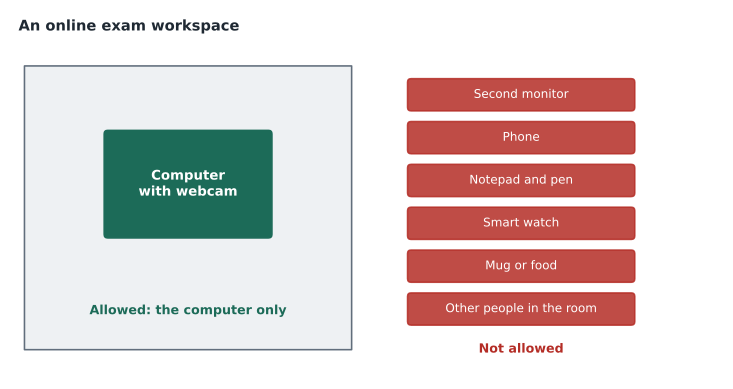
Google's help page on online proctored exams, checked in November 2026, sets out the rules clearly. Your workspace must be clear except for your computer: no extra monitors, scratch paper, pens, phones, smart watches or other wearables, and no food or drink. No one else may be in the room, and background noise must stay low. No breaks are allowed unless you have an approved accommodation, which must be requested before you schedule and can take two to four weeks to arrange. You can launch the session shortly before the scheduled time, and the page describes a window from 10 minutes before to 20 minutes after the start; outside it, the session is cancelled and the fee is lost. Identity checks and setup take 5 to 15 minutes, and your full exam time begins after you launch.
The page also lists behaviour that can get an exam suspended and the result rejected, whether or not you meant to break a rule. Reading questions aloud, talking to anyone, leaving the camera's view, using any test aid, pressing keys such as Print Screen, trying to copy exam content and photographing your result on screen are all on the list. Generative AI Leader questions are often long scenarios, and many careful people murmur long questions under their breath without noticing. Jules plans to practise every sample set in silence from February onward so that the habit is gone by April.
Technical problems are the candidate's responsibility. The help page says Google and Pearson are not responsible for sessions that fail because of poor internet, low bandwidth or a computer that does not meet the requirements. Pearson will try to restart a session that drops, but if it cannot and you have already seen exam content, the attempt counts toward your retake limit. That is why Pearson asks you to run its system test on the exact computer, network and room you will use, ideally at the same time of day as the exam. Jules plans to run the test twice: once when booking, and again the week before the exam, on the same weekday morning.
Rescheduling, cancelling and no-shows
Plans change, and the rules allow for it if you act early. Google's program policies page says you reschedule or cancel through your registration account, and that a late fee applies if you do so within 24 hours of the scheduled start. If you simply do not show up, you forfeit the fee, and fees are not refunded when an online exam is suspended or invalidated. Jules puts two reminders in the calendar: one three days before the exam, to decide whether the practice results justify going ahead, and one the day before, when it is too late to move without a fee.
Retakes
Not everyone passes the first time, and the retake policy for foundational exams is generous. Google's retake policy page, checked in November 2026, says that for foundational exams you may have up to 10 attempts in a one-year period, and that after each failed attempt you must wait at least 14 days before trying again. You pay for each attempt. Every attempt counts toward the limit whether it was online or onsite and in whatever language, and trying to get around the policy, for example by registering under a different name, can lead to a denied or revoked certification. Associate and professional exams have a stricter policy with longer waits, which matters if you go on to them later.
# Earliest retake date after a failed foundational exam (14-day wait)
import datetime
failed = datetime.date(2027, 4, 14)   # an example date, not a prediction
earliest = failed + datetime.timedelta(days=14)
print("Failed on", failed.isoformat(), "- earliest retake", earliest.isoformat())Failed on 2027-04-14 - earliest retake 2027-04-28
What this code does
Starting from an example date of a failed attempt, the program adds the 14-day waiting period to find the earliest retake date. Using a date library avoids mistakes when the wait crosses into a new month. The example result is April 28, 2027.
Two weeks is enough time to study the objectives where you were weakest, which lesson 12 covers in detail. It is not a reason to sit the exam before you are ready. Each attempt costs the full fee, and a failed attempt can shake your confidence.
Accommodations and languages
If you need extra time, a break, an assistive technology or another adjustment because of a disability or medical condition, request it before you schedule. Google's help pages describe an accommodation request process and warn that it can take several weeks. Approved accommodations are arranged through the testing provider, and some may only be available at a testing centre. If English is not your strongest language, check whether the exam is offered in one you prefer; in November 2026 the standard exam was listed in English, Japanese, Spanish and Portuguese. Choose the language you read fastest and most accurately, because the exam is mostly reading, and scenario questions about AI can be dense.
For candidates on the Canadian site, note that French was not among the listed languages for this exam when we checked, even though it was listed for Cloud Digital Leader. If you were planning to test in French, check the certification page again, and if French is still not offered, allow extra reading time in your practice so that you are used to working in your chosen language at exam pace.
Choosing a date and time
The date you choose shapes your whole study plan, so choose it on purpose. Book far enough ahead to finish your review of all four sections and to sit at least two full timed practice sessions, but not so far ahead that the exam stops feeling real. For most people who have finished the three courses in this program, four to eight weeks is a good window. Look at your work calendar and avoid the week after a big launch, the days around a move or a holiday, and any morning after a late night. Choose a time of day when you are usually alert. Jules is sharpest first thing in the morning and books accordingly.
Booking also changes how you study. Once the date is fixed, your plan has an end point, and every week has a job. Ravi asks Jules to write the date at the top of the study log and count back from it: the final week for light review, the week before that for a timed practice run, and the weeks before that for section reviews and closing gaps. Lessons 9 to 11 fill in that plan. If, three days before the exam, practice results are still weak in several sections, rescheduling early is cheaper than a failed attempt.
Worked problem
Spotting the risky booking
Three Birchline colleagues plan to book the exam. (a) Mei enters her name as Mei Chen, but her passport says Mei-Ling Chen. (b) Andre books an online exam for 9 a.m. and plans to run the system test that morning. (c) Grace books an online exam in a shared office and plans to put a sign on the door. Which bookings carry an avoidable risk, and what should each person change?
Show solution
- (a) Mei's profile name does not match her ID. She should update the profile to match the passport exactly, contacting support if needed, well before the exam.
- (b) Andre has no time to fix a failed system test. He should run it days earlier on the same computer, network and room, and again close to the date.
- (c) A shared office cannot guarantee that no one enters. Grace should book a private room or a testing centre.
- All three risks are about logistics, not knowledge, and all three can be removed in advance.
Answer: All three bookings carry a risk. Fix the name, test the system early, and secure a private room.
Jules decides to book in early March for a Wednesday at 9 a.m. in mid-April, which leaves about six weeks of study after the review sessions begin. Ravi asks Jules to forward the confirmation email when it arrives, mostly so he will remember to ask how the system test went.
Common mistakes
MistakeEntering your usual name instead of your legal name.
InsteadMatch your registration profile to your government-issued photo ID exactly.
MistakeRunning the online system test on the morning of the exam.
InsteadTest the same computer, network and room days ahead, and again near the date.
MistakeKeeping a phone or watch nearby during an online exam.
InsteadClear the room and desk of everything except the computer.
MistakeReading long scenarios aloud to think.
InsteadPractise reading silently; speaking can end an online session.
MistakeAssuming the language list matches another Google exam.
InsteadCheck this exam's own page; French was listed for Cloud Digital Leader but not for this exam.
Summary and key terms
- Book through the links on Google's certification page; the exam is delivered by Pearson VUE.
- Your registration profile name must match your government-issued photo ID exactly.
- Online exams need a private, quiet, cleared room and a computer that passes Pearson's system test; no breaks.
- Reschedule or cancel more than 24 hours ahead to avoid a late fee; no-shows forfeit the fee.
- Foundational exams allow up to 10 attempts a year with at least 14 days after each failed attempt.
- Use the same email for CM Connect and Google Skills to make renewal simpler later.
- CM Connect
- Google's certification registration account, used to schedule exams and find results.
- Pearson VUE
- The testing company that delivers Google Cloud exams at testing centres and online.
- OnVUE
- Pearson VUE's online proctored exam service.
- System test
- A check of your computer, webcam and network before an online exam.
- Accommodation
- An approved adjustment, such as extra time, for a disability or medical condition.
- Retake policy
- The rules on how often and how soon you may sit an exam again.
Practice problems
Work each problem on paper first, then reveal the answer to check.
What must match your government-issued photo ID?
Show answer
The legal name in your registration profile.
How long is the launch window for an online exam?
Show answer
From 10 minutes before to 20 minutes after the scheduled start.
Are breaks allowed in an online exam?
Show answer
No, unless you have an approved accommodation.
When does a late fee apply to rescheduling?
Show answer
Within 24 hours of the scheduled start.
How long must you wait after a failed foundational exam?
Show answer
At least 14 days.
How many foundational attempts are allowed in a year?
Show answer
Up to 10.
Which languages were listed for this exam in November 2026?
Show answer
English, Japanese, Spanish and Portuguese.
Lesson quiz · 5 questions
Score 60% or more to complete this lesson.
Create a free account to save your progress, take quizzes and earn a certificate.