
DCT-220 · Lesson 10 of 12 · 19 min
Rack PDUs: metered, switched and monitored
The rack PDU is the end of the power chain and the part of it a data centre technician handles most. It is the strip of outlets mounted vertically in the back of a cabinet, plugged into the branch receptacle or tap-off box, into which every server, switch and storage shelf in the rack plugs. DCT-130 covered mounting rack PDUs, managing their cords and checking A and B feeds during installation. This lesson looks at rack PDUs as power equipment: the types, what their meters and network interfaces tell you, how to read and balance their loads, and how technicians use them in troubleshooting and remote hands work.
Types of rack PDU
| Type | What it does | Typical use |
|---|---|---|
| Basic | Distributes power to outlets; may have a breaker per bank | Low-cost racks, labs |
| Metered (input) | Displays and reports total current for the PDU or each phase | Most colocation racks, so customers and staff can see load |
| Metered per outlet | Measures current and power for each outlet | Customers who bill internally or manage power closely |
| Switched | Lets authorized users turn each outlet on or off remotely | Remote rebooting of hung equipment; controlled power-up sequencing |
| Switched and metered per outlet | Both of the above | Most new enterprise and cloud racks |
| High-density three-phase | Many outlets across three phases at 208 V or 415Y/240 V, high current | AI and high-performance racks such as Hall D |
Rack PDUs in a colocation facility usually belong to the customer, chosen to match their equipment. Stonebridge supplies the branch circuit and receptacle; the customer supplies the rack PDU and plugs it in, unless they buy a managed cabinet that includes Stonebridge's standard PDUs. Either way, the rack PDU must match the receptacle's plug type, voltage and rating, and the operations team checks this before energizing a new rack.
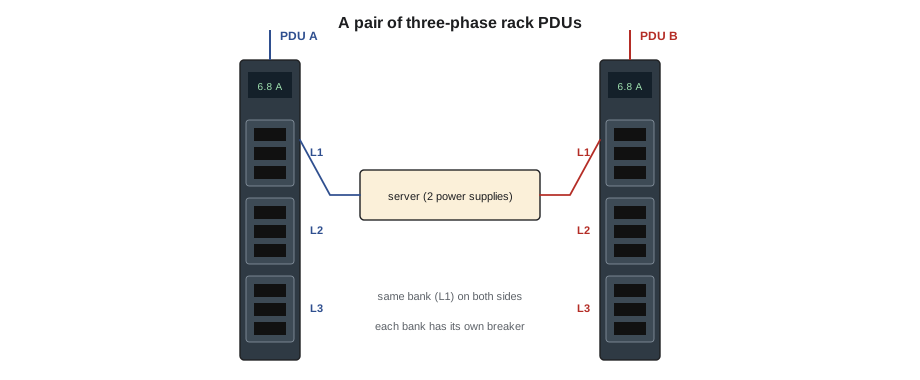
Outlets, banks and phases
Most rack PDUs today use IEC outlets: C13 outlets for most servers and switches, rated about 10 to 15 A, and C19 outlets for larger devices such as high-power servers and storage, rated about 16 to 20 A. Larger AI servers may use C19, or special connectors. On a three-phase rack PDU, the outlets are divided into banks, each connected to one phase pair (on 208 V delta) or one phase and neutral (on 415Y/240 V). Each bank usually has its own small breaker, typically 16 or 20 A, so an overload on one bank trips only that bank. The PDU's label and display show which outlets belong to which bank.
Because each bank is on one phase, how the equipment is spread across the banks decides the phase balance of the whole branch. A rack whose servers are all plugged into bank 1 loads one phase heavily and leaves the others light, using up the branch capacity of that phase early. Good practice is to spread devices across banks so that the three phase currents are close, and to plug each device's two cords into the same bank number on the A and B PDUs, so that if one side fails the load moves to the same phase on the other side.
# Rack PDU phase balance: compare the three banks on the A and B PDUs (illustrative)
rack = "A-31-03"
pdu = {  # bank: amps
    "A": {"L1": 6.8, "L2": 2.1, "L3": 1.9},
    "B": {"L1": 6.6, "L2": 2.0, "L3": 1.8},
}
bank_breaker = 20.0
for side, banks in pdu.items():
    avg = sum(banks.values()) / 3
    worst = max(banks, key=banks.get)
    imbalance = (banks[worst] - avg) / avg * 100
    print(f"{rack} {side}: " + ", ".join(f"{b} {a:.1f} A" for b, a in banks.items()) + f"; imbalance {imbalance:.0f} % on {worst}")
# If side B fails, bank L1 on side A carries both L1 loads
l1_after = pdu["A"]["L1"] + pdu["B"]["L1"]
print(f"After a B-side failure, A-side L1 carries {l1_after:.1f} A of its {bank_breaker:.0f} A breaker ({l1_after / bank_breaker * 100:.0f} %)")A-31-03 A: L1 6.8 A, L2 2.1 A, L3 1.9 A; imbalance 89 % on L1 A-31-03 B: L1 6.6 A, L2 2.0 A, L3 1.8 A; imbalance 90 % on L1 After a B-side failure, A-side L1 carries 13.4 A of its 20 A breaker (67 %)
Rack A-31-03 has most of its equipment on bank L1. The rack's total load is well inside its branch limit, but if one side failed, the L1 bank on the surviving side would carry 13.4 A, two thirds of its 20 A breaker. That is still safe, but the imbalance wastes branch capacity: the branch's L1 phase would reach its limit long before L2 and L3. Jamal suggests to the customer that the next devices go on L2 and L3, and that two of the existing servers be moved at their next maintenance window.
Reading the display and the network interface
Metered rack PDUs have a small display on the PDU body showing total current, or current per phase or bank, and sometimes voltage and power. Network-connected PDUs also report through a web interface or to monitoring software using protocols such as SNMP, and many can send alerts when current crosses a threshold. In colocation, the customer usually manages their own PDUs' network interfaces; Stonebridge sees the branch current through its own RPP, PDU or tap-off monitoring. For managed cabinets, Stonebridge's monitoring system polls the rack PDUs directly.
Rack PDUs and their network interfaces are part of the customer's network and security. DCT-120's rules about touching customer equipment apply: technicians read a customer's PDU display when a remote hands ticket asks them to, and never change a PDU's settings, switch an outlet or reset a PDU's network card unless the ticket asks for that specific action, with the outlet and device named.
Switched outlets and remote hands
Switched PDUs let a customer turn an outlet off and on remotely to reboot a hung device, which saves a remote hands ticket. When a customer cannot reach their PDU, or the device has no switched outlet, they ask for a remote hands power cycle. A power cycle is done with care, because the wrong outlet can take down a working device, and because most devices have two power supplies: turning off only one outlet does not reboot a dual-corded server. The remote hands procedure in DCT-110 lesson 11 applies, with these power-specific checks:
- Confirm the device by its label and serial number, not just its position, before touching any cord or outlet.
- Confirm with the ticket whether the customer wants both power supplies cycled, how long to leave the device off, and whether to power it back on.
- On a switched PDU, use the customer's instructions or their authorized remote access; do not log in to a customer PDU without explicit authority.
- When pulling cords by hand, pull both cords of the same device, wait the time asked for, and plug them back in the same outlets.
- Watch the device's indicator lights and report what you saw, including any fault lights.
Breaker trips at the rack
When a rack PDU bank breaker or the PDU's own input breaker trips, the devices on that bank lose that side's power. Dual-corded devices keep running on the other side; single-corded devices on that bank go down. Rack PDU breakers trip for the same reasons as any breaker: overload, often from too many devices on one bank or from inrush when many devices power on at once, or a fault in a device or cord. A technician may reset a rack PDU bank breaker only if the site's procedure allows and the customer's ticket asks for it, and only after checking the load: resetting a breaker on a bank that is still overloaded will trip it again, and resetting it on a faulty device can damage it further.
# Before resetting a tripped rack PDU bank: will the load fit? (illustrative)
bank_breaker = 20.0
devices_on_bank = {  # device: (amps per cord in normal use, cords)
    "stor-07": (1.9, 2), "srv-11": (1.2, 2), "srv-12": (1.2, 2), "srv-13": (1.3, 2),
    "srv-14": (1.2, 2), "gpu-02": (5.6, 2), "gpu-03": (5.8, 2),
}
partner_ok = False      # the other side's matching bank is offline for maintenance
total = 0.0
for dev, (amps, cords) in devices_on_bank.items():
    # with the partner side offline, each dual-corded device draws its whole load from this bank
    draw = amps * cords if not partner_ok else amps
    total += draw
print(f"Load this bank would carry after reset: {total:.1f} A ({total / bank_breaker * 100:.0f} % of {bank_breaker:.0f} A)")
print("Safe to reset" if total <= 0.8 * bank_breaker else "Do not reset: load exceeds 80 % of the bank breaker; move devices or wait for the partner side")Load this bank would carry after reset: 36.4 A (182 % of 20 A) Do not reset: load exceeds 80 % of the bank breaker; move devices or wait for the partner side
In this case the customer had moved two GPU servers onto a bank whose partner bank on the other PDU was offline for maintenance. When the maintenance started, the remaining bank tried to carry both cords' worth of load, about 36 A, and tripped. Resetting it would trip it again. The right fix is to restore the partner side or move devices, not to reset.
Inrush and power-on sequencing
When a server's power supply is first energized, it draws a short surge of current to charge its capacitors, called inrush current, many times its running current for a few milliseconds. One server's inrush is harmless, but when a whole rack is energized at once, the inrushes add up and can trip a bank or branch breaker. Switched rack PDUs avoid this with outlet power-on delays, turning outlets on one after another over a few seconds. When technicians energize a new rack or restore a rack after maintenance without switched PDUs, they switch on banks one at a time, or ask the customer to stagger power-on of their equipment, as the tripped-breaker example in lesson 3 showed.
High-density rack PDUs in Hall D
Hall D's Corvid AI racks each draw about 132 kW from several 415Y/240 V three-phase circuits on each side. Their rack PDUs are large three-phase units with many C19 or high-current outlets, heavy input cords, and sometimes busbar-style power shelves that feed the servers through the rack's own power distribution. Each server tray has several power supplies spread across both sides and across phases. At these power levels, cord management, connector seating and labelling matter even more: a partly seated plug carrying 30 A can overheat quickly. Technicians in Hall D check that every connector is fully seated and latched after any work, and watch the PDU temperature readings where the PDUs provide them.
Worked problem
A single-corded device in a dual-corded world
During planned maintenance on Hall A's B-side PDU-B2-07, all racks in its row run on their A sides. Ten minutes after the B side is isolated, a customer reports that a network switch in rack A-22-03 has gone down.
Show solution
- Jamal checks the rack: the switch has only one power supply, plugged into the B-side rack PDU.
- The customer had been notified of the maintenance a week earlier and asked to confirm all equipment was dual-corded; their reply had missed this switch.
- The switch cannot be moved to the A side while it is powered off without the customer's agreement, so Jamal calls the customer's contact.
- The customer agrees: Jamal plugs the switch's single cord into a free C13 outlet on the A-side PDU, on the bank with the most spare capacity, and the switch boots.
- After the maintenance, the customer orders a transfer switch for the rack: a small rack-mounted automatic transfer switch that feeds single-corded devices from either side.
Answer: Single-corded devices are the weak point of 2N distribution. Stonebridge now asks customers to list single-corded devices when they install equipment, and the maintenance notification checklist includes checking branch monitoring for racks whose load is on one side only, which would have revealed this switch in advance.
Common mistakes
MistakePlugging all a rack's equipment into one bank.
InsteadSpread devices across banks to balance the phases.
MistakePower-cycling a dual-corded server by turning off one outlet.
InsteadBoth power supplies must lose power for the server to reboot.
MistakeResetting a tripped bank breaker straight away.
InsteadCheck what tripped it and whether the load will fit; follow the procedure.
MistakeLogging in to a customer's PDU because the password is on a sticker.
InsteadAct only on the customer's explicit request and authority.
MistakeEnergizing a full rack all at once.
InsteadStagger power-on to avoid adding up inrush currents.
Summary and key terms
- Rack PDUs range from basic strips to switched units with per-outlet metering, and high-density three-phase units for AI racks.
- Outlets are grouped in banks on separate phases, each with its own breaker.
- Spreading devices across banks and matching banks on A and B sides keeps phases balanced.
- Rack PDUs usually belong to customers; technicians act on them only as a ticket asks.
- Before resetting a bank breaker, find what tripped it and check the load will fit.
- Inrush current from many power supplies at once can trip breakers; stagger power-on.
- Rack PDU
- A strip of outlets mounted in a rack that distributes power to the equipment.
- Outlet bank
- A group of outlets on one phase, protected by one breaker.
- Switched PDU
- A rack PDU whose outlets can be turned on and off remotely.
- C13 and C19
- Common IEC outlet types on rack PDUs, for lower and higher currents.
- Inrush current
- The short surge of current when a power supply is first energized.
- Rack transfer switch
- A small automatic transfer switch that feeds single-corded devices from either side.
Practice problems
Work each problem on paper first, then reveal the answer to check.
Why should a device's two cords go into the same bank number on the A and B PDUs?
Show answer
So that if one side fails, the load moves to the same phase on the other side.
A bank breaker is 20 A. What continuous load may it carry under the 80 % rule?
Show answer
16 A.
How does a switched PDU prevent inrush trips when a rack powers up?
Show answer
It turns outlets on one after another with a delay.
What is the risk of single-corded devices in a 2N rack?
Show answer
They lose power if their one side fails or is taken down for maintenance.
Lesson quiz · 5 questions
Score 60% or more to complete this lesson.
Create a free account to save your progress, take quizzes and earn a certificate.