
DCE-440 · Lesson 9 of 12 · 32 min
Physical security and access control
Cybersecurity gets most of the attention, but every digital system ultimately runs on physical hardware in a physical building. Someone who can walk up to a server can steal disks, plug in a malicious device, cut cables, or switch off power. Data centres hold the data and services of many organizations, so they are attractive targets for thieves, saboteurs, activists and spies, and their operators must also guard against mistakes and misconduct by people who are allowed inside. This lesson covers the principles of physical security, the layered design of a secure data centre, access control and identity, surveillance and monitoring, protection of the perimeter against vehicles, the people and procedures that make the technology work, and the standards and audits customers rely on.
Threats and principles
Physical security threats to a data centre include:
- Theft of equipment, drives or components (memory and GPUs are valuable).
- Unauthorized access to data through direct connection to equipment.
- Sabotage or vandalism: cutting fibre or power, arson, damaging cooling.
- Insider threats: employees, contractors or customers misusing legitimate access, deliberately or through carelessness.
- Social engineering: talking or tailgating one's way in by impersonating a technician or delivery driver.
- Vehicle attacks, protests and civil disturbance at the perimeter.
- Natural hazards and accidents (covered elsewhere in the program).
Security design follows a few principles. Defence in depth means several independent layers, so that defeating one does not give full access. Deter, detect, delay and respond describes what each layer should do: discourage attackers, notice them, slow them down, and allow a response team to arrive before they reach the target. Least privilege means each person can enter only the areas they need, only when they need them. Accountability means every access is logged and traceable to an individual.
Worked problem
Delay versus response time
Security staff can reach any point in a data hall within 4 minutes of an alarm. An intruder who defeats the perimeter fence (detected, 30 s delay) must cross 100 m of open ground (about 40 s), force a building door (detected, 2 min delay), and defeat a data hall door (3 min delay). Is the delay sufficient?
Show solution
- Detection occurs at the fence, so the clock starts there.
- Delay after detection: \(30 + 40 + 120 + 180 = 370\) s, about 6.2 minutes.
- Response: 4 minutes \(= 240\) s.
Answer: Yes: 370 s of delay exceeds the 240 s response time by about 2 minutes. If detection occurred only at the building door, the remaining delay would be \(120 + 180 = 300\) s, still sufficient but with less margin. The principle is that detection must happen early enough that the delay after detection exceeds the response time.
Layers of a secure data centre
A typical data centre has five or six concentric layers, each with stronger controls than the one outside it:
1. Site perimeter: fencing, gates, vehicle barriers, lighting, cameras, and a setback between the fence and the building. Clear zones without vegetation or parked vehicles help cameras and patrols.
2. Building exterior: few entrances, reinforced doors, no windows into critical spaces, protected air intakes and utility connections, and alarms on emergency exits.
3. Lobby and reception: a secure entrance with identity checks, visitor registration, a security desk and screening.
4. Internal corridors and support areas: badge-controlled doors separating offices, loading docks, and mechanical and electrical rooms.
5. Data halls: stronger authentication (often badge plus biometric or PIN), single-person entry portals, and cameras covering every aisle.
6. Cages, suites and cabinets: locked cages or cabinets for individual customers, with their own access control and logs.
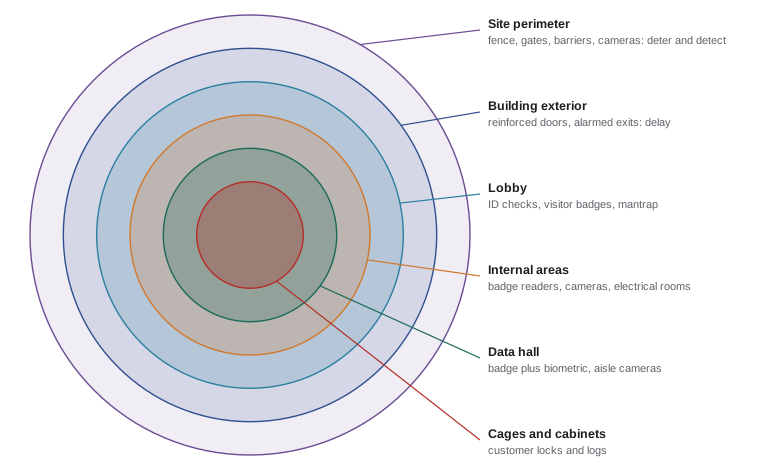
Mechanical and electrical spaces deserve as much protection as data halls, because someone who reaches the switchgear, UPS or cooling plant can take down the whole facility without touching a server. Fibre entry points and meet-me rooms, where telecommunications carriers connect, are also critical.
Access control and authentication
Electronic access control systems manage who can open which doors and when. Each person is enrolled with credentials and assigned access levels; readers at doors check credentials against the system and unlock the door if allowed, logging every attempt. Authentication factors fall into three types:
- Something you have: a badge or card (modern systems use encrypted smart cards; older proximity cards can be cloned easily) or a mobile credential.
- Something you know: a PIN.
- Something you are: a biometric such as a fingerprint, palm vein pattern, iris or face.
Combining two factors (multi-factor authentication) at sensitive doors makes it much harder to use a lost or stolen badge. Access control systems also enforce rules such as anti-passback (a badge cannot be used to enter twice without exiting, preventing it being passed back to another person), time schedules, two-person rules for the most critical areas, and automatic expiry of contractor access.
Biometric data is sensitive personal information. In Canada, private-sector organizations must comply with PIPEDA (or substantially similar provincial laws in Alberta, British Columbia and Quebec), which require a legitimate purpose, consent, proportionality and safeguards; the Office of the Privacy Commissioner has issued guidance on biometrics, and Quebec's Law 25 requires organizations to disclose biometric databases to the Commission d'accès à l'information before using them.
Mantraps and tailgating
The most common way to defeat access control is not hacking but tailgating (following an authorized person through a door) or piggybacking (being let in by someone who holds the door). Countermeasures include:
- Mantraps (also called sally ports or interlocking vestibules): a small room with two doors, where the second door opens only after the first has closed and the occupant has authenticated again. Some use weight sensors or overhead cameras to confirm that only one person is inside.
- Optical turnstiles and security revolving doors that admit one person per credential.
- Door-held-open and door-forced alarms monitored by security staff.
- Culture and training: staff are taught to challenge anyone without a visible badge and never to hold secure doors open for others.
Egress requirements still apply: mantraps and secure doors must allow people to leave in a fire, through fail-safe locks that release on fire alarm or power loss or mechanical free egress from inside, as agreed with the authority having jurisdiction. Designers balance security against life safety, often with alarms and cameras on emergency exits.
Surveillance and monitoring
Video surveillance (CCTV) records activity at entrances, perimeters, corridors, data hall aisles, loading docks and critical rooms. Cameras serve as a deterrent, provide live views for security operators, trigger alerts through video analytics, and provide evidence after incidents. Recordings are typically retained for 90 days or more, often as required by customer contracts or audit standards.
Camera design depends on what each camera must do. A common way to express this is pixel density on target, the number of pixels per metre across the scene at the target distance:
| Purpose | Pixel density (approximate) | What it allows |
|---|---|---|
| Detection | 25 px/m | See that a person is present |
| Observation | 62 px/m | See general actions and clothing |
| Recognition | 125 px/m | Recognize a known person |
| Identification | 250 px/m | Identify an unknown person beyond reasonable doubt |
Worked problem
Camera coverage at a doorway
A camera with 1920 horizontal pixels must identify people entering through a 2 m wide doorway. What is the maximum field width at the doorway? What about a 3840-pixel (4K) camera?
Show solution
- Field width at 250 px/m: \(1920/250 = 7.7\) m.
- 4K: \(3840/250 = 15.4\) m.
Answer: The 1920-pixel camera can cover up to 7.7 m of width at the doorway and still identify faces, comfortably more than 2 m, so it could be placed farther away or cover a wider entrance. Lighting, lens quality, compression and angle also matter, so identification cameras are usually positioned to see faces at eye level rather than from steeply above.
Other monitoring systems include intrusion detection (door contacts, motion sensors, fence sensors), environmental monitoring, and a security operations centre staffed 24 hours a day that watches alarms and video, dispatches officers, and coordinates with the network operations centre. Increasingly, physical security systems are networked IP devices, which means they must themselves be protected from cyberattack: segmented networks, changed default passwords, updated firmware and monitored logs.
Perimeter and vehicle protection
A vehicle can deliver a large amount of energy against a building or carry explosives close to it. Perimeter protection uses crash-rated barriers (bollards, gates, wedge barriers, reinforced fences) at vehicle approaches, a standoff distance between the perimeter and the building, and controlled vehicle entry points where vehicles are inspected. Barriers are rated by standardized crash tests; ASTM F2656 ratings such as M30 and M50 indicate that a barrier stops a 6,800 kg (15,000 lb) medium-duty truck at 30 or 50 mph (about 48 or 80 km/h) with limited penetration.
Worked problem
Vehicle kinetic energy
Compare the kinetic energy of a 6,800 kg truck at 48 km/h and at 80 km/h.
Show solution
- 48 km/h \(= 13.3\) m/s: \(E = 0.5 \times 6800 \times 13.3^2 = 604\) kJ.
- 80 km/h \(= 22.2\) m/s: \(E = 0.5 \times 6800 \times 22.2^2 = 1.68\) MJ.
Answer: About 0.6 MJ at 48 km/h and 1.68 MJ at 80 km/h, nearly three times as much, because energy rises with the square of speed. Designers limit approach speeds with road layout (curves, chicanes, long straight approaches avoided) so that barriers face lower energies.
People and procedures
Technology fails without good procedures. Key procedures include:
- Identity verification and background checks for staff and long-term contractors, according to law and customer requirements.
- Visitor management: pre-registration, government ID checks, escorting, temporary badges that expire, and logs.
- Access reviews: regular reviews of who has access to what, with prompt removal for people who leave or change roles.
- Shipping and receiving: inspection of deliveries in a secured loading area, tracking of assets into and out of the building, and checks that equipment leaving is authorized.
- Media handling and destruction: failed or retired drives are tracked and destroyed (shredded or degaussed) on site or under chain of custody, because they may contain customer data.
- Key and lock control for mechanical keys, which must be tracked as carefully as badges.
- Security patrols, incident reporting and investigation.
- Training: security awareness for everyone, including how to challenge unknown people and report suspicious activity.
Worked problem
Access review
An audit of a data hall's access list shows 420 active badges. Cross-checking with HR and contractor records shows 37 belong to people who left more than 30 days ago and 58 contractors whose projects ended. What does this indicate, and what should be done?
Show solution
- Stale access: \(37 + 58 = 95\) badges, \(95/420 = 23\%\) of the list.
- Least privilege is not being enforced, and offboarding is not removing access promptly.
Answer: Nearly a quarter of badges with data hall access should not exist. Immediate action is to disable them and check logs for any use after the holders left. Longer term, link the access control system to HR and contractor systems so that access expires automatically, and review access lists monthly or quarterly as audit standards expect.
Standards, audits and certifications
Customers rely on independent audits to confirm that data centre operators protect their equipment. Common frameworks include:
- ISO/IEC 27001: an international standard for information security management systems; its Annex A includes physical controls covering perimeters, entry, secure areas, equipment and media.
- SOC 2 (System and Organization Controls) reports, based on criteria from the American Institute of CPAs, widely requested by North American customers, in which auditors test the design and operation of security controls over a period.
- PCI DSS requirement 9 for facilities handling payment card data: restricting physical access, visitor logs, media controls and video retention.
- ANSI/TIA-942, the data centre infrastructure standard, which includes physical security requirements in its rating levels.
- Government requirements: federal organizations and their suppliers follow Government of Canada security policies and may require security-cleared personnel and facilities assessed under the Contract Security Program.
Audits look for evidence: logs of badge use, visitor records, access reviews, camera retention, training records and incident reports. Good security is not only having controls but being able to prove they work.
Lesson 10 looks at the electronic systems behind these layers, including access control credentials, video storage, log analysis and the cyber risks of networked building systems.
Common mistakes
MistakeProtecting the data hall but not electrical and mechanical rooms.
InsteadTreat switchgear, UPS, cooling plant and fibre entries as critical areas.
MistakeRelying on a single badge for critical areas.
InsteadUse multi-factor authentication, anti-passback and mantraps.
MistakeLetting access accumulate as people leave or change roles.
InsteadLink access to HR and contractor records and review regularly.
MistakePlacing cameras high above doors for identification.
InsteadAchieve enough pixel density at face level for the purpose.
MistakeLeaving security devices on the corporate network with default passwords.
InsteadSegment, harden and monitor physical security systems.
Summary and key terms
- Physical threats include theft, sabotage, insiders, social engineering and vehicles.
- Defence in depth layers deter, detect, delay and respond; delay after detection must exceed response time.
- Layers run from site perimeter to building, lobby, internal areas, data halls and cabinets.
- Access control combines badges, PINs and biometrics with anti-passback and least privilege.
- Mantraps, turnstiles and culture counter tailgating while preserving fire egress.
- Camera design uses pixel density: about 250 px/m for identification.
- Crash-rated barriers and standoff protect against vehicles; energy rises with speed squared.
- Procedures, access reviews and audits (ISO 27001, SOC 2, PCI DSS) make controls effective and provable.
- Defence in depth
- Multiple independent layers of security.
- Least privilege
- Giving each person only the access they need.
- Tailgating
- Following an authorized person through a secure door.
- Mantrap
- A two-door vestibule that admits one authenticated person at a time.
- Anti-passback
- A rule preventing a credential from being used to enter twice without exiting.
- Multi-factor authentication
- Requiring two or more types of credential.
- Pixel density
- Pixels per metre across the scene at the target.
- Standoff distance
- The distance between a perimeter barrier and the protected building.
- Insider threat
- Risk from people with legitimate access.
- SOC 2
- An independent audit report on an organization's security controls.
Practice problems
Work each problem on paper first, then reveal the answer to check.
What do deter, detect, delay and respond mean?
Show answer
Discourage attackers, notice them, slow them, and allow a response before they reach the target.
Delay after detection is 200 s and response time 5 minutes. Adequate?
Show answer
No; 200 s is less than 300 s.
Name the three types of authentication factor.
Show answer
Something you have, know, are.
What does anti-passback prevent?
Show answer
Passing a badge back to let another person in.
How does a mantrap prevent tailgating?
Show answer
Only one person passes at a time, with the second door opening after the first closes and authentication.
A 2560-pixel camera for recognition (125 px/m). Maximum field width?
Show answer
20.5 m.
A 2,000 kg car at 72 km/h. Kinetic energy?
Show answer
20 m/s; 0.5 × 2000 × 400 = 400 kJ.
Why protect electrical rooms as strictly as data halls?
Show answer
Access to switchgear, UPS or cooling can take down the whole facility.
Name four security procedures besides technology.
Show answer
Background checks, visitor management, access reviews, shipping control, media destruction, key control, training.
Name two audit frameworks customers request.
Show answer
ISO/IEC 27001, SOC 2, PCI DSS.
Lesson quiz · 5 questions
Score 60% or more to complete this lesson.
Create a free account to save your progress, take quizzes and earn a certificate.