
CSCO-112 · Lesson 7 of 12 · 18 min
Network security basics
▶ Video coming soon A video version of this lesson is on the way.
Keisha Moreau, Brightline's security analyst, has a ritual for new technicians. She hands Jordan a printed configuration from a client switch Brightline took over last year and gives him ten minutes to find everything wrong with it. He finds Telnet enabled, a password stored in clear text, every unused port active in VLAN 1 and no login banner. He misses that the management interface accepts connections from anywhere. "Five problems," Keisha says, "and none of them needed an attacker with special skills. Most of security is closing doors people forgot were open." CSCO-121 and CSCO-122 go deeper into cybersecurity. This lesson covers the network security basics that the CCST Networking exam expects every support technician to know and apply.
Confidentiality, integrity and availability
Security goals are usually summarized as the CIA triad. Confidentiality means information is seen only by people who are allowed to see it: Riverside Family Law's client files must not reach anyone outside the firm. Integrity means information is not changed without authorization: a bakery's prices and a clinic's medication records must be what they are supposed to be. Availability means systems and data are there when they are needed: a clinic whose network is down cannot book appointments. Every security control supports one or more of these goals, and many trade-offs, such as how strict a password policy should be, are a balance between them.
Common threats
Technicians should be able to recognize the main kinds of threat, even if they do not investigate them. Malware is malicious software: viruses, worms that spread across networks, trojans disguised as useful programs, and ransomware that encrypts files and demands payment. Phishing uses fake emails, texts or websites to trick people into revealing passwords or running malware; it is the most common starting point for attacks on small businesses. Social engineering more broadly manipulates people, for example a caller pretending to be from Brightline who asks the receptionist for a password.
Some threats target the network itself. A denial-of-service (DoS) attack floods a service or link so that legitimate users cannot reach it; a distributed attack (DDoS) uses many computers at once. On-path attacks, formerly called man-in-the-middle, place an attacker between two parties to read or alter their traffic, for example through a fake Wi-Fi access point with a familiar name. Spoofing forges an address, such as a MAC or IP address, to impersonate another device. Rogue devices, such as an unauthorized access point or a personal router plugged into a wall jack, can open a path around the organization's protections without anyone intending harm.
| Threat | What it does | Basic defences |
|---|---|---|
| Phishing | Tricks users into giving credentials or running malware | User training, email filtering, multifactor authentication |
| Ransomware | Encrypts data and demands payment | Offline and tested backups, patching, least privilege |
| Denial of service | Overwhelms a service so users cannot reach it | Provider filtering, redundancy, rate limits |
| On-path attack | Intercepts or alters traffic between two parties | Encryption (HTTPS, VPN), WPA3, certificate checks |
| Rogue device | Adds an unmanaged path into the network | Port security, 802.1X, shutting unused ports, wireless scans |
Defence in depth
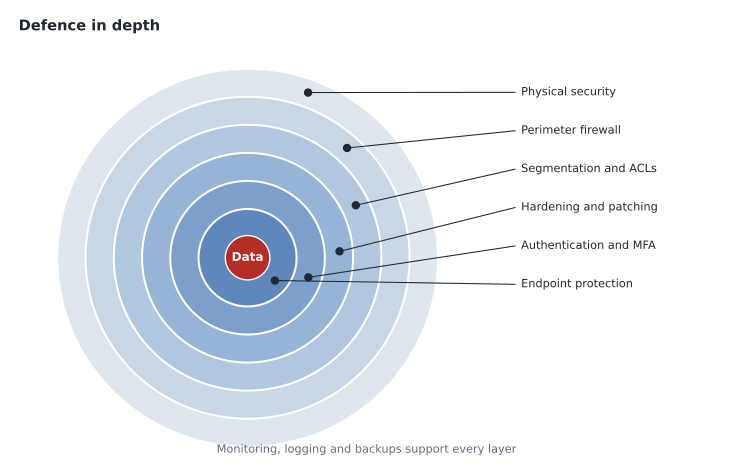
No single control stops every threat, so networks are protected in layers, an approach called defence in depth. Physical security keeps strangers away from equipment. Network controls such as firewalls, VLANs and access lists limit where traffic can go. Device hardening removes unnecessary services and weak settings. Endpoint protection guards each computer. Authentication and authorization decide who can do what. Monitoring and logging notice when something goes wrong. Backups make recovery possible. If one layer fails, the others still stand.
A guiding rule inside those layers is least privilege: every person, device and service should have only the access it needs for its job, and no more. The reception PC at Prairie Paws needs the practice-management system and the internet, not the switch's management interface. A guest needs the internet, not the printers.
Firewalls and access control lists
A firewall enforces rules about which traffic may pass between networks. Rules usually match on source and destination addresses, protocols and port numbers. Modern firewalls are stateful: they track each connection, so once an inside device opens a connection to a website, the replies are allowed back in automatically, while unsolicited traffic from the internet is blocked. Next-generation firewalls add application awareness, intrusion prevention, web filtering and malware scanning. Small businesses often have the firewall built into the router or a single security appliance at the edge.
Routers and layer 3 switches can also filter traffic with access control lists (ACLs): ordered lists of permit and deny statements checked from the top down, where the first match decides and anything that matches nothing is denied by an invisible implicit deny at the end. Standard ACLs match only source addresses; extended ACLs also match destinations, protocols and ports. ACLs are commonly used to limit who can reach device management, as in the problem Jordan missed.
SW-PP1(config)# ip access-list standard MGMT-ONLY
SW-PP1(config-std-nacl)# permit 10.20.99.0 0.0.0.255
SW-PP1(config-std-nacl)# permit 10.1.1.0 0.0.0.255
SW-PP1(config-std-nacl)# exit
SW-PP1(config)# line vty 0 15
SW-PP1(config-line)# access-class MGMT-ONLY in
The numbers after each address in a Cisco ACL are a wildcard mask, the inverse of a subnet mask: 0.0.0.255 means the first three octets must match and the last can be anything. Order matters. A broad permit placed above a narrow deny makes the deny useless, so specific rules go first.
VPNs
A virtual private network (VPN) creates an encrypted tunnel across an untrusted network such as the internet. A site-to-site VPN connects two networks, like the two Prairie Paws clinics, so their routers or firewalls exchange traffic securely and users do not notice it. A remote-access VPN connects one device, such as a lawyer's laptop at home, to the office network using client software. Common technologies are IPsec for site-to-site tunnels and SSL/TLS-based VPNs for remote access. A VPN protects data in transit; it does not make an infected laptop safe, which is why remote-access VPNs are usually combined with device checks and multifactor authentication.
Authentication and access
Authentication proves identity; authorization decides what an identified user may do; accounting records what they did. Passwords alone are weak, because they are reused, guessed and phished. Multifactor authentication (MFA) requires two or more different kinds of proof: something you know (a password or PIN), something you have (a phone app, a hardware key or a smart card) and something you are (a fingerprint or face). MFA stops most attacks that rely on stolen passwords, and Brightline requires it on every client's email, VPN and cloud accounts.
On the network itself, IEEE 802.1X controls which devices may connect at all. When a device plugs into a switch port or joins a Wi-Fi network, the switch or access point asks it to authenticate before allowing any normal traffic. The switch passes the credentials to a RADIUS server, which checks them against the directory and can also tell the switch which VLAN to place the device in. 802.1X is common in larger organizations and is the basis of WPA2 and WPA3 Enterprise Wi-Fi, covered in the next lesson.
Hardening switches and routers
Hardening means removing weaknesses from a device before attackers find them. For switches and routers the checklist is short and well known:
- Disable Telnet and HTTP management; use SSH and HTTPS only.
- Use enable secret and personal accounts or central AAA, with strong passwords and MFA where supported.
- Restrict management access to known networks with an ACL on the VTY lines, as shown above.
- Shut down unused ports and move them to an unused VLAN, not VLAN 1.
- Enable port security on access ports to limit how many MAC addresses each port may learn, so a hub or personal router cannot be added quietly.
- Turn on BPDU guard on access ports so that a switch plugged in where a PC should be shuts the port down.
- Keep the software up to date with the vendor's security fixes, during a planned maintenance window.
- Set a login banner, exec-timeouts and logging to a central server, with accurate time from NTP so that logs can be compared.
SW-PP1(config)# interface range gigabitEthernet1/0/13 - 20
SW-PP1(config-if-range)# description UNUSED
SW-PP1(config-if-range)# switchport mode access
SW-PP1(config-if-range)# switchport access vlan 999
SW-PP1(config-if-range)# shutdown
SW-PP1(config-if-range)# exit
SW-PP1(config)# interface gigabitEthernet1/0/1
SW-PP1(config-if)# switchport port-security
SW-PP1(config-if)# switchport port-security maximum 2
SW-PP1(config-if)# switchport port-security violation restrict
Physical security and privacy
Physical access defeats most technical controls: anyone who can reach a switch's console port or unplug its power can cause harm. Network equipment belongs in a locked room or cabinet, with access recorded. Wall jacks in public areas, such as the Northfield Centre lobby, should be disabled unless needed. Laptops and phones need screen locks and disk encryption in case they are lost.
Security also has legal sides. Under PIPEDA, Canadian businesses must protect personal information with safeguards suited to its sensitivity and must report breaches that create a real risk of significant harm to the Privacy Commissioner and to affected people. Provincial laws add rules for health and public-sector information. A technician who suspects a breach should not try to investigate alone; the right step is to stop, preserve what they have seen and escalate to the security lead, as Brightline's incident procedure requires.
Common mistakes
MistakeRelying on a firewall alone.
InsteadUse layers: hardening, segmentation, MFA, endpoint protection, monitoring and backups.
MistakePutting a broad permit above a specific deny in an ACL.
InsteadACLs stop at the first match, so place specific rules first.
MistakeLeaving unused switch ports active in VLAN 1.
InsteadShut them down and put them in an unused VLAN.
MistakeTrying to clean up a suspected breach without telling anyone.
InsteadPreserve evidence and escalate according to the incident procedure.
Logging and monitoring
Controls that nobody watches are only half a defence. Switches, routers, firewalls and access points can all send their log messages to a central syslog server, and many also report counters and alerts through SNMP. Brightline collects these for every managed client, so that a burst of failed logins on a firewall, a port going up and down every few minutes, or a new device appearing on a switch raises an alert rather than sitting unread on a device that will overwrite its own buffer within days. Accurate time matters: every device gets its time from an NTP server, because logs from several devices can only be compared if their clocks agree.
Logs should be kept long enough to investigate problems that are noticed late, and protected from being changed. Many security incidents are discovered weeks after they began, and the logs from those weeks are often the only record of what happened. Clients in regulated fields, such as health care and law, may have their own rules about how long records must be kept.
Monitoring also covers the devices themselves. A switch whose processor runs at full load, a firewall whose session table is nearly full or an access point that reboots several times a day may be under attack, misconfigured or failing. Baselines, described in lesson 11, show what normal looks like, so that unusual readings stand out. When an alert fires, the technician follows the incident procedure: record what was seen and when, avoid changing more than necessary and escalate to the security analyst if the cause might be malicious.
Keisha ends her session with Jordan by handing back the printed configuration with the five problems circled and a sixth note in the margin: the switch had no record of when its software was last updated. Hardening is not a one-time job. New vulnerabilities are announced every month, and a device that was well configured last year can be exposed today if nobody checks the vendor's security advisories.
Worked problem
Reading an ACL
A standard ACL on the VTY lines reads: permit 10.20.99.0 0.0.0.255, then permit 10.1.1.0 0.0.0.255. A technician at 10.20.10.15 in the staff VLAN tries to SSH to the switch. What happens?
Show solution
- The source 10.20.10.15 does not match 10.20.99.0 with wildcard 0.0.0.255, because the third octet is 10, not 99.
- It does not match 10.1.1.0 0.0.0.255 either.
- Every ACL ends with an implicit deny, so unmatched traffic is denied.
Answer: The SSH connection is refused. The technician must connect from the management VLAN or Brightline's office network.
Summary and key terms
- Security protects confidentiality, integrity and availability.
- Common threats include phishing, malware and ransomware, denial of service, on-path attacks, spoofing and rogue devices.
- Defence in depth layers physical security, firewalls, segmentation, hardening, endpoint protection, authentication, monitoring and backups, with least privilege throughout.
- Stateful firewalls and ACLs filter traffic, with ACLs read top-down to an implicit deny.
- VPNs encrypt traffic between sites or for remote users, MFA and 802.1X with RADIUS strengthen access, and hardening removes weak services, unused ports and default settings.
- Breaches have legal reporting duties and must be escalated.
- CIA triad
- Confidentiality, integrity and availability, the core goals of security.
- Phishing
- Deceptive messages that trick people into revealing credentials or running malware.
- Defence in depth
- Protecting systems with several independent layers of controls.
- Stateful firewall
- A firewall that tracks connections and allows return traffic automatically.
- ACL
- An ordered list of permit and deny rules ending with an implicit deny.
- VPN
- An encrypted tunnel across an untrusted network.
- MFA
- Multifactor authentication, using two or more kinds of proof.
- 802.1X
- Port-based network access control using a RADIUS server.
Practice problems
Work each problem on paper first, then reveal the answer to check.
Which part of the CIA triad does a denial-of-service attack target?
Show answer
Availability.
Name the three factor types used in MFA.
Show answer
Something you know, something you have and something you are.
What happens to traffic that matches no line of an ACL?
Show answer
It is denied by the implicit deny at the end of the list.
Lesson quiz · 5 questions
Score 60% or more to complete this lesson.
Create a free account to save your progress, take quizzes and earn a certificate.