
CSCO-112 · Lesson 2 of 12 · 18 min
The Cisco IOS command line
▶ Video coming soon A video version of this lesson is on the way.
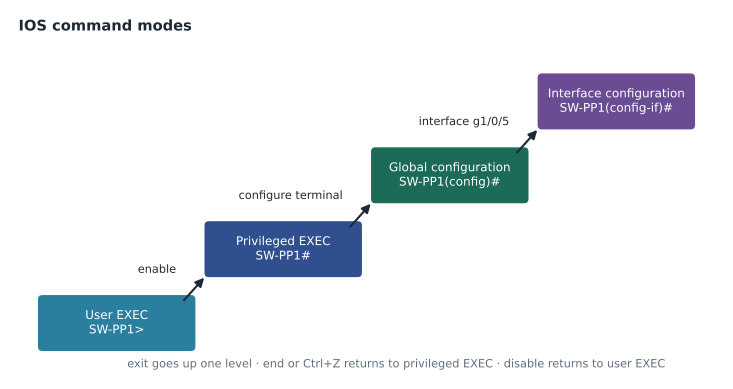
With the console session open on the new Prairie Paws switch, Jordan stares at a single line on the screen: Switch>. Dev slides a printed sheet across the bench. It is not a list of commands to memorize. It is a map of the modes the command line moves through, with one arrow between each. "Most of the confusion people have with IOS," Dev says, "comes from typing the right command in the wrong mode." This lesson walks through that map, the help features that make IOS easier to learn than it looks, and the small set of commands a support technician uses every day.
Cisco's operating systems for routers and switches are called IOS, and the newer versions used on most current hardware are called IOS XE. Other Cisco platforms, such as NX-OS on data centre switches, look similar. The CCST Networking exam does not expect deep configuration skills, but it does expect a technician to move through the modes, read the output of common show commands and make simple, safe changes such as setting a description, enabling an interface or saving a configuration.
The command modes
IOS arranges its commands in a hierarchy of modes, and the prompt always shows where you are. User EXEC mode, shown by a prompt ending in >, allows only basic monitoring commands such as ping and a few show commands. Typing enable moves to privileged EXEC mode, shown by #, where every show command, the copy and reload commands and the debugging tools are available. From privileged EXEC, configure terminal enters global configuration mode, shown by (config)#, where changes affect the whole device. From there, commands such as interface or line enter sub-configuration modes for one interface, one set of terminal lines or one routing process.
Moving back up is just as important. exit leaves the current mode and goes up one level. end, or the key combination Ctrl+Z, returns straight to privileged EXEC from any configuration mode. disable drops from privileged EXEC back to user EXEC. A technician who sees a command rejected should first look at the prompt and ask whether the command belongs in that mode.
| Mode | Prompt | How to enter | Typical commands |
|---|---|---|---|
| User EXEC | SW-PP1> | Log in | ping, show version, show interfaces (limited) |
| Privileged EXEC | SW-PP1# | enable | show running-config, copy, reload, debug, traceroute |
| Global configuration | SW-PP1(config)# | configure terminal | hostname, banner, username, vlan, ip route |
| Interface configuration | SW-PP1(config-if)# | interface gigabitEthernet1/0/5 | description, shutdown, switchport, ip address |
| Line configuration | SW-PP1(config-line)# | line vty 0 15 or line console 0 | login, transport input, exec-timeout |
Help, abbreviation and history
IOS has built-in help that makes it possible to work without memorizing everything. Typing a question mark at any prompt lists the commands available in that mode. Typing part of a word followed immediately by a question mark, such as sh?, lists the commands that start with those letters. Typing a command followed by a space and a question mark, such as show ?, lists what can come next. The help is context-sensitive, so the same question mark shows different choices in each mode.
Commands can be abbreviated to the shortest unambiguous form: sh run means show running-config, conf t means configure terminal and int g1/0/5 means interface gigabitEthernet1/0/5. Pressing Tab completes a partly typed word. The up arrow, or Ctrl+P, recalls earlier commands from the history buffer, which saves typing when the same command is repeated with small changes. Abbreviations save time, but documentation and change notes should use full command names so that someone else can read them.
SW-PP1# show ?
  arp              ARP table
  cdp              CDP information
  interfaces       Interface status and configuration
  ip               IP information
  mac              MAC configuration
  running-config   Current operating configuration
  version          System hardware and software status
  vlan             VTP VLAN status
  ...
SW-PP1# sh ip int br        (abbreviation for show ip interface brief)
When IOS cannot understand a command, it prints an error message that begins with a special symbol. Invalid input detected usually comes with a caret (^) under the point where the problem starts, which often reveals a typing mistake or a command used in the wrong mode. Incomplete command means more words are needed; typing the command again followed by a space and a question mark shows the options. Ambiguous command means the abbreviation matches more than one command and needs another letter or two.
Show commands every technician uses
Most support work on a network device is reading, not changing. The show commands display the device's current state without altering anything, which makes them safe to use while gathering information. A handful cover most situations, and lesson 9 explains their output in more detail.
| Command | What it shows |
|---|---|
| show version | Software version, uptime, hardware model, memory, serial number and the reason for the last reload |
| show running-config | The whole active configuration |
| show ip interface brief | Every interface with its IP address and its status and protocol state, one line each |
| show interfaces | Detailed counters for each interface: speed, duplex, input and output errors, drops |
| show interfaces status | On switches, each port with its description, VLAN, duplex, speed and connection state |
| show vlan brief | Each VLAN and the access ports assigned to it |
| show mac address-table | Which MAC addresses the switch has learned on which ports |
| show ip route | The routing table on a router or a layer 3 switch |
| show cdp neighbors | Directly connected Cisco devices discovered with Cisco Discovery Protocol |
| show logging | Recent log messages, such as links going up and down |
Long output scrolls in pages; the space bar shows the next page, Enter shows one more line and q stops. Output can also be filtered with a pipe: show running-config | include hostname prints only matching lines, show running-config | section interface prints one section, and show interfaces status | begin Gi1/0/20 starts partway through. Filtering is the fastest way to answer a narrow question in a long configuration.
SW-PP1# show running-config | include hostname|banner
hostname SW-PP1
banner motd ^C Authorized access only. Managed by Brightline IT Services. ^C

SW-PP1# show interfaces status | include connected
Gi1/0/1   Reception-PC1    connected    10   a-full a-1000 10/100/1000BaseTX
Gi1/0/2   Reception-Phone  connected    20   a-full a-1000 10/100/1000BaseTX
Gi1/0/24  Uplink-R-PP1     connected    trunk a-full a-1000 10/100/1000BaseTX
Making simple changes safely
Configuration changes on a production device should be small, planned and reversible. Before changing anything, Brightline technicians save a copy of the current configuration, either by running show running-config and saving the session text, or with the company's automatic backup tool. They then make one change at a time and check its effect before moving on.
The commands a CCST-level technician is most likely to use change names and descriptions, enable or disable interfaces and save the result. The hostname command names the device, which then appears in the prompt and in logs. A banner shows a message at login, typically a warning that access is for authorized users. The description command labels an interface with what is connected to it, which pays for itself the first time someone has to trace a cable. The shutdown command disables an interface, and no shutdown enables it. In IOS, the word no in front of almost any command removes or reverses it.
SW-PP1# configure terminal
SW-PP1(config)# interface gigabitEthernet1/0/7
SW-PP1(config-if)# description Exam-Room-2-PC
SW-PP1(config-if)# no shutdown
SW-PP1(config-if)# end
SW-PP1# show interfaces status | include Gi1/0/7
Gi1/0/7   Exam-Room-2-PC   connected    10   a-full a-1000 10/100/1000BaseTX
SW-PP1# copy running-config startup-config
Some commands deserve extra care. reload restarts the device and drops every connection through it. erase startup-config, or write erase, deletes the saved configuration so that the device boots empty. Changing the IP address or VLAN of the management interface while connected over SSH can cut off the session that made the change, leaving the device unreachable until someone arrives with a console cable. Experienced technicians schedule such changes, use the console when they can, or set a timed reload that will restore the saved configuration automatically if they lose access.
Saving has two common forms. copy running-config startup-config is the full, modern command. write memory, often shortened to wr, is an older command that does the same thing and still works on most devices. Either way, the output should end with OK, and show startup-config should then show the change.
Security settings on the command line
A few basic settings protect the command line itself. enable secret sets the password for privileged EXEC mode and stores it as a strong hash. The older enable password stores it weakly and should not be used. service password-encryption obscures plain-text passwords in the configuration, such as old line passwords, but the obscuring is weak and only protects against someone glancing at a screen. Console and VTY lines can be given an exec-timeout so that an idle session logs out by itself, which matters on a laptop left open at a reception desk.
Brightline's standard build for client switches includes a login banner, an enable secret, personal user accounts, SSH only on the VTY lines, a ten-minute exec-timeout and descriptions on every connected port. Dev keeps the standard as a short template so that every switch Brightline installs looks the same, which makes the next technician's job easier.
Common mistakes
MistakeTyping configuration commands at the SW-PP1# prompt.
InsteadEnter configure terminal first; check that the prompt shows (config)#.
MistakeWriting abbreviations such as sh ip int br in documentation.
InsteadUse full command names in notes and tickets so that anyone can follow them.
MistakeChanging the management VLAN over SSH without a plan.
InsteadUse the console or schedule the change, so a mistake does not lock everyone out.
MistakeUsing enable password instead of enable secret.
InsteadUse enable secret, which stores a strong hash.
Checking your work before you leave
Every change on a client device ends with the same short routine at Brightline, and Dev makes Jordan say it aloud until it becomes habit. First, verify: use a show command that proves the change did what was intended, such as show interfaces status for a port change or show vlan brief for a VLAN change, and ask the user to test whatever they were missing. Second, compare: show running-config and show startup-config should differ only by the changes just made, until they are saved. Third, save with copy running-config startup-config and confirm the OK. Fourth, record the exact commands in the ticket, using full command names, so that anyone can repeat or reverse them.
IOS can help with the comparison on many platforms. The show archive config differences command, where available, lists the lines that differ between two configurations, and configuration backup tools at Brightline produce the same kind of comparison automatically every night. When a client reports that something stopped working after a visit, the first question is always what changed, and a saved difference answers it in seconds.
Some technicians also use the reload in command before a risky change made over SSH. reload in 10 schedules a restart in ten minutes. If the change works, reload cancel stops the restart. If the change cuts off access, the device restarts on its own, loads the saved startup configuration and comes back as it was. The trick only works if the risky change has not been saved, so it must be planned carefully, and it should never be used without warning the client, because the restart will interrupt everyone using the device.
One more habit protects the client: before ending a remote session, Dev runs show users to confirm that no other technician is connected and making changes at the same time. Two people changing one device at once is a common cause of confusing results, and Brightline's change calendar exists partly to prevent it.
Worked problem
Reading an error message
Jordan types interface gigabitEthernet1/0/7 at the SW-PP1# prompt and IOS replies Invalid input detected, with a caret under the i of interface. What is wrong?
Show solution
- The caret points to the first word, so IOS does not recognize interface as a command in the current mode.
- The prompt ends in # with no (config), so Jordan is in privileged EXEC mode.
- The interface command belongs to global configuration mode.
Answer: Jordan needs to type configure terminal first, then the interface command.
Summary and key terms
- IOS uses a hierarchy of modes: user EXEC (>), privileged EXEC (#), global configuration and sub-modes for interfaces and lines.
- The prompt shows the current mode, and most errors come from commands typed in the wrong one.
- Context-sensitive help with the question mark, abbreviation, Tab completion and command history make IOS quicker to use.
- Show commands read the device's state safely, and pipes filter long output.
- Changes should be small and checked, the no form reverses a command, and copy running-config startup-config saves the result.
- User EXEC mode
- The limited first mode, shown by a prompt ending in >.
- Privileged EXEC mode
- The full monitoring and management mode, entered with enable and shown by #.
- Global configuration mode
- The mode for device-wide changes, entered with configure terminal.
- Context-sensitive help
- The question mark, which lists the commands or options valid at that point.
- Banner
- A message shown at login, usually an authorized-use notice.
- enable secret
- The privileged-mode password, stored as a strong hash.
- exec-timeout
- A line setting that logs out idle sessions.
- Pipe filter
- An option such as | include that limits command output to matching lines.
Practice problems
Work each problem on paper first, then reveal the answer to check.
What command returns from interface configuration mode straight to privileged EXEC?
Show answer
end, or Ctrl+Z.
How do you see only the lines of the running configuration that contain the word vlan?
Show answer
show running-config | include vlan
What does no shutdown do on an interface?
Show answer
It enables the interface by reversing the shutdown command.
Lesson quiz · 5 questions
Score 60% or more to complete this lesson.
Create a free account to save your progress, take quizzes and earn a certificate.