
CSCO-112 · Lesson 11 of 12 · 18 min
Documenting and handing off problems
▶ Video coming soon A video version of this lesson is on the way.
At 4:55 on a Friday, Jordan is halfway through a problem at Kettle & Crumb Bakery: the payment terminals at the third shop keep dropping off the network for a minute at a time. He has found that the shop's switch logs show the uplink port flapping, but he has not found why, and he is due to leave. Marisol Tran, the service desk lead, will pass the ticket to the weekend on-call technician. "Write it so Sam can carry on without phoning you," she says. "If Sam has to start again, the bakery loses Saturday morning." Documentation and hand-offs are where good troubleshooting either pays off or is wasted. This lesson covers what to record, where and how.
Tickets
Brightline, like most support organizations, tracks every request and fault in a ticketing system. Its own system, Brightline Desk, gives each issue a number such as BL-24817 and records who reported it, which client and device it concerns, its priority, its status and every note and action taken. Tickets let the team see what is open, measure how long problems take, show clients what was done and find patterns, such as the same switch failing every few months.
A useful ticket answers a predictable set of questions. What is the problem, in the user's words and in technical terms? Who is affected, and how badly? When did it start? What has been checked, with what results? What has been changed? What is the current status and the next step? Notes should be written as the work happens, not reconstructed from memory at the end, and each entry should carry a time so that the sequence can be followed.
| Field | Example from BL-25102 |
|---|---|
| Summary | Shop 3 payment terminals drop off the network for about a minute, several times a day |
| Client and site | Kettle & Crumb Bakery, shop 3 |
| Priority | High: payments fail during outages |
| Affected | Two payment terminals and the shop tablet on VLAN 40; office laptop unaffected |
| Started | Tuesday morning, first reported Wednesday |
| Findings | Switch log shows uplink Gi0/1 going down and up at the same times as the outages; error counters rising on that port |
| Changes made | None yet |
| Next step | Replace the uplink patch cable and watch the counters; if still failing, test the cable run to the router |
| Status | In progress, handed to weekend on-call |
Priority and escalation
Not every problem is equally urgent. Most organizations assign a priority based on two factors: impact, how many people or how important a system is affected, and urgency, how quickly the problem will cause harm. A failed payment system at a bakery during opening hours has high impact and high urgency; one slow laptop has low impact. Priority decides the order of work and, in managed-services contracts, the response times Brightline has promised the client, often set out in a service level agreement (SLA).
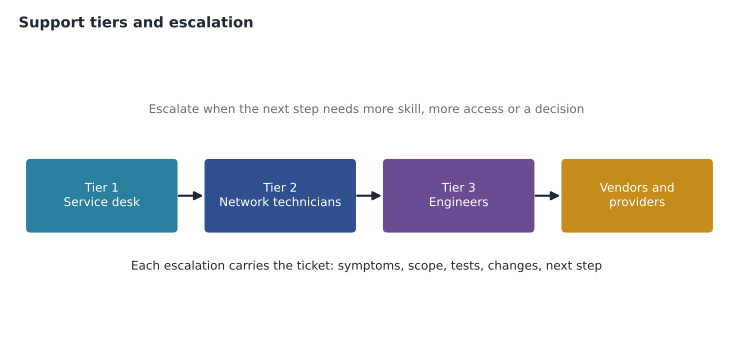
Problems move between support tiers. Tier 1, the service desk, handles common requests and initial troubleshooting. Tier 2 handles more complex problems, such as network configuration. Tier 3 is the specialists and engineers, and beyond them are vendors and service providers. Escalation moves a ticket up when it needs more skill or access, or functionally to another team, such as from support to security. It can also be hierarchical, to a manager, when a client is unhappy or a decision is needed. Escalating early with good notes is a strength; escalating with nothing written down wastes the next person's time.
Writing a good hand-off
A hand-off note is written for a specific reader who knows nothing of what you have done. It should be possible to act on it without calling you. A good note states the current situation in one or two sentences, lists what has been confirmed and what has been ruled out, gives the exact commands or tests that produced key evidence, names anything that was changed and how to undo it, and says clearly what the next step is and what to do if it fails. It avoids private shorthand, vague words such as "seems" without evidence, and blame.
BL-25102  Fri 16:58  J. Pelletier
Situation: Shop 3 POS terminals (VLAN 40) drop for ~60 s several times a day.
Confirmed: SW-KC3 log shows Gi0/1 (uplink to router R-KC3) down/up at each
  outage. show interfaces Gi0/1: CRC errors rising (212 at 16:30, 260 at 16:50).
Ruled out: DHCP (terminals keep their addresses), Wi-Fi (terminals are wired),
  ISP (router internet interface stable, no loss to the provider gateway).
Changed: nothing.
Next: replace the Gi0/1 patch cable with a new certified cord (spare in shop
  network cabinet, bottom shelf). Clear counters, watch for 30 min.
If still failing: test the cable run from the cabinet to the router with the
  cable tester; the run was added by the shop's electrician last month.
Client contact: shop manager Ana Ribeiro, on site Sat from 6:30.
Network documentation
Ticket notes record events; network documentation records how things are meant to be. A support team needs several kinds. Physical diagrams show where equipment is, which rack and port each cable connects to, and where wall jacks lead. Logical diagrams show how the network works: VLANs, subnets, routers, firewalls and the paths between sites. An IP address plan, or IPAM record, lists each subnet, its VLAN, its gateway, its DHCP range and any static addresses. An asset inventory lists each device with its model, serial number, software version, location, warranty and support contract.
Configuration matters too. Brightline keeps an automatic backup of every device configuration, saved nightly and whenever a change is made, so a failed switch can be replaced and restored quickly and so changes can be compared. Passwords and keys are kept in a password vault, never in diagrams, tickets or spreadsheets. Baselines, records of normal behaviour such as typical bandwidth use and error rates, make it possible to recognize when something is abnormal.
| Document | Answers | Updated when |
|---|---|---|
| Physical diagram | Where is it and what is it plugged into? | Equipment or cabling changes |
| Logical diagram | How does traffic flow between networks? | VLANs, subnets, routing or sites change |
| IP address plan | Which subnets and addresses are used for what? | Any address or DHCP change |
| Asset inventory | What equipment exists and what support covers it? | Purchases, replacements, disposal |
| Configuration backups | How was each device configured, and when did it change? | Automatically, nightly and after changes |
| Baseline | What does normal look like? | Periodically, and after major changes |
Change management
Many faults are caused by changes, so organizations control them. Change management means that planned changes are described, assessed for risk, approved, scheduled, carried out with a back-out plan and then reviewed. Small routine changes, such as moving a port to another VLAN, may be pre-approved; larger ones, such as replacing a firewall, need approval and a maintenance window agreed with the client. Emergency changes made to restore service, like Dev's cellular workaround, are recorded and reviewed afterward. A technician who makes an unrecorded change leaves a trap for the next person who reads the documentation and trusts it.
Communicating with clients and users
Documentation is also communication. Users and clients want to know that their problem has been understood, what is being done, roughly when it will be fixed and what they should do meanwhile. Updates should be plain and honest, without jargon: "The connection between your shop and the payment network has been dropping because of a faulty cable. We will replace it first thing tomorrow; until then, use the backup card reader on the counter." When a problem is closed, the client should be told what was done and asked to confirm it is fixed, and the ticket should be closed only after that.
Technicians also handle information that must stay private. Ticket notes, screenshots and packet captures can contain names, health details, legal matters or payment information. Brightline's rule is to record only what is needed to solve the problem, never to copy client data into tickets, and to follow the client's confidentiality rules, which at Riverside Family Law and Prairie Paws are strict. Canadian privacy law, including PIPEDA and provincial health laws, applies to that information as much as to the client's own systems.
Closing the loop
On Saturday morning Sam replaces the patch cable, clears the counters and watches. The CRC errors stop, the uplink stays up and the payment terminals stay online. Sam adds a note, updates the ticket to resolved and asks the shop manager to confirm at closing time. On Monday, Marisol reviews the ticket and adds one more step: the asset record for the shop's switch now lists the new cable, and a note goes into the client's site documentation that the cable run added by the electrician should be tested. When the same symptom appears at another shop months later, a search for "POS drops uplink CRC" finds BL-25102 in seconds.
Common mistakes
MistakeWriting notes only at the end of the day from memory.
InsteadRecord findings and changes as you go, with times.
MistakeWriting "network issue, fixed" as the resolution.
InsteadState the cause, the fix and how it was verified.
MistakePutting passwords or client data in ticket notes.
InsteadStore credentials in the vault and record only what is needed.
MistakeMaking a quick change without recording it.
InsteadFollow change management and update the documentation, even for emergency fixes.
Knowledge base articles
Some problems recur often enough that they deserve more than a ticket note. Brightline keeps a knowledge base of short articles, each describing one problem, how to recognize it, the steps that fix it and any warnings. When Jordan solved the Northfield DHCP exhaustion problem, Marisol asked him to turn his ticket notes into an article: how to check a pool's usage, how to change the lease time and when to widen the range. The next time a busy event filled a client's pool, a tier 1 technician fixed it in ten minutes by following the article.
Good articles are written for the person who will use them, usually someone under time pressure. They use a clear title that matches how people search ("PCs get 169.254 addresses during events"), list the symptoms first, give exact commands and screens, and say when to stop and escalate. They are also reviewed and dated, because an article that describes an old version of a system can do more harm than good.
Post-incident reviews
After a serious outage, many organizations hold a short post-incident review. The team goes through the timeline, what was noticed and when, what helped and what slowed the response, and what will change to prevent a repeat or shorten the next one. The review is meant to improve systems, not to blame people; if people fear blame, they hide mistakes, and the organization stops learning from them. For the branch VPN outage in lesson 10, the review led to two changes: monitoring of link quality on every client's internet connection, and a standard configuration that lets VPNs use the cellular backup automatically.
Documentation is only useful if people can find it and trust it. Brightline keeps each client's diagrams, address plan, inventory and articles in one place, linked from the client's record in Brightline Desk, and reviews them twice a year with a simple test: a technician who has never visited the site tries to find a given switch port, VLAN and password vault entry using only the documents.
Worked problem
Improving a hand-off note
A note reads: "POS still broken. Tried some stuff. Probably the switch. Call me if needed." Rewrite its key points so the next technician can act.
Show solution
- State the situation: which devices, which symptom, since when.
- List what was confirmed and ruled out, with the evidence (log entries, counters, test results).
- Name any changes and how to undo them, the exact next step, what to do if it fails, and who the client contact is.
Answer: A note like the BL-25102 example: situation, confirmed, ruled out, changed, next step, fallback, contact.
Summary and key terms
- Tickets record each problem's summary, scope, priority, findings, changes, status and next steps, with timed notes written as the work happens.
- Priority combines impact and urgency and drives SLA response times.
- Problems escalate between support tiers, functionally or hierarchically, and good hand-off notes let the next person continue without starting over.
- Network documentation includes physical and logical diagrams, IP address plans, asset inventories, configuration backups and baselines.
- Change management controls risk, and clear, private, plain-language communication keeps clients informed until a fix is confirmed.
- Ticket
- A record of one request or fault and all work done on it.
- Priority
- A ranking based on impact and urgency that decides the order of work.
- SLA
- Service level agreement, the response and resolution times promised to a client.
- Escalation
- Passing a ticket to a higher tier, another team or a manager.
- Logical diagram
- A diagram showing VLANs, subnets and traffic paths.
- IP address plan
- A record of subnets, VLANs, gateways, DHCP ranges and static addresses.
- Baseline
- A record of normal network behaviour used to spot problems.
- Change management
- A process for planning, approving, carrying out and reviewing changes.
Practice problems
Work each problem on paper first, then reveal the answer to check.
Which two factors usually decide a ticket's priority?
Show answer
Impact and urgency.
What is the difference between a physical and a logical diagram?
Show answer
A physical diagram shows where equipment and cables are; a logical diagram shows how networks, VLANs and subnets connect.
Why should configuration backups be automatic?
Show answer
So that a failed device can be restored quickly and changes can be compared without relying on someone remembering to save them.
Lesson quiz · 5 questions
Score 60% or more to complete this lesson.
Create a free account to save your progress, take quizzes and earn a certificate.