
CSCO-112 · Lesson 4 of 12 · 17 min
Routing concepts and the routing table
▶ Video coming soon A video version of this lesson is on the way.
Prairie Paws has two clinics. The main clinic uses 10.20.0.0/16 and the branch across town uses 10.21.0.0/16. A site-to-site VPN between the two routers lets the branch reach the practice-management server in the main clinic. One morning the branch phones Brightline: everything works except the server. Dev opens an SSH session to the branch router and types one command, show ip route. "Every question about where traffic goes," he says, "is answered by this table. If the table is wrong, nothing else matters." This lesson explains how routers make forwarding decisions and how to read the table that holds them.
What a router does
A router works at layer 3. It connects different IP networks and forwards packets between them based on their destination IP address. When a packet arrives, the router removes the layer 2 frame around it, looks at the destination address, chooses the best route in its routing table, decrements the packet's time-to-live (TTL) value, and builds a new frame for the next link. If the TTL reaches zero, the router drops the packet and usually sends an ICMP time-exceeded message back to the sender. That behaviour is what makes traceroute work, as lesson 9 shows.
Routers also separate broadcast domains. A broadcast sent in the main clinic's staff VLAN never crosses the router into the branch. This keeps large networks manageable, and it is why each VLAN or site has its own subnet.
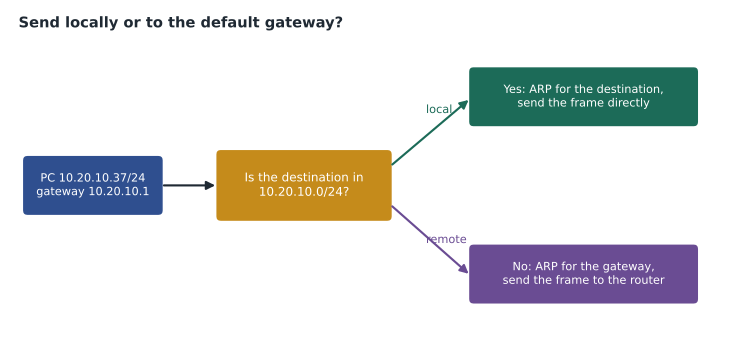
For end devices, the router is the default gateway: the address a host sends traffic to when the destination is not on its own subnet. A PC decides this by comparing the destination address with its own address and subnet mask. If both are in the same subnet, it sends directly, after using ARP to find the destination's MAC address. If not, it sends the frame to the gateway's MAC address instead. A PC with the wrong default gateway can reach everything in its own subnet and nothing beyond it, which is one of the most common faults a technician meets.
Where routes come from
A router learns routes in three ways. Directly connected routes appear automatically when an interface has an IP address and is up: a router with an interface at 10.20.10.1/24 knows that 10.20.10.0/24 is reachable out of that interface. Cisco routers also add a local route for the interface's own address, shown as a /32. Static routes are typed in by an administrator, telling the router to reach a network through a particular next hop or interface. Dynamic routes are learned from other routers through a routing protocol.
A special static route, the default route, written 0.0.0.0/0, matches every destination. It tells the router where to send traffic when no more specific route exists, usually toward the internet service provider. Small sites like the Prairie Paws branch often need only connected routes, a static route or VPN route to the main clinic, and a default route to the internet.
R-PPB(config)# ip route 0.0.0.0 0.0.0.0 203.0.113.1
R-PPB(config)# ip route 10.20.0.0 255.255.0.0 Tunnel1
Reading the routing table
The output of show ip route begins with a legend of codes and then lists each route. The code at the start of each line tells where the route came from: C for connected, L for local, S for static, O for OSPF, D for EIGRP, B for BGP and an asterisk for a candidate default. Each entry gives the destination network and prefix length, and for learned routes two numbers in square brackets, the administrative distance and the metric, followed by the next hop or the exit interface.
R-PPB# show ip route
Codes: L - local, C - connected, S - static, O - OSPF, D - EIGRP,
       B - BGP, * - candidate default
Gateway of last resort is 203.0.113.1 to network 0.0.0.0

S*    0.0.0.0/0 [1/0] via 203.0.113.1
      10.0.0.0/8 is variably subnetted, 5 subnets, 3 masks
S        10.20.0.0/16 is directly connected, Tunnel1
C        10.21.10.0/24 is directly connected, GigabitEthernet0/1.10
L        10.21.10.1/32 is directly connected, GigabitEthernet0/1.10
C        10.21.20.0/24 is directly connected, GigabitEthernet0/1.20
L        10.21.20.1/32 is directly connected, GigabitEthernet0/1.20
      203.0.113.0/24 is variably subnetted, 2 subnets, 2 masks
C        203.0.113.0/30 is directly connected, GigabitEthernet0/0
L        203.0.113.2/32 is directly connected, GigabitEthernet0/0
The line Gateway of last resort shows the default route in use. If it says the gateway of last resort is not set, the router has no default route and will drop any packet it has no specific route for, which on an internet-facing router means users cannot reach the internet.
Choosing between routes
A router may know several routes that match a destination. It chooses in a fixed order. First, the longest prefix match wins: the route with the most specific prefix, the largest number after the slash, is used. A packet for 10.20.10.5 matches 0.0.0.0/0, 10.0.0.0/8 and 10.20.0.0/16, and the /16 wins because it is the most specific. This rule is what lets a default route coexist with detailed routes: the default is only used when nothing more specific matches.
Second, when two sources offer routes with the same prefix, the router prefers the source with the lowest administrative distance (AD), a measure of how much it trusts that source. Connected routes have an AD of 0 and static routes 1, so they beat anything learned dynamically. Third, within one routing protocol, the route with the lowest metric wins. Each protocol measures cost its own way: OSPF uses a cost based on bandwidth, RIP counts hops, and EIGRP combines bandwidth and delay.
| Route source | Code | Default administrative distance |
|---|---|---|
| Connected interface | C | 0 |
| Static route | S | 1 |
| EIGRP (internal) | D | 90 |
| OSPF | O | 110 |
| RIP | R | 120 |
| External BGP | B | 20 |
Routing in both directions
Routing has to work both ways. A packet from the branch to the main clinic needs a route at the branch, and the reply needs a route at the main clinic back to 10.21.0.0/16. A missing return route produces a confusing symptom: traffic leaves, reaches the destination, and the reply is dropped or sent the wrong way, so the source sees nothing at all. Technicians who find that one direction looks correct should always check the other. Firewalls add a further twist, because a stateful firewall that sees only one direction of a conversation may drop it as suspicious.
The same idea explains a common mistake with static routes. If a technician adds a new subnet at the branch, say 10.21.30.0/24 for a new camera system, the branch router knows it immediately as a connected route. The main clinic does not, unless its route to the branch covers 10.21.0.0/16 as a whole or a routing protocol advertises the new subnet. Planning addresses in blocks, as Brightline did by giving each Prairie Paws site its own /16, keeps routing tables short and means new subnets inside the block need no new routes.
IPv6 routing in brief
IPv6 routing follows the same principles: connected, static and dynamic routes, longest prefix match and administrative distance. The command is show ipv6 route, the default route is written ::/0, and hosts usually learn their default gateway from router advertisements rather than from DHCP. One difference catches people out: IPv6 next hops are often link-local addresses beginning with fe80, which are valid only on one link, so a static route that uses one must also name the exit interface.
Jordan practises reading routing tables by predicting the answer before typing the command. Given a destination, he writes down which route he expects to match and which interface the packet should leave by, then checks with show ip route followed by the address, which on Cisco devices shows the single route that would be used for that destination. Getting the prediction wrong is the useful part, because it shows exactly which rule he misapplied.
He also learns to read the routes a host itself holds. On Windows, route print lists the host's routing table, including its default route through the gateway and any routes added by VPN software. A laptop connected to a remote-access VPN may send all its traffic through the tunnel or only traffic for the office networks, a choice called full or split tunnelling, and the routing table shows which.
Worked problem
Longest prefix match
A router has these routes: 0.0.0.0/0 via the ISP, 10.0.0.0/8 via a data centre link, 10.20.0.0/16 via Tunnel1 and 10.20.10.0/24 on GigabitEthernet0/1. Where does it send a packet for 10.20.10.77, and one for 10.20.40.9?
Show solution
- 10.20.10.77 matches all four routes. The longest prefix is /24, so it goes out GigabitEthernet0/1.
- 10.20.40.9 is not inside 10.20.10.0/24. It matches 10.20.0.0/16, 10.0.0.0/8 and the default. The longest is /16.
- So 10.20.40.9 goes through Tunnel1.
Answer: GigabitEthernet0/1 for 10.20.10.77; Tunnel1 for 10.20.40.9.
Dynamic routing protocols
Static routes are simple and predictable but do not adapt: if a link fails, a static route keeps pointing at it. Dynamic routing protocols let routers tell each other which networks they can reach, and recalculate when something changes. Interior gateway protocols run inside one organization. OSPF (Open Shortest Path First) is an open standard, link-state protocol in which each router builds a map of the network and calculates the shortest paths. EIGRP is Cisco's advanced distance-vector protocol, now published as an open specification. RIP is an old, simple protocol that counts hops and is rarely used now.
BGP (Border Gateway Protocol) is the exterior gateway protocol that connects organizations and internet service providers to each other; it is what holds the internet together. Small businesses rarely run BGP themselves, because their provider handles it. For a CCST technician the important skills are to recognize which protocol a route came from, to know that dynamic routes can disappear when a neighbour goes down, and to escalate routing protocol problems to a network engineer.
Layer 3 switches and the gateway
Many networks route between VLANs on a layer 3 switch rather than on a router. The switch has an SVI for each VLAN, each with an IP address that serves as that VLAN's default gateway, and it routes between them in hardware. It still has a routing table, read with the same show ip route command, and it usually has a default route pointing at the firewall or internet router. A technician who finds that a whole VLAN has lost contact with other VLANs should check that its SVI is up: an SVI stays down if no port in its VLAN is active, or if someone has shut it down.
Back to the branch
Dev reads the branch router's table and finds the static route to 10.20.0.0/16 through Tunnel1 present and correct. He then checks show ip interface brief and sees Tunnel1 is down. The route is in the configuration, but a static route pointing at an interface that is down is removed from the active table, so the branch's traffic for the server falls through to the default route and heads out to the internet, where it is dropped. The problem is not routing at all: the VPN tunnel has failed. Dev opens a ticket with the internet provider after confirming that the branch's internet connection shows heavy packet loss, and lesson 10 follows how he proves it.
Common mistakes
MistakeSetting a PC's default gateway to an address outside its own subnet.
InsteadThe gateway must be in the PC's own subnet, normally the router or SVI address for that VLAN.
MistakeThinking the route with the lowest metric always wins.
InsteadLongest prefix match comes first, then administrative distance, then metric.
MistakeForgetting a default route on an internet router.
InsteadCheck for Gateway of last resort in show ip route; add a default route to the provider.
MistakeAssuming a configured static route is active.
InsteadA static route through an interface that is down disappears from the routing table.
Summary and key terms
- Routers forward packets between networks using the routing table.
- Hosts send traffic for other subnets to their default gateway, which must be in their own subnet.
- Routes are connected, static or dynamic, and the default route 0.0.0.0/0 catches everything else.
- The router picks the longest prefix match first, then the lowest administrative distance, then the lowest metric.
- OSPF and EIGRP are common interior routing protocols and BGP connects organizations.
- Layer 3 switches route between VLANs with SVIs, and show ip route reveals what a device will actually do with a packet.
- Routing table
- The list of networks a router knows and how to reach each one.
- Default gateway
- The router address a host uses for destinations outside its subnet.
- Default route
- The route 0.0.0.0/0, used when no more specific route matches.
- Longest prefix match
- The rule that the most specific matching route is used.
- Administrative distance
- A value that ranks how trustworthy a route source is; lower wins.
- Metric
- A routing protocol's measure of path cost.
- OSPF
- An open, link-state interior routing protocol.
- TTL
- Time to live, a packet field decremented at each router to prevent endless loops.
Practice problems
Work each problem on paper first, then reveal the answer to check.
A router has 10.0.0.0/8 learned by OSPF and 10.0.0.0/8 as a static route. Which is used?
Show answer
The static route, because its administrative distance (1) is lower than OSPF's (110).
What does the code C mean in show ip route?
Show answer
A directly connected network.
A PC can reach devices in its own subnet but nothing else. Name the first setting to check.
Show answer
Its default gateway address.
Lesson quiz · 5 questions
Score 60% or more to complete this lesson.
Create a free account to save your progress, take quizzes and earn a certificate.