
CSCO-112 · Lesson 5 of 12 · 18 min
DHCP, DNS and NAT
▶ Video coming soon A video version of this lesson is on the way.
Northfield Community Centre calls Brightline on a Saturday morning: half the computers in the public lab say they have no internet, and the other half are fine. Jordan is on call. On one of the broken PCs he runs ipconfig and sees an address beginning 169.254. "That's not one of ours," he tells Dev over the phone. "Right," Dev says. "That address means the PC asked for one and nobody answered." Three services sit behind almost every working network connection: DHCP hands out addresses, DNS turns names into addresses, and NAT lets private addresses reach the internet. When any of them fails, users simply say the internet is down.
DHCP: handing out addresses
Every device needs an IP address, a subnet mask, a default gateway and the address of at least one DNS server. Typing these into every PC, phone and tablet would be slow and error-prone, so networks use the Dynamic Host Configuration Protocol (DHCP). A DHCP server keeps a scope, also called a pool, of addresses for each subnet, and leases them to clients for a set time. Before the lease runs out, the client renews it, usually at the halfway point. When a device leaves, its lease eventually expires and the address returns to the pool.
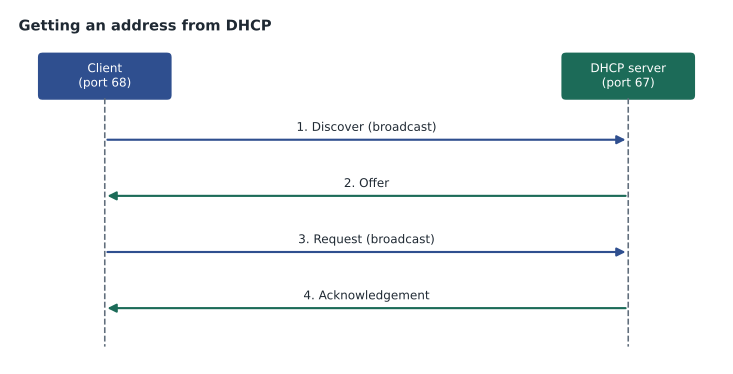
A client gets its first lease in four steps, often remembered as DORA. The client sends a Discover as a broadcast, because it has no address yet and does not know where the server is. The server replies with an Offer of an address and settings. The client broadcasts a Request for that offer, which also tells any other servers that their offers were not taken. The server confirms with an Acknowledgement, and the client starts using the address. DHCP uses UDP, with servers listening on port 67 and clients on port 68.
Besides the address and mask, a DHCP server sends options: the default gateway, the DNS servers, a domain name, and sometimes extras such as the address of a phone system or a network boot server. Administrators can also create reservations (Cisco calls them manual bindings) that always give the same address to a particular MAC address, which suits printers and servers. Some addresses at the start or end of each subnet are excluded from the pool so they can be set statically on routers and other infrastructure.
| DHCP setting | Example for the Northfield lab VLAN |
|---|---|
| Network | 10.40.50.0/24 |
| Pool range | 10.40.50.20 to 10.40.50.220 |
| Excluded addresses | 10.40.50.1 to 10.40.50.19 (router, switch, printers) |
| Default gateway option | 10.40.50.1 |
| DNS server option | 10.40.1.10 and a public resolver as backup |
| Lease time | 8 hours for the public lab; staff VLANs use longer leases |
DHCP relay
DHCP Discover messages are broadcasts, and routers do not forward broadcasts. A DHCP server on one subnet therefore cannot hear clients on another unless something forwards their requests. That job is done by a DHCP relay agent, usually the router or layer 3 switch that is the client's default gateway. On Cisco devices it is set with the ip helper-address command on the gateway interface. The relay receives the broadcast, turns it into a unicast message to the server and adds the subnet it came from, so the server knows which scope to use.
NF-CORE(config)# interface vlan 50
NF-CORE(config-if)# description Public-Lab
NF-CORE(config-if)# ip address 10.40.50.1 255.255.255.0
NF-CORE(config-if)# ip helper-address 10.40.1.10
When DHCP fails: APIPA
When a Windows, macOS or Linux client cannot reach any DHCP server, it gives itself an address from 169.254.0.0/16, a range called link-local or, on Windows, APIPA (Automatic Private IP Addressing). The address lets it talk to other link-local devices on the same cable, but there is no gateway, so nothing beyond the local link is reachable. A 169.254 address is therefore a symptom, not a configuration: it says that DHCP did not answer.
The usual causes are a broken path to the server (an unplugged cable, a port in the wrong VLAN, a missing ip helper-address), a server that is stopped, or a scope that has run out of addresses. At Northfield, Jordan found the last one. A weekend coding camp had filled the lab with forty extra laptops, the scope had only 200 addresses and a long lease, and every address was taken. The PCs that had renewed recently were fine; the ones that had rebooted could not get an address. Shortening the lease and widening the pool fixed it, and the change went into the ticket so the next camp would not repeat the problem.
C:\> ipconfig /all
   IPv4 Address. . . . . . . . . . . : 169.254.37.112(Preferred)
   Subnet Mask . . . . . . . . . . . : 255.255.0.0
   Default Gateway . . . . . . . . . :
   DHCP Enabled. . . . . . . . . . . : Yes
C:\> ipconfig /release
C:\> ipconfig /renew
On the server side, Cisco routers acting as DHCP servers can show their leases with show ip dhcp binding and the pool usage with show ip dhcp pool. Windows Server and most firewalls have similar screens that show how many addresses are free. Checking pool usage is a quick test whenever a group of devices suddenly fails at the same time.
DNS: turning names into addresses
People use names such as portal.riversidefamilylaw.com; networks use IP addresses. The Domain Name System (DNS) translates between them. When a PC needs an address, it asks its configured DNS server, the resolver. The resolver answers from its cache if it can; otherwise it asks the root servers which servers handle .com, asks those servers which servers handle riversidefamilylaw.com, and finally asks that domain's authoritative server for the record. The answer is cached on the resolver and on the PC for a time set by the record's TTL. DNS normally uses UDP port 53, switching to TCP for large answers and transfers.
| Record type | Holds | Example use |
|---|---|---|
| A | An IPv4 address for a name | portal.example.com to 198.51.100.20 |
| AAAA | An IPv6 address for a name | The same name over IPv6 |
| CNAME | An alias pointing to another name | www to the main site name |
| MX | The mail servers for a domain | Where email for the firm is delivered |
| PTR | A name for an address (reverse lookup) | Logs and mail servers checking who an address belongs to |
| TXT | Free text, often used for verification and email security | SPF records that list approved mail senders |
DNS problems look like network outages to users, because nothing works by name. The key diagnostic step is to separate the two: if ping 8.8.8.8 or another known address works but ping by name fails, the network path is fine and the problem is DNS. The nslookup command, available on every major operating system, asks a DNS server directly and shows the answer. On Windows, ipconfig /displaydns shows the local cache and ipconfig /flushdns clears it, which helps when a record has changed but the PC is still using the old answer.
C:\> nslookup portal.riversidefamilylaw.com
Server:  dns.brightline.local
Address:  10.1.1.10

Non-authoritative answer:
Name:    portal.riversidefamilylaw.com
Address:  198.51.100.20

C:\> ipconfig /flushdns
Internal networks often run their own DNS servers so that local names, such as the practice-management server at Prairie Paws, resolve to private addresses. A common fault after changes is a PC pointed at a public DNS server that knows nothing about internal names, so the internet works but the server cannot be found by name.
NAT: sharing one public address
The addresses used inside most networks come from the private ranges set aside by RFC 1918: 10.0.0.0/8, 172.16.0.0/12 and 192.168.0.0/16. These addresses are not routed on the internet, so many organizations can reuse them. To reach the internet, traffic from private addresses must be translated to a public address. That is the job of Network Address Translation (NAT), performed by the router or firewall at the edge of the network.
Most small networks use a form called PAT (Port Address Translation), also called NAT overload. Many inside devices share one public address, and the router keeps each conversation separate by also translating source port numbers and keeping a table of which inside address and port maps to which outside port. When a reply arrives, the router looks up the table and sends it to the right inside device. Static NAT maps one inside address permanently to one public address, and port forwarding maps one public port to one inside server, which is how an inside web server or camera system can be reached from outside.
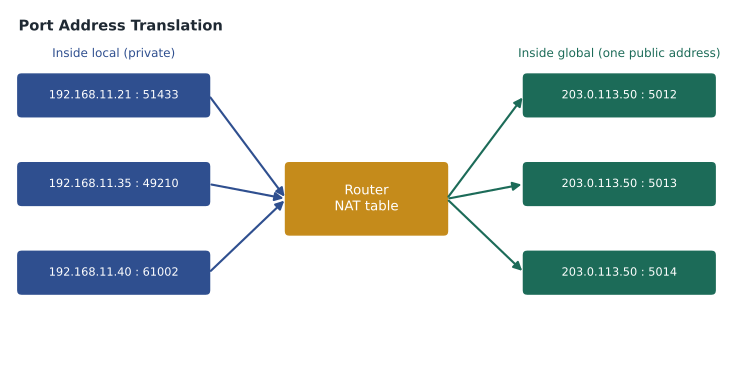
R-KC1# show ip nat translations
Pro  Inside global        Inside local         Outside local       Outside global
tcp  203.0.113.50:5012    192.168.11.21:51433  198.51.100.80:443   198.51.100.80:443
tcp  203.0.113.50:5013    192.168.11.35:49210  198.51.100.80:443   198.51.100.80:443
udp  203.0.113.50:5014    192.168.11.40:61002  192.0.2.53:53       192.0.2.53:53
In NAT terms, inside local is a device's private address, inside global is the public address it appears as, and outside addresses belong to the remote server. NAT also hides inside addresses from the internet, which helps a little with security, but it is not a firewall; the firewall rules still decide what is allowed. IPv6, with its huge address space, is designed to work without NAT, which is one reason it changes how edge security is planned.
Common mistakes
MistakeTreating a 169.254 address as a valid configuration.
InsteadIt means DHCP failed. Check the cable, the VLAN, the relay and the pool.
MistakeRestarting the router when only names fail.
InsteadPing a known IP address first; if that works, investigate DNS.
MistakeForgetting ip helper-address on a new VLAN.
InsteadAny VLAN whose DHCP server is on another subnet needs a relay on its gateway.
MistakeCalling NAT a firewall.
InsteadNAT translates addresses; filtering is done by firewall rules.
DHCP and DNS for IPv6
IPv6 hosts can configure themselves in more than one way. With SLAAC (stateless address autoconfiguration), a host builds its own address from the network prefix announced in the router's advertisements. With DHCPv6, a server assigns addresses much as in IPv4. Many networks combine the two, using SLAAC for addresses and DHCPv6 or router advertisement options for DNS servers. The diagnostic idea is unchanged: check that the host has a global address in the expected prefix, a default gateway (usually a link-local fe80 address) and working DNS. A host with only an fe80 address has not heard from a router, the IPv6 equivalent of a 169.254 address.
DNS works the same way for both protocols. The difference is the record type: AAAA records hold IPv6 addresses. When both A and AAAA records exist, most operating systems try IPv6 first and fall back to IPv4, so a broken IPv6 path can make some sites slow to open even though IPv4 works perfectly.
DNS changes take time to spread because answers are cached. When Riverside Family Law moved its portal to a new address, the old answer stayed in resolvers' caches until its TTL expired. Brightline lowered the record's TTL to five minutes a day before the move and raised it again afterwards, so that the switch-over took minutes rather than hours. Planning TTLs around changes is a small step that prevents a large number of confused support calls.
A last DHCP detail is worth remembering for the exam and for real work: the DHCP server, the relay and the client all have to agree on which subnet a request came from. If a port is placed in the wrong VLAN, the client receives a perfectly valid address for that VLAN, as case 1 in lesson 12 shows, so a valid address is not proof that a device is on the right network.
Worked problem
Is it the network or DNS?
A Riverside Family Law laptop cannot open the firm's portal by name. ping 198.51.100.20 succeeds and ping portal.riversidefamilylaw.com reports that it could not find the host. ipconfig shows a DNS server of 192.168.1.1, the address of the home router the lawyer used last week. What is the problem?
Show solution
- Pinging the IP address works, so the network path and gateway are fine.
- Pinging the name fails, so name resolution is the problem.
- The DNS server is a home router address that is not reachable from the office network; the laptop kept a manually set DNS server.
Answer: Set the laptop back to obtain DNS automatically, release and renew, and flush the DNS cache.
Summary and key terms
- DHCP leases addresses, masks, gateways and DNS servers from a scope using Discover, Offer, Request and Acknowledgement, on UDP ports 67 and 68; a relay with ip helper-address forwards requests across routers, and a 169.254 address means DHCP failed.
- DNS resolves names to addresses with A, AAAA, CNAME, MX and PTR records on port 53, and nslookup tests it directly.
- NAT, usually PAT, lets many private RFC 1918 addresses share one public address by tracking ports, while static NAT and port forwarding expose specific inside servers.
- DHCP scope
- The pool of addresses and options a DHCP server offers for one subnet.
- Lease
- A time-limited assignment of an address to a client.
- DHCP relay
- A router function that forwards DHCP broadcasts to a server on another subnet.
- APIPA
- A self-assigned 169.254.x.x address used when DHCP fails.
- Resolver
- The DNS server a client asks, which finds and caches answers.
- A record
- A DNS record mapping a name to an IPv4 address.
- PAT
- Port Address Translation, letting many inside hosts share one public address.
- RFC 1918
- The standard that reserves private IPv4 ranges.
Practice problems
Work each problem on paper first, then reveal the answer to check.
What are the four DHCP messages in order?
Show answer
Discover, Offer, Request, Acknowledgement.
Which DNS record type points a name to an IPv6 address?
Show answer
AAAA.
Name the three RFC 1918 private ranges.
Show answer
10.0.0.0/8, 172.16.0.0/12 and 192.168.0.0/16.
Lesson quiz · 5 questions
Score 60% or more to complete this lesson.
Create a free account to save your progress, take quizzes and earn a certificate.