
CSCO-112 · Lesson 6 of 12 · 18 min
Cloud and virtualization basics
▶ Video coming soon A video version of this lesson is on the way.
Riverside Family Law runs its document management system on an old server in a closet. The server is eight years old, its warranty has expired, and Owen Larkin, Brightline's owner, has been asked to recommend what replaces it. Over lunch he asks Jordan and Dev to think through the options: a new physical server, a virtual server in Brightline's own hosted environment, or a cloud service the firm simply subscribes to. "Every one of those still needs a network," Owen says. "The difference is who owns the boxes and who you call when it breaks." This lesson covers the cloud and virtualization ideas that a support technician needs to follow that kind of conversation and to support what is chosen.
Virtualization
Virtualization lets one physical computer run several independent operating systems at once. Each one runs in a virtual machine (VM), which behaves like a complete computer with its own processors, memory, disks and network cards, all of them simulated. A layer of software called a hypervisor shares the real hardware among the VMs and keeps them isolated from each other.
There are two kinds of hypervisor. A type 1 or bare-metal hypervisor, such as VMware ESXi, Microsoft Hyper-V on Windows Server, KVM on Linux or Proxmox, runs directly on the server hardware and is used for production servers. A type 2 or hosted hypervisor, such as VirtualBox or VMware Workstation, runs as an application on a normal desktop operating system and is used for testing, training and labs. Jordan uses a type 2 hypervisor on his laptop to run practice routers and Linux machines while studying for the CCST Networking exam.
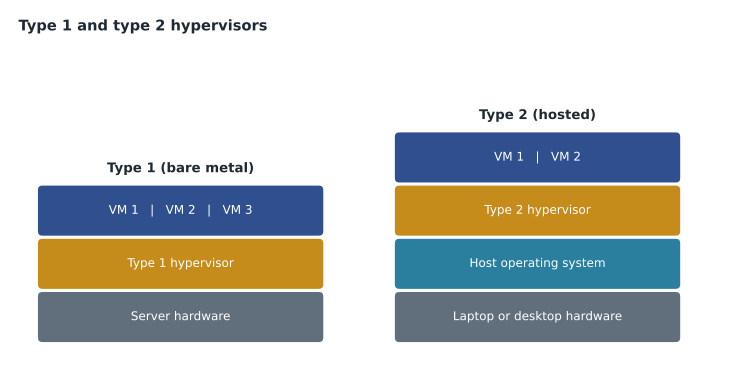
Virtualization has clear benefits. One physical server can replace many lightly used ones, saving power and space. VMs can be copied, backed up as files, moved between hosts while running, and restored quickly from a snapshot after a failed update. New servers can be created in minutes rather than ordered and racked. The risks are concentration and complexity: if the physical host fails without a second host to take over, every VM on it goes down together, and a mistake in the hypervisor affects everything above it.
Virtual networking
VMs need networks too. Inside a host, the hypervisor provides a virtual switch that connects each VM's virtual network card to the others and to the host's physical network ports. Virtual switches behave much like physical ones: they learn MAC addresses, they can place VMs in VLANs, and their uplinks to the physical network are often trunks carrying several VLANs. A VM's traffic may therefore never touch a physical cable when it talks to another VM on the same host, which can surprise a technician who is looking for it on the physical switch.
Network functions themselves can also be virtual. Network functions virtualization (NFV) runs routers, firewalls, load balancers and VPN gateways as software in VMs or containers instead of as dedicated boxes. Cisco offers virtual versions of its routers and firewalls for this purpose. A small business is unlikely to run these itself, but its cloud provider almost certainly does.
Containers
Containers are a lighter form of isolation. Instead of simulating a whole computer, a container packages one application with the libraries it needs and runs it on the host's operating system kernel, isolated from other containers. Containers start in seconds, use less memory than VMs and can be moved easily between computers. Docker is the best-known container tool, and Kubernetes is widely used to run many containers across many servers. For networking, containers get their own virtual interfaces and addresses, usually behind a form of NAT on the host, and they appear and disappear often, which makes addresses less useful for identifying them than names.
| Virtual machine | Container | |
|---|---|---|
| Isolates | A whole computer, with its own operating system | One application, sharing the host's kernel |
| Start-up time | Minutes | Seconds |
| Size | Gigabytes | Often megabytes |
| Typical use | Servers, legacy applications, mixed operating systems | Web applications and services built to scale out |
| Managed with | A hypervisor such as ESXi, Hyper-V or KVM | A container runtime such as Docker, often orchestrated by Kubernetes |
What the cloud is
Cloud computing means using computing resources, such as servers, storage, databases and applications, delivered over a network by a provider and paid for as they are used. The usual definition, from the US National Institute of Standards and Technology, lists five characteristics: on-demand self-service, broad network access, resource pooling among many customers, rapid elasticity so capacity can grow and shrink quickly, and measured service so that use is metered and billed. The cloud is still made of physical servers and switches in data centres; the customer simply does not own or manage them.
Service models
Cloud services are grouped by how much the provider manages. With Infrastructure as a Service (IaaS), the provider supplies virtual machines, storage and networks, and the customer installs and manages the operating systems and applications. With Platform as a Service (PaaS), the provider also manages the operating system and runtime, and the customer deploys only its own application code. With Software as a Service (SaaS), the provider runs the whole application and the customer just uses it through a browser or app, as with Microsoft 365, Google Workspace or a hosted practice-management system.
Whatever the model, responsibility is shared. The shared responsibility model says the provider secures the parts it manages, such as the data centres, the hardware and the hypervisors, while the customer secures what it controls: its user accounts, its data, its configuration and, in IaaS, its operating systems. Many cloud security failures happen on the customer's side, through weak passwords, accounts without multifactor authentication or storage left open to the public.
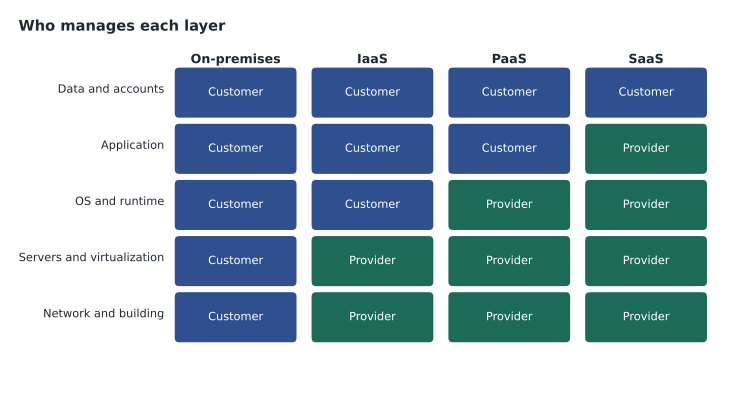
| Layer | On-premises | IaaS | PaaS | SaaS |
|---|---|---|---|---|
| Data and user accounts | Customer | Customer | Customer | Customer |
| Application | Customer | Customer | Customer | Provider |
| Operating system and runtime | Customer | Customer | Provider | Provider |
| Virtualization and servers | Customer | Provider | Provider | Provider |
| Network, storage hardware and building | Customer | Provider | Provider | Provider |
Deployment models
Clouds are also described by who uses them. A public cloud, such as Amazon Web Services, Microsoft Azure or Google Cloud, serves many customers on shared infrastructure. A private cloud is dedicated to one organization, whether in its own data centre or hosted by a provider. A hybrid cloud combines the two, for example keeping sensitive systems on-premises while running other services in a public cloud. A community cloud is shared by organizations with common requirements, such as government agencies. Most businesses today use several providers at once, which is sometimes called multicloud.
The network side of the cloud
Moving services to the cloud makes the internet connection critical. When the document system lived in the closet, a failed internet link only stopped email and web browsing. Once it moves to the cloud, the same failure stops the firm's work entirely. Technicians therefore look at bandwidth, latency and redundancy: a second internet connection from a different provider, ideally on a different physical route, and a firewall or router that fails over between them automatically.
Organizations connect to the cloud in a few ways. Most small businesses simply use the internet, with encryption provided by HTTPS or a VPN. Larger ones use dedicated private connections offered by the cloud providers. SD-WAN (software-defined wide area networking) is common for businesses with several sites: devices at each site build encrypted tunnels over ordinary internet links, choose the best path for each application, and are managed centrally. Kettle & Crumb's three shops would be a natural fit if they grow.
Networking equipment itself is increasingly cloud-managed, as lesson 1 described. The switches and access points still forward traffic locally, so the network keeps working if the dashboard is unreachable, but configuration changes and monitoring depend on the provider's service.
Data location and privacy
Cloud data lives somewhere physical, and that location can matter. In Canada, PIPEDA and provincial laws such as Saskatchewan's Health Information Protection Act set rules for personal and health information. They generally allow data to be stored outside Canada, but organizations remain responsible for protecting it and may need to tell people it may be processed abroad. Some public bodies and health organizations have stricter rules about keeping data in Canada. Law firms also have professional obligations to keep client information confidential, so Riverside's choice of provider needs the firm's approval and a look at where the data will be held.
What the firm chose
After comparing costs, Owen recommends a SaaS document management system with data hosted in Canadian data centres, multifactor authentication for every user and a second internet connection at the office. Brightline will manage the user accounts, the office network and the backup of the firm's data, while the provider runs the application. Jordan's part is the network checklist: confirming bandwidth, setting up the failover link and documenting which firewall rules the new service needs.
Common mistakes
MistakeAssuming that moving to the cloud removes the customer's security responsibilities.
InsteadThe customer still owns its data, accounts and configuration under the shared responsibility model.
MistakeLooking for traffic between two VMs on the physical switch.
InsteadVMs on the same host may talk through the virtual switch without touching a cable.
MistakeUsing one internet connection for a business that depends on SaaS.
InsteadPlan a second connection and automatic failover when the cloud is critical.
MistakeConfusing a type 2 lab hypervisor with production virtualization.
InsteadProduction servers run on type 1, bare-metal hypervisors.
Supporting cloud services day to day
Once a client relies on cloud services, the support work changes shape. Many problems that used to be fixed in the server closet are now the provider's to fix, and the technician's job becomes telling the difference quickly. Every major provider publishes a status page showing outages and maintenance; checking it is the first step when a cloud service fails for everyone at once. If the status page is clear and only one office is affected, the cause is more likely local: the internet connection, the firewall, DNS or the users' accounts.
Cloud services also bring identity to the centre of support. Users sign in to many services with one account through single sign-on, so a locked account, an expired password or a lost MFA device can look like a dozen different application failures. Brightline's help desk checks the identity system early whenever several cloud applications fail for one person.
Finally, cloud costs are metered, so changes have a price. Leaving a test virtual machine running, storing old backups in an expensive tier or sending large amounts of data out of a cloud region can produce a surprising bill. Technicians who create cloud resources tag them with the client, the ticket and an end date, and remove them when the work is done.
Backups need special thought in the cloud. A SaaS provider keeps the service running and protects against its own hardware failures, but its contract often does not promise to restore data that a customer deleted by mistake or that ransomware encrypted through a user's account. Brightline therefore backs up each client's cloud email and documents to a separate service, so that a restore does not depend on the same account that suffered the problem.
For technicians, the practical lesson is that the network, the identity system and the provider's status page now belong in the first five minutes of any cloud troubleshooting, ahead of anything on the user's own computer.
Worked problem
Which service model?
For each case, name the service model: (a) a firm rents virtual servers and installs its own Windows Server on them; (b) a developer uploads code and the provider runs it on a managed runtime; (c) staff log in to a web-based accounting system.
Show solution
- Renting virtual machines and managing the operating system is IaaS.
- Supplying only the code while the provider manages the runtime is PaaS.
- Using a complete application through a browser is SaaS.
Answer: (a) IaaS, (b) PaaS, (c) SaaS.
Summary and key terms
- Virtualization runs several virtual machines on one physical host under a hypervisor: type 1 on bare metal for production, type 2 on a desktop for labs.
- Virtual switches connect VMs and can carry VLANs, and network functions can run as software.
- Containers package single applications and share the host kernel.
- Cloud computing delivers on-demand, metered resources over a network in IaaS, PaaS and SaaS models, deployed as public, private, hybrid or community clouds.
- Responsibility is shared, internet links become critical, SD-WAN connects sites, and data location can raise privacy questions.
- Hypervisor
- Software that runs and isolates virtual machines on physical hardware.
- Virtual machine
- A software computer with its own operating system, running on a hypervisor.
- Virtual switch
- A hypervisor's software switch connecting VMs to each other and the network.
- Container
- An isolated application package that shares the host's operating system kernel.
- IaaS
- Infrastructure as a Service: rented virtual servers, storage and networks.
- PaaS
- Platform as a Service: a managed runtime for the customer's code.
- SaaS
- Software as a Service: a complete application used over the network.
- Shared responsibility model
- The split of security duties between cloud provider and customer.
Practice problems
Work each problem on paper first, then reveal the answer to check.
What is the difference between a type 1 and a type 2 hypervisor?
Show answer
Type 1 runs directly on the hardware; type 2 runs as an application on a host operating system.
In SaaS, who is responsible for user accounts and data?
Show answer
The customer.
Why does moving a critical system to the cloud change the importance of the internet connection?
Show answer
If the connection fails, the business can no longer reach the system, so redundancy becomes important.
Lesson quiz · 5 questions
Score 60% or more to complete this lesson.
Create a free account to save your progress, take quizzes and earn a certificate.