
CSCO-102 · Lesson 2 of 12 · 23 min
IP addressing and DHCP for support staff
▶ Video coming soon A video version of this lesson is on the way.
Ticket BL-24871 comes in at 8:12 on Tuesday, October 27. The front-desk PC at Northfield Community Centre "has no internet", and the volunteer on the desk has already restarted it twice. Jordan connects to the centre's network monitoring dashboard and sees the PC online, so he asks the volunteer to read out the IPv4 address from the network details window. "One six nine, two five four, eighty-eight, twelve," she says. Jordan writes it down and smiles, because he knows what that address means before he has asked anything else. Marisol, listening on the call, nods. "Tell her what that number is telling us."
IP addresses are the second step on the staircase from lesson 1, and support technicians read them the way a mechanic reads a dashboard warning light. Some addresses are perfectly normal. Some reveal at a glance that the device never got a proper address from the network. Knowing which is which, and understanding how DHCP hands out addresses, solves a large share of connectivity tickets.
The structure of an IPv4 address
An IPv4 address is 32 bits long, written as four decimal numbers from 0 to 255 separated by dots, such as 192.168.20.47. Each number represents 8 bits, called an octet. The subnet mask, written the same way or as a prefix length such as /24, divides the address into a network part and a host part. With the mask 255.255.255.0, or /24, the first three octets identify the network and the last octet identifies the host. Every device whose address starts with 192.168.20 is on the same local network as 192.168.20.47, and can be reached directly without going through the router.
A /24 network has 256 addresses, of which two are reserved. The lowest, ending in .0, is the network address, which names the network itself. The highest, ending in .255, is the broadcast address, used to send to every device on the network at once. That leaves 254 usable host addresses, from .1 to .254. In small offices, the router usually takes .1 or .254, and the DHCP server hands out a range in between.
Worked problem
Is this address local?
The bakery office laptop has address 192.168.20.47 with mask 255.255.255.0. The receipt printer is at 192.168.20.210 and the accounting cloud app is at 52.18.144.9. Which can the laptop reach directly, and which goes through the gateway?
Show solution
- With a /24 mask, the network part is the first three octets: 192.168.20.
- The printer's address starts with 192.168.20, so it is on the same network and is reached directly.
- The cloud app's address starts with 52.18.144, a different network.
- Traffic to the cloud app goes to the default gateway, 192.168.20.1, which forwards it.
Answer: The printer is local; the cloud app is reached through the gateway.
Private and public addresses
The internet uses public addresses that are unique worldwide. Inside homes and offices, networks use private addresses from three ranges set aside for that purpose: 10.0.0.0 to 10.255.255.255, 172.16.0.0 to 172.31.255.255, and 192.168.0.0 to 192.168.255.255. Private addresses can be reused by every organization, because they never appear directly on the internet. The office router translates between the private addresses inside and its one public address outside, a process called network address translation, or NAT.
For support work, the distinction matters in two ways. First, a client should normally have a private address on an office network; a public address on an ordinary office PC would be unusual. Second, when a user asks for "their IP address" for a vendor's firewall rule or remote support, they usually need the public address the office presents to the internet, not the private one shown in ipconfig. Websites that show "what is my IP" report the public address.
| Range | Type | What it tells a support technician |
|---|---|---|
| 10.0.0.0/8, 172.16.0.0/12, 192.168.0.0/16 | Private | Normal for an office or home network |
| 169.254.0.0/16 | Link-local (APIPA) | The device did not get an address from DHCP |
| 127.0.0.0/8 | Loopback | The device talking to itself; 127.0.0.1 tests the network software |
| Anything else | Usually public | Normal on the internet side of the router |
The address that means "no DHCP"
When a device set to obtain an address automatically cannot reach a DHCP server, Windows and most other systems give themselves an address from the link-local range 169.254.0.0/16. Microsoft calls this Automatic Private IP Addressing, or APIPA. The device can talk to other devices on the same cable that also have link-local addresses, but it has no gateway and cannot reach the internet or most servers. A 169.254 address is therefore a clear sign: the device has a link, but DHCP failed.
That is what Jordan explains to the volunteer at the community centre. The PC has a link, because it reports an address at all, but it has not received a real address. The likely causes are that the DHCP server is down, that the PC is plugged into a port that is not connected to the right network, or that the network between the PC and the DHCP server has a fault. Because the other front-desk PC is working, he suspects the port or cable. He asks her to move the PC's cable to the port the other PC uses, and within a minute the PC shows 192.168.50.31. The original wall port turns out to be unpatched in the network closet, and Jordan creates a follow-up ticket for Dev Anand, Brightline's network technician, to patch it properly.
How DHCP works
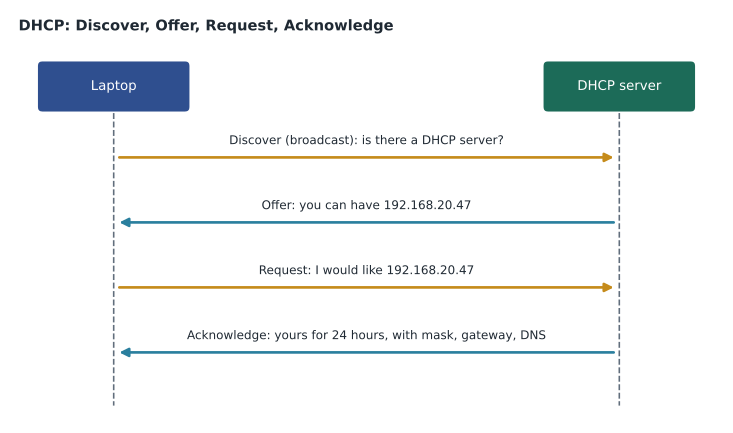
DHCP, the Dynamic Host Configuration Protocol, hands out addresses and the other settings a client needs. When a device joins a network, it broadcasts a Discover message asking whether any DHCP server is listening. A server replies with an Offer containing an available address. The client sends a Request asking for that address, and the server confirms with an Acknowledge, which includes the subnet mask, default gateway, DNS servers and the length of the lease. These four messages are often remembered by their initials, DORA.
An address from DHCP is leased, not owned. A typical office lease lasts a day or eight hours; guest networks often use an hour or less. Halfway through the lease, the client asks the same server to renew, and if all is well the lease is extended without the address changing. If the server has gone away, the client keeps trying and, when the lease finally expires, gives up the address. That is why a DHCP server failure may not show up immediately: devices with current leases keep working, and the problem appears as people arrive the next morning or as leases run out during the day.
Scopes, exhaustion and reservations
A DHCP server hands out addresses from a defined pool called a scope. If the scope is too small for the number of devices, new devices cannot get an address once it runs out, and they fall back to link-local addresses. Scope exhaustion is common on guest and public Wi-Fi networks, where phones come and go and each one holds a lease for its full duration even after its owner has left. The community centre's public Wi-Fi ran out of addresses during a busy weekend event in September, and Marisol fixed it by enlarging the scope and shortening the lease to one hour.
A reservation tells the DHCP server always to give the same address to a particular device, identified by its MAC address. Reservations suit printers, cameras and other devices that others need to find at a predictable address, without the work of configuring a static address on the device itself. If a reserved device is replaced, its new MAC address must be added to the reservation, or the new device will receive a random address and everything that pointed to the old address will fail. That is exactly what happened when Prairie Paws replaced a label printer last spring.
Static addresses and conflicts
Some devices are configured with a static address by hand. Servers, network equipment and some printers are typically static. A static address must be outside the DHCP scope, or the DHCP server may hand the same address to another device. Two devices with the same address on the same network cause an address conflict: Windows usually warns that another device is using the address and may refuse to use it, and connections to both devices become unreliable. When a conflict appears, the support technician finds the two devices, usually from the DHCP server's lease table and the static address records, and moves the static one out of the scope or makes it a reservation instead.
Reading and renewing the address on a client
C:\Users\jordan> ipconfig /all
   ...
   DHCP Enabled. . . . . . . . . . . : Yes
   IPv4 Address. . . . . . . . . . . : 192.168.50.31(Preferred)
   Subnet Mask . . . . . . . . . . . : 255.255.255.0
   Lease Obtained. . . . . . . . . . : Tuesday, October 27, 2026 8:24:10 AM
   Lease Expires . . . . . . . . . . : Wednesday, October 28, 2026 8:24:10 AM
   Default Gateway . . . . . . . . . : 192.168.50.1
   DHCP Server . . . . . . . . . . . : 192.168.50.1
   DNS Servers . . . . . . . . . . . : 192.168.50.1

C:\Users\jordan> ipconfig /release
C:\Users\jordan> ipconfig /renew
The /all switch shows the details that matter for DHCP problems: whether DHCP is enabled, which server issued the lease and when it expires. Releasing and renewing forces a fresh DHCP exchange, which fixes a client that has a stale or wrong address after moving networks. On macOS, the Renew DHCP Lease button is in the network adapter's details in System Settings; on Linux, the method depends on the network manager in use. A support technician should warn the user before releasing an address remotely, because the remote session itself will drop.
IPv6 in support work
IPv6 addresses are 128 bits long and written as eight groups of hexadecimal digits separated by colons, with runs of zeros shortened to a double colon, such as 2001:db8:4a2::17. Most modern operating systems have IPv6 turned on, and many internet services now prefer it. Every IPv6 interface has a link-local address starting with fe80, which is normal and does not mean a failure, unlike a 169.254 IPv4 address. Devices may also get global IPv6 addresses automatically from router advertisements, a method called stateless address autoconfiguration, or from a DHCPv6 server.
For entry-level support, IPv6 mostly matters in two ways. A user's device may reach a website over IPv6 while another device reaches it over IPv4, which can explain why one works and the other does not. And an fe80 address alone is normal, while a missing global address on a network that is supposed to provide one is a clue. CSCO-111 covers IPv6 addressing in more detail.
Worked problem
Diagnosing from the address
A laptop at Riverside Family Law shows IPv4 address 169.254.31.7 with no default gateway, and an IPv6 address starting with fe80. Other laptops in the office work. What do these addresses say, and what should Jordan check?
Show solution
- 169.254 means DHCP failed for IPv4 on this laptop.
- The fe80 IPv6 address is normal on every interface and does not by itself show a problem.
- Other laptops work, so the DHCP server is probably fine.
- Check this laptop's connection: the Wi-Fi network it joined, the cable or dock port, and any security setting that might block it, then renew the lease.
Answer: The laptop has a link but no DHCP lease. Because others work, look at this laptop's connection or network choice, then release and renew.
Common mistakes
MistakeTreating a 169.254 address as a normal address.
InsteadIt means DHCP failed; the device cannot reach the gateway.
MistakeTreating an fe80 IPv6 address as a failure.
InsteadEvery IPv6 interface has an fe80 link-local address; it is normal.
MistakeGiving a printer a static address inside the DHCP scope.
InsteadUse a reservation, or a static address outside the scope.
MistakeForgetting to update a reservation after replacing a device.
InsteadA new device has a new MAC address; update the reservation.
MistakeReleasing the address on a remote session without warning.
InsteadThe session will drop; tell the user and plan how to reconnect.
Summary and key terms
- An IPv4 address has 32 bits in four octets; the subnet mask splits it into network and host parts.
- A /24 network has 254 usable host addresses; .0 names the network and .255 is the broadcast address.
- Private ranges are 10/8, 172.16/12 and 192.168/16; NAT translates them to a public address.
- A 169.254 address means the device did not get a DHCP lease.
- DHCP uses Discover, Offer, Request and Acknowledge, and leases addresses for a set time.
- Scopes can run out; reservations give fixed addresses by MAC address; static addresses must sit outside the scope.
- IPv6 link-local fe80 addresses are normal; a 169.254 IPv4 address is not.
- Octet
- One of the four 8-bit parts of an IPv4 address.
- Prefix length
- The number of network bits in an address, written after a slash, such as /24.
- NAT
- Network address translation between private and public addresses.
- APIPA
- Automatic Private IP Addressing, which assigns a 169.254 address when DHCP fails.
- DHCP lease
- An address on loan from a DHCP server for a set time.
- Scope
- The pool of addresses a DHCP server hands out.
- Reservation
- A DHCP setting that always gives the same address to one device.
Practice problems
Work each problem on paper first, then reveal the answer to check.
What does a 169.254 address tell you?
Show answer
The device has a link but did not get a DHCP lease.
Name the four DHCP messages in order.
Show answer
Discover, Offer, Request, Acknowledge.
How many usable host addresses does a /24 network have?
Show answer
254.
Is 172.20.4.9 a private or public address?
Show answer
Private; it is inside 172.16.0.0/12.
Why might public Wi-Fi run out of addresses?
Show answer
Many short visits each hold a lease for its full length, exhausting the scope.
What is the safer alternative to a static printer address inside the scope?
Show answer
A DHCP reservation.
Lesson quiz · 5 questions
Score 60% or more to complete this lesson.
Create a free account to save your progress, take quizzes and earn a certificate.