
CSCO-102 · Lesson 11 of 12 · 21 min
Escalation, ethics and privacy
▶ Video coming soon A video version of this lesson is on the way.
On Monday, November 9, Jordan is fixing a slow laptop at Prairie Paws when he notices something he was not looking for. The laptop's downloads folder holds a spreadsheet named with the clinic's client list, exported that morning, and the browser shows it being uploaded to a personal file-sharing account. The laptop belongs to a receptionist who, the clinic manager mentioned in passing, is leaving at the end of the week to work for a competitor. Jordan's ticket is about a slow laptop. He does not open the spreadsheet, does not confront the receptionist and does not delete anything. He finishes the task he was asked to do, then calls Marisol from his car and tells her exactly what he saw. "Good," she says. "That's not yours to handle, and you handled it right."
Support technicians see a great deal: other people's files, email, browsing and personal lives. They also hold powerful access. This lesson covers when and how to escalate work beyond the first line of support, the ethical standards that go with privileged access, and the privacy laws in Canada that shape how support teams handle personal information.
Support tiers and escalation
Most help desks are organized in tiers. Tier 1, the first line, takes calls and tickets, handles common requests and known problems, and gathers information for anything more complex. Tier 2 handles problems that need deeper technical knowledge or higher access, such as server issues or complex network faults. Tier 3 is made up of specialists, engineers or the vendor, who handle the hardest problems and design changes. Some organizations add a tier 0 for self-service portals and knowledge base articles that users can follow themselves. At Brightline, Jordan works tier 1 with growing tier 2 duties; Dev and Keisha act as tier 2 and 3 for networking and security; and vendors are the final tier for their own products.
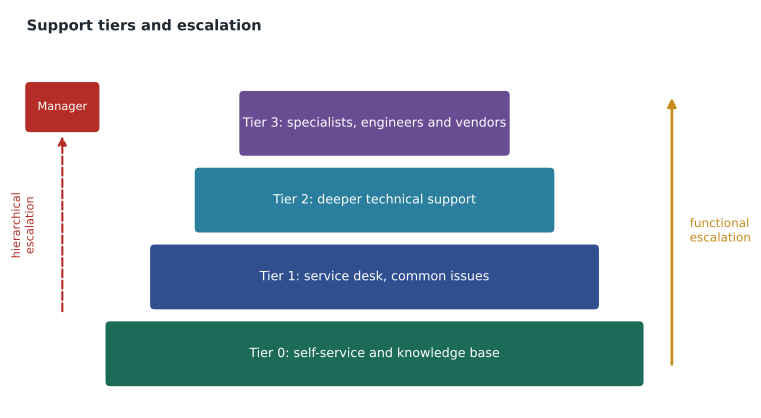
Escalation means moving a ticket to someone better placed to resolve it. Functional escalation sends it to a higher tier or a specialist group because it needs more expertise or access. Hierarchical escalation brings in management, for example when an SLA is about to be breached, a client is unhappy, or a decision is beyond the technician's authority. Escalating is not failure; escalating too late is. Signs that it is time include running out of ideas, needing access you do not have, the SLA clock running short, a problem affecting many users, a security concern, and anything that needs a business decision.
Escalating well
A good escalation saves the next person time. The ticket should state the problem clearly, the impact and urgency, everything already tried and its results, relevant logs or screenshots, and why the ticket is being escalated. The technician should tell the user that the ticket has moved, who now has it and when they can expect an update, then stay available to help. Marisol's rule is that nobody escalates a ticket that says only "please look at this".
| Escalate when | Example | Escalate to |
|---|---|---|
| The fix needs access or skills you lack | A firewall rule change for the law firm's VPN | Network technician (tier 2) |
| A security incident is suspected | Signs of ransomware or account takeover | Security analyst immediately |
| Many users or a whole site are affected | All clinic workstations lose the practice app | Tier 2 and the service desk lead |
| An SLA is about to be breached | A P2 ticket stuck waiting on a vendor | Service desk lead (hierarchical) |
| A business or policy decision is needed | A user asks for access their manager has not approved | The client's authorized contact |
| A vendor product is faulty | A point-of-sale update breaks receipts | The vendor's support, through the agreed channel |
Ethics and privileged access
Privileged access brings ethical duties. Support technicians must access only what the task needs, keep confidential what they see, never use their access for personal purposes, and report concerns through the proper channel rather than acting alone. Brightline's staff sign an acceptable use and confidentiality agreement, and many organizations have similar codes of conduct. Professional bodies publish codes of ethics for IT workers, which share the same core: honesty, competence, respect for privacy, and putting the client's and public's interests ahead of personal gain.
Jordan's discovery at the clinic shows how these duties work. He was not asked to investigate the receptionist, so he did not open files or gather evidence; doing so could have been a privacy breach of its own and could have damaged any later investigation. He did not confront the employee or tell colleagues, because that is a matter for the clinic's management and possibly its lawyer. He reported what he saw, factually and promptly, to his lead, who passed it to the client's authorized contact, the clinic owner. What happened next was the owner's decision, with Brightline helping only as asked: disabling the receptionist's access to the shared files, and preserving logs.
| Situation | Ethical response |
|---|---|
| You see a user's personal email while fixing their PC | Look away, do not read it and do not mention its content |
| A friend asks you to look up a client's customer | Refuse; access is only for work tasks |
| You notice possible data theft by an employee | Do not investigate or confront; report factually to your lead |
| A manager asks you to read an employee's email | Follow the client's written policy and authorization, usually through HR and legal |
| You made a mistake that caused an outage | Report it honestly and quickly, and help fix it |
Privacy law: what support staff need to know
Privacy laws govern how organizations collect, use, disclose and protect personal information, meaning information about an identifiable person, such as names, addresses, phone numbers, health and financial details, and often device identifiers and location. Support technicians handle personal information constantly, so they need to know the basics of the laws that apply to their clients.
In Canada, the federal Personal Information Protection and Electronic Documents Act, PIPEDA, applies to private-sector organizations' commercial activities in most provinces, including Saskatchewan. Alberta, British Columbia and Quebec have their own private-sector laws that apply instead within those provinces, and several provinces, including Saskatchewan with its Health Information Protection Act, have separate laws for personal health information held by health trustees. PIPEDA is built on fair information principles: accountability, identifying purposes, consent, limiting collection, use and retention, accuracy, safeguards, openness, individual access and challenging compliance. It also requires organizations to report breaches of security safeguards that create a real risk of significant harm to the Office of the Privacy Commissioner of Canada, to notify affected individuals, and to keep records of every breach.
For Brightline's clients, the practical effects are clear. Prairie Paws holds pet owners' names, addresses and payment details, which PIPEDA protects; veterinary records are not human health records, so HIPA does not apply, but the clinic still treats them as confidential. Riverside Family Law holds extremely sensitive personal information and is bound by solicitor-client privilege and the Law Society of Saskatchewan's rules as well as PIPEDA. Kettle & Crumb holds payment card data, which the card industry's security standard governs by contract.
Privacy in everyday support work
Privacy law turns into a handful of daily habits. Collect and record only the personal information a ticket needs. Do not copy personal data to personal devices or unapproved cloud services. Use secure methods to transfer files, never ordinary email for sensitive documents. Lock your screen. Wipe or destroy storage properly when devices are retired, using the client's approved method and keeping a record. Treat a lost unencrypted laptop, a misdirected email containing client files, or unauthorized access to an account as a possible privacy breach, and escalate it promptly, because breach reporting has deadlines and the organization, not the technician, must decide whether to report.
Working with vendors
Some tickets can only be solved by a vendor: a bug in the practice management software, a fault in the internet provider's equipment, a failed part under warranty. Escalating to a vendor works best through the agreed channel, usually a support portal or phone line, with the client's account details, serial numbers, and a clear description of the problem and the troubleshooting already done. The vendor's case number goes into the Brightline ticket so that anyone can follow up. Brightline stays the client's point of contact throughout, chasing the vendor rather than leaving the client to do it, and records each update in the ticket.
Vendor escalation sometimes involves sharing information, such as log files or remote access to a device. Before sharing, the technician should check that the vendor is genuine, that the client has agreed, and that the information does not include more personal data than the vendor needs. Logs can be trimmed, and remote vendor sessions can be supervised so that the vendor sees only what is required.
Ethical duties also apply to small, everyday temptations: looking up a celebrity's account in a client's system out of curiosity, reading a colleague's ticket about their personal laptop, or using a client's software licence for a personal project. None of these may seem harmful in the moment, but each breaks the trust that privileged access depends on, and access logs make them visible. Brightline's rule is simple: if the access is not needed for the ticket in front of you, do not do it.
Vendors should also be held to the same privacy expectations as the help desk itself. Where a vendor will handle personal information, the client usually needs a written agreement covering how the data is protected, where it is stored and when it is deleted. Support technicians do not negotiate those agreements, but they should know whether one exists before sending a vendor anything sensitive, and ask the service desk lead when they are unsure.
Worked problem
Is it a possible breach?
A Riverside Family Law assistant emails Jordan: she accidentally sent a scanned custody agreement, with names, addresses and children's details, to the wrong external email address an hour ago. She asks him to "pull it back". What should Jordan do?
Show solution
- Try a message recall if the email system supports it, but recall rarely works for external recipients.
- Treat this as a possible privacy breach, because sensitive personal information has gone to an unauthorized person.
- Do not promise the assistant that it is fixed; escalate to Marisol and the firm's privacy officer or managing partner, who decide on next steps such as contacting the recipient and assessing whether reporting is required.
- Record the time, the recipient address and what was sent in the ticket, and keep copies of the relevant logs.
Answer: Attempt recall, but escalate it as a possible privacy breach to the firm's responsible person immediately and document the details. The firm decides whether to notify.
Data retention and disposal
Personal information should be kept only as long as it is needed. Help desks often hold old device images, exported mailboxes and copies of user files from migrations long after they are needed, which is a breach waiting to happen. Brightline's procedure deletes temporary copies when a ticket closes and wipes retired drives with a verified method, issuing the client a certificate of disposal. When a device leaves an organization for repair or recycling, its storage should be removed, wiped or encrypted first.
Common mistakes
MistakeInvestigating a suspected insider on your own.
InsteadReport factually to your lead; investigations belong to the client's management.
MistakeEscalating without context.
InsteadInclude the problem, impact, what was tried, results and why you are escalating.
MistakeWaiting too long to escalate.
InsteadEscalate early when access, skills, SLA time or authority run short.
MistakeDeciding yourself whether a privacy incident is reportable.
InsteadEscalate quickly; the organization decides and reporting has deadlines.
MistakeKeeping migration copies of user data indefinitely.
InsteadDelete temporary copies when the work is done and wipe retired storage.
Summary and key terms
- Help desks use tiers: self-service, service desk, deeper technical support and specialists or vendors.
- Functional escalation adds expertise; hierarchical escalation brings in management.
- Good escalations include the problem, impact, actions, results and reasons, and keep the user informed.
- Privileged access requires accessing only what the task needs, confidentiality and reporting concerns through proper channels.
- In Canada, PIPEDA and provincial laws govern personal information, with breach reporting to the Privacy Commissioner.
- Possible privacy breaches must be escalated promptly; the organization decides on reporting.
- Keep personal information only as long as needed and dispose of storage securely.
- Tier 1
- The first line of support, handling common issues and gathering information.
- Functional escalation
- Moving a ticket to a group with more expertise or access.
- Hierarchical escalation
- Bringing management into a ticket.
- Personal information
- Information about an identifiable individual.
- PIPEDA
- Canada's federal private-sector privacy law.
- HIPAA
- The US law protecting health information held by covered entities and business associates.
- Privacy breach
- Unauthorized access to, or disclosure or loss of, personal information.
Practice problems
Work each problem on paper first, then reveal the answer to check.
What is the difference between functional and hierarchical escalation?
Show answer
Functional adds expertise or access; hierarchical brings in management.
Name three signs it is time to escalate.
Show answer
Any three of: out of ideas, needing access you lack, SLA running short, many users affected, security concern, business decision needed.
You see a user's personal email during a fix. What should you do?
Show answer
Look away and not read or mention it.
Who decides whether a privacy breach must be reported?
Show answer
The organization, after the technician escalates it promptly.
Why not investigate a suspected insider yourself?
Show answer
It is outside your task, may breach privacy and could damage a proper investigation.
What should happen to temporary copies of user data after a migration?
Show answer
They should be deleted when the work is done.
Lesson quiz · 5 questions
Score 60% or more to complete this lesson.
Create a free account to save your progress, take quizzes and earn a certificate.