
CSCO-102 · Lesson 10 of 12 · 21 min
Talking to users: communication and empathy
▶ Video coming soon A video version of this lesson is on the way.
Gerald Haines, a senior partner at Riverside Family Law, calls at 7:48 on Friday, November 6, and he is angry. His laptop will not connect to the printer, he has a court filing due at nine, and, he says, "this is the third time this month your people have wasted my morning." Jordan feels the urge to defend himself, to explain that the last two tickets were about different things, to point out that he is new. Instead he takes a breath and does what Marisol has been coaching him to do for weeks. He listens, says back what he heard, apologizes for the frustration, and tells Gerald what he is going to do in the next five minutes. By 8:06 the filing is printed. By 8:30 Gerald has emailed Owen Larkin, Brightline's owner, to say that "the young fellow on the phone this morning was excellent."
Technical skill fixes problems; communication decides whether users trust the person fixing them. The CCST IT Support exam lists assisting end users as a core area, and for good reason: help desks are judged by how people feel after talking to them as much as by how many tickets they close. This lesson covers the communication skills that make support work go well, from the first greeting to the follow-up.
Professional basics
Professionalism starts before a word is spoken about the problem. Answer promptly and identify yourself and the organization. Use the user's name. Be on time for appointments and call ahead if you will be late. Dress appropriately for the client's workplace when visiting on site. Keep your phone away and your attention on the user. Avoid jargon, or explain it when it is needed. Respect the user's workspace and property: ask before moving things on their desk, and leave things as you found them. And keep confidential what you see, from the documents on a lawyer's screen to the medical notes on a vet's desk.
Tone carries more than words. On the phone, users cannot see a reassuring face, so a calm, steady voice and short pauses to let them speak matter. In writing, short paragraphs, plain language and a clear next step help. Exclamation marks, capital letters and humour can easily be misread in a ticket update; Marisol's rule is to write every message as if it might be forwarded to the client's managing partner, because sometimes it is.
Active listening
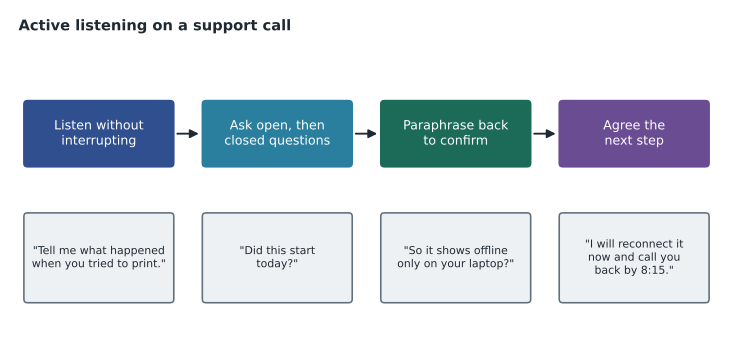
Active listening means giving full attention to what the user says, showing that you have understood, and asking questions to fill gaps. It sounds obvious, but under time pressure technicians often start forming a diagnosis after the first sentence and stop listening. The user may be about to mention the detail that matters: "it started after the router was replaced", or "only when I'm in the boardroom". Letting the user finish, then summarizing what you heard in your own words, catches misunderstandings early and shows the user they have been heard.
Questions that find the problem
Good questions move from open to closed. Open questions invite the user to describe things in their own words: "What happens when you try to print?" "What were you doing when it stopped working?" Closed questions confirm specific facts: "Does the printer show as offline?" "Did this work yesterday?" "Is anyone else affected?" Starting with open questions gathers information the technician did not think to ask about; closed questions then narrow it down. Leading questions that suggest the answer, such as "you didn't install anything, did you?", produce defensive or misleading answers and should be avoided.
| Question type | Purpose | Example |
|---|---|---|
| Open | Gather the user's description | "Can you walk me through what you see when you try to print?" |
| Closed | Confirm a specific fact | "Is the printer showing as offline on your screen?" |
| Scope | Find out who and what is affected | "Can anyone else in your office print to it?" |
| Timeline | Find when it started and what changed | "When did it last work? Has anything changed since?" |
| Leading (avoid) | Suggests the answer the asker wants | "You didn't change any settings, did you?" |
Empathy and frustrated users
Empathy means recognizing how the user feels and responding to it, not just to the technical problem. Users who call the help desk are often stressed: they have a deadline, a customer waiting, or a sense that technology is working against them. Acknowledging that, in plain words, lowers the temperature: "That sounds really frustrating, especially with a filing due this morning." An apology for the inconvenience is not an admission of fault, and it costs nothing.
When users are angry, the technician's job is to stay calm and steer toward a solution. Do not argue, take the anger personally or blame the user or colleagues. Let the user vent briefly, acknowledge the frustration, then move to what you will do. Give specific commitments with times and keep them. If a user becomes abusive, it is acceptable to say calmly that you want to help and need the conversation to stay respectful, and to involve a lead if it continues. Gerald was angry but not abusive, and once he heard a concrete plan, his tone changed completely.
Phone, email, chat and in person
Each channel needs a slightly different approach. On the phone, voice and pacing do most of the work, and the technician should summarize the plan before hanging up, because nothing is written down for the user. In email, clear subject lines that include the ticket number, short paragraphs, numbered steps and one clear request per message work best; long walls of text are rarely read. Chat sits in between: it is quick and informal, but the technician should still be complete and avoid abbreviations the user may not know. In person, body language counts: face the user, keep a respectful distance, and explain what you are doing at their desk, especially if you need to use their keyboard.
A good rule is to move to a richer channel when the conversation is not working. If an email thread has gone back and forth three times without progress, a short phone call or a screen-share usually settles it. If a phone call is getting tense, offering to follow up in writing with a clear summary can help both sides.
Saying no politely
Support technicians often have to refuse requests: a user wants administrator rights, a manager wants a colleague's password, a client asks for something outside the contract. Refusing well means explaining the reason briefly, offering what can be done instead, and pointing to the right person for a decision. "I can't give you administrator rights, because the firm's policy limits them to IT, but I can install that software for you now, and if you need it regularly your manager can request an exception." The user may still be disappointed, but they will know why and what to do next.
Written instructions deserve the same care as conversations. When a user needs to do something themselves, such as reconnecting a printer or setting up an authenticator app, short numbered steps with screenshots work far better than a paragraph. Each step should contain one action, use the exact words the user will see on screen, and say what should happen next, so the user can tell whether it worked. Jordan keeps a library of these instructions in the knowledge base, written for users rather than technicians, and sends links instead of retyping them.
Worked problem
Responding to an angry caller
Gerald says: "This is the third time this month your people have wasted my morning, and I have a filing at nine." Which response follows good practice?
Show solution
- Option A: "The last two tickets were different problems, actually." This argues and makes Gerald feel unheard.
- Option B: "I'm new, so I'm not sure what happened before." This shifts responsibility and lowers confidence.
- Option C: "I'm sorry, that's really frustrating with a filing due. Let's get you printing first: I'm going to connect to your laptop now, and I'll stay on the line until it's done."
- Option C acknowledges the feeling, focuses on his urgent need and gives a specific next step.
Answer: Option C. Acknowledge, focus on the user's goal and commit to a specific next step; deal with the recurring issue afterwards.
Setting expectations
Users tolerate delays far better when they know what to expect. At the start of a call, tell the user what you will do and roughly how long it will take. If you need to investigate, give a time when you will update them, and update them at that time even if there is no news. If the fix needs another team or a vendor, say so and say what happens next. Never promise what you cannot deliver: "I'll have it fixed in ten minutes" is a trap; "I'll try the most likely fix now and call you back by 8:15 either way" is a promise you can keep.
After Gerald's filing is printed, Jordan makes one more commitment: he will look into why Gerald's laptop has lost its printer three times and report back by Tuesday. He opens a problem record linked to all three tickets. He finds that the firm's printers were moved to a new print server in October, and Gerald's laptop still had the old print queue saved, which a scheduled clean-up task removed every few days. Jordan removes the old queue properly, updates the deployment policy, and calls Gerald on Monday, a day early, to explain.
Explaining technical things to non-technical people
Support technicians often have to explain what went wrong and what was done. The best explanations are short, use plain language and focus on what matters to the user: what happened, whether their data is safe, what they need to do, and whether it will happen again. Analogies help: an IP address is like a street address, DNS is like a phone book, a VPN is like a private tunnel through a public road. Avoid making users feel foolish for not knowing. A sentence such as "lots of people run into this" reassures without condescending.
Cultural awareness and accessibility
Brightline's clients serve and employ people from many backgrounds. Communication should respect differences in language, culture and ability. Speak clearly without talking down, check understanding without assuming it, and offer to switch to email or a screen-share if the phone is difficult. Users with hearing, vision or motor impairments may use accessibility features such as screen readers, magnifiers, captions or dictation, and a support technician should know where those settings are and avoid changing them without asking. At Northfield Community Centre, where many lab users are newcomers practising English, Jordan learns to write short step-by-step instructions that users can translate on their phones.
Closing the call well
End every interaction by confirming that the problem is fixed or what happens next, checking whether the user has any other questions, and telling them how to get back in touch. Record the outcome in the ticket. Where it fits, a short follow-up a day later, "Just checking the printer is still working for you", turns a fixed problem into a satisfied client. Satisfaction surveys after ticket closure are common, and while technicians should not chase scores, they are a useful mirror.
Common mistakes
MistakeInterrupting the user to start diagnosing.
InsteadLet them finish, then summarize what you heard.
MistakeArguing with an angry user about past tickets.
InsteadAcknowledge the frustration and focus on their immediate need.
MistakePromising a fix time you cannot control.
InsteadCommit to an update time you can keep.
MistakeUsing leading questions.
InsteadAsk open questions, then closed ones, without suggesting the answer.
MistakeExplaining in jargon.
InsteadUse plain language and analogies, focused on what matters to the user.
Summary and key terms
- Professionalism covers punctuality, attention, respect for workspaces and confidentiality.
- Tone matters on the phone and in writing; write as if your message will be forwarded.
- Active listening means letting users finish, paraphrasing and confirming the next step.
- Use open questions first, then closed, scope and timeline questions; avoid leading questions.
- Empathy acknowledges feelings; with angry users, stay calm, do not argue and give specific commitments.
- Set expectations with update times you can keep.
- Explain plainly, respect cultural and accessibility needs, and close with confirmation and follow-up.
- Active listening
- Giving full attention, confirming understanding and asking clarifying questions.
- Open question
- A question that invites a description in the user's own words.
- Closed question
- A question that confirms a specific fact, often yes or no.
- Leading question
- A question that suggests the answer the asker expects.
- Empathy
- Recognizing and responding to how another person feels.
- Paraphrase
- Restating what someone said in your own words to confirm understanding.
- Follow-up
- Contact after a fix to confirm it is still working.
Practice problems
Work each problem on paper first, then reveal the answer to check.
Give an example of an open question for a printing problem.
Show answer
"What happens when you try to print?"
Why avoid leading questions?
Show answer
They produce defensive or misleading answers.
Is apologizing for inconvenience an admission of fault?
Show answer
No; it acknowledges the user's experience.
What should you commit to when you cannot predict a fix time?
Show answer
A specific time for your next update.
Name one analogy for DNS.
Show answer
A phone book that turns names into numbers.
What three things should happen when closing a call?
Show answer
Confirm the fix or next step, check for other questions, explain how to get back in touch.
Lesson quiz · 5 questions
Score 60% or more to complete this lesson.
Create a free account to save your progress, take quizzes and earn a certificate.