
COMP-119 · Lesson 8 of 12 · 27 min
Review: security
▶ Video coming soon A video version of this lesson is on the way.
Security is the second-largest Tech+ domain, about 18 or 19 in every 100 points, roughly thirteen questions, and Lorna asks Hana Petrovic, the library's security and accounts lead, to run the review. Hana holds Security+ and CySA+ and spends much of her week on exactly the topics Tech+ covers: passwords, multifactor authentication, phishing reports, device updates and backups. She tells Noor that Tech+ security questions are rarely about technical attacks. They are about good habits and the reasons behind them, which is why the domain matters so much for everyone who uses a computer at work, not only for security staff.
What domain 6 covers
The domain has six main areas. The first is the basic goals of security: confidentiality, integrity and availability. The second is privacy and the handling of personal information. The third is authentication, authorization and accounting, including multifactor authentication. The fourth is password practices and password managers. The fifth is device and browsing security: updates, antivirus, firewalls, safe browsing and secure use of wireless networks. The sixth is threats and protection: malware, social engineering, encryption and backups. COMP-111 lessons 8 to 11 taught these in detail. Questions here usually present a short situation and ask for the best protective action or the name of the threat.
Confidentiality, integrity and availability
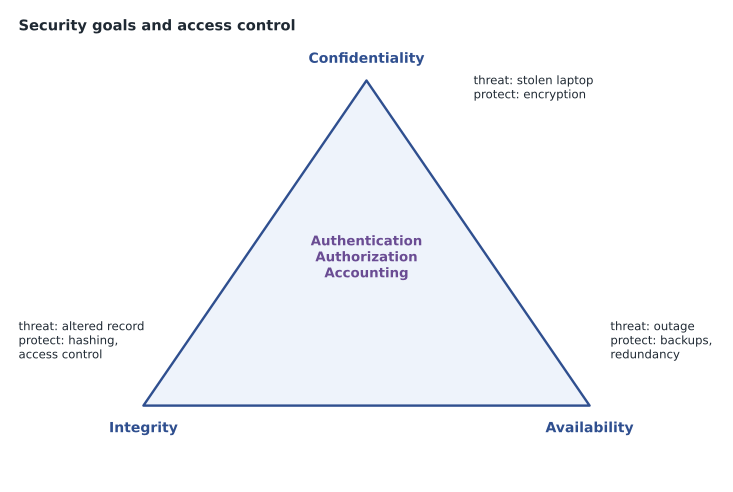
Confidentiality means only authorized people can see information. Integrity means information is accurate and has not been changed without authorization. Availability means information and systems are there when authorized people need them. Together they are often called the CIA triad. Exam questions describe an incident and ask which goal it affects. A stolen laptop with unencrypted patron data is a confidentiality problem. A changed fine amount in a record is an integrity problem. A server outage that stops checkouts is an availability problem. Encryption mainly protects confidentiality, hashing and digital signatures help prove integrity, and backups, redundancy and power protection support availability.
Privacy and personal information
Privacy is about the proper handling of personal information. Personally identifiable information (PII) is any data that identifies a person, such as a name with an address, a card number, a date of birth or an email address. Organizations should collect only what they need, use it only for the stated purpose, keep it only as long as needed, protect it while they have it and dispose of it securely. Laws in both Canada and the United States set rules for how organizations handle personal information, and libraries add their own strict policies about borrowing records. Questions may ask what counts as PII, or which action best protects a person's privacy, such as shredding printed lists or not sending personal data over unencrypted email.
Authentication, authorization and accounting
Authentication proves who someone is, authorization decides what they are allowed to do, and accounting records what they did. The three together are called AAA. A staff member signing in to the circulation system is authenticating; the system then authorizes her to check out items but not to change fine policies; and the system's logs account for each action she takes. Questions often describe one of these and ask for its name. A log of who opened a file is accounting; being denied access to a folder after signing in successfully is authorization at work.
Authentication factors fall into categories: something you know (a password or PIN), something you have (a phone app, a security key or a smart card), something you are (a fingerprint or face), and sometimes somewhere you are (location). Multifactor authentication (MFA) requires factors from two or more different categories. A password plus a code from an authenticator app is MFA; a password plus a security question is not, because both are things you know. Single sign-on (SSO) lets one authentication give access to several systems, which reduces the number of passwords people manage but makes that one sign-in especially important to protect.
| Factor category | Examples | Combined with a password, is it MFA? |
|---|---|---|
| Something you know | Password, PIN, security question answer | No: same category |
| Something you have | Authenticator app, security key, smart card | Yes |
| Something you are | Fingerprint, face recognition | Yes |
| Somewhere you are | Location or network | Yes, but usually as an extra check |
Passwords
Current password advice favours length over complexity. A long passphrase of several unrelated words is far harder to guess than a short password with symbols, and easier to remember. Every account should have a unique password, because criminals take passwords leaked from one website and try them on others. A password manager stores strong, unique passwords for every account behind one strong master password, ideally protected by MFA, and many browsers include one. Passwords should never be shared, written on sticky notes on the monitor, or reused. Changing passwords on a fixed schedule is less useful than changing them immediately when a breach is suspected, and many organizations now follow that approach.
Worked problem
Choosing the stronger option
A staff member offers two ideas for her new password: "Fh2026!" or "lantern orchard ferry bicycle". She also wants to use the same password for her work account and her personal email so she will not forget it. What advice should she get?
Show solution
- "Fh2026!" is short (7 characters) and built from guessable parts: initials and a year.
- "lantern orchard ferry bicycle" is much longer (29 characters including spaces) and made of unrelated words, so it is far harder to guess and easier to remember.
- Reusing one password across work and personal accounts means a breach of the personal email provider would expose her work account too.
- She should use the passphrase for work only, enable MFA, and store unique passwords for personal accounts in a password manager.
Answer: Use the long passphrase, only for the work account, with MFA turned on, and use a password manager for unique passwords elsewhere.
Device and browsing security
Device security starts with updates. Operating system and application updates close known vulnerabilities, so devices should update automatically or on a managed schedule. Antivirus or anti-malware software detects and removes malicious programs. A host firewall controls which network connections the device accepts. Screens should lock automatically after a short idle time, and devices should be encrypted so that a lost laptop does not expose its data. On mobile devices, apps should come from official stores and receive only the permissions they need.
Safe browsing means checking the domain name before entering credentials, being wary of unexpected downloads and pop-ups, keeping the browser and its extensions updated and few in number, and treating certificate warnings seriously. Public Wi-Fi, such as the library's own patron network, should be treated as untrusted: use HTTPS sites, avoid sensitive tasks when possible, and consider a virtual private network (VPN), which encrypts traffic between the device and the VPN provider.
Threats and protection
Malware is software designed to harm. A virus attaches to files and spreads when they are run; a worm spreads across networks by itself; a Trojan pretends to be useful software; ransomware encrypts files and demands payment; spyware secretly collects information; adware pushes unwanted advertising; and a keylogger records keystrokes. Social engineering tricks people instead of computers. Phishing uses fraudulent emails, smishing uses text messages, and vishing uses phone calls. Impersonation pretends to be someone trusted, such as an IT technician or a manager. Shoulder surfing is watching someone type a password; dumpster diving is searching discarded paper for useful information; tailgating is following an authorized person through a secure door.
| Threat | How it works | Best protection |
|---|---|---|
| Phishing | Fraudulent email asking for credentials or a click | Check sender and links; report, do not click; MFA |
| Ransomware | Encrypts files and demands payment | Updates, careful email habits, tested offline backups |
| Vishing | Phone call pretending to be someone trusted | Hang up and call back on a known number |
| Shoulder surfing | Watching someone enter a password | Privacy screens, awareness of surroundings |
| Tailgating | Following someone through a secure door | Do not hold secure doors for people you do not know |
Encryption converts readable data into a form that only someone with the key can read. Data at rest, stored on a drive or in the cloud, is protected by drive or file encryption. Data in transit, moving across a network, is protected by HTTPS, VPNs and encrypted Wi-Fi. Backups protect availability and integrity against hardware failure, mistakes and ransomware. A common guideline is the 3-2-1 rule: keep at least three copies of important data, on two different kinds of storage, with one copy off site. Backups only count if they can be restored, so they must be tested.
Worked problem
Responding to a suspicious message
A branch staff member receives an email that appears to come from "LTS Support" saying her mailbox is full and asking her to sign in through a link within one hour. The sender's address ends in a domain that is not the library's. What should she do?
Show solution
- Recognize the signs of phishing: urgency, a request to sign in through a link, and a sender domain that does not match the library's.
- Do not click the link or reply.
- Report the message using the library's reporting method, so that Hana's team can warn others and block the sender.
- If she already clicked and entered her password, report it immediately and change the password, so that MFA and a fast reset can limit the damage.
Answer: Treat it as phishing: do not click, report it, and if credentials were entered, report at once and change the password.
Physical security and disposal
Not every security question is about software. Physical security protects devices and paper from being stolen, seen or tampered with: locked server rooms, cable locks on public laptops, badge access to staff areas, privacy screens on computers that face the public, and a clear-desk habit so that printed patron lists are not left on the counter. Secure disposal matters as much as secure storage. Paper with personal information should be shredded, not thrown in the recycling. Drives from retired computers should be wiped with a proper data-erasure tool or physically destroyed, because deleting files or even reformatting a drive often leaves the data recoverable. The library's retired lab computers go to a certified recycler only after their drives have been erased and the erasure has been logged.
How security questions are built
Hana shares the pattern she sees in entry-level security questions. Many offer several answers that would all improve security a little, and ask for the best one. The best answer is usually the one that addresses the specific risk in the scenario most directly and most reliably. If a scenario is about stolen passwords, MFA is usually stronger than a longer password policy, because it protects even when the password is known. If it is about losing a laptop, encryption beats a strong screen lock, because the data stays protected even if the drive is removed. If it is about ransomware, a tested offline backup beats everything else for recovery, while updates and careful email habits are the best prevention.
A second pattern is the reporting question. When a user notices something suspicious, such as an odd email, an unknown USB stick left in the lab or a stranger asking for a password over the phone, the best answer is almost always to report it through the organization's process rather than to investigate alone. Reporting lets the security team see patterns across many users and act quickly. Organizations support this with an acceptable use policy, which sets out what staff may and may not do with technology, and with regular awareness training. A question that asks what a user should do after clicking a phishing link has the same answer: report it immediately, because speed limits the damage.
Worked problem
Picking the best protection
The library's laptops for lending to patrons are sometimes not returned. Which single control best protects any library data that might be on a missing laptop: a stronger sign-in password, full-disk encryption, a cable lock, or a privacy screen?
Show solution
- A stronger password protects the sign-in screen, but someone could remove the drive and read it in another computer.
- A cable lock only helps while the laptop is inside a branch; lending laptops leave the building.
- A privacy screen protects against shoulder surfing, not theft.
- Full-disk encryption keeps the data unreadable without the key, even if the drive is removed, so it addresses the risk directly.
Answer: Full-disk encryption, because it protects the data even when the device and its drive are in someone else's hands.
Common mistakes
MistakeThinking a password plus a security question is MFA.
InsteadBoth are something you know; MFA needs two different categories.
MistakeUsing a short complex password for every account.
InsteadUse long, unique passphrases and a password manager.
MistakeAssuming HTTPS means a site is safe to trust.
InsteadHTTPS protects the connection; check the domain name.
MistakeTreating backups as finished once they run.
InsteadFollow 3-2-1 and test restores.
MistakeHolding a secure door for a stranger to be polite.
InsteadThat is tailgating; let them use their own access or contact staff.
Summary and key terms
- Confidentiality, integrity and availability are the three goals of security.
- PII must be collected sparingly, protected and disposed of securely.
- Authentication proves identity, authorization grants rights and accounting records actions.
- MFA combines factors from different categories.
- Long, unique passphrases and password managers beat short, complex, reused passwords.
- Updates, anti-malware, firewalls, encryption, careful habits and tested backups protect against common threats.
- CIA triad
- Confidentiality, integrity and availability, the three goals of security.
- PII
- Personally identifiable information, data that identifies a person.
- Authorization
- Deciding what an authenticated user is allowed to do.
- Multifactor authentication
- Sign-in that requires factors from two or more categories.
- Phishing
- Fraudulent messages that try to trick people into revealing information or running malware.
- Ransomware
- Malware that encrypts files and demands payment.
- 3-2-1 rule
- Three copies of data, on two kinds of storage, with one off site.
Practice problems
Work each problem on paper first, then reveal the answer to check.
A server outage stops checkouts. Which security goal is affected?
Show answer
Availability.
Is a password plus a fingerprint multifactor authentication?
Show answer
Yes; they are from different categories.
What does accounting mean in AAA?
Show answer
Recording what users did, such as in logs.
Why should passwords never be reused?
Show answer
A breach of one site exposes every account that shares the password.
What is vishing?
Show answer
Social engineering by phone call.
What does the 3-2-1 backup rule say?
Show answer
Three copies, on two kinds of storage, with one off site.
Which protects data in transit: drive encryption or HTTPS?
Show answer
HTTPS.
Lesson quiz · 5 questions
Score 60% or more to complete this lesson.
Create a free account to save your progress, take quizzes and earn a certificate.