
COMP-119 · Lesson 7 of 12 · 25 min
Review: data fundamentals
▶ Video coming soon A video version of this lesson is on the way.
Domain 5, data and database fundamentals, is where Noor asks for help from Marcus Bell, the library's data and reporting analyst. Marcus spends his days turning circulation records and program attendance into reports for branch managers, and he has a way of explaining databases that Lorna admires: he starts with a question someone actually wants answered and works backward to the tables. The domain is worth about 13 or 14 in every 100 points, roughly nine or ten questions. Noor rated it 2 because she still mixes up primary and foreign keys and is never sure when a question means relational or non-relational. Marcus promises that by the end of one lunch hour both will be settled.
What domain 5 covers
The domain has three main areas. The first is the value of data and information: why organizations collect data, how it supports decisions, how it is captured and reported, and why it must be protected. The second is database structures: relational and non-relational databases, schemas, tables, records, fields, and keys. The third is using a database: how people and programs get data in and out, through queries, reports and interfaces, and how databases are backed up. COMP-111 lessons 5 to 7 taught these in detail.
The value of data
Organizations treat data as an asset because it supports better decisions. The library's circulation data shows which branches need more copies of popular titles, which programs are well attended, and when the self-checkout kiosks are busiest. Decisions based on evidence like this are called data-driven decisions. Data can be captured in many ways: typed in by staff, scanned from barcodes, recorded automatically by systems such as kiosks and web servers, or gathered through surveys. Once collected, it is turned into information through reporting and analysis, and the information is shared through reports and dashboards.
Data also creates obligations. Personal data, such as a patron's name, address and borrowing history, must be protected, kept only as long as needed and used only for the purposes people were told about. Libraries take borrowing privacy especially seriously. Some organizations earn money from data by selling it or using it for targeted advertising, which is called data monetization; others, like the library, deliberately avoid it. Exam questions in this area often ask why an organization collects data, what makes data valuable, or what responsibility comes with holding it.
Data quality and capture
Data is only as useful as it is accurate, and the exam may describe a problem that comes down to poor data quality. Duplicate records, missing values, inconsistent formats and typing errors all produce misleading reports. When the same patron is entered twice, once as "R. Ingram" and once as "Ruth Ingram", every count of active patrons is wrong by one. Good systems reduce these problems at the point of capture: drop-down lists instead of free typing, required fields, input validation that rejects a date in the wrong format, and barcode scanning instead of typing numbers by hand. The phrase people use is "garbage in, garbage out": a report cannot be better than the data it is built from.
Marcus describes the clean-up he did last spring, when program attendance had been recorded on three different paper sign-in sheets and typed into a spreadsheet by different staff. Branch names were spelled four ways, dates were in two formats, and some rows were duplicated. Before he could report anything, he had to standardize the names, convert the dates and remove the duplicates. Since then, attendance is captured on a tablet form with a fixed list of branches and programs, and the clean-up step has nearly disappeared. Noor notes the lesson for exam questions: when a scenario describes inaccurate reports, look first at how the data was captured.
Flat files, spreadsheets and databases
Not every set of data needs a database. A flat file, such as a plain text or comma-separated values (CSV) file, stores records one per line with fields separated by commas or tabs; it is simple, portable and readable by almost any program, but it has no relationships, no constraints and no way for many people to update it safely at once. A spreadsheet adds formulas, sorting, filtering and charts, and suits small data sets that one person or a small team works on. A database is the right choice when data is large, shared by many users at once, linked across several kinds of record, or must obey rules that keep it accurate. Exam scenarios often describe a spreadsheet that has outgrown itself: many users overwriting each other, thousands of rows, and copies drifting apart. The answer is usually to move the data into a database.
| Option | Strengths | Limits | Suits |
|---|---|---|---|
| Flat file (CSV) | Simple, portable, readable everywhere | No relationships, constraints or safe shared editing | Exporting or moving data between systems |
| Spreadsheet | Formulas, sorting, charts, easy to learn | Error-prone at scale; weak multi-user control | Small data sets and quick analysis |
| Database | Relationships, constraints, many users, large volumes | Needs design and administration | Shared, structured data that must stay accurate |
Relational databases
A relational database stores data in tables. Each table holds one kind of thing, such as patrons, items or loans. Each row in a table, also called a record, describes one instance of that thing, such as one patron. Each column, also called a field, holds one attribute, such as a patron's name or card number, and has a data type. The design of the tables, columns, data types and relationships is called the schema. Relational databases are the standard choice when data has a clear, consistent structure and when accuracy matters, as with the library's loans.
Keys connect tables. A primary key is a field, or a combination of fields, whose value uniquely identifies each record in its table, such as the patron's card number in the patrons table. A primary key must be unique and must not be empty. A foreign key is a field in one table that holds the primary key of a record in another table, linking the two. In the loans table, the card number field is a foreign key that points to the patrons table, and the item barcode field is a foreign key that points to the items table. Marcus's memory aid: the primary key is the record's own ID; a foreign key is someone else's ID borrowed to make a link.
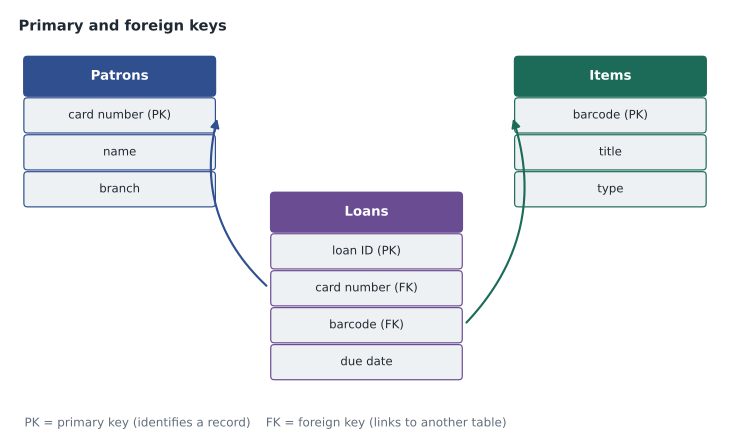
Constraints are rules the database enforces to keep data accurate. A primary key constraint stops duplicate or empty IDs. A foreign key constraint stops a loan from pointing to a patron who does not exist. Other constraints can require that a field is never empty or that a value is within a range. Questions about why a database rejected a record usually come down to a constraint doing its job.
Worked problem
Identifying keys
Marcus shows Noor a table of program registrations with the fields registration ID, card number, program code and date registered. Each program also has a row in a programs table with the fields program code, title and room. Which fields are primary keys and which are foreign keys?
Show solution
- In the registrations table, registration ID uniquely identifies each registration, so it is the primary key.
- Card number in the registrations table holds a patron's ID from the patrons table, so it is a foreign key.
- Program code in the registrations table holds the ID of a program from the programs table, so it is also a foreign key.
- In the programs table, program code uniquely identifies each program, so there it is the primary key.
Answer: Registration ID is the primary key of registrations; card number and program code are foreign keys in it; program code is the primary key of programs.
Non-relational databases
Non-relational databases, often called NoSQL databases, store data in forms other than fixed tables. Document databases store records as flexible documents, often in a format such as JSON, where each record can have different fields. Key-value stores keep simple pairs of a key and a value and are very fast for lookups. Graph databases store items and the relationships between them, useful for networks of connections. Wide-column databases store data in flexible columns across very large systems. Non-relational databases suit data whose structure varies or changes often, or very large volumes that must be spread across many servers. Relational databases suit structured data where consistency and relationships matter.
| Feature | Relational | Non-relational |
|---|---|---|
| Structure | Tables with a fixed schema | Documents, key-value pairs, graphs or wide columns |
| Best for | Structured, consistent data with relationships | Varied or changing data, very large scale |
| Query approach | SQL | Varies by product |
| Library example | Patrons, items and loans | Event logs from kiosks and web pages |
Data is also described by how structured it is. Structured data fits neatly into rows and columns, like a table of loans. Semi-structured data has some organization, such as tags or fields, without a fixed table shape, like a JSON document or an email with headers. Unstructured data has no predefined model, such as photos, videos and free-text comments. Most of what organizations hold is unstructured, and it is the hardest to search and report on.
Using a database
People and programs interact with databases in several ways. A query asks for specific data; in SQL, a SELECT statement retrieves records, often with a WHERE clause to filter them, such as all loans due today. Other SQL statements add data (INSERT), change it (UPDATE) and remove it (DELETE). A report presents query results in a readable, organized form for people who will never write a query themselves. Access can be direct, through a database management tool, or indirect, through an application such as the library's circulation system, which builds queries behind its screens. Programmatic access means software reaches the database through code or an application programming interface.
Reports and dashboards are how most people meet a database without knowing it. A report is usually a fixed layout produced on a schedule, such as the monthly circulation report each branch manager receives. A dashboard shows several key figures at once, often as charts, and updates as new data arrives, such as a display of today's checkouts by branch. Both depend on queries written once and run many times. When Ruth at Northgate asks why her dashboard shows fewer checkouts than she expected, Marcus's first questions are about the query behind it: which dates it covers, which branches it includes and whether self-checkout transactions are counted. Questions about misleading reports are often about the query, not the data.
Databases need backups like any other important data, and the exam may ask about the difference between a database backup and simply copying files. Because a database is constantly being written to, its backups are usually taken by the database system itself, so that the copy is consistent. Backups should be tested by restoring them, kept in more than one place, and protected from the same threats as the live data. Marcus mentions that the vendor hosting the library's integrated library system takes nightly backups, and that the library asks for proof of a test restore once a year.
Worked problem
Reading a simple query
Marcus writes SELECT title FROM items WHERE type = 'DVD'; on the whiteboard. What does it return, and which parts do which job?
Show solution
- SELECT title names the field to return: the title of each matching record.
- FROM items names the table to search: the items table.
- WHERE type = 'DVD' filters the records so that only rows whose type field is DVD are included.
- The result is a list of titles of every DVD in the items table; it does not change any data.
Answer: A list of DVD titles. SELECT chooses fields, FROM chooses the table and WHERE filters the rows.
Pulling domain 5 together
Noor ends the lunch hour with three sentences on a card. Tables hold records in rows and fields in columns, and the schema is the design. A primary key identifies a record in its own table; a foreign key links to another table's primary key. Relational suits structured data with relationships; non-relational suits varied data at large scale. Marcus adds a fourth line for the value-of-data questions: data supports decisions, and holding personal data creates a duty to protect it. Those four lines cover most of what the domain will ask.
Common mistakes
MistakeTreating any unique-looking field as a foreign key.
InsteadA foreign key is a field that holds another table's primary key.
MistakeThinking a primary key can be left empty.
InsteadPrimary keys must be unique and never empty.
MistakeChoosing a non-relational database for structured, related records by default.
InsteadRelational databases suit structured, related data where consistency matters.
MistakeBelieving a SELECT query changes data.
InsteadSELECT only retrieves; INSERT, UPDATE and DELETE change data.
MistakeAssuming a backup works because it ran.
InsteadTest backups by restoring them.
Summary and key terms
- Data supports decisions, and holding personal data creates a duty to protect it.
- Relational databases store records in tables with a fixed schema.
- A primary key uniquely identifies a record; a foreign key links to another table's primary key.
- Non-relational databases store documents, key-value pairs, graphs or wide columns.
- Data can be structured, semi-structured or unstructured.
- Queries retrieve and change data, reports present it, and backups must be tested.
- Record
- One row in a table, describing one instance of something.
- Field
- One column in a table, holding one attribute.
- Schema
- The design of a database's tables, fields, types and relationships.
- Primary key
- A field that uniquely identifies each record in its table.
- Foreign key
- A field that holds the primary key of a record in another table.
- Constraint
- A rule a database enforces to keep data valid.
- NoSQL
- A common name for non-relational databases.
Practice problems
Work each problem on paper first, then reveal the answer to check.
In a database table, what is a row called?
Show answer
A record.
What two rules must a primary key follow?
Show answer
It must be unique and must not be empty.
What does a foreign key do?
Show answer
It links a record to a record in another table by holding that table's primary key.
Which kind of database suits flexible JSON documents?
Show answer
A non-relational document database.
Is a collection of photos structured or unstructured data?
Show answer
Unstructured.
Which SQL keyword filters the rows a query returns?
Show answer
WHERE.
Why is a data-driven decision better than a guess?
Show answer
It is based on evidence collected and analyzed from real activity.
Lesson quiz · 5 questions
Score 60% or more to complete this lesson.
Create a free account to save your progress, take quizzes and earn a certificate.