
COMP-119 · Lesson 3 of 12 · 26 min
Review: technology concepts
▶ Video coming soon A video version of this lesson is on the way.
Noor's first review session is on domain 1, the one CompTIA calls IT concepts and terminology. It is one of the smaller domains, about nine questions, but it has a reputation in the cert club for catching people out. Its questions are short and precise: convert this number, which unit is larger, what is the next step in the troubleshooting method. There is little room for partial understanding. Lorna calls it "the domain of exact answers", and she wants Noor to leave the session able to do every conversion and recite the method without hesitation, because questions she can answer in twenty seconds buy time for harder ones later.
What domain 1 covers
Domain 1 has four main areas. The first is the basic computing cycle: input, processing, output and storage, and the difference between data and information. The second is notational systems: binary, decimal, hexadecimal and octal, and how text is represented with character encodings such as ASCII and Unicode. The third is units of measure: bits and bytes, the prefixes used for storage, throughput units for networks, and processing speed. The fourth is the troubleshooting methodology, which also underpins many scenario questions in other domains. COMP-110 taught each of these from scratch in lessons 1, 2 and 12; this lesson concentrates on the points where candidates most often slip.
The computing cycle and data versus information
Questions on the computing cycle usually describe a device or a transaction and ask which stage a component or action belongs to. A barcode scanner, a microphone, a touchscreen tap and a temperature sensor are input. Calculating, sorting, comparing and searching are processing. A display, a printer, a speaker and a signal sent to a motor are output. A drive, a memory card and cloud storage are storage. A few items belong to more than one stage: a touchscreen is both input and output, and a network adapter both receives and sends. If a question asks for the best description, pick the stage that matches what the item is doing in the scenario described.
Data and information is a favourite distinction. Data is raw facts and values without context, such as a list of numbers from a sensor. Information is data that has been processed and organized so that it has meaning, such as a chart showing the average temperature in each room by hour. If a question describes something a person can act on directly, it is usually information; if it describes values that still need processing, it is data.
Number systems
Binary is base 2 and uses only the digits 0 and 1. Each place is worth twice the place to its right: 1, 2, 4, 8, 16, 32, 64, 128 for an eight-bit byte. Decimal is base 10, the system people use every day. Hexadecimal is base 16 and uses the digits 0 to 9 and then A to F for the values 10 to 15. Octal is base 8, using the digits 0 to 7; it appears less often today but is still used in places such as Linux file permissions. The exam expects candidates to convert small numbers between these systems and to recognize which system a value is written in.
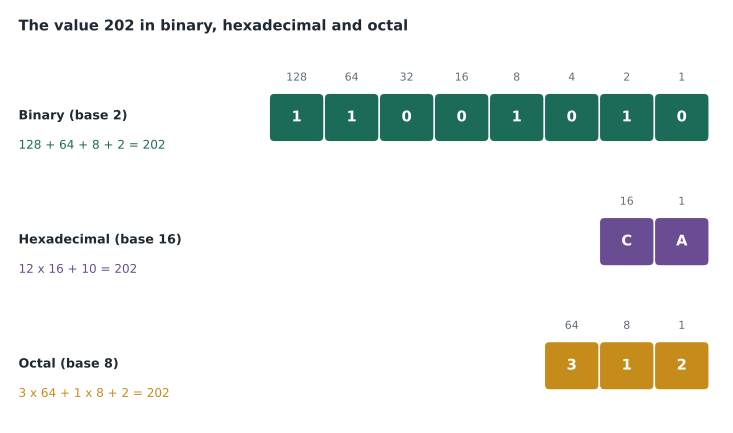
Two shortcuts save time. First, one hexadecimal digit always stands for exactly four binary digits, so 1100 1010 in binary splits into 1100 (12, which is C) and 1010 (10, which is A), giving CA in hexadecimal. Converting through groups of four avoids long arithmetic. Second, recognize the clues that tell you which system a value uses. A value containing letters A to F is hexadecimal; a value written with a 0x prefix, as in 0xFF, is hexadecimal; a value containing only 0s and 1s and described as bits is binary. Questions sometimes add a subscript, such as 1010 with a small 2, to show binary.
Worked problem
Converting in three directions
Convert binary 10110110 to decimal and to hexadecimal, then convert hexadecimal 3F to decimal.
Show solution
- Binary 10110110: add the place values where the bit is 1: 128 + 32 + 16 + 4 + 2 = 182.
- Split the binary into groups of four: 1011 is 11, which is B; 0110 is 6. So the hexadecimal value is B6.
- Check: B6 is 11 × 16 + 6 = 176 + 6 = 182, which matches.
- Hexadecimal 3F: 3 × 16 + 15 = 48 + 15 = 63.
Answer: Binary 10110110 is 182 in decimal and B6 in hexadecimal; hexadecimal 3F is 63.
Character encoding is the link between numbers and text. ASCII is an older encoding that uses seven bits for 128 characters, enough for the English alphabet, digits and punctuation. Unicode is the modern standard that aims to include every writing system, plus symbols and emoji, and UTF-8 is the most common way of storing Unicode text; it uses one byte for the original ASCII characters and more bytes for others. Exam questions tend to ask which encoding supports many languages (Unicode) or why text from one system appears as strange symbols on another (the two systems are using different encodings).
Units of measure
A bit is a single binary digit; a byte is eight bits. Storage is measured in bytes with prefixes: kilobyte, megabyte, gigabyte, terabyte and petabyte, each about a thousand times the one before. Network speed, or throughput, is measured in bits per second: kilobits, megabits and gigabits per second, written Kbps, Mbps and Gbps. The lowercase b for bits and capital B for bytes is the single most tested detail in this area. A 100 Mbps connection moves about 12.5 megabytes per second, not 100, because each byte is eight bits.
There are two ways to count the prefixes. Drive makers use powers of ten, so a kilobyte is 1,000 bytes and a terabyte is 1,000,000,000,000 bytes. Some operating systems, including Windows, report sizes using powers of two, where each step is 1,024 rather than 1,000. Strictly, the powers-of-two units have their own names, the kibibyte, mebibyte and gibibyte (KiB, MiB, GiB), but many programs still label them KB, MB and GB. That is why a new 1 TB drive shows about 931 GB in Windows. Nothing is missing; the same number of bytes is being divided by a larger unit. Processing speed is measured in hertz, the number of cycles per second; modern processors run at billions of cycles per second, written in gigahertz (GHz).
| Quantity | Unit | Size of each step | Typical example |
|---|---|---|---|
| Storage capacity | Bytes: KB, MB, GB, TB, PB | 1,000 (or 1,024 in some operating systems) | A 2 TB external drive |
| Network throughput | Bits per second: Kbps, Mbps, Gbps | 1,000 | A 500 Mbps fibre connection |
| Processor speed | Hertz: MHz, GHz | 1,000 | A 3.2 GHz processor |
| Memory | Bytes: GB | 1,024 in practice | 16 GB of RAM |
Worked problem
Estimating a download time
A patron wants to download a 3 GB video file over the branch's 200 Mbps internet connection. Ignoring overhead and other traffic, how long should it take?
Show solution
- Convert the file to bits: 3 GB is 3,000,000,000 bytes, and 3,000,000,000 × 8 = 24,000,000,000 bits.
- The connection moves 200,000,000 bits per second.
- Divide: 24,000,000,000 ÷ 200,000,000 = 120 seconds.
- In practice, overhead and shared traffic make real downloads slower, so two to three minutes is a realistic expectation.
Answer: About 120 seconds, or two minutes, in theory; a little longer in practice.
The troubleshooting methodology
CompTIA uses the same troubleshooting method across Tech+, A+ and other exams, and Tech+ includes it in domain 1. The steps are: identify the problem; research the knowledge base or the internet if needed; establish a theory of probable cause; test the theory to determine the cause; establish a plan of action to resolve the problem; implement the solution or escalate; verify full system functionality and, if applicable, implement preventive measures; and document findings, actions and outcomes. Questions about the method nearly always ask for the next step or the first step in a scenario, so the order matters more than the exact wording.
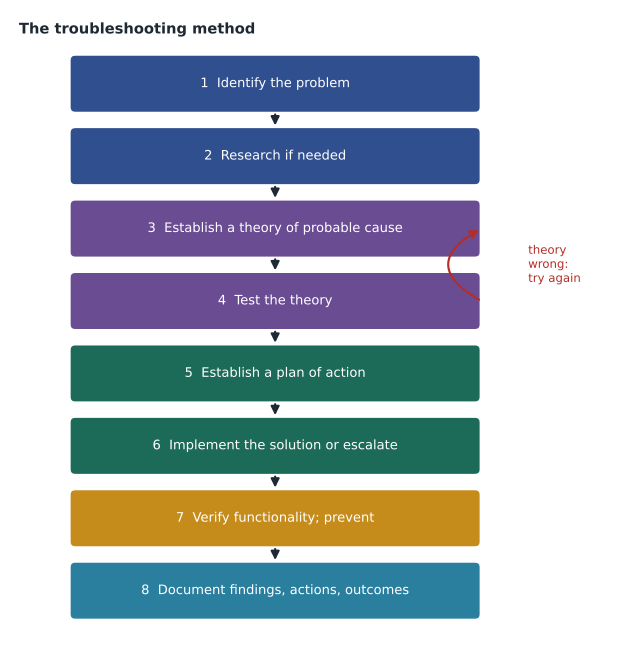
Several details are tested often. Identifying the problem includes gathering information, questioning users, identifying symptoms, finding out whether anything changed recently, duplicating the problem if possible, and approaching multiple problems one at a time. Establishing a theory includes questioning the obvious, such as whether the device is plugged in, and considering several possible approaches. If testing shows the theory is wrong, the method loops back to establish a new theory or escalate. Documentation comes last, after the fix has been verified, and it is never optional. Questions often offer "document the findings" as a tempting answer for an early step; it is only right at the end.
Worked problem
Choosing the next step
A staff member reports that her laptop cannot print to the branch printer. Noor asks what changed and learns that the laptop received updates last night. She suspects a printer driver problem, removes and reinstalls the driver, and a test page prints. What should she do next, according to the method?
Show solution
- Identify the problem: done, by questioning the user and finding the recent change.
- Theory and test: done; reinstalling the driver confirmed the cause.
- Plan and implement: done, as the driver was reinstalled.
- The next step is to verify full system functionality: check that the staff member can print her real documents, in colour and on both sides if she needs those, and consider preventive measures such as checking the other laptops that received the same update.
Answer: Verify full functionality with the user's real work and consider preventive measures, then document the findings, actions and outcome.
Ten-second questions
Many domain 1 questions can be answered in ten seconds once the facts are automatic, and Lorna keeps a stack of cards for exactly that purpose. Each card has a short question on the front and a one-line answer on the back, and the cert club runs through them in pairs at the start of every Thursday session. The table shows a few of Noor's cards. The aim is not to memorize these particular questions, which will not appear on the exam in this form, but to make the underlying facts so familiar that a new question built on them takes no thought at all.
| Card | Answer | Why it is quick |
|---|---|---|
| Largest value in one byte? | 255 (11111111 in binary, FF in hex) | Eight bits, all set to 1 |
| Hex digit for decimal 13? | D | A is 10, so D is 13 |
| Which is larger: 2,000 KB or 2 GB? | 2 GB | A gigabyte is about a million kilobytes |
| Unit for processor speed? | Hertz, usually gigahertz | Cycles per second |
| First troubleshooting step? | Identify the problem | Always gather information first |
| Octal digits allowed? | 0 to 7 | Base 8 has eight digits |
Octal is the system candidates most often forget. It survives mainly in Linux and macOS file permissions, where three octal digits describe what the owner, the group and everyone else may do. Each digit is the sum of read (4), write (2) and execute (1), so 7 means all three, 6 means read and write, and 5 means read and execute. A permission written as 755 therefore gives the owner full control and lets everyone else read and run the file. Tech+ does not expect permission administration, but recognizing that a three-digit value like 644 is octal, not decimal, is the kind of recognition question the domain likes.
Quick checks before the exam
Lorna gives Noor a one-minute drill to repeat each day until the exam. Write the binary place values from 128 down to 1. Write the hexadecimal digits from 0 to F with their decimal values. Say which is bigger, 1 GB or 1,000 Mb, and why (1 GB, because 1 GB is 8,000 Mb). Recite the troubleshooting steps in order. If any of those takes more than a minute, that area needs more practice. The point of the drill is speed, because domain 1 questions should be the fastest on the exam.
Common mistakes
MistakeTreating Mbps and MBps as the same thing.
InsteadLowercase b is bits; capital B is bytes; there are eight bits in a byte.
MistakeThinking a 1 TB drive showing 931 GB is faulty.
InsteadThe maker counts in 1,000s and some operating systems in 1,024s.
MistakeConverting long binary numbers digit by digit into hexadecimal.
InsteadSplit the binary into groups of four bits; each group is one hex digit.
MistakeChoosing "document the findings" as an early troubleshooting step.
InsteadDocumentation comes last, after verifying full functionality.
MistakeSkipping verification once the fix seems to work.
InsteadVerify with the user's real tasks and consider preventive measures.
Summary and key terms
- Domain 1 covers the computing cycle, notational systems, units of measure and the troubleshooting method.
- Binary is base 2, decimal base 10, hexadecimal base 16 and octal base 8.
- One hexadecimal digit equals four binary digits.
- Unicode supports many writing systems; ASCII covers basic English characters.
- Storage is measured in bytes, throughput in bits per second, and processor speed in hertz.
- The troubleshooting method runs from identifying the problem to documenting findings, with a loop back if a theory fails.
- Binary
- A base 2 number system using only 0 and 1.
- Hexadecimal
- A base 16 number system using 0 to 9 and A to F.
- Octal
- A base 8 number system using 0 to 7.
- Unicode
- A character encoding standard covering most of the world's writing systems.
- Throughput
- The amount of data moved per second, measured in bits per second.
- Gibibyte
- A unit of 1,024 mebibytes, used when sizes are counted in powers of two.
- Theory of probable cause
- The technician's best explanation of a problem, tested before a fix is planned.
Practice problems
Work each problem on paper first, then reveal the answer to check.
What is binary 11110000 in decimal?
Show answer
240 (128 + 64 + 32 + 16).
What is hexadecimal 2A in decimal?
Show answer
42 (2 × 16 + 10).
How many megabytes per second is a 400 Mbps connection, ignoring overhead?
Show answer
About 50 MB per second.
Which encoding is designed to support most of the world's writing systems?
Show answer
Unicode.
What comes immediately after testing a theory that proves correct?
Show answer
Establishing a plan of action to resolve the problem.
When in the method is the problem documented?
Show answer
At the end, after verifying full functionality.
A drive is sold as 500 GB and shows about 465 GB in Windows. Why?
Show answer
Windows divides by 1,024 at each step, while the maker uses 1,000.
Lesson quiz · 5 questions
Score 60% or more to complete this lesson.
Create a free account to save your progress, take quizzes and earn a certificate.