
COMP-119 · Lesson 10 of 12 · 23 min
Time management on exam day
▶ Video coming soon A video version of this lesson is on the way.
Sixty minutes for up to 70 questions sounds generous until a candidate spends four minutes on one question about cloud models and suddenly realizes that a quarter of the time has gone and only a dozen questions are answered. Lorna has seen it happen to good candidates, and she wants Noor to walk into the exam with a pacing plan she has practised so often that she follows it without thinking. This lesson covers the arithmetic of the exam clock, a checkpoint system, what to do with hard questions, and the practical timeline of exam day from waking up to reading the score report.
The arithmetic of the clock
CompTIA's main Tech+ page lists a maximum of 70 questions in 60 minutes. Sixty minutes is 3,600 seconds, so if all 70 questions appear, the average time available is a little over 51 seconds per question. That average hides a useful truth: many Tech+ questions, especially in domain 1 and on definitions, take fifteen or twenty seconds for a prepared candidate, while scenario questions may need a minute or more. Fast questions bank time for slow ones. The goal is not to spend exactly 51 seconds on each question but to keep the overall pace steady enough to finish with a few minutes in hand.
A practical plan is to aim to finish the first pass through all questions with about six minutes left, keeping that time for reviewing flagged questions. That leaves 54 minutes for the first pass, or about 46 seconds per question on average. Checkpoints turn that average into something you can check against the on-screen timer. The short program below works out where you should be at each checkpoint for any question count, time limit and review reserve, so the plan can be adjusted if CompTIA's numbers change.
questions = 70
minutes = 60
review_reserve = 6          # minutes kept for flagged questions

first_pass = minutes - review_reserve
per_question = first_pass * 60 / questions
print(f"Average for the first pass: {per_question:.0f} seconds per question")
for q in (20, 40, 60, 70):
    elapsed = q * per_question / 60
    left = minutes - elapsed
print(f"After question {q:2d}: about {elapsed:4.1f} min used, {left:4.1f} min left")Average for the first pass: 46 seconds per question After question 20: about 15.4 min used, 44.6 min left After question 40: about 30.9 min used, 29.1 min left After question 60: about 46.3 min used, 13.7 min left After question 70: about 54.0 min used, 6.0 min left
What this code does
The program takes the number of questions, the time limit and the minutes you want to save for a final review. It works out how many seconds each question can have on average during the first pass, then shows how much time should have been used, and how much should remain, after questions 20, 40, 60 and 70. The output gives a set of checkpoints to compare with the exam timer: for 70 questions in 60 minutes with six minutes saved, about 15 minutes used after question 20 and about 6 minutes left after the last question.
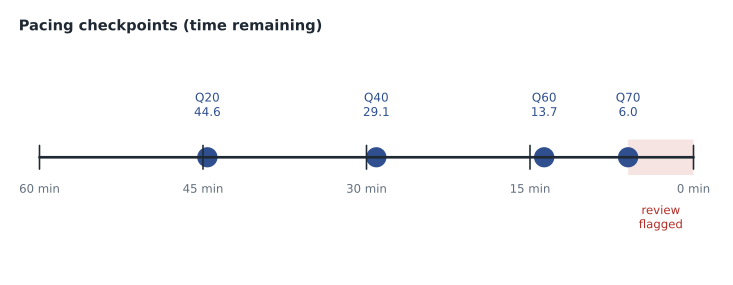
Noor rounds the checkpoints into three numbers she can remember: after question 20, at least 44 minutes left; after question 40, at least 29 minutes left; after question 60, at least 13 minutes left. Exam timers count down, so she writes the targets as time remaining rather than time used. If she is ahead, she can relax slightly. If she is a minute or two behind, she does not panic; she simply moves a little faster through the next easy questions. If she is five or more minutes behind at a checkpoint, she switches to strict triage: answer, flag and move on whenever a question is not clear within about 30 seconds.
Triage: answer, flag or guess
Every question falls into one of three groups. Some you know: answer them immediately and move on without second-guessing. Some you can work out: give them a reasonable amount of time, using the reading routine from lesson 9. Some you cannot answer after a fair attempt: choose your best guess, flag the question if the exam allows flagging, and move on. The most expensive mistake on a timed exam is letting a single hard question take three or four minutes in the first pass. Those minutes would have answered four or five easier questions later.
Never leave a question blank. CompTIA does not publish a penalty for wrong answers, so a guess can only help, and a flagged question with a guess already recorded is safe even if time runs out before you return to it. Most CompTIA exams provide a way to mark questions for review, and the tutorial at the start of the exam shows the tools available. Because exam software can change, confirm what the tutorial says on the day rather than assuming a feature exists.
| Group | How to recognize it | What to do in the first pass |
|---|---|---|
| Know it | The answer is clear after reading the question line and options | Answer and move on; do not second-guess |
| Can work it out | You recognize the topic and can eliminate options | Use the reading routine; spend up to about a minute |
| Stuck | No clear answer after a fair attempt | Pick the best guess, flag if possible, move on |
Using the review time
With the first pass complete and a few minutes left, return to flagged questions. Fresh eyes often see what was missed: a keyword, a fact in the scenario, or a clue in another question. Change an answer only when you find a specific reason, such as a misread word or a fact you overlooked. Research on multiple-choice tests generally finds that changes made for a clear reason are more often right than wrong, but changes made from vague anxiety are not. If no flagged questions remain, use spare minutes to recheck questions with NOT, EXCEPT or choose-two instructions, since those are the most common reading errors.
Worked problem
Recovering from a slow start
At question 20, Noor's practice exam timer shows 40 minutes remaining instead of the planned 44. She has flagged three questions. What should she do?
Show solution
- Compare with the checkpoint: she is about four minutes behind the target of 44 minutes remaining.
- Four minutes behind is a warning, not a disaster; 50 questions remain and many will be quick.
- She should tighten triage for the next stretch: answer known questions immediately and flag anything not clear within about 30 seconds.
- At question 40 she checks again against 29 minutes remaining; if she has caught up, she returns to normal pace, and if not, she keeps strict triage and accepts a shorter review period.
Answer: Tighten triage until the next checkpoint, then reassess; do not try to make up all the time on one question.
The exam day timeline
Time management starts long before the first question. For an online exam, Noor plans her morning backward from her appointment. Check-in for OnVUE opens 30 minutes before the appointment time, and a candidate who is more than 15 minutes late cannot sit the exam, so she plans to begin check-in as soon as it opens. Before that, she needs time to wake fully, eat, use the restroom (CompTIA exams are built for one session with no scheduled breaks, and online candidates cannot leave the camera view without an approved accommodation), clear the room and desk, close every other program, and have both IDs within reach for the check-in photos. For a test centre, the same logic applies with travel time and a margin for traffic or a late bus added.
| Time before the appointment | Online (OnVUE) | Test centre |
|---|---|---|
| The evening before | Rerun the system test; set up the room; lay out both IDs | Plan the route; lay out both IDs |
| 90 minutes | Breakfast, water, restroom | Breakfast, leave home with a margin |
| 45 minutes | Close other programs; phone out of reach; clear the desk | Arrive and find the centre |
| 30 minutes | Check-in opens: start immediately | Check in at the desk |
| 0 | Exam begins after the proctor releases it | Exam begins at the workstation |
Small physical choices affect concentration over an hour. A glass of water before check-in, a light meal rather than a heavy one, a room at a comfortable temperature and a few slow breaths before the first question all help. Candidates who feel anxious often find that the first five or six questions settle them; Lorna suggests treating those as a warm-up, reading them slowly and carefully, and letting the pace come from the checkpoints rather than from nerves.
Practising the pace
A pacing plan only works if it has been rehearsed. Lorna asks Noor to take every full practice test under exam conditions: one sitting, 60 minutes on a visible countdown timer, phone in another room, and no notes. At each checkpoint she writes down the time remaining in a small log. After the test she compares her checkpoints with the targets and looks for patterns. In her first timed practice test she was two minutes ahead at question 20, level at question 40 and four minutes behind at question 60, which told her she was slowing down as she tired and spending too long on scenario questions in the last third. Her fix was simple: in the final stretch, she now reads the question line first even more deliberately and flags sooner.
Short timed drills help too. A set of 15 mixed questions in 12 minutes, done two or three times a week, builds the feel of the pace without the time cost of a full test. Noor uses these drills on her lunch breaks and saves full practice tests for weekends, when she can give them an uninterrupted hour. Over several weeks, her average time on domain 1 questions falls to about 20 seconds, which gives her a comfortable cushion for the longer scenarios in infrastructure and security.
Focus and nerves
Some anxiety before an exam is normal and can even sharpen attention. Problems start when anxiety becomes a loop of worrying about the result instead of reading the question in front of you. Three techniques help. First, a breathing pattern: breathe in slowly for a count of four, hold briefly, and breathe out for a count of six, two or three times, which calms the body quickly. Second, a reset phrase, something short such as "next question", said silently after any question that felt bad, so that one difficult item does not colour the next ten. Third, perspective: a passing score does not require a perfect exam. Candidates who pass routinely get a number of questions wrong; the goal is a steady performance across all domains, not a flawless one.
If something goes wrong
Online exams depend on the candidate's computer and internet connection, and occasionally something fails: the connection drops, the webcam stops, or the exam freezes. Pearson VUE's rules and support process apply, and candidates should read the current OnVUE guidance before exam day so that they know how to contact support and what the proctor may ask them to do. The most useful preparation is prevention: a wired connection if possible, other devices off the home network during the exam, the computer plugged into power, and automatic updates postponed so that the computer does not restart itself. At a test centre, raise a hand and tell the proctor immediately if the workstation misbehaves. In either case, do not try to fix the exam software yourself, and keep a calm note of the time and what happened.
After the last question
When the exam ends, the score report appears on screen. A pass means the certification will appear in the candidate's CompTIA account after processing. If the result is not a pass, the report shows which domains were weakest, which is exactly the information lesson 11's gap-closing method needs. Under CompTIA's retake policy a second attempt can be booked without a waiting period, but Lorna advises at least a week or two of targeted study on the weak domains before rebooking, because the same preparation will tend to produce the same result.
Common mistakes
MistakeSpending several minutes on one hard question in the first pass.
InsteadGuess, flag and move on; come back with the review time.
MistakeLeaving questions blank to return to later.
InsteadAlways record a best guess before moving on.
MistakeChanging answers from anxiety during review.
InsteadChange an answer only for a specific reason.
MistakeArriving at the online check-in with minutes to spare.
InsteadStart check-in as soon as it opens, 30 minutes before.
MistakeAssuming exam software features from memory.
InsteadRead the tutorial at the start of the exam.
Summary and key terms
- Seventy questions in 60 minutes is a little over 51 seconds per question on average.
- Plan a first pass with a few minutes kept in reserve for review.
- Use checkpoints of time remaining at questions 20, 40 and 60.
- Sort questions into know it, can work it out, and stuck; never let one question eat the clock.
- Never leave a question blank; change answers only for a specific reason.
- Plan exam day backward from the appointment, starting check-in as soon as it opens.
- Pacing
- Keeping a steady rate through an exam so that time does not run out.
- Checkpoint
- A planned point in the exam where you compare progress with the clock.
- Triage
- Sorting questions by how quickly they can be answered and acting accordingly.
- Review reserve
- Minutes kept at the end of the first pass for flagged questions.
- Flag
- A marker on a question you plan to revisit, where the exam allows it.
Practice problems
Work each problem on paper first, then reveal the answer to check.
About how many seconds per question are available for 70 questions in 60 minutes?
Show answer
A little over 51.
With six minutes kept for review, about how many seconds does each question get in the first pass?
Show answer
About 46.
What should you do with a question you cannot answer after a fair attempt?
Show answer
Choose the best guess, flag it if possible and move on.
Is it ever worth leaving a question blank?
Show answer
No; CompTIA publishes no penalty for wrong answers.
When does OnVUE check-in open?
Show answer
30 minutes before the appointment time.
You are five minutes behind at a checkpoint. What changes?
Show answer
Switch to strict triage: answer quickly, flag anything unclear within about 30 seconds.
When should you change an answer during review?
Show answer
Only when you find a specific reason, such as a misread word.
Lesson quiz · 5 questions
Score 60% or more to complete this lesson.
Create a free account to save your progress, take quizzes and earn a certificate.