
COMP-111 · Lesson 8 of 12 · 21 min
Confidentiality, integrity and availability
▶ Video coming soon A video version of this lesson is on the way.
Hana Petrovic, the library's security and accounts lead, takes over the cert club for the security half of the course. She opens with three short stories from the past year at Fairhaven, all lightly disguised. In the first, a printed list of patrons with overdue laptops was left on a public printer and read by someone waiting for their own job. In the second, a spreadsheet of program attendance figures was edited by mistake before it went to the board, so the board saw numbers that were wrong. In the third, a power cut took the central library's server room offline for four hours and the self-checkout kiosks at every branch stopped working. "Three different problems," Hana says, "and each one damaged a different part of what security is meant to protect." This lesson covers the CIA triad of confidentiality, integrity and availability, the threats to each, and the controls that defend them.
The CIA triad
Information security has three classic goals, usually drawn as a triangle and called the CIA triad. Confidentiality means information is seen only by people who are authorized to see it. Integrity means information is accurate and complete and is changed only by authorized people in authorized ways. Availability means information and systems are there when authorized people need them. Every security control, from a password to a backup generator, exists to protect one or more of the three, and every security incident damages at least one. Hana's three stories map onto them exactly: the printed list was a failure of confidentiality, the edited spreadsheet a failure of integrity, and the power cut a failure of availability.
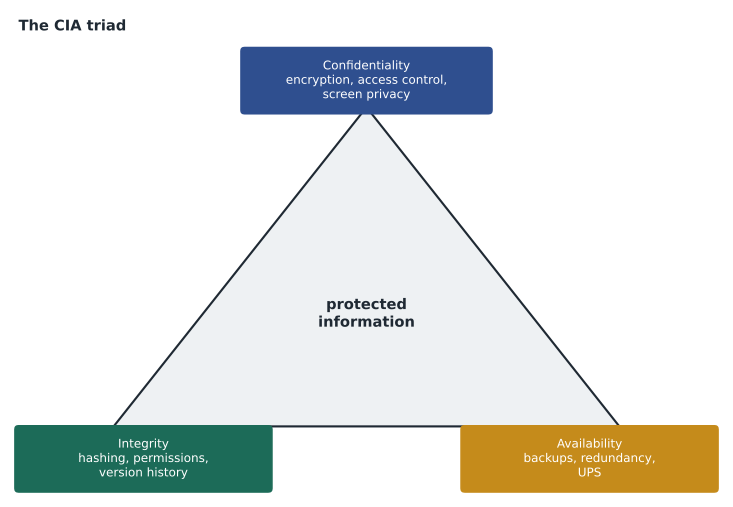
The three goals sometimes pull against each other, and security work is about balance. Locking every file so tightly that nobody can open it would give perfect confidentiality and no availability. Letting everyone edit everything makes data available but threatens integrity. Good security protects each kind of information as much as its value and sensitivity require, not more, which is why lesson 5's data classification matters: public opening hours need availability above all, while patron records need strong confidentiality.
Confidentiality
Confidentiality is about keeping secrets from people who should not have them. Threats come in physical and digital forms. Snooping is looking at information you are not authorized to see, whether by reading a screen over someone's shoulder, opening an unattended computer or browsing files on a shared drive out of curiosity. Eavesdropping is listening in on conversations or communications, from overhearing a phone call at the circulation desk to capturing network traffic on an unencrypted Wi-Fi network. Wiretapping is the deliberate interception of a communication line. Dumpster diving means searching discarded paper and equipment for useful information, which is why printouts with personal details must be shredded and old drives wiped or destroyed. Social engineering, covered in lesson 11, tricks people into revealing information directly.
The main controls for confidentiality limit who can reach information and make it unreadable to anyone else. Access controls, covered in lesson 9, ensure that only authorized accounts can open a file or record. Encryption scrambles data so it is useless without the right key, both when it is stored, called data at rest, and when it travels across a network, called data in transit. Physical controls, such as locked server rooms, privacy screens on public-facing monitors and secure print release that holds a job until the owner taps their card at the printer, prevent the casual exposure that caused Hana's first story. Policies and training make sure people know what is confidential and how to handle it.
Integrity
Integrity is about trust in the data. A record that has been altered without authorization, whether by accident, by a faulty program or by an attacker, can be worse than a missing one, because people act on it believing it is correct. Threats include unauthorized information alteration, such as someone changing a fine amount or a grade; on-path attacks, once called man-in-the-middle attacks, where an attacker secretly sits between two parties and can read or change what passes between them; replay attacks, where a valid transmission, such as a login message, is captured and sent again later to repeat its effect; and impersonation, where someone pretends to be a trusted person or system so their false information is believed.
Controls for integrity detect or prevent unauthorized change. Permissions let most people read data but only a few change it. Version history and audit logs record who changed what and when, so a mistake like the spreadsheet in Hana's second story can be traced and reversed. Input validation, from lesson 2, stops bad data at the door. Hashing creates a short fingerprint of data that changes completely if even one character changes, so comparing fingerprints reveals tampering. Digital signatures combine hashing with encryption keys to prove both that data has not changed and who sent it, which also gives non-repudiation: the sender cannot later credibly deny sending it.
import hashlib

def fingerprint(text):
    return hashlib.sha256(text.encode("utf-8")).hexdigest()

original = "Northgate October program attendance: 412"
received = "Northgate October program attendance: 412"
altered  = "Northgate October program attendance: 512"

print("Original:", fingerprint(original)[:32], "...")
print("Received:", fingerprint(received)[:32], "...")
print("Altered: ", fingerprint(altered)[:32], "...")
print("Received matches original:", fingerprint(received) == fingerprint(original))
print("Altered matches original: ", fingerprint(altered) == fingerprint(original))Original: 9369597d88d46748dcf4cdfac76a1427 ... Received: 9369597d88d46748dcf4cdfac76a1427 ... Altered: 41acdd1248f8cded19dc62563a712e1e ... Received matches original: True Altered matches original: False
What this code does
It calculates a SHA-256 fingerprint for three versions of the same line of text and shows the first part of each. The copy that matches the original gives exactly the same fingerprint, while the copy with one digit changed from 4 to 5 gives a completely different one. Comparing fingerprints is how software checks that a file or message has not been altered.
Hashing is a one-way process: you cannot turn a hash back into the original data. That makes it useful beyond tamper detection. Software publishers list the hash of each download so you can confirm the file you received is the one they published. Well-designed systems store a salted hash of each password rather than the password itself, so even someone who steals the account database cannot simply read the passwords. Hashing is not encryption: encryption is designed to be reversed by someone with the key, while hashing is designed never to be reversed.
For Hana's second story, the fix was simpler than any cryptography. The attendance spreadsheet now lives in a shared workspace with version history turned on, only Marcus and the branch managers can edit it, everyone else can view it, and the board receives a copy saved as a read-only file. If a figure looks wrong, anyone can see who last changed that cell and when, and restore the earlier version in a few clicks. Most integrity problems in an ordinary office are accidents, and controls that make accidents visible and reversible prevent most of the harm.
Availability
Availability is about systems and data being there when needed. A library catalogue that is perfectly confidential and perfectly accurate is still useless if it is down on a Saturday morning. Threats to availability include denial of service, where an attacker floods a system with so much traffic or so many requests that legitimate users cannot get through, and its distributed form, a DDoS, launched from many compromised devices at once; power outages; hardware failures, such as a failed drive or power supply; destruction from fire, flood or deliberate damage; and service outages at a provider, such as the hosted library system or an internet service provider. Ransomware, covered in lesson 11, attacks availability by encrypting data so its owner cannot use it.
Controls for availability fall under the headings of redundancy and fault tolerance: designing systems so that one failure does not stop the service. Examples include RAID storage that keeps working when one drive fails, servers with two power supplies, a second internet connection from a different provider, an uninterruptible power supply, or UPS, that keeps equipment running through short outages and allows a clean shutdown in longer ones, and a generator for extended outages. Backups, covered in lesson 11, allow recovery when everything else fails. Planning matters too: a business continuity plan describes how the organization keeps essential services running during a disruption, such as letting branches check books out offline and upload the loans later, and a disaster recovery plan describes how systems are restored afterwards.
| Goal | Example threats | Example controls |
|---|---|---|
| Confidentiality | Snooping, eavesdropping, wiretapping, dumpster diving, social engineering | Access control, encryption, secure print release, shredding, privacy screens, training |
| Integrity | Unauthorized alteration, on-path attacks, replay attacks, impersonation | Permissions, audit logs, version history, hashing, digital signatures, input validation |
| Availability | Denial of service, power outages, hardware failure, destruction, provider outages, ransomware | Redundancy, RAID, UPS and generators, backups, continuity and recovery plans |
Measuring availability
Availability is often promised as a percentage of uptime in a service level agreement with a provider, written on this course as a number out of 100, such as 99.9 out of 100. Small differences in that number make large differences in practice, because a year has 8,760 hours. The calculation below shows how much downtime each common promise allows.
HOURS_PER_YEAR = 365 * 24
for uptime in [99.0, 99.9, 99.99]:
    down_hours = HOURS_PER_YEAR * (100 - uptime) / 100
    print(f"{uptime} out of 100 uptime allows about {down_hours:6.2f} hours "
f"({down_hours * 60:7.1f} minutes) of downtime a year")99.0 out of 100 uptime allows about 87.60 hours ( 5256.0 minutes) of downtime a year 99.9 out of 100 uptime allows about 8.76 hours ( 525.6 minutes) of downtime a year 99.99 out of 100 uptime allows about 0.88 hours ( 52.6 minutes) of downtime a year
What this code does
It takes three common uptime promises and works out how many hours, and then minutes, of downtime each one still allows in a 365-day year of 8,760 hours. The output shows that 99 out of 100 allows more than three and a half days of outage a year, while 99.99 allows under an hour. That is why the extra decimal places in a provider's promise matter.
Hana compares the numbers with the four-hour power cut in her third story. A single outage of that length used up nearly half the yearly allowance of a 99.9 promise, and it affected every branch because the kiosks depended on servers in one room. The fix the team chose was a larger UPS for the server room, a generator connection and a change to the kiosks so they can keep checking items out offline for a few hours and upload the loans when the link returns. Each is an availability control.
Worked problem
Classifying incidents by the CIA triad
Hana gives the cert club four more incidents to classify. (1) A staff member's laptop is stolen from a car, unencrypted, with a spreadsheet of patron contact details on it. (2) A flood of junk traffic makes the library website unreachable for an afternoon. (3) A volunteer changes the makerspace printer settings so every job prints at the wrong scale. (4) Someone intercepts the unencrypted login page of an old room-booking system and later reuses the captured login to cancel bookings. Which goal does each damage most?
Show solution
- Incident 1 exposes personal information to whoever has the laptop: confidentiality. Full-disk encryption would have prevented it.
- Incident 2 is a denial-of-service attack that stops legitimate users reaching the site: availability.
- Incident 3 changes settings without authorization so the results are wrong: integrity.
- Incident 4 starts as eavesdropping on unencrypted traffic, a confidentiality failure, and the reuse of the captured login is a replay attack that leads to unauthorized changes, damaging integrity. Encrypting the connection with HTTPS defends against both.
Answer: Confidentiality, availability, integrity, and both confidentiality and integrity for the replayed login.
Common mistakes
MistakeThinking security means only keeping secrets.
InsteadIntegrity and availability matter as much as confidentiality.
MistakeTreating hashing as a form of encryption.
InsteadHashing is one-way; encryption can be reversed with a key.
MistakeAssuming a backup alone guarantees availability.
InsteadBackups restore after failure; redundancy keeps services running through it.
MistakeThrowing printouts with personal data in the recycling bin.
InsteadShred them; dumpster diving targets discarded paper.
MistakeReading 99.9 uptime as "almost never down."
InsteadIt still allows almost nine hours of downtime a year.
Summary and key terms
- The CIA triad is confidentiality, integrity and availability.
- Confidentiality threats include snooping, eavesdropping, wiretapping, dumpster diving and social engineering.
- Integrity threats include unauthorized alteration, on-path, replay and impersonation attacks.
- Availability threats include denial of service, power and hardware failures, destruction and provider outages.
- Encryption and access control protect confidentiality; hashing, permissions and logs protect integrity.
- Redundancy, fault tolerance, UPS and generators, backups and continuity plans protect availability.
- Confidentiality
- Information is seen only by authorized people.
- Integrity
- Information is accurate and changed only in authorized ways.
- Availability
- Information and systems are accessible when needed.
- Eavesdropping
- Listening in on conversations or communications without authorization.
- On-path attack
- An attacker secretly placed between two parties, able to read or alter traffic.
- Replay attack
- Capturing a valid transmission and sending it again later.
- Hash
- A fixed-length fingerprint of data that changes completely if the data changes.
- Denial of service
- An attack that overwhelms a system so legitimate users cannot reach it.
- Fault tolerance
- The ability to keep working when a component fails.
Practice problems
Work each problem on paper first, then reveal the answer to check.
Which CIA goal does encryption mainly protect?
Show answer
Confidentiality.
Which goal does a UPS protect?
Show answer
Availability.
What is dumpster diving?
Show answer
Searching discarded paper or equipment for useful information.
How does a hash reveal tampering?
Show answer
Any change to the data produces a completely different hash value.
What is a replay attack?
Show answer
Capturing a valid message, such as a login, and sending it again later.
Roughly how much downtime a year does 99.9 out of 100 uptime allow?
Show answer
About 8.8 hours.
Lesson quiz · 5 questions
Score 60% or more to complete this lesson.
Create a free account to save your progress, take quizzes and earn a certificate.