
COMP-111 · Lesson 6 of 12 · 22 min
Databases and structured data
▶ Video coming soon A video version of this lesson is on the way.
For years, the makerspace kept its 3D printer bookings in a spreadsheet on a shared drive. It worked until it did not: two volunteers opened the file at once and one person's changes overwrote the other's, a patron's name was spelled three different ways across three bookings, and nobody could easily answer how many hours each printer was used last term. Jun, one of the teen volunteers, asks Lorna whether the library could "just use a database." Lorna turns the question into a cert club session. "Tech+ wants you to know why databases exist, how they organize data and when a spreadsheet stops being enough," she says. This lesson covers structured, semi-structured and unstructured data, how relational databases are built from tables, records, fields and keys, how non-relational databases differ, and what a database offers that a flat file does not.
Structured, semi-structured and unstructured data
Data comes in different shapes, and the shape decides how it is best stored. Structured data fits neatly into rows and columns with a fixed set of fields, each holding a known type: a list of bookings with a date, a printer number, a patron card number and a number of hours. Spreadsheets and relational databases hold structured data, and it is the easiest kind to search, sort, total and report on.
Unstructured data has no predefined format: the text of emails, scanned letters, photos of makerspace projects, audio recordings of a children's story time, video from a program and social media posts. Most of the data organizations hold is unstructured. It can still be stored, searched by keywords and analysed with specialized tools, but it does not fit into fixed columns. Semi-structured data sits in between: it has labels or tags that give it some organization, but records do not all need the same fields. JSON and XML files are common examples; one booking record might include a list of materials while another has none. Email is often described as semi-structured too, because it has fixed header fields, such as sender, date and subject, wrapped around a free-text body.
| Type | Description | Examples |
|---|---|---|
| Structured | Fixed fields and types in rows and columns | Bookings table, circulation records, payroll |
| Semi-structured | Tagged or labelled data whose records can vary | JSON from a web service, XML catalogue records, email headers |
| Unstructured | No predefined format | Photos, video, audio, scanned documents, free-text notes |
Flat files and their limits
A flat file stores data as a single table in a plain file, such as a spreadsheet or a comma-separated values (CSV) file, with one record per line. Flat files are simple, portable and readable by almost any program, which is why data is often exported and exchanged in CSV. They are also fine for small, single-user jobs. Their weaknesses appear as data and users grow. Only one person can safely edit at a time. The same facts, such as a patron's name, are repeated in every row, so a correction must be made everywhere and mistakes creep in. There is little control over what is entered, so a column meant for hours can end up holding "about 2." And as files grow to hundreds of thousands of rows, opening, searching and saving them becomes slow.
What a database offers
A database is an organized collection of data managed by software called a database management system, or DBMS, such as MySQL, PostgreSQL, Microsoft SQL Server, Oracle or SQLite. The DBMS stores the data, enforces rules about it and answers requests from people and programs. Tech+ expects you to know the main reasons organizations use databases rather than flat files.
| Benefit | What it means | Makerspace example |
|---|---|---|
| Multiple concurrent users | Many people and programs can read and change data at the same time without overwriting each other | Two volunteers can book printers at once |
| Speed | Indexes let the DBMS find records quickly even among millions | The kiosk finds a patron's bookings instantly |
| Scalability | The database can grow in size and users, often by adding storage or servers | All fifteen locations can share one booking system |
| Variety | Databases can hold many related kinds of data, and some handle semi-structured data too | Patrons, printers, bookings and materials in one place |
| Integrity and rules | Data types and constraints stop invalid or duplicate data | Hours must be a number from 0.5 to 8 |
| Persistence and recovery | Changes are saved reliably and can be backed up and restored | Bookings survive a power cut and can be recovered |
Data persistence means data survives after the program that created it stops running or the computer is switched off. Variables in a running program, from lesson 2, live in memory and vanish when the program ends; data written to a database, or to a file, persists. Databases add careful handling of each change, often grouped into transactions that either complete fully or not at all, so a booking is never half saved when the power fails.
Relational databases
A relational database stores data in tables that are linked to one another. Each table holds one kind of thing: a patrons table, a printers table, a bookings table. A table is made of rows and columns. Each row is a record, one instance of the thing, such as one booking. Each column is a field, one attribute every record has, such as the booking date, and every field has a data type, such as integer, text, date or decimal. The design that lists the tables, their fields, the types and the relationships between them is called the schema. Relational databases are the most common kind for structured business data and are queried with SQL, which lesson 7 covers.
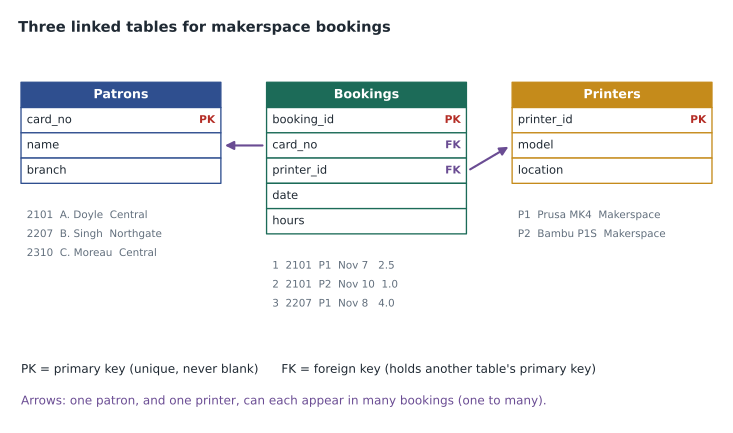
Keys connect the tables. A primary key is a field, or combination of fields, whose value uniquely identifies each record in a table and is never blank: the card number in the patrons table, the printer ID in the printers table, a booking number in the bookings table. A foreign key is a field in one table that holds the primary key of a record in another table, creating a relationship. Each booking stores the card number of the patron and the ID of the printer rather than copying the patron's name and the printer's details into every booking. The patron's name is stored once, in the patrons table; correct it there and every booking shows the correction. Removing repeated data in this way is called normalization.
Relationships between tables have a cardinality. One patron can have many bookings, but each booking belongs to one patron, which is a one-to-many relationship, the most common kind. A one-to-one relationship links each record to exactly one in another table, such as a staff member and their parking permit. A many-to-many relationship, such as patrons and the workshops they attend, is usually handled with a linking table in the middle that holds a pair of foreign keys for each enrolment.
Constraints are rules the database enforces on data. A primary key constraint refuses a duplicate or blank key. A foreign key constraint refuses a booking for a printer ID that does not exist. A NOT NULL constraint refuses a blank value in a required field. A CHECK constraint enforces a condition, such as hours between 0.5 and 8. A UNIQUE constraint refuses duplicates in a field that is not the key, such as an email address. Constraints catch the errors that crept into the old spreadsheet at the moment someone tries to enter them.
import sqlite3
db = sqlite3.connect(":memory:")
db.execute("PRAGMA foreign_keys = ON")
db.execute("CREATE TABLE printers (printer_id TEXT PRIMARY KEY, model TEXT NOT NULL)")
db.execute("""CREATE TABLE bookings (
    booking_id INTEGER PRIMARY KEY,
    printer_id TEXT NOT NULL REFERENCES printers(printer_id),
    hours REAL CHECK (hours BETWEEN 0.5 AND 8))""")
db.execute("INSERT INTO printers VALUES ('P1', 'Prusa MK4'), ('P2', 'Bambu P1S')")

attempts = [
    ("Valid booking", "INSERT INTO bookings VALUES (1, 'P1', 2.5)"),
    ("Duplicate booking number", "INSERT INTO bookings VALUES (1, 'P2', 1.0)"),
    ("Printer that does not exist", "INSERT INTO bookings VALUES (2, 'P9', 1.0)"),
    ("Hours out of range", "INSERT INTO bookings VALUES (3, 'P2', 12)"),
]
for label, sql in attempts:
    try:
        db.execute(sql)
        print(label.ljust(28), "-> accepted")
    except sqlite3.IntegrityError as e:
print(label.ljust(28), "-> refused:", e)Valid booking -> accepted Duplicate booking number -> refused: UNIQUE constraint failed: bookings.booking_id Printer that does not exist -> refused: FOREIGN KEY constraint failed Hours out of range -> refused: CHECK constraint failed: hours BETWEEN 0.5 AND 8
What this code does
It builds a tiny two-table booking database in memory, with rules saying booking numbers must be unique, every booking must name a real printer, and hours must be between 0.5 and 8. It then tries to add four bookings. Only the first is accepted; the database itself refuses the other three and says which rule each one broke, which is how constraints keep bad data out.
Non-relational databases
Not all data suits tables. Non-relational databases, often called NoSQL databases, store data in other ways and usually trade some of the strict rules of relational databases for flexibility or speed at very large scale. Tech+ names two common kinds. A key-value database stores each item as a unique key paired with a value, like a giant dictionary, and is extremely fast at looking up a value when you know its key; it is often used for caching and for session data such as the contents of a shopping cart. A document database stores self-describing records, usually as JSON documents, where each document can have its own set of fields; it suits semi-structured data such as catalogue records that vary by format, or user profiles with optional sections. Other kinds include column-family and graph databases, which suit huge analytical tables and highly connected data such as social networks.
| Relational | Key-value | Document | |
|---|---|---|---|
| Structure | Tables with fixed columns and types | Unique key paired with a value | Self-describing documents, often JSON |
| Schema | Defined in advance; strict | None beyond the key | Flexible; documents can differ |
| Relationships | Built in, through keys and joins | Not modelled | Limited; related data often embedded |
| Good for | Structured business records | Very fast lookups, caching, sessions | Semi-structured, varied records |
| Examples | MySQL, PostgreSQL, SQL Server | Redis, Amazon DynamoDB | MongoDB, Couchbase |
Worked problem
Choosing storage for the makerspace
Jun lists what the makerspace needs to keep: bookings with patron, printer, date and hours; a gallery of project photos; and a record of each print job's settings exported by the printer software as JSON, where different printers export different fields. Which kind of storage suits each?
Show solution
- Bookings are structured, related to patrons and printers, and need rules such as valid hours, so they belong in a relational database with primary and foreign keys.
- Photos are unstructured. They are best kept as files in storage built for files, such as the library's file server or cloud storage, with the database holding only a reference such as the file name and the booking it belongs to.
- Print job settings are semi-structured JSON whose fields vary by printer, which suits a document database, or a JSON field inside the relational database if the volume is small.
- One booking system shared by all locations replaces the spreadsheet and lets many volunteers book at once.
Answer: Relational tables for bookings, file storage with database references for photos, and a document store or JSON field for the varying print settings.
Lorna points out that the library already runs on exactly this kind of design. The integrated library system that holds the catalogue and circulation records is a large relational database hosted by a vendor, with tables for items, patrons, loans and holds linked by keys. When a circulation desk screen shows a patron's loans, it is running a query that joins the patrons table to the loans table to the items table. That is lesson 7.
Common mistakes
MistakeCalling a spreadsheet a relational database.
InsteadA spreadsheet is a flat file; it lacks keys, constraints and safe concurrent editing.
MistakeCopying the same details into every row.
InsteadStore each fact once and link to it with a foreign key.
MistakeTreating a primary key and a foreign key as the same.
InsteadA primary key identifies a record; a foreign key points to a record in another table.
MistakeAssuming all data fits in tables.
InsteadPhotos, audio and free text are unstructured; JSON and XML are semi-structured.
MistakeThinking NoSQL means no rules or no queries.
InsteadNon-relational databases use other models and query methods, often at very large scale.
Summary and key terms
- Structured data has fixed fields; semi-structured data is tagged but flexible; unstructured data has no set format.
- Flat files are simple but struggle with many users, repeated data and large volumes.
- Databases offer concurrent access, speed, scalability, variety, integrity rules and persistence.
- Relational databases use tables of records and fields defined by a schema.
- A primary key uniquely identifies a record; a foreign key links to another table's primary key.
- Constraints such as NOT NULL, UNIQUE and CHECK stop invalid data.
- Key-value and document databases are common non-relational models.
- Structured data
- Data with fixed fields and types, organized in rows and columns.
- Unstructured data
- Data with no predefined format, such as photos or free text.
- Schema
- The design of a database: its tables, fields, types and relationships.
- Record
- One row in a table, describing one item.
- Field
- One column in a table, holding one attribute.
- Primary key
- A field that uniquely identifies each record in a table.
- Foreign key
- A field that refers to the primary key of a record in another table.
- Constraint
- A rule the database enforces on the data it accepts.
- Key-value database
- A non-relational database storing values under unique keys.
Practice problems
Work each problem on paper first, then reveal the answer to check.
Is a JSON file structured, semi-structured or unstructured?
Show answer
Semi-structured.
What does a primary key do?
Show answer
It uniquely identifies each record in a table.
What links a booking to its patron in another table?
Show answer
A foreign key holding the patron's primary key value.
Name two benefits of a database over a spreadsheet.
Show answer
For example, safe concurrent users and enforced rules; also speed and scalability.
What is the most common relationship between patrons and bookings?
Show answer
One-to-many.
Which kind of database stores varied JSON records?
Show answer
A document database.
Lesson quiz · 5 questions
Score 60% or more to complete this lesson.
Create a free account to save your progress, take quizzes and earn a certificate.