
COMP-111 · Lesson 3 of 12 · 21 min
Algorithms, flowcharts and pseudocode
▶ Video coming soon A video version of this lesson is on the way.
Ruth Ingram, the manager of the Northgate branch, has a request that lands on the cert club table. The branch is piloting automatic overdue reminders, and Ruth wants to know exactly which patrons will get an email, which will get a text message, and which will get nothing. The vendor's documentation describes the rule in one dense paragraph. Lorna asks Noor to turn it into something the branch staff can check line by line. "Before anyone writes code, someone has to write the steps," Lorna says. "That is an algorithm. Tech+ expects you to read algorithms written as flowcharts and as pseudocode, and to recognize the three structures every algorithm is built from: sequence, branching and looping." This lesson covers all three, the common ways of writing algorithms down, and how to trace one by hand to check it.
What an algorithm is
An algorithm is a precise, finite sequence of steps that solves a problem or completes a task. A recipe is an algorithm, and so is the procedure the circulation desk follows to issue a new library card. To be useful to a computer, an algorithm must be unambiguous, so each step has only one meaning; it must be finite, so it eventually stops; and it must produce the right output for every valid input, not just the example someone had in mind. Computers are fast but literal: they do exactly what the steps say, including the mistakes.
Algorithms are independent of any programming language. The same steps for deciding who gets a reminder could be written in Python, Java or PowerShell, or carried out by a person with a printed list. That is why programmers plan with flowcharts and pseudocode first: it lets them agree on the logic with the people who know the rules, such as Ruth, before spending time on code. It also means a technician who can read an algorithm can test a vendor's claim without seeing the vendor's source code.
The three building blocks
Every algorithm, however large, is made from three kinds of structure. Sequence means steps happen one after another in order: look up the patron, find their overdue items, count them. Branching, also called selection or a conditional, means choosing between paths depending on a condition: if the patron has an email address, send an email; otherwise, check for a mobile number. Looping, also called iteration or repetition, means repeating steps: for each patron on the overdue list, apply the rule. Combining the three in different ways produces everything from a three-line script to an operating system.
Branching comes in a few common forms. A simple if runs a step only when a condition is true. An if-else chooses between two paths. A chain of if, else if and else checks conditions in order and runs the first path whose condition is true, so the order of the checks matters. Some languages also offer a switch or case statement, which compares one value against a list of possible values, such as a branch code, and jumps to the matching block. All of them depend on the Boolean comparisons covered in lesson 2.
Looping also has two main forms. A for loop, also called a count-controlled loop, repeats a known number of times or once for each item in a collection: for each of the fourteen branches, print its total. A while loop, also called a condition-controlled loop, repeats as long as a condition stays true: while the printer queue is not empty, send the next job. The danger with a while loop is that if the condition never becomes false, the loop never ends. An infinite loop is a common cause of a program that freezes and uses all of a processor's time until someone stops it.
Flowcharts
A flowchart draws an algorithm as shapes connected by arrows. Its value is that the branches are visible at a glance, which makes it a good tool for agreeing logic with people who do not read code. A few standard shapes cover almost every case, and the exam may show one and ask what a shape means or what happens on a particular path.
| Shape | Name | Meaning |
|---|---|---|
| Rounded rectangle (oval) | Terminator | Start or end of the algorithm |
| Rectangle | Process | An action or calculation, such as "count overdue items" |
| Diamond | Decision | A yes-or-no question with two exits, such as "Has email?" |
| Parallelogram | Input or output | Data coming in or going out, such as "read patron record" or "send message" |
| Arrow | Flow line | The direction to the next step |
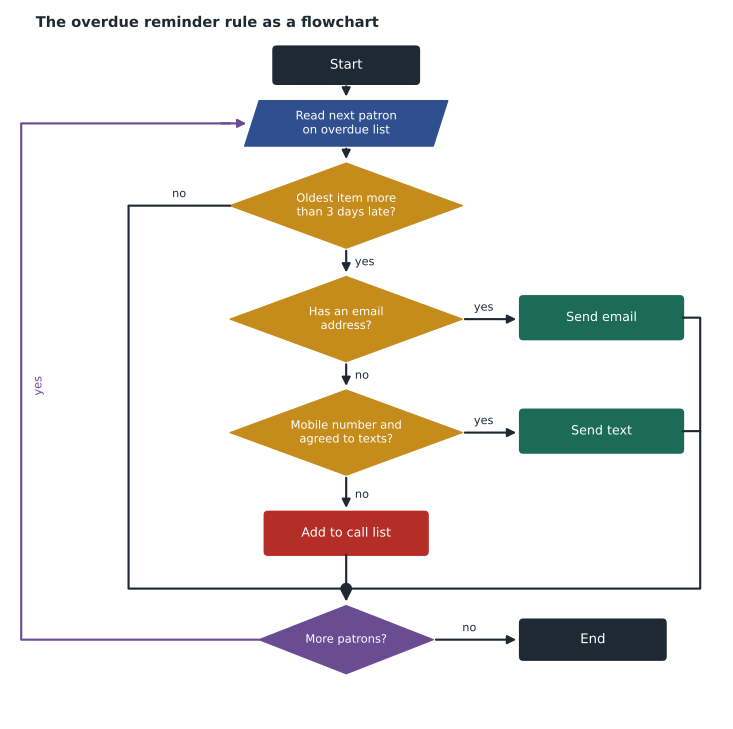
Pseudocode
Pseudocode writes an algorithm in structured plain language that looks a little like code but follows no particular language's rules. There is no single official format. It uses indentation to show which steps belong inside a branch or loop, and capitalized keywords such as IF, ELSE, FOR EACH, WHILE and END to mark structure. Its purpose is clarity: a person should be able to follow it without knowing any programming language, and a programmer should be able to turn it into code directly. Noor writes the vendor's rule as pseudocode for Ruth.
FOR EACH patron ON overdue list
    IF days overdue of oldest item > 3 THEN
        IF patron has email THEN
            send email reminder
        ELSE IF patron has mobile number AND agreed to texts THEN
            send text reminder
        ELSE
            add patron to call list
        END IF
    END IF
END FOR
Ruth reads it once and spots something the vendor's paragraph hid: patrons with a mobile number who never agreed to receive texts go on the call list, not the text list. That is the point of writing the steps down. She also asks what happens to a patron whose item is exactly three days late, and the pseudocode answers immediately: the condition says greater than 3, so three days late gets no reminder, and the first reminder goes out on day four. The vendor confirms that is the intended behaviour. A boundary case like this, sitting exactly on the edge of a condition, is where algorithms most often go wrong.
Turning the steps into code
Once the steps are agreed, translating pseudocode into a real language is mostly mechanical. The FOR EACH becomes a for loop, the IF and ELSE IF become if and elif in Python, and the actions become calls to whatever sends email or text. The version below uses a short invented list of patrons so you can see every path run.
patrons = [
    {"name": "A. Doyle", "days_late": 6, "email": True, "mobile": True, "texts_ok": True},
    {"name": "B. Singh", "days_late": 3, "email": True, "mobile": False, "texts_ok": False},
    {"name": "C. Moreau", "days_late": 9, "email": False, "mobile": True, "texts_ok": True},
    {"name": "D. Kowal", "days_late": 5, "email": False, "mobile": True, "texts_ok": False},
    {"name": "E. Price", "days_late": 12, "email": False, "mobile": False, "texts_ok": False},
]
for p in patrons:
    if p["days_late"] > 3:
        if p["email"]:
            action = "email reminder"
        elif p["mobile"] and p["texts_ok"]:
            action = "text reminder"
        else:
            action = "add to call list"
    else:
        action = "no reminder yet"
print(p["name"].ljust(10), str(p["days_late"]).rjust(2), "days ->", action)A. Doyle 6 days -> email reminder B. Singh 3 days -> no reminder yet C. Moreau 9 days -> text reminder D. Kowal 5 days -> add to call list E. Price 12 days -> add to call list
What this code does
It goes through five sample patrons one at a time and applies the reminder rule to each. It first checks whether the item is more than three days late, then prefers email, then a text if the patron agreed to texts, and otherwise puts them on the call list. The output shows one patron reaching each possible result, which is a quick way to prove every path in the rule works.
Tracing an algorithm by hand
Tracing means stepping through an algorithm with sample values and writing down what each variable holds after each step. It is the most reliable way to check logic before code runs, and exam questions sometimes ask what a short piece of pseudocode outputs. Choose test values that hit every branch, including the boundaries: here, a patron exactly three days late, one with an email, one with only a mobile and consent, one with a mobile but no consent, and one with no contact details at all. The sample list above was chosen that way on purpose.
Worked problem
Tracing a loop that counts
Ava, one of the teen volunteers in the makerspace, has written pseudocode to count how many 3D print jobs in the queue are over two hours long. The queue holds jobs of 1.5, 2.0, 3.25, 0.75 and 2.5 hours. What does the algorithm output?
Show solution
- The pseudocode reads: SET count TO 0; FOR EACH job IN queue: IF hours > 2 THEN ADD 1 TO count; END FOR; OUTPUT count.
- Job 1 is 1.5 hours: not greater than 2, so count stays 0.
- Job 2 is 2.0 hours: equal to 2 is not greater than 2, so count stays 0.
- Job 3 is 3.25 hours: greater than 2, so count becomes 1.
- Job 4 is 0.75 hours: count stays 1. Job 5 is 2.5 hours: count becomes 2.
- The loop ends after the last job and the algorithm outputs 2.
Answer: The output is 2. The 2.0-hour job does not count, because the condition is greater than 2, not greater than or equal to 2.
Ava had expected 3, because she counted the two-hour job in her head. The difference between > and >= is small on paper and large in practice, and it is exactly the kind of detail Tech+ questions test. Jun suggests writing the boundary value into the condition's description, such as "more than two hours, two hours exactly does not count," whenever a rule is shared with people.
Patterns that appear again and again
A handful of small patterns turn up inside almost every real algorithm, and recognizing them makes pseudocode much faster to read. A counter starts at zero and adds one each time something happens, as in Ava's count of long print jobs. An accumulator starts at zero and adds a value each time, such as a running total of fines collected across all branches. A flag is a Boolean that starts false and is switched to true when a condition is met, such as found_problem, so the program can act on it after the loop ends. A running maximum or minimum keeps the largest or smallest value seen so far, such as the busiest day of the month, and replaces it whenever a bigger or smaller one appears.
Each pattern has a classic mistake. A counter or accumulator that is set to zero inside the loop instead of before it is reset on every pass and ends with only the last value. A flag that is never reset carries an old result into the next run. A running maximum that starts at zero gives the wrong answer if every value is negative, so it is safer to start it at the first value in the list. When you trace pseudocode, look first at where each variable gets its starting value; that single line explains a surprising share of wrong answers.
Efficiency and sorting
Two algorithms can both give the right answer while taking very different amounts of time. Finding a book by checking every shelf in order works, but a catalogue that keeps titles in sorted order lets the computer jump to the middle, see which half the title is in, and repeat, which finds any one of a million titles in about twenty checks instead of up to a million. That second approach is called binary search. Sorting, searching and similar standard problems have well-known algorithms, and programmers usually use the ones built into their language rather than inventing their own. For Tech+, the main idea is that the choice of algorithm matters as data grows, and that a program which is fast with ten records may be painfully slow with ten million.
Common mistakes
MistakeWriting steps that could mean two things.
InsteadEach step in an algorithm must have exactly one meaning.
MistakeForgetting how a loop stops.
InsteadEvery while loop needs a condition that will eventually become false.
MistakeTesting only the typical case.
InsteadTrace boundary values and every branch, including "none of the above."
MistakeTreating > and >= as the same.
InsteadA value exactly on the boundary passes one and fails the other.
MistakePutting else-if checks in a careless order.
InsteadThe first true condition wins, so order the checks deliberately.
Summary and key terms
- An algorithm is a precise, finite sequence of steps that solves a problem.
- Every algorithm is built from sequence, branching and looping.
- Branching uses if, if-else, else-if chains and switch or case statements.
- For loops repeat a known number of times; while loops repeat while a condition is true.
- Flowcharts use ovals, rectangles, diamonds and parallelograms joined by arrows.
- Pseudocode describes logic in structured plain language with no fixed syntax.
- Tracing with boundary values is the best way to check an algorithm by hand.
- Algorithm
- A precise, finite sequence of steps that solves a problem.
- Sequence
- Steps carried out one after another in order.
- Branching
- Choosing between paths based on a condition; also called selection.
- Loop
- A structure that repeats steps; also called iteration.
- Infinite loop
- A loop whose stopping condition is never met.
- Flowchart
- A diagram of an algorithm using standard shapes and arrows.
- Pseudocode
- Structured plain-language description of an algorithm.
- Tracing
- Stepping through an algorithm by hand with sample values.
Practice problems
Work each problem on paper first, then reveal the answer to check.
Which flowchart shape shows a decision?
Show answer
A diamond.
Which kind of loop suits "repeat for each of the 14 branches"?
Show answer
A for loop, also called a count-controlled loop.
What is an infinite loop?
Show answer
A loop whose condition never becomes false, so it never stops.
Name the three building blocks of algorithms.
Show answer
Sequence, branching and looping.
Under the reminder rule, does a patron exactly 3 days late get a reminder?
Show answer
No; the rule needs more than 3 days.
What is the purpose of pseudocode?
Show answer
To describe an algorithm clearly without following any one language's syntax.
Lesson quiz · 5 questions
Score 60% or more to complete this lesson.
Create a free account to save your progress, take quizzes and earn a certificate.