
COMP-111 · Lesson 4 of 12 · 22 min
Functions, objects and version control ideas
▶ Video coming soon A video version of this lesson is on the way.
Dez Okafor-Laine has a confession for the cert club. His kiosk check script, which Noor read in lesson 1, started as twenty lines and is now nearly four hundred, and the same block that sends an email appears in it six times, each copy slightly different. Last month he changed the mail server name in five of the copies and missed the sixth. "That is the problem functions solve," Lorna says, "and the reason the script should be in version control, so we can see exactly what changed and when." This lesson covers the ideas that keep code organized as it grows: functions with parameters and return values, objects with properties and methods, and version control. Tech+ asks you to explain what each is for rather than to write them from scratch.
Functions
A function is a named block of code that performs one task and can be used, or called, from anywhere in a program. Instead of copying the email-sending steps six times, Dez can write them once in a function called send_report and call send_report wherever an email is needed. If the mail server changes, he edits one place. Functions make code shorter, easier to read, easier to test and easier to reuse in other programs. Some languages call them procedures, subroutines or methods, depending on the context, but the idea is the same.
Functions usually take inputs and give back a result. The inputs are called parameters when the function is defined and arguments when it is called: in a function defined as late_fee(days_late, daily_rate), days_late and daily_rate are the parameters, and in the call late_fee(4, 0.25), the numbers 4 and 0.25 are the arguments. The result the function hands back is its return value. A function that calculates a late fee returns the fee; a function that checks whether a patron may borrow a laptop returns true or false. Some functions return nothing and simply do something, such as print a receipt.
MAX_FEE = 5.00

def late_fee(days_late, daily_rate):
    """Return the fee for an overdue item, capped at MAX_FEE."""
    if days_late <= 0:
        return 0.0
    fee = days_late * daily_rate
    return min(fee, MAX_FEE)

for days, rate in [(0, 0.25), (4, 0.25), (10, 0.25), (30, 0.50)]:
print(f"{days} days at {rate:.2f} a day -> fee {late_fee(days, rate):.2f}")0 days at 0.25 a day -> fee 0.00 4 days at 0.25 a day -> fee 1.00 10 days at 0.25 a day -> fee 2.50 30 days at 0.50 a day -> fee 5.00
What this code does
It defines one reusable calculation that takes the number of days late and the daily rate, multiplies them, and never charges more than the 5.00 cap. It then calls that calculation with four different pairs of inputs. The output shows no fee for an item returned on time, 1.00 for four days at 0.25, and the cap applied to the two long overdue cases.
Programming languages also come with many built-in functions, and libraries add thousands more. In the example, min is a built-in function that returns the smaller of two values. A spreadsheet's SUM and AVERAGE are functions in the same sense: you pass them arguments, a range of cells, and they return a value. When documentation describes a function, it lists its name, its parameters and their types, and what it returns, which is often called the function's signature. Reading a signature is a practical skill when a vendor's support article says "the export function requires a start date and an end date."
Variables created inside a function usually exist only while the function runs and cannot be seen from outside it; this is called local scope. Variables created outside any function, at the top level of the program, have global scope. Keeping variables local stops one part of a program accidentally changing a value another part depends on, which is another reason long scripts become fragile when everything lives at the top level.
Comments and documentation
The line in quotation marks just under def late_fee is a docstring: a short description built into the function that tools can display when someone uses it. Lines beginning with # in Python, or // in many other languages, are comments, which the computer ignores entirely and which exist only for people. Good comments explain why the code does something, such as "fees are capped by board policy," rather than repeating what each line plainly says. They matter to support staff as much as to programmers, because the comment at the top of an old script is often the only record of what it was meant to do and who to ask about it. Small, well-named functions with a one-line description each are also far easier to test: you can call late_fee with a handful of known inputs and confirm it returns the expected fees, without running the whole program.
Objects and object-oriented programming
Object-oriented programming, often shortened to OOP, organizes code around objects that represent things, such as a library item, a patron or a printer. An object bundles together data about the thing and the actions it can perform. Its data are called properties or attributes: a library item has a title, a barcode, a due date and a status. Its actions are called methods, which are functions that belong to the object: an item can be checked out, renewed or returned. Tech+ treats property and attribute as near-synonyms; some languages distinguish them, but the exam focuses on the idea that objects hold data and behaviour together.
A class is the template from which objects are made, and each object built from it is an instance. The class LibraryItem describes what every item has and can do; the copy of a particular novel at Northgate with barcode 31234000456789 is one instance, and the same title at another branch is a different instance with its own due date. Writing the logic once in a class and creating as many instances as needed is the object-oriented equivalent of writing a function once and calling it many times.
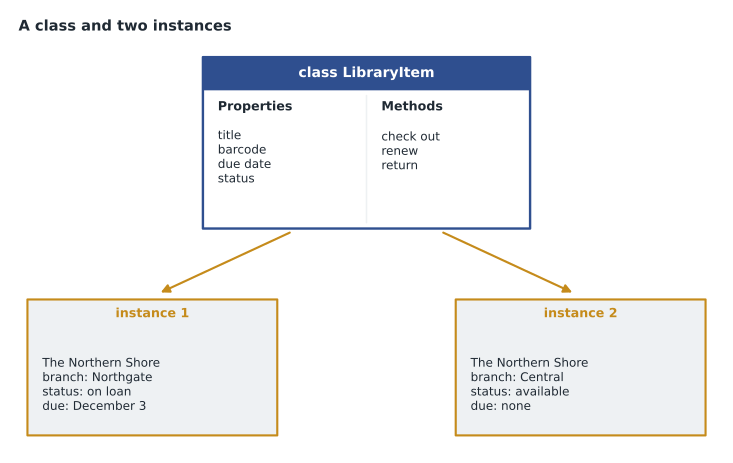
class LibraryItem:
    def __init__(self, title, barcode):
        self.title = title          # properties
        self.barcode = barcode
        self.status = "available"
        self.renewals = 0

    def check_out(self):            # methods
        self.status = "on loan"

    def renew(self, limit=2):
        if self.status != "on loan":
            return "not on loan"
        if self.renewals >= limit:
            return "renewal limit reached"
        self.renewals += 1
        return f"renewed ({self.renewals} of {limit})"

book = LibraryItem("The Northern Shore", "31234000456789")
book.check_out()
for attempt in range(3):
    print(book.title, "->", book.renew())
print("Status:", book.status, "| Renewals used:", book.renewals)The Northern Shore -> renewed (1 of 2) The Northern Shore -> renewed (2 of 2) The Northern Shore -> renewal limit reached Status: on loan | Renewals used: 2
What this code does
It describes what every library item has (a title, a barcode, a status and a renewal count) and what it can do (be checked out or renewed). It then creates one book, checks it out and tries to renew it three times. The first two renewals succeed and the third is refused because the limit is two, showing how the object keeps track of its own state.
OOP is often described with a few more terms that appear in study guides. Encapsulation means an object keeps its internal details to itself and other code works with it only through its methods, so the renewal count cannot be changed by accident from somewhere else. Inheritance means a new class can be based on an existing one, so a class for laptops in the lending program could build on LibraryItem and add a battery-check method. Polymorphism means different classes can respond to the same method name in their own way. Tech+ concentrates on objects, properties, attributes and methods, but recognizing these words helps when reading documentation.
Version control
Version control is a system that records every change to a set of files over time, so you can see who changed what, when and why, compare versions and go back to an earlier one. It is used for source code above all, but also for scripts, configuration files and documentation. Git is the most widely used version control system, and services such as GitHub, GitLab and Azure DevOps host Git repositories online. Without version control, people fall back on file names like kiosk_check_final_v2_REALLY_FINAL.ps1, which is exactly what Dez found on the shared drive.
A few terms cover the essentials. A repository, or repo, is the stored project with its full history. A commit is a saved snapshot of changes with a short message explaining them, such as "Move mail server name into a constant." A branch is a separate line of development, so someone can work on a new feature without disturbing the working version, which usually lives on a branch called main. Merging brings the changes from one branch back into another. When two people change the same lines differently, the system reports a merge conflict, and a person decides which version to keep. Cloning copies a repository to your own computer; pushing sends your commits back to the shared copy, and pulling fetches other people's.
| Term | What it means | Library example |
|---|---|---|
| Repository | A project and its complete history of changes | The kiosk-check repository on the LTS server |
| Commit | A saved set of changes with a message | "Use one send_report function for all emails" |
| Branch | A separate line of work | A branch for adding the new print stations |
| Merge | Combining one branch's changes into another | Merging the print-station branch into main after testing |
| Merge conflict | Two changes to the same lines that need a person to decide | Dez and Hana both edit the same mail settings |
| Revert or roll back | Undo a change by returning to an earlier version | Going back to last week's version after a bad change |
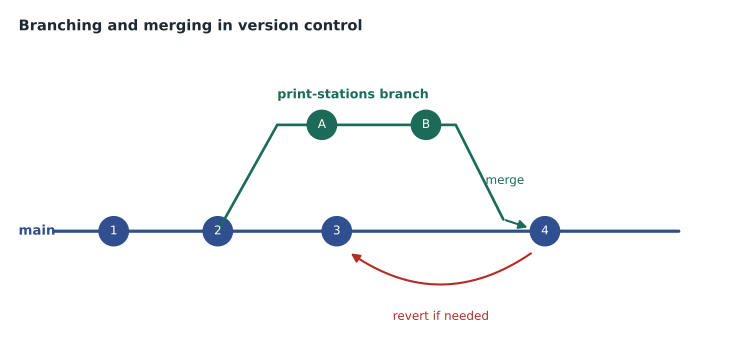
For a support technician, the practical value of version control is the history. When the kiosk report breaks on a Tuesday, the first question is "what changed?", and a repository answers it in seconds: the log shows a commit on Monday afternoon that changed the list of kiosk addresses. Rolling back to the previous commit restores the working version while the team works out what went wrong. Configuration files for routers, firewalls and servers benefit from the same discipline, and many IT teams now keep them in Git for that reason.
Worked problem
Reorganizing the kiosk script
Dez's script repeats the same email block six times and hard-codes the mail server name in each copy. It lives as a single file on a shared drive with five older copies beside it. Which three changes from this lesson would make it easier to maintain, and what does each one fix?
Show solution
- Move the email steps into one function, such as send_report(subject, body), and call it from the six places. A change to how email is sent is then made once.
- Store the mail server name, the sender address and the list of recipients as named constants at the top of the script, or in a separate settings file, so they are easy to find and change.
- Put the script in a Git repository, commit each change with a clear message, and delete the extra copies from the shared drive. The history replaces the copies, and any bad change can be rolled back.
- Optionally, represent each kiosk as an object with properties such as name, branch and address, and a method that tests it, so adding a new kiosk means adding one entry rather than editing logic.
Answer: Use a function for the repeated email code, constants for settings that change, and version control for the history; objects are a good next step for the kiosks themselves.
Hana Petrovic, the security and accounts lead, adds a warning from her side of the team: a repository remembers everything, so passwords and keys must never be committed to it, even briefly. Deleting a password in a later commit does not remove it from the history. Settings that are secret belong in a password vault or a protected configuration store, which the security lessons return to.
Common mistakes
MistakeCopying and pasting the same code in several places.
InsteadPut it in a function and call the function.
MistakeConfusing parameters with return values.
InsteadParameters are inputs; the return value is the output handed back.
MistakeCalling a class and an object the same thing.
InsteadA class is the template; an object is one instance made from it.
MistakeTreating dated file copies as version control.
InsteadA repository records every change with who, when and why.
MistakeCommitting passwords to a repository.
InsteadHistory keeps them forever; store secrets in a vault instead.
Summary and key terms
- A function is a named, reusable block of code that performs one task.
- Parameters receive inputs; arguments are the values passed; the return value is the output.
- Objects bundle properties or attributes with methods, the actions they can perform.
- A class is a template; each object built from it is an instance.
- Version control records changes so you can compare, branch, merge and roll back.
- A commit is a saved snapshot with a message; a branch is a separate line of work.
- Function
- A named block of code that performs a task and can be called repeatedly.
- Parameter
- A named input that a function expects.
- Return value
- The result a function hands back to the code that called it.
- Object
- A bundle of data and behaviour representing one thing.
- Property
- A piece of data held by an object; also called an attribute.
- Method
- A function that belongs to an object.
- Class
- A template that defines the properties and methods of objects.
- Version control
- A system that tracks changes to files over time.
- Commit
- A saved snapshot of changes with a descriptive message.
Practice problems
Work each problem on paper first, then reveal the answer to check.
In late_fee(4, 0.25), what are 4 and 0.25?
Show answer
Arguments passed to the function's parameters.
What is a method?
Show answer
A function that belongs to an object.
What is the difference between a class and an instance?
Show answer
The class is the template; an instance is one object made from it.
Name one benefit of functions.
Show answer
Code is written once and reused, so changes are made in one place.
What does a commit record?
Show answer
A snapshot of changes with a message, author and time.
Why should passwords never be committed to a repository?
Show answer
The history keeps them even after they are deleted in a later commit.
Lesson quiz · 5 questions
Score 60% or more to complete this lesson.
Create a free account to save your progress, take quizzes and earn a certificate.