
COMP-111 · Lesson 12 of 12 · 22 min
Putting it together: a small business technology review
▶ Video coming soon A video version of this lesson is on the way.
The Friends of Fairhaven Library run a used-book shop in the lobby of the central library. Volunteers staff it six days a week, and the money it raises pays for children's programs. Its technology grew one gift at a time: two donated laptops, a tablet with a card reader for sales, a consumer Wi-Fi router plugged in years ago, a shared email account, a donor list kept in a spreadsheet, a small website, and a macro someone wrote to total the week's sales. The Friends' chair has asked Lorna whether the library could look it over. Lorna gives the job to Noor, with Jun as her assistant, and tells them to treat it as the final session of the cert club's second half. "Use everything from this course," she says. "Software, data and security. Write down what you find, rank it, and recommend what to fix first." This lesson walks through that review from start to finish.
Step 1: Inventory what exists
Every review starts with an inventory, because you cannot protect what you do not know about. Noor and Jun spend an afternoon in the shop listing every device, account, piece of software and store of data, who uses it and what it is for. They ask volunteers how they actually work, not how they are supposed to work, which is where the most useful findings come from.
| Item | What they found |
|---|---|
| Laptops | Two donated laptops, one on an operating system version that no longer receives updates; both use one shared local account with no password |
| Sales tablet | A tablet with a card reader app from the payment processor, updated automatically; the processor handles card data |
| Wi-Fi router | A consumer router about seven years old, still using its default admin password and an old WPA2 passphrase written on the wall |
| One shared account for all volunteers; the password is the same as on the website and the social media account | |
| Donor list | A spreadsheet of about 1,400 donors with names, addresses, emails and gift amounts, saved on one laptop and copied to a USB stick |
| Sales macro | A spreadsheet macro that totals weekly sales; nobody now knows how it works |
| Website | A small site on a hosted platform; the plug-ins have not been updated in a year |
| Backups | None, apart from the USB stick, which lives in the cash drawer |
Step 2: Review the software
The first lessons of this course help with the sales macro. Opening it, Noor finds a short script in the spreadsheet's macro language, which is interpreted: it runs each time someone presses the button, with no compile step. Reading it as pseudocode, she can see the algorithm: for each row in the week's sheet, if the payment type is cash, add the amount to the cash total, otherwise add it to the card total, then show both totals. It contains one logic error that explains a puzzle the treasurer had mentioned: the condition checks for the word "Cash" with a capital C, so rows typed as "cash" fall into the card total. Nothing ever showed an error message, because the code runs; it just gives the wrong answer.
sales = [("Cash", 12.00), ("Card", 25.50), ("cash", 8.00),
         ("Card", 14.00), ("CASH", 6.50), ("Card", 30.00)]

def weekly_totals(rows, ignore_case):
    cash = card = 0.0
    for kind, amount in rows:
        is_cash = kind.lower() == "cash" if ignore_case else kind == "Cash"
        if is_cash:
            cash += amount
        else:
            card += amount
    return cash, card

for fixed in (False, True):
    cash, card = weekly_totals(sales, fixed)
    label = "Fixed macro   " if fixed else "Original macro"
print(f"{label}: cash {cash:6.2f} card {card:6.2f} total {cash + card:6.2f}")Original macro: cash 12.00 card 84.00 total 96.00 Fixed macro : cash 26.50 card 69.50 total 96.00
What this code does
It totals six sample sales into cash and card, once the way the old macro did and once with the fix. The old version only counts a sale as cash when the word is typed exactly as "Cash", so "cash" and "CASH" wrongly land in the card total. The fixed version compares the words without regard to capital letters, and the output shows 14.50 moving from card to cash while the grand total stays the same, which is exactly the mismatch the treasurer had noticed.
The fix is simple, but the bigger recommendation is about maintenance. The macro should carry a comment explaining what it does and who to ask, the payment type should be a drop-down list so it is always entered the same way, which is input validation from lesson 2, and a copy of each version should be kept with a note of what changed, a lightweight form of version control. Noor writes all three into her report.
Step 3: Review the data
The donor list is the shop's most valuable data and its biggest risk. It is structured data in a flat file, with the same donor sometimes appearing twice under slightly different spellings, which makes the totals unreliable. It holds personal information about 1,400 people, stored on one unencrypted laptop with no password and copied to a USB stick in a cash drawer. If the laptop is stolen, those details are exposed; if it fails, the list is gone, apart from a stick that may be out of date.
Jun asks whether a database would be better. For 1,400 donors maintained by two or three people, a full database server would be more than the shop needs, but the principles from lessons 6 and 7 still apply. Noor recommends moving the list into the donor management feature of a reputable hosted service designed for small charities, which stores records in a proper database with a unique ID for each donor, prevents duplicates, enforces required fields and keeps an audit history. Access goes only to the two volunteers who manage donations, each with their own account and MFA. The Friends should also check what Canadian privacy law expects of them as an organization holding donor information, including telling donors how their details are used and keeping them only as long as needed.
Lesson 5's point about the value of data shows up here too. The donor list is how the Friends raise most of their money, so losing it would cost far more than replacing a laptop. Investing a little in protecting it is a straightforward business decision. The sales records are less sensitive, because the payment processor handles card numbers and the shop never sees them, but they matter for the treasurer's reports and should be backed up as well.
Step 4: Review security
Security findings are grouped by the CIA triad from lesson 8, which makes it easier to explain why each one matters. Confidentiality is threatened by the shared passwordless laptop account, the unencrypted laptop with the donor list, the Wi-Fi passphrase on the wall and the one password reused across email, website and social media. Integrity is threatened by the macro's logic error and by everyone being able to change everything. Availability is threatened by the lack of backups, the ageing router and the laptop that no longer receives updates, which leaves it open to any new vulnerability.
The authentication findings from lesson 9 are the quickest to fix. Each volunteer who needs the laptops gets their own standard user account with a password, and one person holds a separate administrator account. The shared email moves to individual accounts, or at least to a shared mailbox that volunteers reach through their own sign-ins, with MFA. Every service gets its own unique password, stored in a password manager the Friends can share securely among the two coordinators. The router's default administrator password is changed, its firmware updated or the router replaced, and the Wi-Fi gets a new passphrase that is not on the wall, with a separate guest network if customers are offered Wi-Fi at all.
Device findings from lesson 10 follow. The laptop on the unsupported operating system is upgraded if its hardware allows, or retired and replaced; the other has automatic updates, the built-in anti-malware and firewall turned on, and full-disk encryption enabled with the recovery key stored with the coordinator. Both get screen locks. The website's plug-ins are updated, unused ones are removed and the site's admin account gets MFA. From lesson 11, a short briefing for volunteers covers phishing and phone scams, especially fake invoices and calls claiming to be from the payment processor, and the rule to verify any request for money or passwords by calling a known number.
Step 5: Rank and recommend
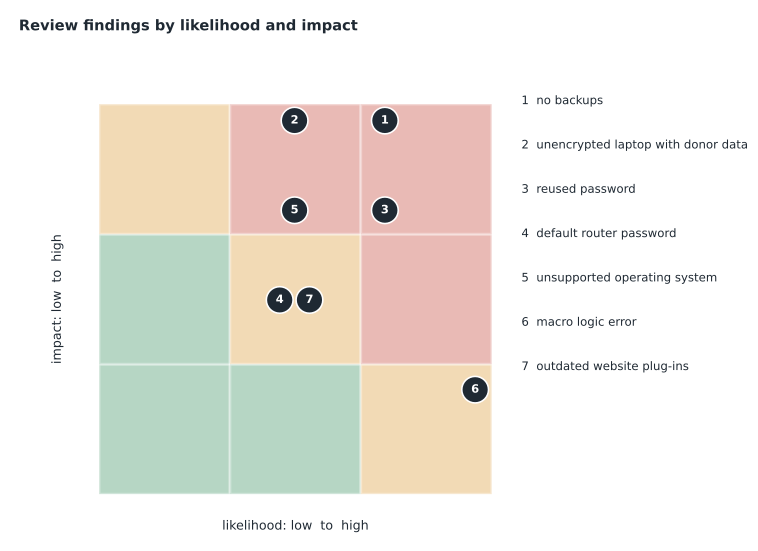
A small organization cannot fix everything at once, so findings are ranked by risk. A simple and widely used method scores each finding for likelihood and impact on a scale of 1 to 5, multiplies the two to get a risk score, and tackles the highest scores first, while also noting how much effort each fix takes, because a cheap fix for a high risk is the best place to start.
findings = [
    # (finding, likelihood 1-5, impact 1-5, effort)
    ("No backups of donor list or sales records", 4, 5, "low"),
    ("Unencrypted, passwordless laptop holds donor list", 3, 5, "low"),
    ("One password reused for email, website and social media", 4, 4, "low"),
    ("Laptop on an operating system with no more updates", 3, 4, "medium"),
    ("Router default admin password; passphrase on the wall", 3, 3, "low"),
    ("Website plug-ins a year out of date", 3, 3, "low"),
    ("Sales macro misreads 'cash' typed in lowercase", 5, 2, "low"),
]
ranked = sorted(findings, key=lambda f: f[1] * f[2], reverse=True)
for rank, (name, likelihood, impact, effort) in enumerate(ranked, start=1):
    score = likelihood * impact
print(f"{rank}. score {score:2d} (L{likelihood} x I{impact}, effort {effort}): {name}")1. score 20 (L4 x I5, effort low): No backups of donor list or sales records 2. score 16 (L4 x I4, effort low): One password reused for email, website and social media 3. score 15 (L3 x I5, effort low): Unencrypted, passwordless laptop holds donor list 4. score 12 (L3 x I4, effort medium): Laptop on an operating system with no more updates 5. score 10 (L5 x I2, effort low): Sales macro misreads 'cash' typed in lowercase 6. score 9 (L3 x I3, effort low): Router default admin password; passphrase on the wall 7. score 9 (L3 x I3, effort low): Website plug-ins a year out of date
What this code does
It lists the seven findings from the review, each with a likelihood and an impact score from 1 to 5 and a rough effort level. It multiplies likelihood by impact to get a risk score and sorts the findings from highest to lowest. The ranked list puts missing backups first, the exposed donor laptop and reused password next, and the router and website plug-ins at the bottom, which becomes the order of the action plan.
The ranking turns into a short plan for the Friends' board. In the first week: set up automatic backups of the donor list and sales records following the 3-2-1 rule, with one copy in a cloud backup service that keeps earlier versions; encrypt and password-protect the laptops with individual accounts; and change every shared password to a unique one in a password manager, turning on MFA wherever it is offered. In the first month: replace or upgrade the unsupported laptop, secure or replace the router, update the website and fix the macro with a drop-down list for payment type. Within three months: move the donor list to a proper donor management service, brief all volunteers on phishing and scams, and run the first test restore from backup.
Worked problem
Writing the summary for the board
The Friends' board are volunteers without a technology background. Noor has one page to summarize the review. What should it say?
Show solution
- Start with the purpose and the headline: the shop's technology works day to day, but the donor list, which is its most valuable asset, is at real risk of being lost or exposed.
- List the top three risks in plain words, each with its fix and rough cost: no backups (automatic cloud backup, a small monthly fee); an unprotected laptop holding donor details (encryption and individual sign-ins, no cost); one password used everywhere (a password manager and two-step sign-in, low cost).
- Give the timeline of week one, month one and month three, and name who is responsible for each item.
- Explain the one surprising finding the treasurer will care about: the sales macro has been putting some cash sales in the card column, so past weekly splits were slightly wrong even though totals were right.
- Close with how success will be checked: a test restore of the donor list, every volunteer with their own sign-in, and a short review again in six months.
Answer: A one-page summary with the headline risk, the top three findings and fixes in plain language, a timeline with owners, the macro finding and how success will be checked.
Lorna reads the report before it goes to the Friends and adds one note: the review itself should be repeated, because technology, people and threats change. A small business that inventories its technology, protects its most valuable data, uses unique passwords with MFA, keeps devices updated, backs up and tests restores, and trains its people has covered most of what attackers rely on. That is also, Noor realizes, most of the Tech+ security domain in one page, and she files the report with her exam notes.
Common mistakes
MistakeStarting a review by buying new equipment.
InsteadInventory first; you cannot protect what you have not listed.
MistakeFixing problems in the order they were found.
InsteadRank by likelihood and impact, and start with cheap fixes for big risks.
MistakeWriting the report in technical jargon.
InsteadExplain risks, fixes, costs and owners in plain language.
MistakeTreating a code fix as the end of the story.
InsteadAdd comments, input validation and a record of changes.
MistakeDoing the review once and filing it.
InsteadRepeat reviews as people, technology and threats change.
Summary and key terms
- A technology review starts with an inventory of devices, accounts, software and data.
- Reading code as an algorithm reveals logic errors that produce no error message.
- Valuable personal data belongs in a properly managed system with limited, authenticated access.
- Group security findings by confidentiality, integrity and availability to explain why they matter.
- Rank findings by likelihood times impact, weigh effort, and fix the top risks first.
- Report in plain language with a timeline, owners and a way to check success.
- Inventory
- A complete list of an organization's devices, accounts, software and data.
- Risk score
- A ranking value, often likelihood multiplied by impact.
- Likelihood
- How probable it is that a threat will occur.
- Impact
- How much harm would result if it did.
- Risk matrix
- A grid that plots findings by likelihood and impact.
- Action plan
- A prioritized list of fixes with owners and dates.
Practice problems
Work each problem on paper first, then reveal the answer to check.
What is the first step of a technology review?
Show answer
Take an inventory of what exists.
Why did the sales macro give wrong splits without any error?
Show answer
It had a logic error: it only matched "Cash" with a capital C.
Which finding scored highest in the review?
Show answer
No backups, with a score of 20.
Which CIA goal does the missing backup threaten most?
Show answer
Availability.
Name a low-effort fix for a reused password.
Show answer
A password manager with unique passwords and MFA.
Why repeat a review?
Show answer
People, technology and threats change over time.
Lesson quiz · 5 questions
Score 60% or more to complete this lesson.
Create a free account to save your progress, take quizzes and earn a certificate.