
COMP-111 · Lesson 1 of 12 · 24 min
Programming languages and how code runs
▶ Video coming soon A video version of this lesson is on the way.
The second half of the Tech+ objectives starts somewhere Noor Abbasi did not expect. On a Thursday at lunch, Lorna Fitzgerald puts a printout on the cert club table: a short script that Dez Okafor-Laine wrote two years ago to check that every self-checkout kiosk at Fairhaven Regional Library in Halifax answers on the network each morning. Noor has watched the script's email report arrive every day since she joined Library Technology Services, but she has never looked inside it. "You do not need to become a programmer for Tech+," Lorna says. "You need to be able to read something like this, recognize what kind of language it is written in, and explain in plain words how a computer turns it into action. That is the software development domain, and it is worth about fourteen questions in every hundred on the exam." This lesson covers the families of programming languages, the difference between compiled and interpreted code, and what actually happens when a program runs.
Why a support technician needs to understand code
Help desk work touches software development more often than people expect. A login script maps network drives when a staff member signs in. A spreadsheet macro builds the monthly circulation report. A web page in the online catalogue misbehaves because a script on it fails in one browser. A vendor asks for the version number of an application before they will open a support case. A teen volunteer in the makerspace asks why the 3D printer software is "stuck compiling." In each case, knowing roughly how code is written and run lets a technician ask better questions, read error messages calmly and describe a problem accurately to the people who can fix it.
Tech+ does not ask you to write large programs. It asks you to compare categories of programming languages, identify the fundamental building blocks of code, such as variables, branching and loops, and explain the purpose of common concepts such as functions, objects and version control. The next four lessons build those ideas one at a time, using short Python examples that you can read even if you have never programmed. Python is not special to the exam; it is used here because it reads almost like English and because it runs directly in this page.
From instructions to machine code
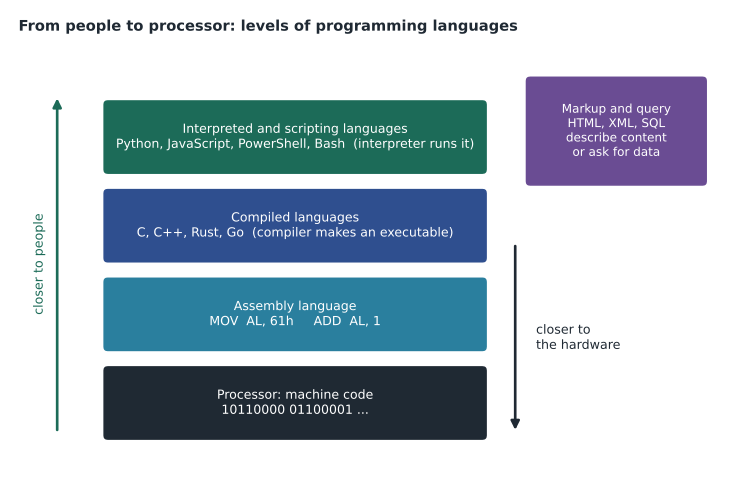
A processor understands only one language: its own machine code, which is a series of binary numbers, each standing for a very small operation such as "add these two values," "copy this value into memory" or "jump to a different instruction if the last result was zero." Different families of processors have different machine codes. The x86-64 instructions in most Windows laptops are not the same as the ARM instructions in phones, tablets and recent Mac computers, which is why software must be built for the right processor architecture. Writing machine code by hand is slow and error-prone, so people almost never do it.
Assembly language is one step up. Each line of assembly is a short, human-readable name for a single machine instruction, such as MOV to move data or ADD to add. An assembler translates the names into the matching binary numbers. Assembly is called a low-level language because it stays very close to the hardware: the programmer manages memory locations and processor registers directly. It is still used for small parts of operating systems, device drivers, firmware and embedded devices where every byte and every microsecond count, but most programmers never write it.
High-level languages hide those details. A single line of a high-level language, such as print(total), can turn into dozens or hundreds of machine instructions. The programmer thinks in terms of names, numbers, text and decisions rather than registers and memory addresses. High-level languages are easier to read, faster to write and easier to move from one kind of computer to another. The price is that something must translate them into machine code, and the way that translation happens is the main difference between compiled and interpreted languages.
Compiled languages
A compiled language is translated in full, ahead of time, by a program called a compiler. The programmer writes source code in a text file; the compiler checks the whole file for errors, translates it into machine code for a particular processor and operating system, and writes the result out as an executable file, such as an .exe file on Windows. The finished executable runs directly on the processor without the source code or the compiler being present. When you install an application from a vendor, you are almost always installing compiled code.
Compiled programs usually run fast, because the translation work was done once in advance and the compiler had time to optimize the result. They also reveal many mistakes before the program ever runs, because the compiler refuses to finish if the code breaks the language's rules. The trade-offs are that every change requires compiling again, which can take minutes for a large project, and that the executable works only on the platform it was built for: a program compiled for Windows on x86-64 will not run on an ARM tablet without being compiled again. C, C++, Rust and Go are well-known compiled languages. Java and C# sit in between: they compile to an intermediate form called bytecode, which a runtime on each computer then turns into machine code as the program runs.
Interpreted and scripting languages
An interpreted language is translated while it runs, by a program called an interpreter. Instead of producing an executable file, the interpreter reads the source code, translates a statement, carries it out, then moves to the next. Python, JavaScript, PowerShell, Bash and Ruby are usually interpreted. Because there is no separate compile step, a programmer can change a line and run it again immediately, which makes interpreted languages popular for learning, testing ideas and automating small jobs. The same script will usually run on any computer that has the right interpreter installed, whatever its processor.
The cost is speed and timing of errors. An interpreted program generally runs more slowly than a compiled one, because translation happens every time. A mistake in a part of the program that does not run until later, such as a misspelled name inside a rarely used branch, may not show up until the moment that branch runs. Many modern interpreters narrow the speed gap by compiling frequently used parts on the fly, so the line between compiled and interpreted is blurrier than it once was, but the exam expects you to know the classic distinction.
Scripting languages are interpreted languages used to automate tasks and glue other programs together. Dez's kiosk check is a script: it runs on a schedule, sends a test message to each kiosk, collects the answers and emails a summary. PowerShell scripts are common in Windows administration, Bash scripts in Linux, and JavaScript runs inside every web browser to make pages interactive. Batch files with the .bat extension, written for the old Windows command prompt, are a simple scripting language still found on older systems. A help desk technician who can read a short script can often spot why it stopped working, such as a changed server name or an expired password inside it.
| Compiled | Interpreted | |
|---|---|---|
| When translation happens | Once, before the program runs | Each time, while the program runs |
| What you distribute | An executable for one platform | The source code, plus an interpreter on each computer |
| Typical speed | Fast | Slower, though modern interpreters close the gap |
| When many errors appear | At compile time | When the faulty line runs |
| Examples | C, C++, Rust, Go | Python, JavaScript, PowerShell, Bash |
Markup and query languages
Two more categories appear on the exam, and neither gives step-by-step instructions in the way a programming language does. A markup language describes the structure and meaning of content using tags. HTML, the HyperText Markup Language, marks a piece of text as a heading, a paragraph, a link or an image, and the browser decides how to display it. XML, the Extensible Markup Language, uses the same style of tags to describe data, such as a list of new books sent from a vendor to the library's catalogue. Markup cannot make decisions or repeat actions on its own; on web pages, that job falls to JavaScript.
A query language asks a database for data or tells it to change data. SQL, the Structured Query Language, is by far the most common. A statement such as SELECT title FROM items WHERE branch = 'Northgate' describes what you want, not how the database should find it; the database works out the steps. Marcus Bell, the library's data and reporting analyst, writes SQL every day, and lesson 7 looks at it in more detail. On the exam, if a language is used to structure documents, it is markup; if it is used to retrieve or change records in a database, it is a query language.
languages = {
    "C": "compiled",
    "Rust": "compiled",
    "Python": "interpreted",
    "PowerShell": "interpreted (scripting)",
    "JavaScript": "interpreted (scripting)",
    "HTML": "markup",
    "XML": "markup",
    "SQL": "query",
    "Assembly": "low-level (assembled)",
}
for name in sorted(languages):
print(name.ljust(11), "->", languages[name])Assembly -> low-level (assembled) C -> compiled HTML -> markup JavaScript -> interpreted (scripting) PowerShell -> interpreted (scripting) Python -> interpreted Rust -> compiled SQL -> query XML -> markup
What this code does
It keeps a small list of language names, each paired with its category, then prints them in alphabetical order with the category beside each one. Nothing is calculated; the point is to see the categories side by side. The printed list is a handy study card for the language-category questions.
What happens when a program runs
Whatever the language, a program that runs goes through the same basic stages. First the operating system loads it: it reads the executable, or starts the interpreter and hands it the script, and gives the program a section of memory to work in. Then the processor carries out instructions one after another, fetching each instruction from memory, decoding what it means and executing it. The program reads input, perhaps from the keyboard, a file or the network, works on it and produces output. When it finishes, or when the user closes it, the operating system takes the memory back. A program that is running is called a process, and Task Manager on Windows or Activity Monitor on macOS lists the processes on a computer.
Programs do not usually talk to hardware directly. They ask the operating system to do things for them, such as open a file, draw a window or send data over the network, through a set of well-defined requests. That is why the same application can run on many different models of computer: the operating system and its drivers deal with the differences in hardware. It is also why a program written for Windows does not run on macOS without changes; the requests it makes are different.
Many programs rely on libraries, which are collections of ready-made code that other programs can call, and on runtimes, which are supporting programs a language needs on each computer. A Java application needs a Java runtime; a .NET application needs the .NET runtime; a Python script needs the Python interpreter and any libraries it imports. When a vendor's installer says it needs a particular runtime version, or an application fails with a message about a missing file ending in .dll, a missing or mismatched library is often the cause. Noting the exact message and the version numbers involved is the most useful thing a technician can do before escalating.
Development tools
Programmers rarely work in a plain text editor. An integrated development environment, or IDE, combines an editor that highlights the language's keywords in colour, tools to run and test the code, a debugger that lets the programmer pause a running program and look at its values, and links to version control, which lesson 4 covers. Visual Studio Code, Visual Studio, IntelliJ IDEA and Xcode are common examples. Simpler editors such as Notepad++ also highlight code. For Tech+, it is enough to know what an IDE is for and that most modern programming happens in one.
Two words often confused are source code and executable. Source code is the human-readable text the programmer writes. An executable is what results after compiling, ready for the processor. Interpreted languages blur this, because the source code is what gets distributed and run. Another pair is syntax and logic. A syntax error breaks the grammar rules of the language, such as a missing bracket, and the compiler or interpreter stops with an error message. A logic error is code that runs without complaint but does the wrong thing, such as adding a late fee twice. Logic errors are harder to find, because nothing tells you they are there; only careful testing does.
Worked problem
Reading Dez's kiosk script
Noor opens the kiosk check file. Its name ends in .ps1, the first line is a comment beginning with #, and it contains commands such as Test-Connection and Send-MailMessage. When it runs on the schedule, there is no compile step; the task scheduler simply starts PowerShell and hands it the file. What kind of language is it written in, and what would she look for if the morning report stopped arriving?
Show solution
- The .ps1 extension and command names such as Test-Connection identify PowerShell, a scripting language that is interpreted when it runs.
- Because it is interpreted, the source code itself is what runs, so any change to the file takes effect the next morning without compiling.
- If the report stops, the first checks are whether the scheduled task still runs, whether the script now produces an error when run by hand, and whether something it depends on changed, such as the mail server name, a password or the list of kiosk addresses.
- Any error message, with the line number it reports, is the most useful thing to record before asking Dez to look.
Answer: It is a PowerShell script, an interpreted scripting language. If it stops working, check the schedule, run it by hand to see any error and line number, and look for changed dependencies such as server names or credentials.
Lorna adds one more point for the cert club. On the exam, questions about language categories are usually short and practical: "Which type of language is used to create the structure of a web page?" or "Which is a benefit of an interpreted language?" Read the key word in the question, such as structure, query, compile or run without compiling, and match it to the category. Noor writes the four categories on a sticky note for her monitor: compiled, interpreted or scripting, markup, query.
Common mistakes
MistakeCalling HTML a programming language.
InsteadHTML is a markup language: it describes content but makes no decisions.
MistakeThinking interpreted programs are compiled into an .exe first.
InsteadInterpreted code is translated while it runs, by an interpreter.
MistakeAssuming an executable runs on any computer.
InsteadA compiled executable is built for one processor and operating system.
MistakeTreating SQL as a general programming language.
InsteadSQL is a query language for retrieving and changing data in databases.
MistakeThinking no error message means the code is right.
InsteadLogic errors run without complaint; only testing finds them.
Summary and key terms
- Processors run only machine code; assembly gives each instruction a readable name.
- High-level languages are easier to write and must be translated into machine code.
- Compiled languages are translated once into an executable; interpreted languages are translated as they run.
- Scripting languages, such as PowerShell, Bash and JavaScript, automate tasks and glue programs together.
- Markup languages such as HTML and XML describe content; query languages such as SQL retrieve and change data.
- A running program is a process; it asks the operating system for services and may need libraries and runtimes.
- Syntax errors stop a program from running; logic errors make it do the wrong thing quietly.
- Machine code
- Binary instructions a processor carries out directly.
- Assembly language
- A low-level language with a readable name for each machine instruction.
- Compiler
- A program that translates source code into an executable before it runs.
- Interpreter
- A program that translates and runs source code statement by statement.
- Scripting language
- An interpreted language used to automate tasks.
- Markup language
- A language that uses tags to describe the structure of content.
- Query language
- A language for retrieving and changing data in a database.
- IDE
- An integrated development environment combining an editor, debugger and build tools.
Practice problems
Work each problem on paper first, then reveal the answer to check.
Which category does HTML belong to?
Show answer
Markup language.
Name one advantage of a compiled language.
Show answer
It usually runs faster, and many errors are caught before it runs.
Name one advantage of an interpreted language.
Show answer
Changes can be run immediately without a compile step, and the same script runs wherever the interpreter is installed.
What does an assembler do?
Show answer
It translates assembly language into machine code.
Which language family is SQL in?
Show answer
Query language.
What is a logic error?
Show answer
Code that runs without an error message but produces the wrong result.
Lesson quiz · 5 questions
Score 60% or more to complete this lesson.
Create a free account to save your progress, take quizzes and earn a certificate.