
BAS-320 · Lesson 9 of 12 · 24 min
Tagging, naming conventions and data models
▶ Video coming soon A video version of this lesson is on the way.
When Sophie and Callie built the RTU-1 database on the afternoon of Monday, October 26, they did two jobs that look alike but serve different readers. They named every point, NF.RTU1.DAT, NF.RTU1.ZNT, NF.RTU1.OAD and so on, so that people could find and read them. And they attached Haystack tags to each point and to the unit itself, so that software could find them. BAS-210 introduced both jobs. This lesson treats them as front-end work, because the front end is where names and tags are used every day: by graphics, alarms, trends and reports, and by any analytics or energy software connected later.
Ilona had a reason for asking. Ninefield's owner was looking at a fault detection service for the next year, and the first question the vendor asked was whether the points were tagged. A building with consistent tags can be connected in days. A building without them needs someone to go through every point by hand and say what it is, which on a site of Ninefield's size is weeks of work.
Naming conventions
A point name has to do several things at once: identify the site, the equipment and the measurement; be short enough to read in an alarm list; sort sensibly; and be the same on the drawings, in the controller and on the front end. Quillon's convention, used across BAS-210 and BAS-310, has three parts separated by dots: a site code, the equipment tag from the drawings, and a point code from a fixed list.
| Part | Example | Rule |
|---|---|---|
| Site | NF, TH, MH | Two letters from a list kept for each owner |
| Equipment | RTU1, AHU1, VAV108 | The tag on the mechanical drawings, without punctuation |
| Point | DAT, ZNT, OAD, SF-S | From the fixed abbreviation list; never invented on the day |
Some sites add a building or floor part between site and equipment, such as NF.P.RTU1 for the podium, and some put a point type at the end. The exact scheme matters less than the rules: one scheme for the whole site, written down; abbreviations from a list; no spaces or characters that some tools cannot handle; and the description property used for the long, plain-language version. A name like NF.RTU1.DAT is for the alarm list. "RTU-1 discharge air temperature, after the heating section" is for the description, the graphic tooltip and the report.
Worked problem
How names help a search
Ninefield's front end holds about 2,300 points. An operator wants every discharge air temperature on the site in one trend. With Quillon's names, what does the search look like, and what could go wrong on a site with mixed naming?
Show solution
- With consistent names: search for points whose name ends in .DAT.
- Result: one entry for each unit, and nothing else.
- With mixed names: the same points might be called DAT, DA-T, SAT, SupplyTemp or Disch Air.
- Every variant must be guessed, and some points will be missed.
Answer: One search with consistent names; an unknown number of searches, and a list that may still be incomplete, without them. Every report, alarm rule and template that selects points by name depends on this.
Why names are not enough
Names are written for people, and people read meaning into them. Software cannot. It does not know that DAT and SAT may mean the same thing on two sites, that RTU1 is a rooftop unit, or that VAV108 is fed by AHU1. A fault detection rule such as "discharge air temperature far from its setpoint while the fan is on" needs to find, for every unit, the discharge air temperature, its setpoint and the fan status, and it needs to do that on any building, whatever naming scheme was used. Names cannot carry that reliably. Tags and data models can.
Project Haystack
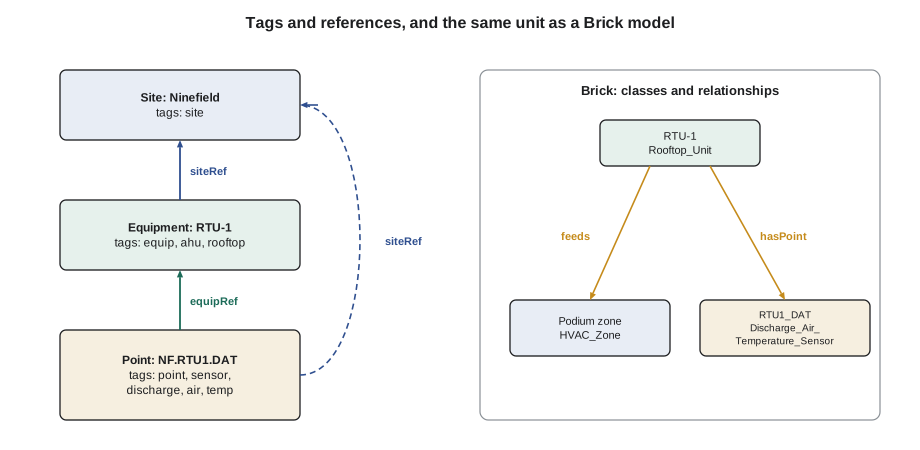
Project Haystack is an open-source initiative that defines a standard vocabulary of tags for building data. A tag is a short name, sometimes with a value, attached to an entity such as a site, a piece of equipment or a point. Marker tags have no value: their presence says something. A point with the tags discharge, air, temp and sensor is a discharge air temperature sensor, whatever its name. Reference tags link entities together: equipRef points from a point to the equipment it belongs to, and siteRef points to the site.
id: @nf.rtu1
dis: "RTU-1 Podium"
equip
ahu
rooftop
siteRef: @nf

id: @nf.rtu1.dat
dis: "RTU-1 discharge air temperature"
point
sensor
discharge
air
temp
unit: "°C"
equipRef: @nf.rtu1
siteRef: @nf
The listing is not code to run. It is how tags look when written out: each line is a tag, and the lines with a colon carry a value. The unit tag must match the controller's engineering units. Haystack defines how to combine tags, which tags are valid together, and how tagged data is exchanged.
Haystack 4 introduced defs, a formal way to define tags and the relationships between them, and the Haystack community announced Haystack 5 in 2025, with a schema language called Xeto for defining equipment and point types more precisely and a way to export models in the RDF format that Brick and other semantic models use. Vendors support Haystack to different degrees and in different versions, so a specification that asks for tagging should say which version and which tags are expected, and how they will be checked.
Brick
The Brick schema is another open data model for buildings, developed by researchers and later supported by an industry consortium. Where Haystack began as a set of tags, Brick began as a model of relationships. It defines classes, such as Air_Handling_Unit, Discharge_Air_Temperature_Sensor and VAV, and relationships between entities, such as feeds, hasPoint and isLocationOf. A Brick model of Ninefield would say that RTU-1 feeds the podium zones, that RTU-1 has a point which is a discharge air temperature sensor, and that each zone is located on a particular floor.
nf:RTU1   a brick:Rooftop_Unit ;
          brick:feeds nf:PodiumZone1, nf:PodiumZone2 ;
          brick:hasPoint nf:RTU1_DAT .

nf:RTU1_DAT a brick:Discharge_Air_Temperature_Sensor .
Brick models are written in RDF, a general format for linked data, and can be queried with SPARQL and checked with SHACL rules. That makes them powerful for software and less friendly for people, which is one reason many projects use names for people, tags for everyday selection and a model for analytics.
ASHRAE 223P
ASHRAE has been developing Standard 223P, a semantic data model for building systems, built on RDF and drawing on both Haystack and Brick. It describes not only equipment and points but how systems are connected, down to the connection points between pieces of equipment and the medium, such as air or water, that flows between them. At the time of writing it was still a proposed standard, with the "P" in its name meaning proposed. BAS-310 noted it as the standards world's answer to semantic models alongside BACnet. A technician does not need to write 223P models by hand, but should know that specifications may begin to ask for them, and that tools to produce them are appearing.
| Names | Haystack | Brick | ASHRAE 223P | |
|---|---|---|---|---|
| For | People | People and software | Software | Software |
| Form | A text string | Tags on entities | Classes and relationships in RDF | Classes, connections and relationships in RDF |
| Strength | Easy to read and search | Simple, widely supported | Rich relationships | Detailed system topology, a standard |
| Weakness | Only as consistent as the people writing them | Weaker on relationships in older versions | Harder for people to read | Still proposed; tools still developing |
Templates and tags together
Lesson 4 showed how templates save time on graphics. Tags make templates work better. A graphic template for a rooftop unit can be bound to points by tag rather than by name: the discharge air temperature value on the graphic is "the point on this equipment tagged discharge, air, temp, sensor". When the template is applied to RTU-2, it finds RTU-2's points automatically. The same applies to alarm templates, trend sets and reports. Sophie set up RTU-1's tags so that the other three podium units, when their controllers are replaced, will need only their tags checked for their graphics, alarms and trends to work.
How tags go wrong
Tags are only as good as the care taken to apply them. The commonest faults are tags left off, tags copied with the wrong equipment, units that disagree with the controller, and local tags invented when a standard tag existed. A front end that shows tags makes them easy to check, and a few simple checks catch most mistakes.
| Check | What it catches |
|---|---|
| Every point has an equipRef and a siteRef | Points that belong to nothing |
| Every equipment item has the expected points by tag | A rooftop unit with no discharge air temperature tag, or two |
| Unit tags match controller engineering units | A temperature tagged in one unit that the controller reports in another |
| No local tags where a standard tag exists | A tag such as dischAir invented instead of discharge and air |
| Tags match the point's description | A point copied from RTU-1 to RTU-2 with equipRef still pointing to RTU-1 |
Worked problem
Counting tagging work
Callie's estimate for tagging RTU-2 to RTU-4 once their controllers are replaced: each unit will have the same 35 points as RTU-1 (7 physical inputs, 6 outputs and 22 virtual points). With a template, checking and correcting the tags takes about 30 seconds a point. Without a template, tagging from scratch takes about 2 minutes a point. Compare the time for the three units.
Show solution
- Points: 3 × 35 = 105.
- With a template: 105 × 0.5 min = 52.5 min.
- From scratch: 105 × 2 min = 210 min = 3.5 h.
Answer: Under an hour against three and a half hours, and the template is more consistent. The saving grows with every unit that shares the template.
Tagging as a deliverable
More specifications now ask for tagging, and some ask for a model. A requirement that only says "points shall be tagged" is hard to check and easy to argue about. A good specification says which scheme and version, which tags each type of equipment and point must carry, how the tags will be delivered (on the front end, as an export, or both), and how they will be checked before acceptance. Quillon's practice was to deliver a tag export alongside the point list at handover, and to run the checks in the table above as part of commissioning, so that the owner's analytics vendor could connect without a separate data-cleaning project.
When Ilona's fault detection vendor came back with a quote, it had two prices: a lower one for buildings that passed their tag check, and a higher one that included tagging by the vendor. Ninefield's podium would pass once all four units were done. The tower, with its 1998 points named in three different styles by three different contractors, would not, and fixing that became a line in Quillon's proposal for the next year.
Tagging an existing building
New controllers can be tagged as they are configured. Existing buildings are harder, because the points already exist under names chosen years ago. The usual approach is to work from the point list rather than the controllers. Export every point with its name, description, object type and units; sort the list by equipment; and build a table that maps each old name to the tags it should carry. Many front ends and analytics tools can then apply the tags in bulk from that table.
The work is mostly reading. Ninefield's tower had chilled water valves called CHWV, CCV and CLG-VLV on different floors, and an analog value called TEMP2 whose meaning was known only from the graphic it appeared on. Each of those needs a person to decide what it is, and the decisions go into the mapping table so that they are made once and recorded. Points nobody can identify are a finding of their own: they may be spares, leftovers from removed equipment, or a sign of undocumented logic.
| Step | Output |
|---|---|
| Export the point list with names, descriptions, types and units | A spreadsheet of every point |
| Group points by equipment | One block of rows for each unit |
| Decide the tags for each kind of point once | A mapping from old names to tags |
| Apply tags in bulk and run the checks in this lesson | A tagged database and a list of exceptions |
| Resolve the exceptions with the site | A short list of points nobody could identify, with a decision for each |
Renaming points is a separate decision. Tags can be added without changing names, which avoids breaking graphics, trends and reports that use the old names. Sophie's advice for Ninefield's tower was to tag first and rename only floor by floor when the graphics were rebuilt.
Common mistakes
MistakeInventing abbreviations on the day.
InsteadUse the site's fixed abbreviation list and add to it only deliberately.
MistakeExpecting names to carry meaning for software.
InsteadAdd tags or a model for software, and keep names for people.
MistakeTreating Haystack or Brick as a protocol.
InsteadThey describe data; BACnet or another protocol moves it.
MistakeCopying a point without changing its references.
InsteadCheck equipRef and siteRef on every copied point.
MistakeAccepting "points shall be tagged" as a specification.
InsteadAsk for the scheme, the version, the expected tags and the acceptance check.
MistakeLeaving unit tags out of step with controller units.
InsteadCheck that each unit tag matches the engineering units the controller reports.
Summary and key terms
- Names are for people and must follow one written convention for the site.
- Descriptions hold the long, plain-language version of a point's meaning.
- Project Haystack uses marker, value and reference tags to describe sites, equipment and points.
- Haystack 4 added defs; Haystack 5 adds the Xeto schema language and RDF export.
- Brick describes equipment and points as classes and relationships in RDF.
- ASHRAE 223P is a proposed standard semantic model describing system connections in detail.
- Templates bound by tag work on any equipment tagged the same way.
- Tagging should be specified, delivered and checked like any other deliverable.
- Naming convention
- A written rule for building point names from site, equipment and point codes.
- Tag
- A short label, with or without a value, attached to a site, equipment item or point.
- Marker tag
- A tag with no value whose presence carries meaning.
- Reference tag
- A tag that links one entity to another, such as equipRef or siteRef.
- Project Haystack
- An open initiative defining standard tags for building data.
- Brick schema
- An open data model describing building equipment and points as classes and relationships.
- ASHRAE 223P
- A proposed ASHRAE standard semantic model for building systems.
- RDF
- A general format for linked data used by Brick and 223P.
Practice problems
Work each problem on paper first, then reveal the answer to check.
What are the three parts of Quillon's point names?
Show answer
Site code, equipment tag and point code.
Which Haystack tag links a point to its equipment?
Show answer
equipRef.
A point is copied from RTU-1 to RTU-2. Which tags must be checked?
Show answer
equipRef, and any tags that depend on the equipment.
Tagging 70 points takes 2 minutes each from scratch and 30 seconds with a template. How much time does the template save?
Show answer
140 − 35 = 105 minutes.
What does the P in ASHRAE 223P mean?
Show answer
Proposed: the standard was still in development.
Lesson quiz · 5 questions
Score 60% or more to complete this lesson.
Create a free account to save your progress, take quizzes and earn a certificate.