
BAS-320 · Lesson 11 of 12 · 21 min
Upgrades, licensing and backups
▶ Video coming soon A video version of this lesson is on the way.
In December 2023, a fan coil controller at Harcastle's Morrow House residence failed and Quillon fitted a replacement from stock. The replacement came with newer firmware than the original, and the backup of the original program would not load into it. Nobody had recorded which firmware version the backup was made from, so nobody could tell whether an older tool or an intermediate version would have helped. Two technicians spent two days in the week before the holidays rebuilding the program from the sequence and the last printout, while the residence's rooms ran on temporary settings. BAS-220 told that story as a lesson about programs. Sophie told it to Callie as a lesson about the front end's least glamorous job: keeping the system's software, licences and backups in order, so that a failure costs an hour and not two days.
What a building system's software is made of
A modern system has software at every level, and each part has its own version, its own update process and its own compatibility rules.
| Part | Examples | Updated by |
|---|---|---|
| Front-end server software | The server application, its database, its web server | The controls contractor or owner, usually under a maintenance agreement |
| Server operating system | The operating system and its security patches | Often the owner's IT team |
| Supervisory controller firmware | The controller's operating software and its drivers | The controls contractor |
| Field controller firmware | The software inside each VAV, unit or plant controller | The controls contractor, with care |
| Engineering tools | The configuration and programming tools on technicians' laptops | Each technician, kept to the versions the site needs |
| Programs and configuration | Control programs, graphics, alarms, schedules, trends, users | Changed every day; kept by backups |
The parts depend on each other. A new front-end version may need a newer operating system, may stop supporting older supervisory controller firmware, or may need a newer engineering tool. A field controller's firmware may need a matching version of the tool that programs it. Before anything is upgraded, the compatibility of every layer it touches must be checked against the vendor's published compatibility information.
Why upgrade at all
Upgrades carry risk, so it is tempting to leave a working system alone. There are good reasons not to. Security fixes arrive only in newer versions, and older versions stop receiving them; BAS-430 treats this in detail. Operating systems reach the end of their support, and an unsupported server on the owner's network is a problem for their IT team. New devices may need a newer front end to integrate. And the longer an upgrade is put off, the bigger the jump becomes, until it is a migration rather than an update.
The opposite mistake is upgrading on impulse: installing the latest version the week it comes out, on a live site, without a plan to go back. Quillon's practice was to upgrade on a planned date, after the version had been out long enough for early problems to be reported, with backups taken and a tested way back.
Planning an upgrade
| Step | What it involves |
|---|---|
| Inventory | Record the present version of every layer: server, operating system, supervisory and field firmware, tools |
| Compatibility check | Check the target version against the vendor's compatibility list for every layer it touches |
| Read the release notes | Look for changed behaviour, removed features and steps that must be done in order |
| Backups | Take and verify full backups of everything that will change |
| Test | Where possible, upgrade a copy or a test controller first |
| Schedule | Pick a time when a problem does the least harm, and tell the owner and operators |
| Upgrade and check | Upgrade, then check graphics, alarms, trends, schedules and a sample of points |
| Record | Update the version inventory and the site documentation |
The check after an upgrade deserves its own list. Do the alarms still reach the right people? Are trends still collecting, and did the histories survive? Do schedules still show the right times? Can each role still log in with the right permissions? A front end can look normal on its home page while its alarm routing is broken, and the first sign is a missed alarm.
Firmware on field controllers
Field controller firmware is upgraded less often than server software, and for good reason: there may be hundreds of controllers, each upgrade carries a small risk of leaving a controller unusable, and a working VAV box gains little from new firmware unless it fixes a known problem or a security issue. Many sites upgrade field firmware only when there is a specific reason. The firmware version of each controller should still be recorded, because a replacement controller, as Morrow House showed, will rarely arrive with the same version.
After Morrow House, Quillon made two rules. Every backup records the firmware version of the controller it came from, in the file name or alongside it. And spare controllers in stock are labelled with their firmware version, so that a technician can see before going to site whether the backup will load or whether the program will need converting.
Licensing
Lesson 2 showed that front ends and supervisory controllers are often licensed by size, counting devices, points or users. Licences also cover time. Many vendors sell the software with a software maintenance agreement (SMA), a yearly fee that entitles the owner to upgrades and sometimes support. When the agreement lapses, the software usually keeps running at its present version, but upgrades are no longer allowed, and reinstating the agreement later may mean paying for the lapsed years.
| Licence item | What to record | Why |
|---|---|---|
| Licence size | Devices, points or users allowed, and present use | Additions fail silently when the limit is reached |
| Maintenance agreement end date | The date and who renews it | Upgrades stop when it lapses |
| Licence file or key | Where it is kept and what hardware it is tied to | Replacing hardware without moving the licence can stop the server |
| Owner of the licence | Usually the building owner, not the contractor | The owner must be able to change contractors without losing the software |
Ninefield's front-end maintenance agreement was due for renewal in January 2027. Lesson 2's calculation had shown 160 devices against a 200-device licence after the RTU work. Ilona planned to renew the agreement at the same size, and Declan noted in the retro-commissioning file that a tenant fit-out adding more than about 40 controllers would need a larger licence first.
Who owns the licence matters more than it seems. On some older sites, the front-end licence was bought in the contractor's name, so that when the owner changed contractors, the new contractor could not get support or upgrades without the old one's help. Quillon's handover documents always named the building owner as the licence holder.
Backups
A backup is a copy of everything needed to rebuild a part of the system: controller programs and configurations, the front-end database, graphics, alarm and trend settings, schedules, users and roles, and, where they matter, histories. A backup that has never been restored is a hope, not a backup. Quillon's practice was to take a backup at every change and on a fixed schedule, to store copies in more than one place, and to restore one to a test system from time to time to prove that it works.
The 3-2-1 rule is a widely used guide: keep at least three copies of the data, on at least two different kinds of storage, with at least one copy away from the site. For a building system, that might be the live system, a copy on the owner's network storage, and a copy in Quillon's own backup store or the owner's off-site storage.
| Backup | When | Kept |
|---|---|---|
| Change backup | Before and after every change | With the work order |
| Daily | Each night | 14 days |
| Weekly | Each Sunday | 8 weeks |
| Monthly | First of the month | 12 months |
| Handover and milestone | At handover and after major work | For the life of the system |
Worked problem
Storage for a backup rotation
Harcastle's front-end configuration backup, without histories, is about 1.6 GB. Using the rotation in the table, how many scheduled copies are kept at once, and how much storage do they need on each of two storage locations?
Show solution
- Copies: 14 daily + 8 weekly + 12 monthly = 34.
- Storage at each location: 34 × 1.6 GB = 54.4 GB.
- Two locations: 2 × 54.4 GB = 108.8 GB.
Answer: 34 copies and about 54 GB at each location, under 110 GB in all, which is small by today's standards. Histories, which lesson 6 sized at tens of gigabytes, are usually backed up separately and less often.
Backup names should say what, where, when and from which version. Quillon's names for controller backups followed the pattern used for RTU-1's first backup on October 27, NF_RTU1_2026-10-27_a, with the firmware version recorded alongside. The second backup after checkout, NF_RTU1_2026-11-11_a, sat next to it in the same folder, so that anyone could see the controller's history at a glance.
Backup record
  Name:      NF_RTU1_2026-11-11_a
  Site:      Ninefield Tower, podium RTU-1
  Device:    BACnet device instance and IP or MAC as recorded
  Firmware:  as read from the controller at backup time
  Tool:      engineering tool and version used
  Reason:    after checkout
  By:        technician's name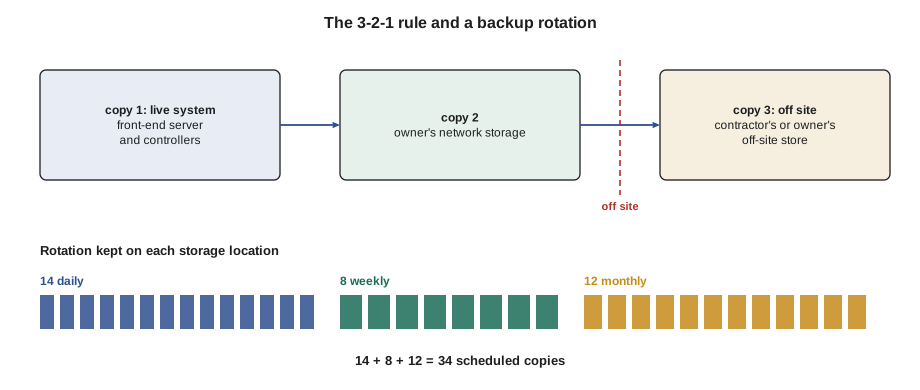
Testing a restore
Restoring a backup is a skill, and like other skills it is lost when it is not practised. Quillon's service desk restored one site's front-end backup to a test server each quarter and one controller backup to a bench controller each month, choosing sites in rotation. Each test answered two questions: did the backup restore, and did the restored system work? A front-end backup that restored but showed graphics with broken links, because the image files were not included, would have passed the first question and failed the second.
Restoring to a live system needs the same care as an upgrade. The backup must be the right one, from the right device, made with a compatible version, and the present state must be backed up first, in case the restore makes things worse.
Ninefield's version inventory
Callie's last job of the RTU-1 project was to update Ninefield's version inventory, a single table listing every layer of the system with its present version, the date it was last changed and the agreement it was covered by. Sophie had started the table when Quillon took over the site, and it had already paid for itself twice: once when a supervisory controller was replaced and the right firmware was ready on the laptop, and once when the vendor announced the end of support for the server's operating system and Ilona could see at once which machine was affected.
Migrations: when an upgrade is not enough
Sometimes a system is so far behind, or its product line so old, that no upgrade path exists. The vendor has stopped making the controllers, the front end will not run on any supported operating system, and spare parts come from other people's removed equipment. At that point the choice is a migration: replacing the front end, and often the supervisory controllers, while keeping as much of the field equipment as possible.
Migrations are planned in stages so the building keeps running. A common pattern is to install the new front end alongside the old one, integrate the old controllers through a gateway or their BACnet interface where they have one, and then replace controllers system by system as budget allows, starting with the plant and the parts most at risk. Each stage moves graphics, alarms, trends and schedules across, and each stage needs the same checks as an upgrade. The old system's histories are usually exported and kept, because the new front end may not be able to import them.
| Stage | Typical work |
|---|---|
| 1. New front end | Install the server, connect it to existing controllers, rebuild graphics and alarms |
| 2. Plant controllers | Replace the boiler, chiller and air handler controllers that matter most |
| 3. Terminal units | Replace VAV and fan coil controllers floor by floor |
| 4. Retire the old front end | Export histories, remove the old server, update documentation |
Ninefield's tower, with its 1998 points, was a candidate for exactly this kind of plan in the years ahead, and Declan's retro-commissioning file listed it as a decision for the owner rather than a job for the next service visit. A migration is also the moment to fix the naming and tagging problems of lesson 9, because every point is being touched anyway.
Common mistakes
MistakeUpgrading one layer without checking the others.
InsteadCheck every layer an upgrade touches against the vendor's compatibility list.
MistakeUpgrading on impulse on a live site.
InsteadPlan the date, take backups and keep a tested way back.
MistakeBacking up without recording the firmware version.
InsteadRecord the firmware and tool version with every backup.
MistakeLetting a maintenance agreement lapse unnoticed.
InsteadRecord its end date and who renews it.
MistakeBuying the licence in the contractor's name.
InsteadMake the building owner the licence holder.
MistakeNever testing a restore.
InsteadRestore backups to a test system regularly and check the result works.
Summary and key terms
- A building system has software at every level, each with its own version and compatibility rules.
- Upgrades are needed for security, support and integration, and must be planned.
- Every upgrade starts from a version inventory and ends with checks of alarms, trends, schedules and logins.
- Field controller firmware is upgraded for a reason, but its version is always recorded.
- Licences cover size and time; maintenance agreements control access to upgrades.
- The owner should hold the licence.
- Backups follow the 3-2-1 rule and a rotation, and are named with what, where, when and which version.
- A backup is proven only by restoring it.
- Firmware
- The operating software inside a controller.
- Compatibility list
- A vendor's statement of which versions of each part work together.
- Software maintenance agreement
- A yearly agreement that entitles the owner to software upgrades and sometimes support.
- Version inventory
- A record of the present version of every layer of a system.
- Backup
- A copy of everything needed to rebuild a part of the system.
- 3-2-1 rule
- Three copies, on two kinds of storage, with one off site.
- Restore test
- Loading a backup onto a test system to prove that it works.
Practice problems
Work each problem on paper first, then reveal the answer to check.
Name four layers of software in a building system.
Show answer
Front-end server software, server operating system, supervisory firmware, field firmware, engineering tools, programs and configuration (any four).
What went wrong at Morrow House in 2023?
Show answer
A replacement controller had newer firmware and the backup would not load; the firmware version had not been recorded.
A rotation keeps 7 daily, 4 weekly and 6 monthly copies of a 2 GB backup. How much storage at one location?
Show answer
17 × 2 GB = 34 GB.
What usually happens when a maintenance agreement lapses?
Show answer
The software keeps running but cannot be upgraded.
What two questions does a restore test answer?
Show answer
Did the backup restore, and does the restored system work?
Lesson quiz · 5 questions
Score 60% or more to complete this lesson.
Create a free account to save your progress, take quizzes and earn a certificate.