
BAS-320 · Lesson 1 of 12 · 22 min
The building automation system architecture
▶ Video coming soon A video version of this lesson is on the way.
On Monday evening, September 14, Sophie Aubertin stayed late at Quillon's office on Nebo Road with a laptop, a projector and a box of sandwiches. Callie Rintoul had been with the company for a week. She had already read alarms on the Tilden Hall front end with Prakash and helped in the panel shop that afternoon, and she had noticed that every conversation in the office eventually came round to "the front end": what it showed, what it hid, who could log in and why a graphic had gone blank. Sophie, who wrote most of Quillon's graphics and alarm configurations, offered to spend Monday evenings that fall explaining the operator's side of the system. "Everything you wire and program ends up here," she said, tapping the screen. "If it is wrong here, the building operator thinks it is wrong in the building."
She began not with a screen but with a drawing: the layers of a building automation system, from the sensor in the duct to the person at the desk. Every later evening in this course would come back to it.
Three levels and the people at each one
Most descriptions of a building automation system, and the international standard for building automation, ISO 16484, divide it into three levels. The names vary between manufacturers and textbooks, but the idea is the same everywhere.
| Level | What lives there | Typical job | Who works with it most |
|---|---|---|---|
| Field level | Sensors, actuators, valves, relays, safeties and their wiring | Measure and move things | Installers and service technicians |
| Automation level | Field controllers, application specific controllers, plant controllers and their programs | Run the control loops, sequences, schedules and safeties | Programmers and technicians |
| Management level | Supervisory controllers, servers, workstations, browsers and phones | Let people see, command, record and report | Operators, managers, programmers and service staff |
The levels are not just a way of drawing the system; they are a way of thinking about where a job belongs. A control loop belongs at the automation level, in the controller next to the equipment, so that it keeps running whatever happens to the network or the server. A graphic, a trend that must be kept for a year or an alarm that must be e-mailed belongs at the management level. Sophie's rule, which she said she had learned the hard way, was that nothing needed to keep a building safe or comfortable should depend on the management level being alive.
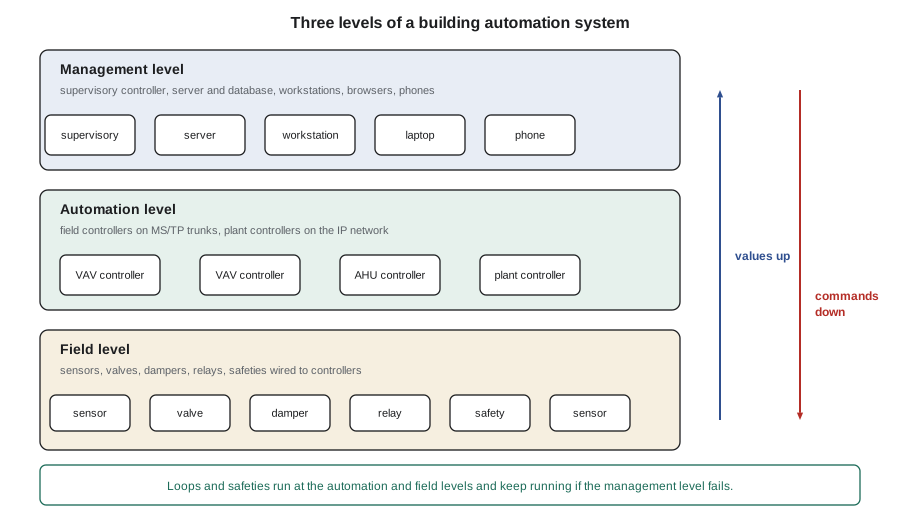
What the management level actually does
The phrase "front end" is used loosely for the whole management level, and also for its most visible part, the graphics an operator looks at. Sophie listed the jobs the management level does in a typical building, because each one would get its own evening.
- Presents the building as graphics: equipment pages, floor plans and summaries that let a person see the state of the systems at a glance (lessons 3 and 4).
- Receives alarms, records them, shows them to the right people and routes them by e-mail, text message or a work-order system (lesson 5).
- Collects and keeps trend logs and histories long after the controllers' own buffers have filled, and produces reports from them (lesson 6).
- Controls who can see and change what, through user accounts, roles and an audit trail (lesson 7).
- Gives people a convenient place to change schedules, holidays and setpoints, which it then writes to the controllers (lesson 8).
- Holds the model of the building: names, tags and relationships that let software find "every VAV box on the third floor" (lesson 9).
- Lets people connect from elsewhere: other buildings, home or a phone (lesson 10).
- Keeps the configuration, programs and backups that let the system be repaired or rebuilt (lesson 11).
Look at what is not on the list. The management level does not, or should not, run the air handler. It may calculate a building-wide value, such as a chilled water reset based on the most-open valve, and write it down to a controller; that is supervisory control, and lesson 2 shows where it belongs. But if the server stops, the controller should carry on with the last good value or a safe default, and the building should not notice.
Supervisory controllers, servers and clients
Between the field controllers and the people sits a layer that has many names: supervisory controller, network controller, building controller, network area controller or, after one widely used product family, a JACE. Whatever it is called, it does three things. It routes or translates between the field networks and the IP network, as BAS-310 showed; it collects data from the controllers below it; and it runs supervisory logic, schedules, alarm handling and short-term trend storage for its part of the building.
Above the supervisory controllers is usually a server. It runs the front-end software and a database, gathers trend data and alarms from every supervisory controller, serves graphics to web browsers, sends e-mails and keeps the long-term records. Small buildings sometimes have no separate server; the supervisory controller itself serves the graphics, and an operator logs into it directly from a browser. Large campuses may have several servers, one for each group of buildings, reporting to an enterprise server above them.
The people use clients: a workstation in the operator's office, a browser on a laptop, or a phone app. Most current front ends are web-based, so the client needs nothing installed beyond a modern browser, although some still use a dedicated workstation program for engineering work such as building graphics or editing programs.
| Part | Harcastle College | Ninefield Tower |
|---|---|---|
| Server | Front-end server in the central plant, on the campus controls subnet with its BBMD | Front-end server in the building engineer's office |
| Supervisory controllers | One per building: Tilden Hall, Morrow House and the others, each routing its own MS/TP trunks | One in the penthouse (a different maker), plus a small BACnet router on each office floor |
| Field controllers | VAV, fan coil and air handler controllers on MS/TP | About 140 VAV controllers, two programmable plant controllers, chiller cards and the new RTU-1 controller |
| Clients | Nell's workstation in the plant, browsers for Gus and the trades, Quillon's service laptops | Browser in the engineer's office, Ilona's laptop, Quillon's service laptops |
How values travel up and commands travel down
A value shown on a graphic has made a journey. A temperature sensor's resistance is read by a field controller, scaled, filtered and stored as the Present_Value of an object. The supervisory controller reads it, by polling or through a change-of-value subscription, and keeps a copy. The server reads that copy, and the browser asks the server for it every few seconds while the page is open. At each step the value can be delayed, cached or lost, and a front end that hides those steps can mislead.
Commands travel the other way. An operator changes a setpoint on a graphic; the browser sends it to the server; the server writes it to the supervisory controller or directly to the field controller, at the priority BAS-310 called the operator's, usually priority 8; and the controller's program then acts on it. Two consequences follow. First, a command written from the front end stays until someone releases it, which is how Tilden came to have 14 points still at priority 8 on November 14, some of them since the summer. Second, a command can fail silently if the front end does not confirm that the write was accepted, so good front ends read the value back and show it.
Worked problem
How fresh is the value on the graphic?
A zone temperature on a Ninefield floor is read by the floor's router from the VAV controller every 30 seconds. The penthouse supervisory controller reads the router's copy every 60 seconds, and the graphic in the browser refreshes every 10 seconds. What is the longest the operator could be looking at a value without knowing it is old, assuming each step can just miss the one before?
Show solution
- Worst case at each step is one full interval.
- Total: 30 + 60 + 10 = 100 s, a little under two minutes.
- With change-of-value subscriptions at both steps instead, the delay is usually a few seconds after the value changes by the COV increment.
Answer: Up to about 100 seconds. That is fine for a zone temperature, but not for watching a damper stroke during a test; for that, Sophie uses the controller's own engineering tool or a fast-refreshing page.
Each refresh also costs network traffic, which is why the front end does not simply read everything as fast as it can. BAS-310 showed how polling and COV subscriptions load an MS/TP trunk. Good front-end design reads what is on the open page often, reads trend points at their trend interval, and leaves everything else to the controllers.
Open and closed management levels
BACnet made it possible for a front end from one maker to read controllers from another. In practice, many sites still have a management level tied to one maker's controllers, and many have a mixture. Ninefield's penthouse supervisory controller came from a different maker than the floor controllers, and both appeared on the same front end. Harcastle's front end read Quillon's controllers in Tilden and Morrow House as well as an older system in another building through a gateway.
There are two common approaches to combining systems at the management level. One is to bring every device onto one BACnet internetwork and let a single front end discover and read them all. The other is to keep each system with its own server and combine them above that, through an integration platform that reads each server's data. Large owners increasingly use the second approach, often called an enterprise or analytics layer, because it lets them compare buildings without replacing every front end. Either way, the owner's specification decides how open the result must be, and Declan reads that clause first when Quillon prices a job.
| Approach | Advantages | Drawbacks |
|---|---|---|
| One front end for everything | One place to look; one alarm list; one set of user accounts | One maker's software must support every device; large databases; one point of failure |
| One front end per system, combined above | Each system keeps its own tools; failures stay contained | Several user account systems; alarms and graphics in more than one place |
| Cloud analytics reading the front ends | Comparisons across buildings; fault detection; dashboards for managers | Data leaves the building; another login; depends on the integration being maintained |
The cloud and the edge
In the last decade, the management level has started to move out of the building. Some makers now host the front end on their own servers, reached over the internet, with only a small gateway or supervisory controller on site; others offer analytics and dashboards in the cloud fed from an on-site server. The words used for this are "cloud" for software hosted elsewhere and "edge" for the computing that stays in the building, close to the equipment.
Cloud services bring real benefits: no server to maintain on site, automatic software updates, access from anywhere and tools for comparing many buildings. They also move the building's data and, sometimes, its commands across the internet, which raises the questions about security and access that lesson 10 and BAS-430 deal with. Sophie's view was practical. "The cloud is just somebody else's server," she said. "The rule stays the same: the building has to run with the connection cut."
Reading an architecture drawing
Every Quillon project includes a system architecture drawing, sometimes called a riser diagram, that shows the management level and the networks below it. A technician arriving at an unfamiliar site should find it before touching anything. It answers the first questions of almost every service call: where the server is, which supervisory controller owns which trunk, what the IP addresses and network numbers are, and where the system connects to anything else.
| On the drawing | Why it matters on a service call |
|---|---|
| Server and supervisory controller locations | Where to go when graphics or alarms stop |
| IP addresses, subnets and BBMDs | Which devices should see each other's broadcasts |
| MS/TP trunks with network numbers, MAC ranges and end-of-line devices | Where to start when a group of controllers goes offline |
| Integrations: chillers, meters, lighting, fire alarm interface | Who owns each link and what it carries |
| Connection to the owner's IT network and any remote access | Who must be called before changing anything at that boundary |
Callie spent the rest of the evening redrawing Tilden Hall's architecture from Sophie's files: the front-end server in the central plant, the Tilden supervisory controller at 10.40.12.10, its three MS/TP trunks, and the converter, air handlers and boxes on each one. When she had finished, Sophie handed her a printout of the alarm list from that morning and asked which level each alarm had come from. Most came from field devices, two from controllers that had dropped offline for a few seconds, and one from the server itself, warning that its disk was 80 in 100 full. "That last one is mine," Sophie said. "Lesson 11."
Common mistakes
MistakePutting a control loop or safety in the server or front end.
InsteadKeep loops, safeties and sequences in the controllers; the management level is for people.
MistakeAssuming the value on a graphic is live.
InsteadKnow the polling and refresh chain, and check stale-data indications before trusting a value.
MistakeWriting commands from the front end and walking away.
InsteadRelease overrides when finished, and make sure the front end confirms that writes were accepted.
MistakeArriving at a site without the architecture drawing.
InsteadFind the riser or architecture drawing first; it answers where the server, trunks and integrations are.
MistakeTreating the cloud as part of the building's control.
InsteadDesign so the building runs safely and comfortably with the internet connection cut.
Summary and key terms
- A BAS has a field level, an automation level and a management level.
- Loops, sequences, schedules and safeties belong at the automation level, close to the equipment.
- The management level presents graphics, handles alarms, keeps trends, controls access and holds backups.
- Supervisory controllers route, collect data and run supervisory logic for part of a building.
- A server runs the front-end software and database; clients are workstations, browsers and phones.
- Values on a graphic pass through several polling or COV steps and can be delayed or stale.
- Commands written from the front end stay at their priority until someone releases them.
- Cloud services add access and analytics, but the building must still run with the connection cut.
- Management level
- The part of a BAS used by people: supervisory controllers, servers, workstations, browsers and phones.
- Automation level
- The controllers and programs that run loops, sequences and safeties.
- Field level
- Sensors, actuators, relays and their wiring.
- Front end
- The software, and often the graphics, operators use to see and command the system.
- Supervisory controller
- A controller that routes between networks, collects data and runs supervisory logic for part of a building.
- Supervisory control
- Building-wide logic, such as a reset, that adjusts the setpoints of local controllers.
- Client
- A workstation, browser or phone that displays the front end.
- Edge
- Computing that stays in the building, close to the equipment.
- Architecture drawing
- A drawing of the servers, controllers, networks and integrations of a BAS.
Practice problems
Work each problem on paper first, then reveal the answer to check.
Where should a mixed air low limit run: in the server or in the air handler's controller?
Show answer
In the controller, so it works if the server or network fails.
Name four jobs of the management level.
Show answer
Graphics, alarms, trends and reports, user access; also schedules, the data model, remote access and backups.
A value is polled every 60 s by a supervisory controller and every 15 s by the server, and the page refreshes every 5 s. What is the worst-case age?
Show answer
60 + 15 + 5 = 80 s.
Why does a front-end command need to be read back?
Show answer
To confirm the controller accepted it; a failed write can otherwise go unnoticed.
What is the first drawing to find on an unfamiliar site?
Show answer
The system architecture or riser drawing.
Lesson quiz · 5 questions
Score 60% or more to complete this lesson.
Create a free account to save your progress, take quizzes and earn a certificate.