
BAS-320 · Lesson 8 of 12 · 25 min
Scheduling from the front end
▶ Video coming soon A video version of this lesson is on the way.
Monday, November 9 was a long day for Callie: the morning at Ninefield tracing a jumping chilled water pressure reading to a shield grounded at both ends, the afternoon on the podium roof while Kelso Electric ran RTU-1's new circuit. At the evening session Sophie had a short list on the whiteboard: three things that had gone wrong with schedules that fall. Tilden's AHU-1 had run until 2:00 on two nights in October after an evening event. Ninefield's seventh-floor tenant had been billed for after-hours heating they said they had not asked for. And Harcastle's 2027 closure calendar, which Gus had sent that afternoon, still had to be loaded before the winter break. "Schedules look like the easiest thing on the front end," Sophie said. "They're the thing people touch most, so they go wrong most."
Where schedules live
BAS-220 described how schedules run inside controllers, as BACnet Schedule and Calendar objects or the equivalent in a controller's own programming. The front end is usually not where a schedule runs but where people see and change it. When an operator moves Tilden's Saturday start from 8:00 to 9:00 on a graphic, the front end writes the change to the Schedule object in the controller, and the controller does the work. If the server is off for a week, the building keeps to its schedule.
That arrangement has one weakness: the same schedule can exist in two places. Some front ends keep their own copy and push it down to the controllers; some read the controller's schedule each time it is displayed; some do both, and the two can disagree if someone changes the controller directly with an engineering tool. Sophie's rule was that each schedule must have one owner, written in the site documentation, and that the front end must show the schedule as the controller actually holds it.
| Arrangement | How it works | Risk |
|---|---|---|
| Controller owns the schedule | The front end reads and writes the controller's Schedule object | Many controllers to edit one by one, unless grouped |
| Front end master, pushed down | A master schedule in the front end writes its times to every controller in a group | A controller changed locally drifts from the master until the next push |
| Supervisory controller schedule | The supervisory controller runs the schedule and commands occupancy to field controllers | Field controllers fall back to their defaults if the supervisory controller fails |
Schedule groups
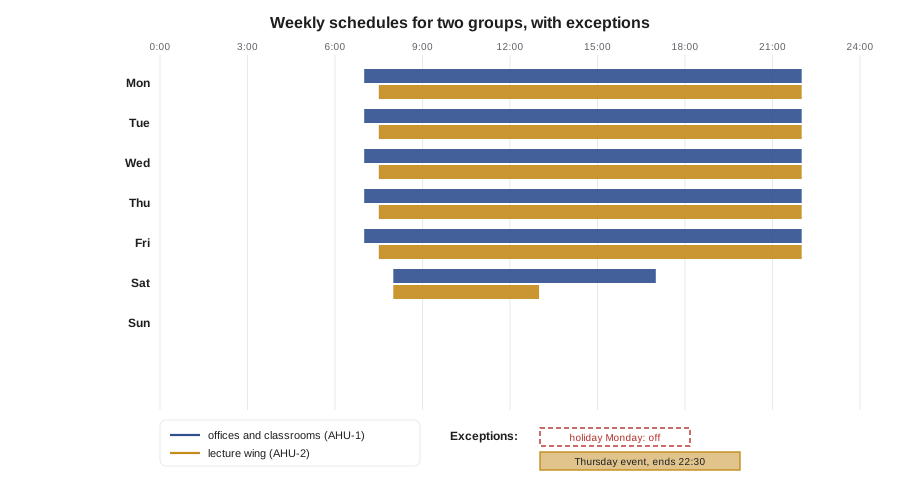
Buildings rarely need one schedule per piece of equipment. Most equipment follows the occupancy of an area, so equipment is grouped and each group follows one schedule. Tilden in the fall had three groups: the office floors and classrooms on AHU-1, the lecture wing on AHU-2, and the stair fan coils and radiation, which followed the building's heating schedule. On October 3, Gus had approved separate schedules for the lecture wing and the offices for the winter term, because the lecture wing was used on evenings and Saturdays when the offices were empty.
| Group | Weekdays | Saturday | Sunday | Hours a week |
|---|---|---|---|---|
| Offices and classrooms (AHU-1) | 7:00 to 22:00 | 8:00 to 17:00 | Off | 84 |
| Lecture wing (AHU-2), winter term | 7:30 to 22:00 | 8:00 to 13:00 | Off | 77.5 |
| Lecture hall T-120 | Broad schedule as AHU-2; ventilation by CO₂ and occupancy | As AHU-2 | Off | Varies with use |
Worked problem
Checking a group's weekly hours
Check the weekly hours of the two Tilden groups in the table.
Show solution
- AHU-1: weekdays 15 h × 5 = 75 h; Saturday 9 h; total 84 h.
- AHU-2: weekdays 14.5 h × 5 = 72.5 h; Saturday 5 h; total 77.5 h.
Answer: 84 and 77.5 hours. A quick check like this, against the runtime report in lesson 6, shows whether equipment is running longer than its schedule allows.
Exceptions and holidays
A weekly schedule says what normally happens on each day of the week. Real buildings also have days that are different: statutory holidays, college closure days, an exam weekend, a Saturday open house. These are handled by exceptions. In BACnet terms, a Calendar object holds a list of dates, and a Schedule object's exception schedule says what to do on the dates of a given calendar; on those dates the exception overrides the weekly schedule. Front ends present this as a holiday list and a special-events list.
Holidays are best kept in one calendar shared by every schedule on the site, so that adding a date once closes the whole building. Gus's 2027 closure calendar for Harcastle listed every day the college would be closed, and Sophie's job was to load it into the campus calendar before the winter break started.
Worked problem
What the holiday calendar saves
Harcastle's 2027 closure calendar lists 12 weekday closures outside the winter break. Tilden's AHU-1 runs 15 hours on a normal weekday. If the holidays were not loaded, how many extra fan hours would AHU-1 run in 2027, and how many normal weeks of running is that?
Show solution
- Extra hours: 12 × 15 = 180 h.
- Normal weekly hours: 84 h.
- Weeks: 180 ÷ 84 ≈ 2.1 weeks.
Answer: About 180 hours, more than two weeks of normal running, for one air handler alone. Missing holiday calendars are one of the cheapest energy savings a controls technician can find.
Holiday dates must be checked every year. Some holidays fall on the same date every year, some on a fixed weekday such as the first Monday of a month, and some move from year to year, such as Good Friday, which follows Easter. Front ends usually let a calendar entry be a fixed date, a date range, or a rule such as "first Monday of August". An entry set as a fixed date for a holiday that moves will be wrong the next year, which is why Sophie preferred to load each year's dates from the owner's published calendar rather than rely on rules.
After-hours requests
Occupants often need heating, cooling or ventilation outside the schedule: a late meeting, a weekend deadline, an evening lecture. The worst way to handle these is the one that caused Tilden's two late nights in October: an operator extends the schedule on the front end and types an end time, and a mistake in the end time leaves the air handler running all night. Better ways have a built-in end.
| Method | How it works | Ends by itself? |
|---|---|---|
| Timed override button on a zone sensor | An occupant presses a button and the zone is occupied for a set time, often 1 or 2 hours | Yes |
| After-hours request on the front end | An operator or tenant requests a floor or zone for a number of hours, chosen from a list | Yes |
| Special event in the schedule | A one-off event added with a start and an end time | Yes, if the end time is right |
| Manual change to the weekly schedule | Someone edits the normal week | No: it stays until someone changes it back |
Ninefield's tenants requested after-hours heating and cooling through a page on the front end that let them choose their floor and a number of hours in blocks of one hour, up to four. Each request was logged with the user's name, so that Ilona could bill tenants for the hours they asked for. The seventh-floor tenant's complaint came from a request made under a shared tenant account in September; with no name on it, nobody could show who had made it, which was one more reason for the personal accounts of lesson 7.
Worked problem
After-hours hours for billing
In October, Ninefield's seventh-floor tenant made after-hours requests of 2, 3, 2, 4, 1, 2 and 4 hours, and two more of 2 hours each on the Saturday of a deadline weekend. The building charges tenants by the floor-hour. How many floor-hours should be billed?
Show solution
- Weekday requests: 2 + 3 + 2 + 4 + 1 + 2 + 4 = 18.
- Saturday requests: 2 + 2 = 4.
- Total: 18 + 4 = 22 floor-hours.
Answer: 22 floor-hours, each tied to a named request in the log. Billing from the log of requests, rather than from equipment runtime, avoids charging a tenant for hours the air handler ran for someone else.
Optimal start and the schedule
A schedule says when a space should be comfortable, not when the equipment should start. With optimal start, which BAS-220 introduced and BAS-330 covers for energy, the controller works out how early to start the equipment each morning so that the space reaches setpoint just as occupancy begins. On cold mornings the start is earlier, on mild mornings later. An operator who sees the fan start at 5:40 when the schedule says 7:00 may think the schedule is wrong. A good schedule page shows the occupancy time, the calculated start time and the reason, so that the operator can see that the equipment is doing what it should.
Optimal start also explains part of the runtime that lesson 6's report could not: Tilden's AHU-1 ran 5.5 hours of morning warm-up in the week of October 12, all of it outside the scheduled 84 hours and all of it intended.
Time and daylight saving
Lesson 2 showed that schedules depend on controller clocks. Daylight saving changes are when that dependence shows. Hamilton moved its clocks back an hour on Sunday, November 1, 2026. A controller that did not apply the change kept to the old time, so its Monday 7:00 start happened at 6:00 by the wall clock, an hour early. One that applied it twice, which can happen when both the controller and the front end adjust local time, started an hour late. Quillon's service desk looked at start times on the first Monday after each change, using the runtime histories, and Sophie showed Callie how to do the same in two minutes on the trend page: plot every air handler's fan status for the Monday morning and look for any that started an hour off from the rest.
Integrating with booking systems
The best schedule for a room that is booked is the booking itself. Some buildings connect their front end to a room booking or calendar system, so that a lecture hall is occupied when a lecture is booked and not otherwise. The connection can be a direct interface, a file the booking system writes, or a feature of an analytics or integration platform. It needs care: a booking system's idea of a room has to be matched to the BAS's zones, cancelled bookings must cancel occupancy, and the BAS must fall back to a sensible schedule if the link fails.
Gus had asked about connecting Tilden's lecture halls to the college's room booking system, and Sophie had put it on the list of ideas for the next year. For now, T-120 ran a broad schedule with ventilation reset from its CO₂ and occupancy sensors, which handled most of the benefit without the integration.
Sophie's three fixes
By the end of the evening, the whiteboard list had three answers. Tilden's late nights would be prevented by an after-hours request page like Ninefield's, with requests in blocks that end by themselves, replacing free-form edits of the weekly schedule. Ninefield's billing dispute would be settled from the request log once tenants had personal accounts, and the shared tenant account would be retired. Harcastle's 2027 calendar would be loaded into the campus calendar the next morning, with every date checked against Gus's list by someone other than the person who typed it in. "Two people for holidays," Sophie said. "It's a short job and an expensive mistake."
Checking a schedule change
Every schedule change is a command to equipment, so it deserves the same check as any other command. Sophie's habit after editing a schedule was to look at three things before closing the page: the next scheduled change shown by the controller, which should match what she intended; the present occupancy state, which should not have changed unexpectedly; and the audit trail entry, which should show her name and the old and new times. On a site with many controllers in a group, she also opened one controller at random to see that the change had reached it.
The second check matters most when a change is made late in the day. An edit that moves the start of occupancy can, on some systems, take effect at once, putting a building into occupied mode at 21:00 with nobody there. A glance at the present state catches it before the fans have run all night.
Common mistakes
MistakeKeeping a schedule in two places with no owner.
InsteadGive each schedule one owner and show the controller's actual schedule on the front end.
MistakeHandling after-hours use by editing the weekly schedule.
InsteadUse timed requests or special events that end by themselves.
MistakeSetting moving holidays as fixed dates.
InsteadLoad each year's closure dates from the owner's calendar and check them.
MistakeAssuming an early fan start means a wrong schedule.
InsteadCheck whether optimal start brought it on, and show the calculated start on the schedule page.
MistakeIgnoring daylight saving changes.
InsteadCheck start times on the first working day after each change.
MistakeBilling after-hours use from runtime.
InsteadBill from a log of named requests.
Summary and key terms
- Schedules usually run in controllers; the front end shows and edits them.
- Each schedule needs one owner, and the front end should show what the controller holds.
- Equipment is grouped by area, and each group follows one schedule.
- Holidays and special days are handled by calendars and exception schedules that override the weekly schedule.
- After-hours requests should end by themselves and be logged with a named user.
- Optimal start moves equipment start times ahead of occupancy; schedule pages should show it.
- Daylight saving changes are the moment to check controller clocks and start times.
- Booking-system integration can drive occupancy, with a fallback if the link fails.
- Schedule group
- A set of equipment that follows one schedule.
- Weekly schedule
- The normal occupied times for each day of the week.
- Exception schedule
- Times that replace the weekly schedule on particular dates.
- Calendar object
- A BACnet object holding a list of dates, such as holidays.
- Special event
- A one-off change to the schedule with a start and an end.
- After-hours request
- A request for heating, cooling or ventilation outside the schedule, usually for a set time.
- Optimal start
- Starting equipment early enough to reach setpoint at the start of occupancy.
Practice problems
Work each problem on paper first, then reveal the answer to check.
A group runs 7:00 to 19:00 on weekdays and is off at weekends. What are its weekly hours?
Show answer
12 × 5 = 60 h.
Nine weekday holidays are missing from a calendar for an air handler that runs 13 h a weekday. How many extra hours a year?
Show answer
9 × 13 = 117 h.
Why is a manual edit of the weekly schedule a poor way to handle an evening event?
Show answer
It does not end by itself and can be left in place or mistyped.
A fan starts at 5:50 on a cold morning with occupancy at 7:00. What is the likely reason?
Show answer
Optimal start.
After a daylight saving change, one air handler starts an hour earlier than the rest. What should you check?
Show answer
That controller's clock and daylight saving setting.
Lesson quiz · 5 questions
Score 60% or more to complete this lesson.
Create a free account to save your progress, take quizzes and earn a certificate.