
BAS-210 · Lesson 9 of 12 · 21 min
Downloading, backing up and restoring a controller
▶ Video coming soon A video version of this lesson is on the way.
In the afternoon of Monday, September 28, with the west stair transformer problem from lesson 3 understood, Prakash asked Callie to do one more thing before they left Tilden Hall: take fresh backups of all four fan coil controllers. She connected her laptop to the supervisory controller, opened the controls software and pulled a backup from each. Then she compared them with the files in Quillon's job archive. Two of the four archived backups were dated 2021, before the actuators had been changed and before two operator setpoints had been made permanent. If either controller had needed replacing that morning, restoring from the archive would have put back a configuration that no longer matched the equipment. This lesson covers how programs get into controllers, how they are backed up and how a controller is restored, and why a current backup is the most valuable thing a controls technician can leave behind.
Download, upload, backup and restore
The words are used loosely in the trade, so it helps to fix them. A download sends a program, database or configuration from a computer to a controller. An upload, in most controls software, copies them from the controller back to the computer, though some manufacturers use the words the other way round. A backup is a saved copy of everything needed to rebuild a controller: its application program, its point database, its settings and, ideally, a note of its firmware version and network settings. A restore loads a backup into a controller, usually after a replacement or a failure. Firmware updates are a separate operation that replaces the manufacturer's operating software, covered below.
| Operation | Direction | When it is done |
|---|---|---|
| Download | Computer to controller | New program, changes, commissioning |
| Upload | Controller to computer | Capturing what is actually in the controller |
| Backup | Saved copy of program, database and settings | After commissioning, before and after every change, on a schedule |
| Restore | Backup to controller | After a replacement, failure or bad change |
| Firmware update | Manufacturer software to controller | Only when needed, with care and a plan to go back |
How programs reach a controller
Controllers can be loaded in several ways. A technician can connect a laptop directly to the controller's service port, as lesson 1 described. The program can be sent over the network from the supervisory controller or a workstation, which is the usual method in an occupied building. Some controllers accept a program from a USB drive or memory card, and some small application-specific controllers are configured from a phone app over a short-range wireless link. Whichever method is used, the software checks that the program suits the controller model and firmware, sends it, and the controller usually restarts to run it.
The speed of the connection matters on RS-485 trunks. A large program sent to a controller on a slow trunk can take minutes, and while it is loading, the trunk carries less of its normal traffic. Technicians plan large downloads for quiet times and, where possible, connect directly to the controller.
Worked problem
How long a download takes
A controller program and database total 180 kilobytes. Each byte on an RS-485 trunk takes 10 bits including start and stop bits. Ignoring protocol overhead, how long does the transfer take at 38,400 bits per second, and at 76,800? If protocol overhead and other traffic roughly triple the time, what should the technician expect at 38,400?
Show solution
- Bits to send: 180,000 × 10 = 1,800,000 bits.
- At 38,400 bits per second: 1,800,000 ÷ 38,400 = 46.9 s.
- At 76,800 bits per second: 1,800,000 ÷ 76,800 = 23.4 s.
- With overhead at 38,400: 3 × 46.9 = 141 s, about 2.3 minutes.
Answer: About two and a half minutes on a busy 38,400 trunk, compared with a fraction of a second over Ethernet. That is why large downloads go through a direct connection or the controller's Ethernet port where it has one.
What to check before a download
Before sending anything to a controller, a technician checks four things. That the controller is the right one: the right name, address and location, because the network will happily accept a program for RTU-1 sent to RTU-2 if the address is wrong. That the program and firmware are compatible: many products refuse a program built for a different firmware version, and some accept it with features missing. That there is a current backup of what is in the controller now, so that the change can be undone. And that the equipment is in a safe state: a download usually restarts the controller, which may stop a fan, close valves or start a sequence from the beginning, so the operator should know and the equipment should be able to tolerate it.
Prakash's habit was to say the four checks out loud, even when alone: right controller, right firmware, backup taken, operator told. He had learned it the hard way. In 2023, at Harcastle's Morrow House residence, a technician had replaced a failed controller with a new one from stock. The new controller had newer firmware than the old one, and the backup would not load. The firmware could not be taken back to the old version, and the program had to be rebuilt from printed documentation and an old export, which took two days in December with the residence's heating running on manual. Afterwards, Quillon started recording firmware versions with every backup and keeping matching firmware files in the archive.
Backing up properly
A backup is only useful if it is current, complete and findable. Current means taken after the last change, not before. Complete means it contains everything needed to rebuild the controller: the program, the database, the settings that live in the controller but not in the program, such as network address and baud rate, and any values operators have changed that the product stores separately. Findable means it is stored where anyone who needs it can get it, named so that the right one is obvious, and kept in more than one place.
| Good practice | Why |
|---|---|
| Back up after commissioning and after every change | The backup must match what is running |
| Back up before every change too | So that the change can be undone |
| Record firmware version, model and network settings with each backup | So that a replacement can be matched, as Morrow House showed |
| Use a consistent file name with site, equipment and date | So that the latest backup is obvious |
| Keep copies in the contractor's archive and with the owner | So that the owner is not dependent on one contractor |
| Test a restore occasionally | A backup that has never been restored is a hope, not a backup |
Quillon's file names followed the point naming convention: site code, equipment, date and a version letter, such as TH_FC-W2_2026-09-28_a. Backups went to Quillon's server, which was itself backed up, and a copy went to the owner's facilities folder at the end of each job and each service visit, as most specifications require. The supervisory controllers and front end were backed up the same way, with their graphics, schedules, trend settings and user accounts, because rebuilding those is as much work as rebuilding a controller program.
Many supervisory systems can back up their field controllers automatically on a schedule, and Callie asked why Quillon did not simply rely on that. Prakash's answer was that automatic backups are excellent, and Ninefield's supervisory controller did run them weekly, but they back up whatever is in the controller, mistakes included, and they are only as good as the place they are stored. A deliberate backup taken by the technician after a change is checked and named, and it is what goes into the job file.
Restoring a controller
When a controller fails or is replaced, it is restored from its backup. The steps are similar on most products. Install the replacement, matching the model and, where required, the firmware version of the backup. Give it its network address and communication settings, often with switches or through the service port, so that it can be reached. Load the backup. Check that the controller restarts and runs the program, that its points read sensible values, that its outputs respond, and that it is visible at the front end with its history and alarms working. Then take a new backup from the replacement, because it is now the controller in the building.
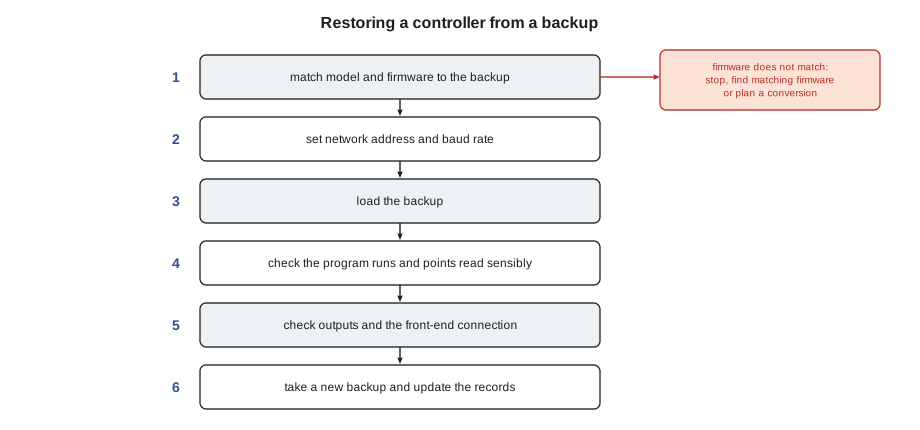
The last step is often skipped and always matters. A controller that has been restored is not exactly the controller that failed: its hardware serial number, its MAC address on Ethernet networks and sometimes its BACnet device instance may differ, and its working values are fresh. Taking a backup from it, and updating the record of its firmware and settings, closes the loop.
Firmware updates
Firmware updates fix bugs, close security holes and add features. They also carry risk. An update can change how a program behaves, make an old backup incompatible, require the program to be converted, or occasionally fail part way and leave the controller unable to start. For those reasons, firmware is updated only when there is a reason: a known bug affecting the job, a security advisory from the manufacturer, a feature the owner needs or a replacement controller that must match the rest. Before an update, the technician takes a backup, reads the release notes, checks that the program and the supervisory system support the new version, and plans how to go back if it fails. After it, the program is tested and a new backup taken with the new firmware version recorded.
Security has made firmware updates more important than they used to be. Controllers on building networks can be targets, as the program's cybersecurity course will cover, and manufacturers publish security updates for vulnerabilities in their products. An owner's maintenance contract should say who watches for these advisories and who installs the updates, so that they are neither ignored nor applied carelessly.
Licences, passwords and keys
Some controllers and most supervisory systems depend on things that are not in a backup file: software licences, user passwords and accounts, encryption keys and certificates for secure communication. A backup that restores the program but not the licence leaves a controller that will not run its features. These items need to be documented and stored securely, separately from the backup files, with the owner given what the specification requires. Passwords should never be written inside the panel door. Quillon kept them in a secure password manager shared with the owner's facilities manager, not in the job folder.
The RTU-1 download
On Tuesday, October 27, while Callie was at Ninefield for the pump and drive work that BAS-110 described, Sophie downloaded the RTU-1 program and database to the controller on the bench in the panel shop, through its USB service port. Late that afternoon, Callie checked the controller's firmware version against the job record, confirmed that the program version on the controller matched the one in the job file, and ran through the test page with Sophie, commanding each output and watching each input respond to the test signals from lesson 4. Then she took the first backup, named NF_RTU1_2026-10-27_a, and put a copy in the job file with the firmware version and the controller's network settings. The second backup would be taken after checkout on site, and the third after commissioning, so that the archive would always hold the version that was really running.
Keeping track of changes
Every controller program changes over its life. Setpoints are adjusted, sequences are refined after commissioning, a new sensor is added, an energy measure changes a schedule. Each change, however small, creates a new version that should be backed up, and the archive should show what changed and why. A simple change log in the job file does this: the date, the controller, what was changed, who changed it, why, and the name of the backup taken afterwards. Some controls software keeps version histories automatically, and some contractors use version-control tools for program files. Either way, the goal is that a technician can answer two questions quickly: what is in this controller now, and what was in it before the last change.
The change log also protects the owner. When a building's performance changes, an operator or commissioning provider can look at the log and see whether a controls change came first. When a contractor changes, the new contractor inherits a history, not a mystery. Callie started a change log for the Tilden fan coils that afternoon, with the transformer replacement, the permanent setpoint change and the new backups as its first entries.
| Change log field | Example |
|---|---|
| Date | 2026-09-28 |
| Controller | TH FC-W2, west stair level 2 |
| Change | Operator setpoints stored permanently |
| Reason | Setpoint lost after brownout restart |
| By | Callie Rintoul with Sophie Aubertin |
| Backup after | TH_FC-W2_2026-09-28_a |
Common mistakes
MistakeDownloading without a current backup.
InsteadBack up what is in the controller before every change, so the change can be undone.
MistakeSending a program to the wrong controller.
InsteadConfirm the name, address and location before downloading.
MistakeReplacing a controller without matching firmware.
InsteadRecord firmware with every backup and keep matching firmware files in the archive.
MistakeRelying only on automatic backups.
InsteadTake a checked, named backup after every change and store it in the job file and with the owner.
MistakeForgetting the backup after a restore.
InsteadTake a new backup from the replacement controller and update the records.
Summary and key terms
- Download sends software to a controller; upload copies it back; a backup is a saved copy of everything needed to rebuild it; a restore loads a backup.
- Programs reach controllers through service ports, the network, USB or wireless tools; large downloads are slow on RS-485 trunks.
- Before a download: right controller, right firmware, backup taken, operator told.
- Useful backups are current, complete, findable and kept in more than one place, with firmware and settings recorded.
- Restoring means matching hardware and firmware, setting the address, loading, testing and taking a new backup.
- Firmware updates are made for a reason, with a backup, release notes and a plan to go back.
- Licences, passwords and keys are documented and stored securely, separately from backups.
- Download
- Sending a program, database or configuration from a computer to a controller.
- Upload
- Copying a controller's program and database back to a computer.
- Backup
- A saved copy of everything needed to rebuild a controller.
- Restore
- Loading a backup into a controller.
- Firmware update
- Replacing the manufacturer's operating software in a controller.
- Release notes
- The manufacturer's description of what a firmware version changes.
- Device instance
- The unique number that identifies a BACnet device on the internetwork.
- Archive
- The organized store of backups, documents and firmware for a job.
Practice problems
Work each problem on paper first, then reveal the answer to check.
What are Prakash's four checks before a download?
Show answer
Right controller, right firmware, backup taken, operator told.
A 120 kB program is sent at 76,800 bits per second with 10 bits per byte. How long, ignoring overhead?
Show answer
1,200,000 ÷ 76,800 = 15.6 s.
Why take a backup after restoring a controller?
Show answer
The replacement differs in detail from the failed controller and is now the one in the building.
Name three things a backup should be recorded with.
Show answer
Any three of: firmware version, model, network address, baud rate, device instance, date.
Why are passwords not stored in the panel door?
Show answer
Anyone with access to the panel could use them; they belong in a secure store.
Lesson quiz · 5 questions
Score 60% or more to complete this lesson.
Create a free account to save your progress, take quizzes and earn a certificate.