
AUTO-420 · Lesson 7 of 12 · 20 min
Parking, surround view and trailer assist
Gord Haney finally bought a newer pickup in June: a two-year-old crew cab with a towing package, a surround view camera system, trailer reverse guidance and blind spot coverage that extends along a trailer. The old pickup, with 315,000 km (196,000 miles) on it, became his crew's work truck. Three weeks later he was back at Ridgeline with two complaints. The bird's-eye view on the dash screen showed a jagged break along the right side of the truck, "like the picture's been cut and glued back crooked", ever since he had clipped the right mirror on a gatepost and had it replaced. And the trailer blind spot feature, which he had been looking forward to with his landscaping trailer, never seemed to warn him of anything beside the trailer.
This lesson covers the low-speed and towing features: parking sensors and park assist, rear automatic braking, rear and surround view cameras, automated parking, and the trailer features that have become common on pickups and SUVs. It also covers how Kiran fixed both of Gord's complaints, one with a calibration and one with a setting.
Park assist and rear automatic braking
Park assist uses the ultrasonic sensors in the bumpers, described in the sensors lesson, to warn of objects close to the vehicle at low speed. The tone speeds up as the distance falls and becomes continuous at a set distance, often about 30 cm (12 in); the display shows which sensor sees the object. Rear automatic braking, now common on light vehicles, adds an intervention: if the vehicle is reversing toward an object and the driver does not stop, the system brakes. It may use the ultrasonic sensors, the rear camera, the rear corner radars or several of them. Front automatic braking for low-speed parking manoeuvres exists on some vehicles as well.
Automated parking systems go further. They use the side ultrasonic sensors, the surround cameras or both to measure a parking space as the vehicle drives past it, then steer, and on many vehicles also brake and shift, while the driver watches or, on some systems, stands outside with a phone or key fob. These systems need every sensor around the vehicle working and correctly calibrated, and they are among the first features to switch off when one is not.
Surround view
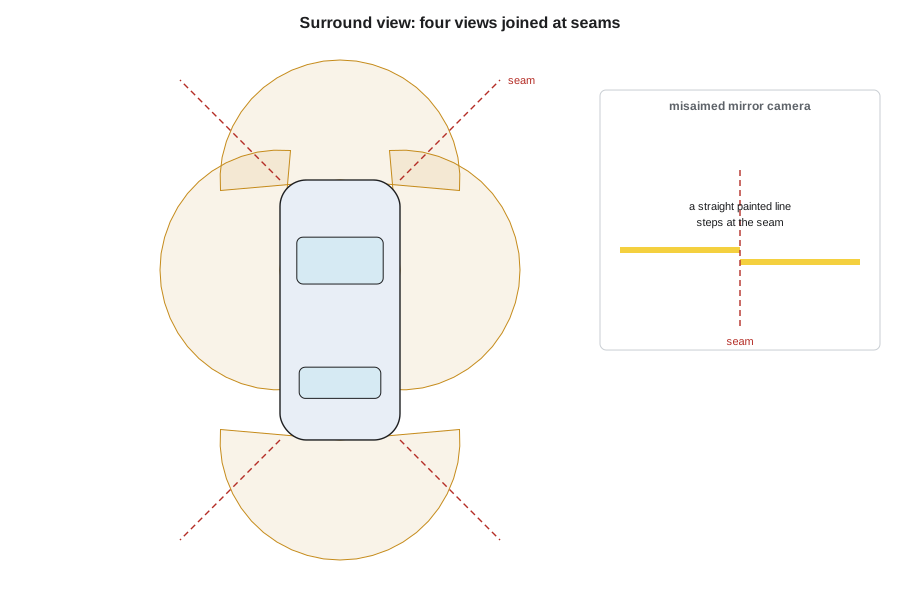
A surround view system, introduced in the cameras lesson, uses wide-angle cameras in the grille, under each side mirror and in the tailgate. The module corrects each camera's fish-eye distortion, projects the image onto a virtual ground plane as if seen from above, and joins the four views along seams near the vehicle's corners. For the seams to line up, the module must know each camera's exact position and three angles: pitch, yaw and roll. A camera that is a degree or two off produces exactly what Gord saw: lines on the ground that kink or break at the seam, objects that appear twice or vanish at the joins, and a vehicle outline that does not sit in its own parking lines.
# Surround view: does each corner have enough overlap between neighbouring cameras? (illustrative)
cams = {"front": (0, 190), "right mirror": (90, 185), "rear": (180, 190), "left mirror": (270, 185)}
# heading of each camera's centre line (degrees, 0 = forward, clockwise) and its horizontal field of view
def span(h, fov):
    return ((h - fov / 2) % 360, (h + fov / 2) % 360)
order = ["front", "right mirror", "rear", "left mirror"]
for a, b in zip(order, order[1:] + order[:1]):
    ha, fa = cams[a]; hb, fb = cams[b]
    gap = (hb - ha) % 360
    overlap = fa / 2 + fb / 2 - gap
print(f"{a:13} / {b:13}: overlap {overlap:5.1f} deg {'ok' if overlap >= 20 else 'too little'}")front / right mirror : overlap 97.5 deg ok right mirror / rear : overlap 97.5 deg ok rear / left mirror : overlap 97.5 deg ok left mirror / front : overlap 97.5 deg ok
Gord's replacement mirror was the correct part, and the body shop that fitted it had transferred the camera from the old mirror housing. But the camera's position relative to the truck had changed slightly with the new housing, and nobody had run the surround view calibration. The service information listed mirror, camera, tailgate, bumper and front grille replacement as calibration triggers. The calibration for Gord's truck used a set of patterned mats laid on the floor at measured positions around the vehicle, with the vehicle at its correct ride height, tire pressures and an empty bed; the scan tool started the routine, each camera viewed the mats, and the module calculated each camera's position and angles from where the patterns appeared. The routine passed on the first run, and the seams lined up.
Trailer features
Pickups and SUVs now offer a family of trailer features. A trailer hitch camera, often the same rear camera with a zoom view, helps line up the hitch. Trailer reverse guidance shows lines predicting the trailer's path as the driver steers while reversing, and some vehicles add a knob that lets the driver steer the trailer directly while the vehicle's electric power steering turns the wheels. Trailer sway control uses the stability system's sensors to detect a swaying trailer and brakes the vehicle's wheels individually to damp it. A trailer light check lets the driver test the trailer's lamps from outside the vehicle. And trailer blind spot coverage extends the rear corner radars' zones back along the trailer.
Most of these features need the vehicle to know about the trailer. A trailer connected to the electrical socket is usually detected automatically, but its dimensions are not. The driver must set up a trailer profile in the vehicle's menu: trailer type, length from the hitch ball to the rear of the trailer, width, sometimes the distance from the hitch to the axle, and for some features a target sticker placed on the trailer tongue so the rear camera can measure the trailer's angle. Without that profile, many trailer features stay off or behave as if no trailer were there.
That was Gord's second complaint. His trailer was detected through the connector, but no profile had been set up, so the blind spot system used its default zone, which ended a short distance behind the truck's bumper, well ahead of most of his 4.9 m (16 ft) trailer. Kiran set up a profile with him, measuring the trailer's length and width, and on a quiet road with Theo driving a shop car alongside, the trailer blind spot warning lit as Theo's car passed the trailer's side. Gord was pleased, but Kiran wrote one more line in her notes: the profile has to be changed when he tows a different trailer.
# Trailer blind spot: zone length with and without the trailer profile (illustrative)
truck_zone = 3.0           # default zone behind the bumper
trailer_len = 4.9          # hitch ball to trailer rear
margin = 3.0                # extra zone behind the trailer
for profile in (False, True):
    zone = truck_zone + (trailer_len + margin if profile else 0)
    print(f"profile {'set' if profile else 'not set'}: zone extends {zone:4.1f} m behind the bumper")
for pos in (2.0, 5.0, 8.0):
    covered = pos <= truck_zone + trailer_len + margin
    print(f"car alongside the trailer at {pos:.1f} m back: {'warned' if covered else 'missed'} with the profile; "
f"{'warned' if pos <= truck_zone else 'missed'} without")profile not set: zone extends 3.0 m behind the bumper profile set: zone extends 10.9 m behind the bumper car alongside the trailer at 2.0 m back: warned with the profile; warned without car alongside the trailer at 5.0 m back: warned with the profile; missed without car alongside the trailer at 8.0 m back: warned with the profile; missed without
Rear and trailer cameras
Rear cameras on vehicles with trailer features often do more than show a picture. The guide lines that predict the vehicle's or the trailer's path depend on the camera's calibration and on the steering angle sensor, so a steering angle sensor that is off centre after an alignment shows up as guide lines that curve when the wheel is straight. Hitch assist features that steer the vehicle back to the trailer tongue use the camera to find the coupler, and they need a clean lens and good lighting. Some trucks add a camera in the centre high-mounted stop lamp to view the bed and a fifth-wheel or gooseneck hitch, and some offer cameras that the owner fits to the rear of the trailer itself, wired or wireless.
Kiran's inspection of Gord's truck covered all of them: lenses clean, the tailgate camera's wiring at the tailgate hinge undamaged, the steering angle sensor centred, the guide lines straight with the wheel straight, and the trailer sway control and trailer brake controller settings correct for his trailer.
| Feature | Sensors | Needs | Common complaint |
|---|---|---|---|
| Park assist | Ultrasonic sensors | Clean, undamaged sensor faces | Constant tone with a rack; false alerts from ice |
| Rear automatic braking | Ultrasonic, rear camera, corner radars | All sensors working; hitch setting | Brakes for a rack or trailer |
| Surround view | Four or more cameras | Calibration after any camera or mount change | Broken or kinked seams |
| Trailer reverse guidance | Rear camera, steering angle | Trailer profile, target sticker on some | Guide lines wrong; feature unavailable |
| Trailer blind spot | Rear corner radars | Trailer length and width set | No warnings beside the trailer |
| Trailer sway control | Stability system sensors | Stability system working | Engages on rough roads with poor loading |
Customers and settings
Many complaints about parking and towing features turn out to be settings or understanding rather than faults. A feature switched off in a menu, a trailer profile not set or set for a different trailer, a hitch-mounted rack without the hitch setting, a parking tone volume turned down, a camera view chosen that hides the guide lines: each can look like a failure. Kiran's routine on any such complaint is to confirm the feature's settings with the customer in the vehicle before testing anything else, and to show the customer the settings before the vehicle leaves.
The second half of the routine is to tell the customer what each feature cannot do. Ultrasonic sensors do not see thin posts, chains or low curbs reliably. Rear automatic braking may not stop for a child running behind the vehicle. Surround view images distort objects that stand up from the ground, such as poles and people, because the system assumes everything lies flat on the ground plane. And trailer features rely on the profile matching the trailer actually attached.
Worked problem
Where does a surround view seam appear to break?
A mirror camera is mounted 1.05 m (41 in) above the ground and its yaw is off by 1.5 degrees after a mirror replacement. A painted line on the ground lies 2.0 m (6.6 ft) from the camera at the seam. How far will the line appear to shift at the seam?
Show solution
- Shift ≈ distance × tan(angle error).
- 2.0 × tan 1.5° = 2.0 × 0.0262 = 0.052 m (6.6 × tan 1.5° = 6.6 × 0.0262 = 0.17 ft).
- That is about 5 cm (about 2 in) at the seam.
Answer: The line appears to jump about 5 cm (about 2 in) at the seam, easily visible on the screen and enough to mislead a driver parking close to a curb.
Automated parking in practice
Automated parking deserves its own note because its complaints are often about conditions rather than faults. To find a space, the side ultrasonic sensors or cameras must see the vehicles or curbs on both sides of the gap as the vehicle passes at a low speed, usually under 20 to 30 km/h (12 to 18 mph), and the space must be long enough, often the vehicle's length plus 0.8 to 1 m (2.5 to 3.3 ft). Snowbanks, a parked trailer with a low drawbar, a space marked only by painted lines with no vehicles beside it, or a curb hidden under slush can all stop the system from offering a space. During the manoeuvre, it stops if any sensor sees something too close, if the driver touches the steering wheel, or if a door opens.
Kiran explains it to customers as a helper that needs the same conditions a careful driver would want: a clearly defined space, sensors that are clean, and the driver watching. When a customer reports that it never finds a space, she checks the side sensors with the board test, confirms the sensor positions are coded correctly, and asks where they tried it. Usually the answer is a snowy lot.
Every parking and towing job at Ridgeline ends with the same quick checks: each ultrasonic sensor tested with the board, the rear camera image clear with straight guide lines, the surround view seams aligned, and any trailer profile shown to the customer before the vehicle leaves.
Common mistakes
MistakeAssuming a replaced mirror with the old camera needs nothing more.
InsteadCheck the procedure; mirror and camera changes usually require a surround view calibration.
MistakeTesting trailer features without a trailer profile.
InsteadSet the profile for the trailer actually attached.
MistakeTreating straight-wheel curved guide lines as a camera fault.
InsteadCheck the steering angle sensor centre after alignments.
MistakeExpecting surround view to show tall objects accurately.
InsteadIt assumes a flat ground plane; tall objects distort.
MistakeSkipping the settings check with the customer.
InsteadMany parking and towing complaints are settings.
Summary and key terms
- Park assist uses ultrasonic sensors; rear automatic braking may use them, the rear camera and corner radars.
- Automated parking needs every sensor around the vehicle working and calibrated.
- Surround view stitches four fish-eye views and needs calibrating after a camera, mirror, tailgate, bumper or grille change.
- Floor mats or targets at measured positions let the module calculate each camera's position and angles.
- Trailer features need a trailer profile with the trailer's dimensions, and sometimes a target sticker.
- Guide lines depend on the steering angle sensor as well as the camera.
- Many low-speed and towing complaints are settings; explain each feature's limits.
- Park assist
- Low-speed warnings of close objects using ultrasonic sensors.
- Rear automatic braking
- Braking applied by the system when the vehicle is reversing toward an object.
- Surround view
- A bird's-eye view stitched from several wide-angle cameras.
- Stitching seam
- The line where two neighbouring camera images are joined in a surround view.
- Trailer profile
- The trailer's type and dimensions entered in the vehicle so trailer features work correctly.
- Trailer sway control
- A stability system function that brakes individual wheels to damp trailer sway.
Practice problems
Work each problem on paper first, then reveal the answer to check.
Why did Gord's surround view seam break?
Show answer
The new mirror housing changed the camera's position slightly, and no calibration was done.
How was the surround view calibrated?
Show answer
With patterned floor mats at measured positions and a scan tool routine.
Why did the trailer blind spot never warn?
Show answer
No trailer profile was set, so the zone ended well ahead of most of the trailer.
Why do poles look bent in a surround view?
Show answer
The system projects everything onto a flat ground plane.
Lesson quiz · 5 questions
Score 60% or more to complete this lesson.
Create a free account to save your progress, take quizzes and earn a certificate.