
AUTO-420 · Lesson 11 of 12 · 19 min
Diagnosing ADAS faults
Two vehicles arrived in the same October week with almost the same complaint. Dr. Singh's electric hatchback had been switching off its adaptive cruise and hands-free highway feature, with a "driver assistance unavailable" message, on wet days only. Courier van 1 had lost adaptive cruise and collision assist completely, with the same kind of message, and Marcus had noticed the traction control light flickering on the same drive. Kiran suspected two different radars. Neither vehicle turned out to have a radar fault.
This lesson pulls the course together into a diagnostic method for driver assistance complaints: confirming the complaint, understanding which systems the feature depends on, reading the scan data across all modules, inspecting the sensors and their surroundings, testing circuits, checking software and calibration status, and verifying the repair. It follows both vehicles from complaint to fix.
A method for ADAS complaints
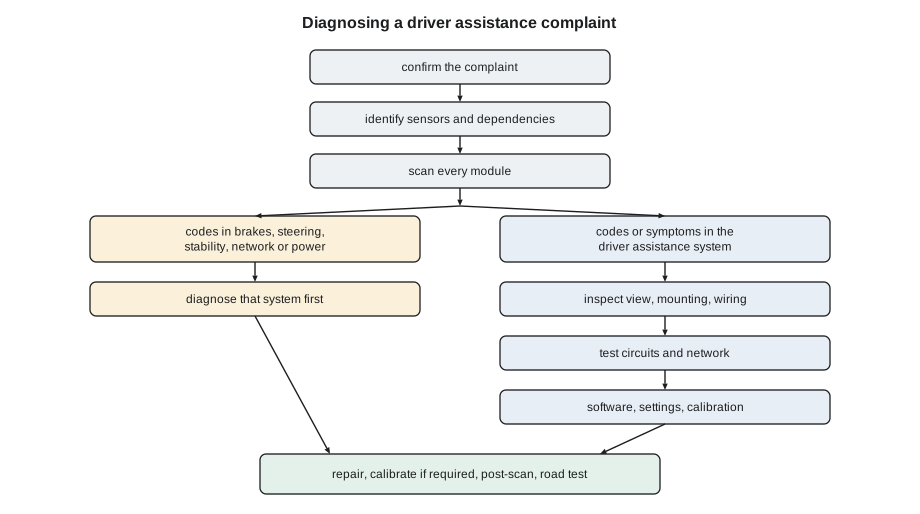
Marty's motto, "Don't guess. Look it up, test it, then fix it", applies more strictly to driver assistance than to almost any other system, because the features depend on so many others and because a wrong guess can leave a vehicle that brakes or steers wrongly. Kiran's method has seven steps. Confirm the complaint: what the customer saw, the exact message, when it happens, and whether it can be reproduced. Identify the feature and its dependencies from the service information: which sensors, which modules, and which other systems, such as brakes, steering, stability control, the network and the power supply, it needs. Scan every module, not just the driver assistance ones, and save the report. Inspect the sensors' views, mountings and wiring. Test the circuits and data indicated by the codes. Check software levels, campaigns and calibration status. Then repair, calibrate if required, and verify with a post-scan and a road test that reproduces the original conditions.
The dependency step is the one most often skipped. A driver assistance feature that brakes or steers needs the brake control module, the stability system and its wheel speed and yaw rate sensors, the electric power steering and its steering angle sensor, a stable supply voltage and a healthy network. If any of them reports a fault, the driver assistance controller usually switches its features off and displays its own message, even though nothing is wrong with its own sensors. Codes in the driver assistance modules may simply say that another module reported a fault or stopped communicating.
Reading the scan across modules
Van 1's scan showed exactly that pattern. The driver assistance controller had codes saying adaptive cruise and collision mitigation were disabled because of a message from the brake control module. The brake control module had a stored and intermittent code for the left front wheel speed sensor signal, and the stability system was logging the same sensor. The forward radar and camera themselves had no faults and full calibration status. Kiran's conclusion was straightforward: the driver assistance features were switching off correctly because the brake system could not trust a wheel speed signal, and traction control was flickering for the same reason.
# Sort a scan report: which codes are likely the root cause and which are consequences (illustrative)
report = [
    ("driver assistance", "ACC disabled: message from brake module", "consequence"),
    ("driver assistance", "collision mitigation disabled: brake module fault", "consequence"),
    ("brake module", "left front wheel speed signal intermittent", "root"),
    ("stability", "wheel speed plausibility left front", "root"),
    ("forward radar", "none", None),
    ("forward camera", "none", None),
]
roots = [r for r in report if r[2] == "root"]
cons = [r for r in report if r[2] == "consequence"]
print("diagnose first:")
for m, code, _ in roots:
    print(f"  {m:18} {code}")
print("expected to clear once the root cause is fixed:")
for m, code, _ in cons:
print(f" {m:18} {code}")diagnose first: brake module left front wheel speed signal intermittent stability wheel speed plausibility left front expected to clear once the root cause is fixed: driver assistance ACC disabled: message from brake module driver assistance collision mitigation disabled: brake module fault
The wheel speed sensor was a familiar winter problem. The sensor's signal, viewed on the scan tool's graph during a road test, dropped out over rough pavement; on the lift, Kiran found the sensor sitting in a hub bore packed with rust scale, which had pushed it away from the tone ring and opened the air gap. She cleaned the bore, fitted a new sensor because the old one's tip was damaged, and checked the tone ring. The wheel speed code, the stability code and both driver assistance codes cleared, and on the road test, adaptive cruise and collision assist were available again. No calibration was needed; the maker's procedure for that van did not list wheel speed sensor replacement as a calibration trigger. Kiran noted on Hal's file that two of his other vans were due for the same inspection.
Inspecting the sensor and its surroundings
Dr. Singh's car was different. Its scan showed a code in the driver assistance controller for lost communication with the forward radar, stored with an occurrence count of 23 and a note of high humidity in the freeze frame data, and a matching code in the gateway module. Between those events, the radar worked perfectly; its calibration status was complete and its self-alignment values were small. A fault that appears only on wet days and involves communication points toward wiring, connectors or the network rather than the radar itself.
Her inspection started with the radar's surroundings. The radar sat behind the lower grille, low in the airflow, where spray from the front wheels and road salt reach it. The grille and radar area were clean and intact. The radar's connector was not: its seal had been pushed out of place, probably during the bumper cover replacement earlier in the year, and the terminals showed green corrosion. In dry weather, the corroded terminals still made enough contact; in wet weather, moisture in the connector added enough resistance and leakage to corrupt the radar's network signal.
# Intermittent fault log: does the fault follow the weather? (from stored occurrences and the weather record)
events = [  # (day, humidity percent, rain, fault count that day)
    (1, 45, False, 0), (2, 88, True, 6), (3, 52, False, 0), (4, 91, True, 9),
    (5, 60, False, 0), (6, 84, True, 5), (7, 40, False, 0), (8, 95, True, 3),
]
wet = [n for d, h, r, n in events if r]
dry = [n for d, h, r, n in events if not r]
print(f"wet days: {len(wet)}, faults {sum(wet)}; dry days: {len(dry)}, faults {sum(dry)}")
n = len(events)
mh = sum(e[1] for e in events) / n; mf = sum(e[3] for e in events) / n
cov = sum((e[1] - mh) * (e[3] - mf) for e in events)
sh = sum((e[1] - mh) ** 2 for e in events) ** 0.5; sf = sum((e[3] - mf) ** 2 for e in events) ** 0.5
print(f"correlation between humidity and fault count: {cov / (sh * sf):.2f}")wet days: 4, faults 23; dry days: 4, faults 0 correlation between humidity and fault count: 0.83
Testing circuits and the network
Inspection found the likely cause, but Kiran tested before replacing anything. With the connector unplugged and the system's power off as the procedure required, she checked the radar's power and ground at the harness side under load with a test lamp and measured voltage drop on the ground, which was within limits. She then checked the radar's network lines. The radar shared a private network with the driver assistance controller, terminated at each end; with the battery disconnected, the resistance between the two network lines measured at the radar connector should have been close to 60 ohms, two termination resistors of 120 ohms in parallel. It read 61 ohms dry. With a spray bottle of water misted over the connector area and the connector plugged back in, a scope on the network lines with the vehicle on showed distorted signal edges and error frames whenever the connector was wet.
That was enough evidence. The repair was the maker's connector repair kit with new terminals and seal, installed on the harness side, and the radar's own connector cleaned with the recommended contact cleaner and inspected. Because the radar was not removed from its bracket, the maker's procedure required no calibration, but Kiran checked the calibration status and ran a road test on a wet day two days later, with the hands-free feature engaged on the highway for twenty minutes without a fault. She also checked for software: Dr. Singh's car already had the update installed during the adaptive cruise visit.
| Symptom | Likely area | Typical test |
|---|---|---|
| Feature unavailable, codes in brake, steering or stability modules | The other system | Diagnose that system's code first |
| Lost communication with a sensor, intermittent | Power, ground, connector, network wiring | Voltage drop, network resistance, scope on the network, wiggle and water tests |
| Sensor blocked, clears when cleaned | View in front of the sensor | Inspect, clean, road test |
| Misalignment code | Bracket, mount, collision, alignment | Inspect mount; check thrust angle; calibrate |
| Calibration not performed or invalid | A repair, module replacement or cleared codes | Find the event; calibrate per the procedure |
| Wrong behaviour, no codes | Software, settings, calibration quality, alignment | Campaigns, settings, alignment, calibration values |
Software, settings and calibration quality
Some complaints involve no fault at all in the usual sense. A feature may be switched off in a menu, set to its least sensitive level, or set differently in a second driver profile. A software update may change a feature's behaviour, for better or worse, and makers release campaigns and service bulletins for known issues such as phantom braking, lane keeping that hugs one side, or features that switch off too readily in cold weather. A calibration may have completed but with angles near the edge of the allowed range, which can produce subtle problems such as lane keeping that drifts toward one line. Kiran's checks on any complaint without clear codes are the settings, the software level against current releases, open campaigns and bulletins, the calibration values stored by the module compared with typical values, and the vehicle's alignment and ride height.
Security and access are part of software work now. Many makers require the shop's scan tool to log in to their systems before it can run calibrations or update modules, using a registered account, and some vehicles' gateway modules block writing to modules without authentication. Ridgeline keeps those subscriptions and registrations current, because an expired login on the day of a calibration means a customer waits.
Verifying the repair
Verification for driver assistance repairs must reproduce the conditions of the complaint as closely as is safe. For van 1, that meant a road test over rough pavement with adaptive cruise engaged and the wheel speed signals graphed. For Dr. Singh's car, it meant a wet day and a long highway run with the hands-free feature engaged. Kiran never tests automatic emergency braking by driving at real obstacles; she verifies the forward collision display shows vehicles ahead, that the system reports no faults and that its status is ready, and she relies on the maker's procedures for any functional checks. The post-repair scan, the road test notes and the parts and procedures used go on the repair order, and any feature that could not be verified, for example because the weather would not allow a dynamic calibration, is listed for the customer.
Worked problem
Is the network termination right?
With the battery disconnected, Kiran measures the resistance between the two network lines at a radar connector. The network has a 120 ohm termination at each end. What reading is normal, and what would a reading of about 120 ohms mean?
Show solution
- Two 120 ohm resistors in parallel: 120 × 120 ÷ (120 + 120) = 60 ohms.
- A reading near 60 ohms means both terminations and the wiring between them are present.
- A reading near 120 ohms means one termination is missing or the wiring to one end is open.
Answer: About 60 ohms is normal. About 120 ohms points to an open circuit to one end of the network, or a missing termination, often in a module or connector.
Common mistakes
MistakeStarting with the driver assistance sensor when other modules have codes.
InsteadDiagnose brake, steering, stability, network and power codes first.
MistakeReplacing a radar for an intermittent communication code.
InsteadTest power, ground, connectors and the network, including in wet conditions.
MistakeClearing codes and calling the job done when the fault does not reappear.
InsteadFind the cause; check freeze frame data and occurrence counts.
MistakeIgnoring settings, profiles and software on no-code complaints.
InsteadCheck menus, updates, campaigns and calibration values.
MistakeTesting emergency braking against real obstacles.
InsteadVerify status, displays and data, and follow the maker's procedures.
Summary and key terms
- Driver assistance diagnosis follows a method: confirm, identify dependencies, scan all modules, inspect, test, check software and calibration, verify.
- ADAS features switch off when brakes, steering, stability control, the network or the power supply report faults.
- Codes in the driver assistance modules may only report another module's fault.
- Intermittent communication faults usually come from power, ground, connectors or network wiring.
- Freeze frame data and occurrence counts reveal conditions such as humidity.
- Software, settings and calibration quality explain many complaints without clear codes.
- Verification reproduces the complaint's conditions safely and is recorded.
- Dependency
- Another system a driver assistance feature needs, such as brakes, steering or the network.
- Root cause code
- The code that identifies the actual fault, as opposed to codes it causes elsewhere.
- Freeze frame data
- Conditions stored with a code, such as speed, temperature and humidity.
- Occurrence count
- How many times a code has been set.
- Network termination
- Resistors at the ends of a data network that keep its signals clean.
- Campaign
- A maker's program to update or repair a known issue on affected vehicles.
Practice problems
Work each problem on paper first, then reveal the answer to check.
Why did van 1 lose adaptive cruise and collision assist?
Show answer
A rusted-in wheel speed sensor gave an intermittent signal, so the brake module reported a fault and the features switched off.
What pointed Kiran toward wiring on Dr. Singh's car?
Show answer
An intermittent communication code linked to high humidity, with a radar that worked normally between events.
What resistance should a network with two 120 ohm terminations read?
Show answer
About 60 ohms.
How is automatic emergency braking verified after a repair?
Show answer
By status, displays and data, following the maker's procedures, never by driving at real obstacles.
Lesson quiz · 5 questions
Score 60% or more to complete this lesson.
Create a free account to save your progress, take quizzes and earn a certificate.