
ARCH-520 · Lesson 9 of 12 · 21 min
Technology in practice
Sam Whitford leads technology for a ninety-person architecture and interiors firm, and in the ninth week he visits the seminar with a laptop and a list. The list shows every piece of software his firm pays for, the number of licences, the annual cost and the person responsible for each. It has fifty-three lines. He says that technology is now a firm's second largest cost after people, that it changes faster than any other part of practice, and that small firms make two opposite mistakes with it: some buy every new tool and use none of them well, and others cling to old tools long after they have become a drag on their work. This week the students will decide what their firms need, what it is worth and how to keep it safe.
The technology stack
Whitford describes a practice's technology as a stack of layers, each depending on the ones beneath it.
- People and practices: the standards, training and habits that make the tools useful, from file naming to model templates.
- Design tools: building information modelling software, 3D modelling and visualization, rendering, energy and daylight analysis, and drawing tools.
- AI tools: assistants for writing, research, specification drafting, image generation and coding, increasingly built into the design tools themselves.
- Business systems: time sheets, project accounting and invoicing, client relationship management for marketing, document management and contract administration tools.
- Infrastructure: computers, the network, cloud storage and collaboration platforms.
- Security: multi-factor sign-in, updates, backups, access control and the plan for when something goes wrong.
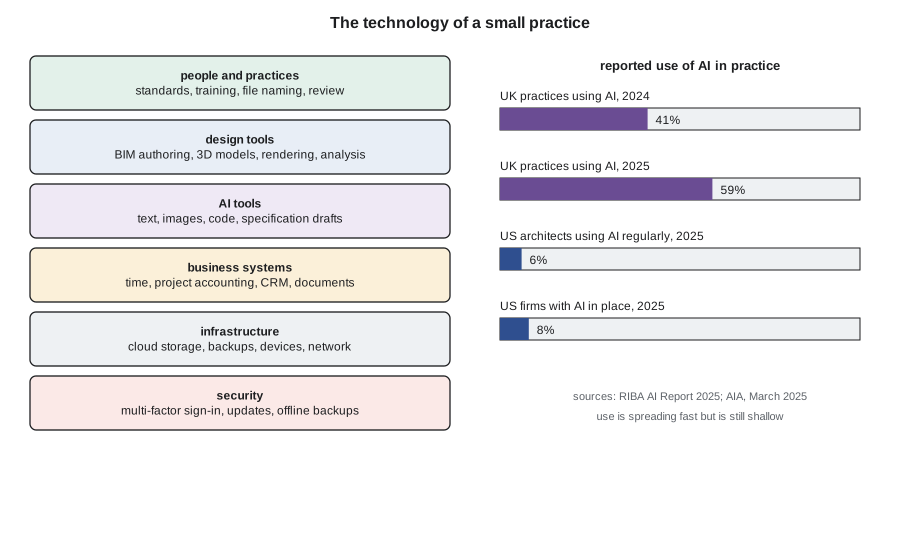
He tells the students that the bottom and top layers are the ones small firms neglect. Expensive design software produces little if the firm has no templates or standards, and a firm with excellent tools and no backups can lose everything in a morning.
Design tools and the cost of change
Building information modelling is now the normal way to produce construction documents in most firms, and many public clients require it. The students learned the software in Digital Design and BIM. Whitford's point here is about the business. Each seat of a major modelling program costs thousands of dollars a year in subscriptions, and changing from one program to another costs far more in lost productivity while people learn, templates are rebuilt and old projects are converted. A small firm should choose its core tools carefully, standardize on them, train everyone well and change only when the benefit is clear.
He adds that subscription pricing has changed how firms budget. Software that was once bought outright and used for years is now rented annually, with prices that rise. A firm should review its subscriptions every year, cancel unused seats and negotiate when it can. Whitford's firm found that a fifth of its licences were unused or duplicated the first time it checked.
Artificial intelligence in practice
Whitford spends the longest on artificial intelligence, because it is changing fastest. He shows two surveys. The Royal Institute of British Architects reported in June 2025 that 59% of UK practices were using AI, up from 41% a year earlier, while two thirds of respondents worried that AI would increase the risk of their work being copied. The American Institute of Architects reported in March 2025 that only 6% of American architects used AI regularly and 8% of firms had put AI tools in place, with another fifth working on it, and that large firms and architects under fifty were leading. Most respondents were optimistic that AI would automate routine tasks, and nine in ten were concerned about inaccurate output, security and transparency.
The two surveys asked different questions in different countries and are not directly comparable, he says, but together they show a pattern: AI use is spreading quickly, mostly for tasks around design rather than design itself. Architects use it to draft letters and reports, summarize codes and meeting notes, generate early concept images, check specifications, write small scripts for modelling software and research products. Fewer use it to make design decisions, and Whitford thinks that is right for now.
He sets out the rules his firm follows. AI output is a draft, never a final product: a person who understands the subject checks every result before it is used. Confidential client information is entered only into tools whose terms protect it, under a firm-approved account, never into free public services. Images produced by AI are labelled as such in internal work, and the firm does not present them to clients as its own design without saying how they were made. And the professional responsibility for drawings and specifications remains with the architect who seals them, whatever tools helped produce them. Moss adds that the regulators and insurers are watching closely, and that a firm's AI policy should be written down and reviewed every year.
Is a tool worth it?
Whitford gives the students a simple way to judge a new tool. Count its full cost in the first year: the subscription for every seat plus the time people spend setting it up and learning it, valued at the billable time they lose. Count its value: the hours it saves each person per year, valued at the share of those hours that become billable work. Compare the two, and look at the payback period, the months it takes for the value to cover the cost.
# Is a new tool worth it? Annual cost per seat against hours saved (Canadian dollars).
RATE = 135                 # average billing rate
UTIL = 0.75                   # share of saved hours that become billable work
tools = {  # tool: (seats, cost per seat per year, setup and training hours per seat, hours saved per seat per year)
    "BIM authoring upgrade":             (9, 4_300, 24, 60),
    "project accounting system":         (9, 1_100, 10, 35),
    "AI drafting assistant for specs":   (3, 900, 6, 50),
    "AI image generation for concepts":  (4, 600, 4, 20),
    "managed backup and security":       (9, 700, 2, 6),
}
print(f"{'tool':36}{'yearly cost':>12}{'value':>10}{'net':>10}{'payback (months)':>18}")
for name, (n, fee, setup, saved) in tools.items():
    cost = n * (fee + setup * RATE * UTIL)          # first-year cost including lost billable time
    value = n * saved * RATE * UTIL
    net = value - cost
    payback = 12 * cost / value if value else float("inf")
print(f"{name:36}{cost:>12,.0f}{value:>10,.0f}{net:>10,.0f}{payback:>18.1f}")tool yearly cost value net payback (months) BIM authoring upgrade 60,570 54,675 -5,895 13.3 project accounting system 19,012 31,894 12,881 7.2 AI drafting assistant for specs 4,522 15,188 10,665 3.6 AI image generation for concepts 4,020 8,100 4,080 6.0 managed backup and security 8,122 5,468 -2,655 17.8
The results are instructive. The AI drafting assistant for specifications pays for itself in under four months, because it saves experienced staff hours of routine work for a modest subscription. The project accounting system pays back in about seven months, mostly by cutting the time spent on invoicing and time sheets. AI image generation for concepts is worthwhile but modest. The upgrade to the BIM authoring software does not pay for itself in the first year, because training costs a great deal of billable time; its value grows in later years, when the training cost is not repeated.
Managed backup and security shows a loss on this measure, because it saves almost no hours. Whitford says this is the most important line in the table. Its value is not in hours saved but in risk avoided: in the eighth week the students estimated that offline backups cut the expected cost of ransomware by about 10,800 dollars a year, more than the whole cost of the service. A firm that judged security only by productivity would never buy it, and would one day lose everything. He tells the students to judge each tool by what it is for.
| Tool | Main source of value | How to judge it |
|---|---|---|
| Design software | Productivity and quality of documents | Hours saved and errors avoided over several years |
| AI assistants | Time saved on routine writing and research | Hours saved, checked against quality and confidentiality |
| Business systems | Faster invoicing, better information | Hours saved and days sales outstanding reduced |
| Security and backups | Losses avoided | Expected loss reduced, not hours saved |
| Collaboration platforms | Coordination with consultants and clients | Fewer errors and meetings |
Information security
Whitford's firm was attacked three years ago. A staff member opened an email that looked like an invoice from a consultant, and within hours ransomware had encrypted the shared drive. The firm lost two days of work, not two months, because its backups were kept in a separate system the attacker could not reach, and it restored everything from the previous night. He says that the experience changed how he talks about security: not as an IT problem but as a business continuity problem that the principals own.
He lists the measures every small firm should have: multi-factor sign-in on every account, especially email and cloud storage; automatic updates on every computer; backups kept separate from the working files and tested every quarter by actually restoring something; access to project files limited to the people who need them; training for every person, every year, on recognizing suspicious messages; and a one-page plan saying who to call and what to do in the first hour of an attack. Most cyber insurers now ask about these measures before they offer coverage. He adds that clients increasingly ask about them too, especially public clients and those with secure facilities.
Privacy law also applies to architecture firms. Firms collect personal information about clients, residents and employees, and under the federal Personal Information Protection and Electronic Documents Act and similar provincial laws they must protect it, use it only for the purposes for which it was collected and report serious breaches. Wren's housing studio will collect information about residents' needs and disabilities during engagement, and Moss tells her to plan how it will be stored and when it will be deleted.
A technology plan for a small firm
Moss asks each student to write a technology plan for their firm's first year. Wren's plan is short. Common Room Architects will use one BIM authoring program with a template built for multi-family housing, a cloud collaboration platform for sharing models with consultants, a project accounting system that links time sheets to invoices, and an AI assistant under a business account for writing, specifications and code research, with a written policy on its use. Its files will be stored in the cloud with a separate backup service, every account will use multi-factor sign-in, and one founder will be responsible for technology, with a budget of about 2,000 dollars per person per year beyond the main design software. Whitford calls it sensible and reminds her to review it every year, because by the time her firm is three years old, half the tools on the list may have changed.
Technology as a service to sell
Callum's building performance consultancy is a reminder that technology can also be a business. Energy modelling, daylight simulation, computational design, model coordination and digital fabrication are services that many architecture firms need occasionally but cannot justify doing in house. A specialist with the right software and expertise can sell them to many firms. Whitford warns that such a business must keep its tools and skills current, because its clients pay for expertise they cannot easily acquire, and that its value lies more in judgement than in software: anyone can buy a simulation program, but few can tell whether its results make sense.
Worked problem
Deciding on an AI tool
A five-person firm is offered an AI assistant that drafts specifications, at about 900 dollars per seat per year. Three people write specifications. Each would spend six hours learning it and save about fifty hours a year. Should the firm buy it?
Show solution
- Count the cost: three seats at 900, plus 18 hours of learning valued at billable rates, about 4,500 in the first year.
- Count the value: 150 hours saved, of which about 75% become billable, about 15,000 at the firm's average rate.
- Check the conditions: a business account whose terms protect client information, and a rule that every draft is checked by the specification writer.
- Write the use into the firm's AI policy and review the results after six months.
- Buy it if the conditions are met; the payback is under four months.
Answer: Yes, with a protected account, human review of every draft and a six-month check.
Exercise 9: a technology plan
- List the tools your firm needs in each layer of the stack, with costs per seat.
- Judge one new tool by its first-year cost, value and payback, and one security measure by the risk it reduces.
- Write a one-page AI policy covering confidentiality, checking and responsibility.
- Write the first-hour plan for a ransomware attack.
Self-check
- Do I judge each tool by what it is for: productivity, quality or risk?
- Does my firm have a written AI policy?
- Are my backups separate from my working files, and tested?
- Do I review subscriptions and cancel unused seats every year?
Common mistakes
MistakeBuying new tools without training or standards to support them.
InsteadBudget training and templates with every tool.
MistakeJudging security by hours saved.
InsteadJudge it by the losses it prevents.
MistakeEntering confidential client information into free public AI services.
InsteadUse firm-approved accounts whose terms protect client data.
MistakeTreating AI output as finished work.
InsteadHave a qualified person check every result before it is used.
MistakeNever testing backups.
InsteadRestore something every quarter to prove the backups work.
Summary and key terms
- A practice's technology is a stack from people and standards to design tools, AI, business systems, infrastructure and security.
- AI use is spreading quickly in practice, mostly for tasks around design, and needs written rules on checking and confidentiality.
- Tools should be judged by their full first-year cost, their value and their payback, using the right measure of value for each.
- Security and backups are judged by the losses they prevent, not the hours they save.
- A small firm needs a simple technology plan, one responsible founder and an annual review.
- Technology stack
- The layers of tools and practices a firm relies on, from standards to security.
- Payback period
- The time it takes for a tool's value to cover its cost.
- Multi-factor sign-in
- Signing in with a password and a second proof of identity, such as a code on a phone.
- AI policy
- A firm's written rules for using artificial intelligence tools.
- Business continuity
- A firm's ability to keep working after a disruption such as a cyberattack.
Practice problems
Work each problem on paper first, then reveal the answer to check.
A tool costs 6,000 dollars in its first year and saves hours worth 9,000. What is its payback period?
Show answer
6,000 / 9,000 × 12 = 8 months.
Why does the BIM upgrade look poor in its first year?
Show answer
Training costs a great deal of billable time; its value grows in later years when that cost is not repeated.
What share of UK practices used AI in 2025, according to the RIBA?
Show answer
59%, up from 41% in 2024.
Name three rules for using AI in a firm.
Show answer
Any three of: treat output as a draft and check it, protect confidential information, label AI images, keep professional responsibility with the architect, write and review a policy.
What saved Whitford's firm after its ransomware attack?
Show answer
Backups kept in a separate system the attacker could not reach, so it restored everything from the previous night.
Lesson quiz · 5 questions
Score 60% or more to complete this lesson.
Create a free account to save your progress, take quizzes and earn a certificate.