
AI-110 · Lesson 1 of 12 · 31 min
Python refresher and environments
Almost all modern AI work happens in Python. Researchers prototype models in it, engineers clean data with it, and the major deep learning frameworks, PyTorch and JAX among them, are driven from it. Python itself is not fast; a plain Python loop is often a hundred times slower than the same loop in C. Its strength is that it is easy to read and write, and that it sits on top of an enormous ecosystem of fast libraries written in C, C++, Fortran and CUDA. Python is the steering wheel; the libraries are the engine.
This course teaches the scientific Python tools that every AI practitioner uses daily: NumPy for numerical arrays, pandas for tables of data, Matplotlib for plots, and the notebooks and project habits that keep the work reproducible. It assumes you have written some code before, for example in an introductory programming course. This first chapter is a brisk refresher of the core language features that data work relies on, followed by the part many courses skip: how to set up and manage Python environments so that your code runs the same way tomorrow, on a colleague's computer and on a server.
Running Python
Python code can run in three common ways:
- As a script: a text file such as analyze.py, run from a terminal with python analyze.py. Scripts are best for finished, repeatable tasks such as a nightly data pipeline.
- Interactively: typing python opens a read-eval-print loop (REPL), where each line runs immediately. IPython is an enhanced REPL with tab completion and history.
- In a notebook: Jupyter notebooks mix code cells, their output (numbers, tables, plots) and formatted text in one document in a web browser or an editor such as VS Code. Notebooks are the standard tool for exploring data; Lesson 11 covers how to use them without creating a mess.
All the code blocks in this course are complete programs. You can paste each one into a file, a REPL or a notebook cell and see exactly the output shown under it.
Values, types and variables
Python has a small set of built-in types that you will use constantly: integers (int), floating-point numbers (float), strings (str), booleans (True and False), and the special value None, which means "no value". A variable is just a name attached to a value; Python works out the type from the value, so there are no type declarations.
The built-in containers are just as important:
- A list holds an ordered sequence that can change: [21.5, 22.1, 23.8].
- A tuple is an ordered sequence that cannot change: (3, 4), often used for fixed groups such as a shape or a coordinate.
- A dictionary (dict) maps keys to values: {"id": "R-104", "power_kw": 12.5}. Dictionaries are how Python represents records, configuration and JSON data.
- A set holds unique values with no order, useful for membership tests and removing duplicates.
The following program uses a list of temperature readings, some built-in functions, an f-string for formatting and a list comprehension.
readings = [21.5, 22.1, 23.8, 22.9, 24.6, 25.3]   # inlet temperatures, °C
print(len(readings), min(readings), max(readings))
average = sum(readings) / len(readings)
print(f"average = {average:.2f} °C")
hot = [t for t in readings if t > 24]
print("above 24 °C:", hot)
print("first three:", readings[:3], "last:", readings[-1])6 21.5 25.3 average = 23.37 °C above 24 °C: [24.6, 25.3] first three: [21.5, 22.1, 23.8] last: 25.3
Three features in this short program deserve attention, because they appear in almost every data script.
- An f-string, written with an f before the opening quote, inserts values inside braces. The part after the colon controls formatting: :.2f means "a float with two decimal places".
- A list comprehension, [t for t in readings if t > 24], builds a new list from an existing one in a single readable line. It is the idiomatic replacement for a loop that appends to a list.
- Slicing: readings[:3] takes items 0, 1 and 2 (the end index is excluded), and readings[-1] takes the last item. Python counts from zero, and negative indices count from the end. NumPy and pandas use the same conventions, so it pays to be fluent in them.
Functions and dictionaries
A function packages a calculation under a name so that it can be reused and tested. It is defined with def, takes parameters and returns a value. The string immediately under the def line is a docstring, which documents what the function does and shows up in help(). Writing small, well-named functions is the single most effective habit for keeping data code understandable.
def to_fahrenheit(c):
    """Convert degrees Celsius to degrees Fahrenheit."""
    return c * 9 / 5 + 32

rack = {"id": "R-104", "power_kw": 12.5, "inlet_c": 24.6}
rack["inlet_f"] = round(to_fahrenheit(rack["inlet_c"]), 1)
for key, value in rack.items():
print(f"{key:>9}: {value}")id: R-104 power_kw: 12.5 inlet_c: 24.6 inlet_f: 76.3
Dictionaries keep their keys in the order they were inserted, and .items() returns the key-value pairs for a loop. The format :>9 right-aligns each key in a field nine characters wide, which is a quick way to print tidy tables. Later chapters replace dictionaries of this kind with rows in a pandas data frame, but the idea of a record with named fields is the same.
Worked problem
Writing a small function
Write a function that takes a list of power readings in kilowatts, sampled every 15 minutes, and returns the energy in kilowatt-hours. Use it on the readings [10.0, 12.0, 11.0, 13.0].
Show solution
- Each reading covers 15 minutes, which is 0.25 h, so each contributes \(P \times 0.25\) kWh.
- The function: def energy_kwh(readings, hours=0.25): return sum(readings) * hours. The parameter hours has a default value, so callers can omit it.
- Sum of readings: \(10 + 12 + 11 + 13 = 46\) kW.
- Energy: \(46 \times 0.25 = 11.5\) kWh.
Answer: energy_kwh([10.0, 12.0, 11.0, 13.0]) returns 11.5 kWh. Because the interval is a parameter with a default, the same function also works for hourly data: energy_kwh(data, hours=1).
Numbers: integers and floating point
Python integers have unlimited size: 2 ** 64 is computed exactly. Floating-point numbers are different. They are stored in binary with about 15 to 17 significant decimal digits (the IEEE 754 double-precision format), and most decimal fractions, such as 0.1, have no exact binary representation. The result is a famous surprise:
import math
print(0.1 + 0.2)
print(0.1 + 0.2 == 0.3)
print(math.isclose(0.1 + 0.2, 0.3))
print(2 ** 64, 7 // 2, 7 % 2, 7 / 2)0.30000000000000004 False True 18446744073709551616 3 1 3.5
The error is tiny, about \(4 \times 10^{-17}\), but it means you should never test floats for exact equality. Use math.isclose, or NumPy's np.isclose and np.allclose for arrays, which compare within a tolerance. The last line shows the three division-related operators: // is floor division (rounding down to an integer), % is the remainder, and / always produces a float.
Floating-point precision matters even more in AI than in everyday programming. Deep learning often uses 16-bit or even 8-bit floating-point numbers to save memory and time, which have only about three decimal digits of precision or less. Understanding that floats are approximations is the first step to understanding why training sometimes becomes unstable and how libraries guard against it.
Handling messy input
Real data is messy. Sensors drop out, spreadsheets contain "n/a", and files have blank lines. When Python cannot do something, it raises an exception, and an exception that is not handled stops the program with an error message (a traceback). The try and except statements let a program catch an expected kind of failure and deal with it.
def parse_reading(text):
    """Return the reading as a float, or None if it is not a number."""
    try:
        return float(text)
    except ValueError:
        return None

raw = ["23.1", "23.4", "n/a", "", "24.0", "23.7"]
values = [parse_reading(r) for r in raw]
print(values)
clean = [v for v in values if v is not None]
print(f"{len(clean)} of {len(raw)} readings usable, mean {sum(clean) / len(clean):.2f}")[23.1, 23.4, None, None, 24.0, 23.7] 4 of 6 readings usable, mean 23.55
Two good habits are visible here. First, the except clause names the specific error it expects (ValueError, raised when text is not a number) rather than catching every possible error, which would also hide genuine bugs. Second, the bad values become None rather than zero. Replacing missing readings with zero would silently drag the average down; marking them as missing keeps the decision about how to handle them explicit. Pandas follows the same principle with its missing-value marker, NaN, in Lesson 5.
Modules and packages
Python code is organized into modules (single .py files) and packages (folders of modules). The import statement loads them. The standard library, which comes with Python, includes modules for mathematics (math, statistics), files and paths (pathlib), dates (datetime), data formats (csv, json) and much more. Third-party packages, such as NumPy and pandas, are installed separately from the Python Package Index (PyPI), which hosts hundreds of thousands of packages.
Conventional import names are so universal that you should always use them, because every tutorial, answer and colleague will:
- import numpy as np
- import pandas as pd
- import matplotlib.pyplot as plt
Environments: why "it works on my machine" happens
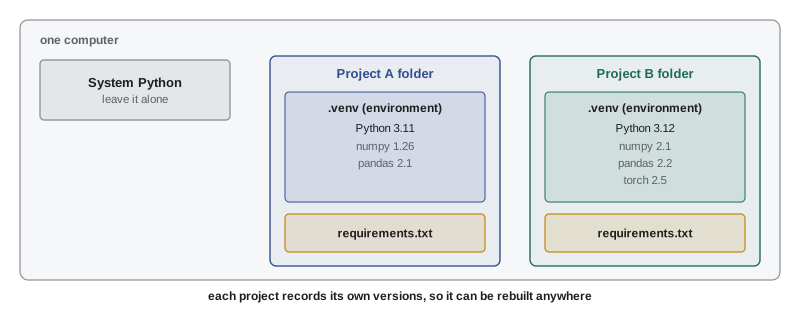
Every Python project depends on particular versions of particular packages. A model trained with one version of a library may give slightly different results, or fail to load, with another. If all your projects share one global Python installation, upgrading a package for one project can break another, and nobody can be sure which versions produced a published result.
The solution is an environment: an isolated Python installation with its own set of packages, one per project. There are two common tools.
venv and pip
The venv module, built into Python, creates a lightweight environment in a folder inside the project. pip, Python's package installer, then installs packages into it from PyPI. A typical session in a terminal looks like this:
- python -m venv .venv creates the environment in a folder called .venv.
- source .venv/bin/activate (on Windows, .venv\Scripts\activate) activates it, so that python and pip now refer to the environment.
- pip install numpy pandas matplotlib installs the packages.
- pip freeze > requirements.txt records the exact installed versions in a text file.
- On another computer, pip install -r requirements.txt recreates the same set of packages.
conda
Conda is a separate package and environment manager, popular in data science, that can install not only Python packages but also Python itself and non-Python libraries such as compilers and GPU toolkits. Conda environments are created with conda create -n myproject python=3.12 and described in an environment.yml file. Conda is especially convenient when a project needs complex compiled dependencies. Newer tools, such as uv, aim to make creating environments and installing packages much faster, but the ideas are the same.
Pinning versions
A requirements file can list packages loosely (numpy) or pin them exactly (numpy==2.1.3). Loose requirements install the newest version, which is convenient but means two people installing a week apart may get different results. Pinned requirements reproduce the environment exactly. A common practice is to keep a short, loose list of the packages a project directly needs, and generate a fully pinned "lock" file from it for actual installation. Lesson 11 returns to this as part of reproducible projects.
Worked problem
Diagnosing a version problem
A colleague sends you a notebook that loads a saved model and computes accuracy. On their computer it reports 91.4%; on yours it fails with an error saying an attribute does not exist in a library. What is the most likely cause, and how do you fix it properly?
Show solution
- An attribute that "does not exist" usually means the library version differs: the function was added, renamed or removed between versions.
- Ask the colleague for the output of pip freeze (or their environment file) from the environment where it worked.
- Create a fresh environment and install exactly those versions with pip install -r requirements.txt.
- Run the notebook again, from the top, in the new environment. It should now reproduce 91.4%.
- Commit the requirements file alongside the notebook so the problem cannot recur.
Answer: A library version mismatch. The proper fix is a separate environment built from a pinned requirements file shared with the code, not upgrading or downgrading packages in your global installation by trial and error.
Style and readability
Code is read far more often than it is written, by colleagues and by you months later. Python has a widely followed style guide, PEP 8: four spaces for indentation, lowercase_with_underscores for variable and function names, CapitalizedWords for classes, and lines kept to a reasonable length. Tools such as Black and Ruff format and check code automatically, so teams do not have to argue about style. Beyond formatting, good data code uses names that carry units and meaning (inlet_temp_c, not t2), keeps functions short, and avoids magic numbers by naming constants at the top of a script.
How this course is organized
The course follows the path of data from raw files to a working model:
- Lesson 2 reads files, text, JSON and dates; Lessons 3 and 4 compute with NumPy, then use it for simulation and the bootstrap.
- Lessons 5 and 6 handle tables with pandas and then clean and prepare them, and Lesson 7 explores data with plots.
- Lesson 8 adds statistics, Lesson 9 machine learning with scikit-learn, and Lesson 10 databases, SQL and data at scale.
- Lesson 11 makes work reproducible, and Lesson 12 carries a complete project from question to deployed model.
Common mistakes
MistakeTesting floats for equality, as in if total == 0.3.
InsteadUse math.isclose (or np.isclose) with a tolerance.
MistakeReplacing unreadable or missing readings with 0.
InsteadMark them as missing (None, or NaN in NumPy and pandas) and decide explicitly how to handle them.
MistakeCatching every exception with a bare except: clause.
InsteadCatch the specific error you expect, such as ValueError, so genuine bugs still surface.
MistakeInstalling every package into one global Python for all projects.
InsteadUse a separate environment per project (venv or conda) and record versions in a requirements or environment file.
MistakeForgetting that slices exclude the end index.
Insteadreadings[0:3] is items 0, 1 and 2. The length of a slice a:b is b − a.
Summary and key terms
- Python is the standard language of AI because it is easy to write and sits on fast libraries written in compiled languages.
- Core types: int, float, str, bool and None; containers: list, tuple, dict and set.
- f-strings format output; list comprehensions build lists concisely; slicing counts from zero and excludes the end index.
- Functions with clear names and docstrings make data code reusable and testable.
- Floats are binary approximations: never compare them for exact equality.
- Use try and except to handle specific, expected errors; mark bad data as missing rather than zero.
- Each project should have its own environment (venv or conda) with versions recorded in requirements.txt or environment.yml.
- Use the conventional imports np, pd and plt, and follow PEP 8 style.
- Interpreter
- The program that reads and runs Python code.
- REPL
- Read-eval-print loop: an interactive prompt where each line of code runs immediately.
- Notebook
- A document that mixes code cells, their output and formatted text, such as a Jupyter notebook.
- List comprehension
- A compact expression that builds a list from another sequence, optionally filtering it.
- f-string
- A string literal prefixed with f that inserts formatted values written inside braces.
- Dictionary
- A mapping from keys to values, used for records and configuration.
- Floating point
- The binary approximation computers use for real numbers, with about 15–17 significant digits in double precision.
- Exception
- An error signalled at run time, which stops the program unless handled with try and except.
- Module
- A Python file whose functions and variables can be imported.
- Package
- A collection of modules distributed together, such as NumPy.
- PyPI
- The Python Package Index, the public repository from which pip installs packages.
- Virtual environment
- An isolated Python installation with its own packages, one per project.
- requirements.txt
- A text file listing the packages (and often exact versions) a project needs.
- conda
- A package and environment manager that can install Python and non-Python libraries.
- PEP 8
- The standard style guide for Python code.
Practice problems
Work each problem on paper first, then reveal the answer to check.
What does [x * 2 for x in range(5) if x % 2 == 0] produce?
Show answer
[0, 4, 8]: the even numbers 0, 2 and 4, each doubled.
Given data = [5, 8, 13, 21, 34, 55], what are data[1:4], data[-2:] and data[::2]?
Show answer
[8, 13, 21]; [34, 55]; [5, 13, 34] (every second item).
Write an f-string that prints the variable load = 1234.5678 as "Load: 1,234.6 kW".
Show answer
f"Load: {load:,.1f} kW" (the comma adds thousands separators).
Why does 0.1 * 3 == 0.3 return False, and how should the comparison be written?
Show answer
0.1 cannot be represented exactly in binary, so 0.1 * 3 is 0.30000000000000004. Use math.isclose(0.1 * 3, 0.3).
What are 17 // 5, 17 % 5 and 17 / 5?
Show answer
3, 2 and 3.4.
Write a function c_to_k(c) that converts Celsius to kelvin, and use a list comprehension to convert [−40, 0, 25, 100].
Show answer
def c_to_k(c): return c + 273.15; [c_to_k(c) for c in [-40, 0, 25, 100]] gives [233.15, 273.15, 298.15, 373.15].
A dictionary site = {"name": "North", "racks": 240}. How do you add a key "kw_per_rack" with value 15, and compute the total IT load?
Show answer
site["kw_per_rack"] = 15; site["racks"] * site["kw_per_rack"] gives 3600 kW.
Readings ["7.5", "x", "8.0", "8.5"] are parsed with a function that returns None for bad values. What is the mean of the usable readings?
Show answer
Usable: 7.5, 8.0, 8.5; mean = 8.0.
List the commands to create a venv, activate it on macOS or Linux, install pandas and save the versions.
Show answer
python -m venv .venv; source .venv/bin/activate; pip install pandas; pip freeze > requirements.txt.
Why is it better to pin exact versions (pandas==2.2.3) in a file used to reproduce a published result?
Show answer
Loose requirements install whatever is newest, which can change behaviour or break code; pinned versions recreate exactly the environment that produced the result.
Lesson quiz · 5 questions
Score 60% or more to complete this lesson.
Create a free account to save your progress, take quizzes and earn a certificate.