
RCDD-101 · Lesson 9 of 12 · 23 min
Scheduling and exam day
▶ Video coming soon A video version of this lesson is on the way.
Daniel's approval email arrives on the twenty-third of December, three days before Roz closes the studio for the holidays. He reads it twice, forwards it to his personal address, and then does what Roz told him to do: he opens his study plan, finds the week he expects to finish his final review, and books the exam for the Thursday after it, April 15, 2027, at a Pearson VUE test center in Duluth. This lesson covers how scheduling works, the choice between a test center and online testing, what to expect on exam day and how to manage time and attention during two and a half hours of questions.
Testing procedures belong to Pearson VUE and BICSI, and they change from time to time. Read the confirmation email and the candidate rules that come with your booking, and follow them rather than any summary, including this one.
Booking the exam
Once BICSI approves your application, you schedule the exam with Pearson VUE using the instructions in your approval. You choose a delivery method, a date and a time, and, for test center delivery, a location. The booking must fall within your one-year eligibility window. Popular centers and dates can fill up, especially near the end of a month or before holidays, so book as soon as you know when you will be ready.
Rescheduling and cancellation are usually possible up to a certain point before the appointment, sometimes with a fee, and missing an appointment without notice may forfeit the attempt. Read Pearson VUE's policy in your confirmation. If something unavoidable happens, contact them as early as possible.
| Decision | Things to consider |
|---|---|
| Date | Your study plan, your work schedule, time for a possible retake within the window |
| Time of day | When you think most clearly; avoid a slot after a night shift or long drive |
| Delivery method | Test center or online; see the comparison below |
| Location | Travel time, parking, weather risk in winter |
| Buffer | At least a few days between finishing review and the exam, not weeks |
Test center or online?
The current handbook allows the RCDD exam to be taken at a Pearson VUE test center or online through OnVUE, Pearson's remotely proctored service. Both deliver the same exam under the same rules for content and timing. The difference is the environment.
| Test center | Online (OnVUE) | |
|---|---|---|
| Environment | Controlled room with staff, lockers and approved workstations | Your own private room, monitored by webcam and microphone |
| Equipment | Provided and maintained by the center | Your computer, webcam, internet connection and a system check beforehand |
| Travel | Required; plan for weather and parking | None |
| Interruptions | Rare; staff handle problems | Any person entering the room, noise or looking away can lead to warnings or termination |
| Technical risk | Low | Depends on your equipment and connection |
| Check-in | Identification checked in person | Identification and room scan by webcam |
Online testing is convenient but unforgiving. You need a quiet, private room with a clear desk and walls free of notes, a computer that passes Pearson's system check, a stable connection and confidence that nobody will walk in. Many candidates who live near a test center choose it for peace of mind. Daniel chooses the Duluth center because his apartment is shared and his connection drops during storms.
Before exam day
The week before the exam is for consolidation, not cramming. Review your summary notes and the limits and calculations you find hardest, take one more timed practice set to confirm your pacing, and then ease off. Sleep matters more than one more chapter. Two days before, confirm your appointment, your route and your identification. The handbook and Pearson VUE's rules require a valid government-issued photo identification whose name matches your registration exactly. A difference such as a missing middle name or a changed surname can lead to being turned away, so check this weeks in advance, not the night before.
Prepare for the physical side too. Two and a half hours without a scheduled break is a long time. Eat a proper meal, drink water but not so much that you need a break in the first hour, and dress in layers because test rooms can be cold or warm. If you wear glasses, bring them. If you have a medical need, raise it through the accommodation process well in advance.
Arriving and checking in
At a test center, plan to arrive early; the confirmation usually says how early. Staff check your identification, may take a photograph and a palm or signature scan, and ask you to store everything, including phones, watches, wallets and notes, in a locker. You may be given a whiteboard or erasable notepad and marker for calculations, and you may be inspected briefly before entering the testing room. Online, check-in includes photographing your identification and your room, and a proctor may ask you to show your desk and surroundings by moving the webcam.
Before the timed exam starts, there is usually a short tutorial on how to navigate the screens, mark items for review and use any on-screen tools such as a calculator. The tutorial may not count against your exam time, but check the instructions. Use it to settle in.
Managing time
With 150 minutes for 100 items, the average is 1.5 minutes per item. That average hides variation. Many definition and recognition items take thirty seconds. Calculation and long scenario items can take three or four minutes. A simple plan keeps you on track: aim for 1.4 minutes per item, which finishes the last item at 140 minutes and leaves 10 minutes for review, and set checkpoints at item 25 by about 35 minutes, item 50 by 70 minutes and item 75 by 105 minutes.
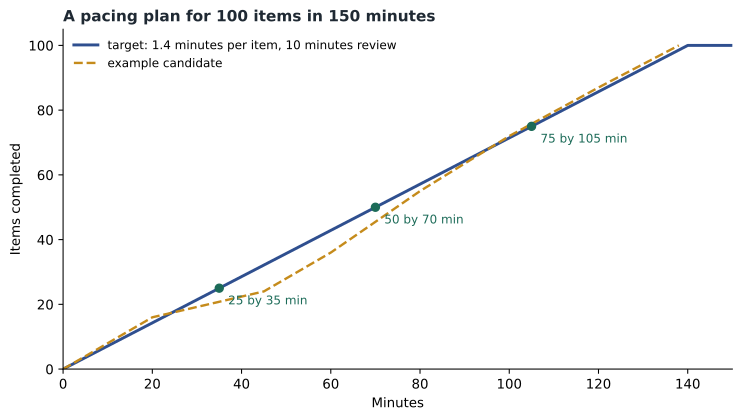
When you meet an item you cannot answer quickly, make your best provisional choice, mark it for review and move on. An unanswered item scores nothing, so never leave one blank at the end. Returning later often helps: another item may jog your memory, and you will read the question with fresh eyes. But do not mark so many items that review becomes a second exam. A useful limit is ten or fifteen marked items.
Using the notepad well
Whatever writing materials the test center or online system provides, use them deliberately. At the start of the exam, some candidates jot down a handful of formulas and limits they fear forgetting under pressure, if the rules allow writing before the timed exam begins; check the instructions, because some programs allow writing only after the exam clock starts. During the exam, use the notepad for calculations and for a running list of marked item numbers with a word or two about what troubled you. That list makes the review faster, because you can go straight to the items where a second look is most likely to help.
Keep calculations neat enough to check. A messy page invites arithmetic slips, and when you return to a marked item you want to see your earlier work clearly. If an on-screen calculator is provided, practice with a similar basic calculator during study so that its layout does not slow you down on the day.
If a technical problem occurs during the exam, such as a frozen screen or a lost connection, raise your hand at a test center or use the online chat with the proctor, and follow their instructions. Note the time and what happened. Pearson VUE and BICSI have procedures for incidents, and reporting promptly protects your attempt.
Worked problem
Recovering from a slow start
At the 45-minute mark, Daniel has finished only 24 items because the first section contained several long calculation scenarios. How should he adjust?
Show solution
- Compare with the plan: at 1.4 minutes per item the target was about 32 items by 45 minutes, so he is about 8 items behind, roughly 11 minutes.
- Remaining: 76 items in 105 minutes, an average of about 1.38 minutes per item including review time, which is tight but workable.
- Strategy: answer quick recognition items promptly, mark and move on from any item that passes about 2.5 minutes, and keep a running check at the next checkpoint.
- Avoid panic: the exam mixes item types, and later sections may contain more quick items.
Answer: Daniel is behind but not in trouble. By keeping slower items to about 2.5 minutes and moving briskly through recognition items, he can reach the 75-item checkpoint on time and still review his marked items.
Reading items well
Many wrong answers come from misreading rather than from not knowing. Read the last line of the item first so you know what is being asked, then read the scenario with that question in mind. Watch for qualifiers: first, best, most, least, not and except all change what the correct answer is. Note units and whether the item is about a permanent link or a channel, a backbone or horizontal subsystem, a recommendation or a requirement. Before choosing, eliminate options that are clearly wrong, which often leaves two; then ask which one answers the exact question asked.
For calculation items, write down the given values on your notepad, the method you will use and the result, and check that the answer is reasonable. If an answer option matches a number you calculated with a common mistake, such as forgetting a conversion or using the wrong limit, be suspicious. Exam writers anticipate common errors and include them as distractors.
| Qualifier | What it usually asks |
|---|---|
| First | The step that should come before all others, often planning, investigation or coordination |
| Best or most appropriate | The option that meets the requirement most fully with the least risk |
| Not or except | The one option that is false or does not belong |
| Maximum or minimum | A limit; check which subsystem or condition it applies to |
| Recommended versus required | The difference between should and shall |
Staying steady
Long exams are tiring, and fatigue causes careless errors in the last hour. Short pauses help: every twenty or thirty items, sit back, take a few slow breaths and relax your shoulders, which costs seconds and restores attention. If you hit a run of hard items, remember that difficulty varies across the exam and that every candidate meets items they cannot answer. One hard item tells you nothing about whether you will pass.
Remember the rules on breaks. There are no scheduled breaks, and any break you take counts against your time. At a test center, you may need to ask permission and leave the room under supervision; online, leaving the camera's view may end the exam. Plan to sit through the whole session.
Finishing the exam
When you have answered every item, use any remaining time to review marked items, then submit. Change an answer only if you find a clear reason, such as a misread word or a remembered fact; changing answers on a vague feeling tends to replace right answers with wrong ones. After submitting, you may be asked to complete a short survey. According to the handbook, candidates who pass are notified at the testing facility, and those who do not pass receive a score report. Lesson 10 explains what those results mean.
Daniel spends the evening before the exam doing nothing that involves cabling. He walks along the lake, eats dinner with friends and goes to bed early. In the morning he checks his identification, his confirmation and the weather, and leaves forty minutes before he needs to. 'The knowledge is already in there,' Roz texts him. 'Today is just about reading carefully.'
Common mistakes
MistakeBooking the earliest date after approval.
InsteadBook the date your study plan says you will be ready.
MistakeIgnoring the name on your identification.
InsteadMake sure it matches your registration exactly, well before exam day.
MistakeChoosing online testing without checking the room and equipment.
InsteadRun the system check and secure a private, quiet space, or choose a test center.
MistakeSpending six minutes on one item.
InsteadSet a limit, mark and move on, and return later.
MistakeLeaving items blank.
InsteadAnswer every item; unanswered items score nothing.
Summary and key terms
- After approval, you schedule with Pearson VUE within your eligibility window, at a test center or online.
- Online testing needs a private room, a compliant computer and a stable connection; test centers reduce those risks.
- Identification must be valid, government-issued and match your registration exactly.
- With 150 minutes for 100 items, use checkpoints and limit time on slow items.
- Read the question first, watch qualifiers and eliminate distractors.
- There are no scheduled breaks; answer every item and review marked items at the end.
- Pearson VUE
- The testing company that schedules and delivers the RCDD exam.
- OnVUE
- Pearson VUE's online, remotely proctored testing service.
- Proctor
- A person who supervises an exam, in person or remotely.
- Checkpoint
- A planned point in the exam for checking progress against time.
- Mark for review
- A feature that flags an item so you can return to it.
- Qualifier
- A word such as first, best or not that changes what an item asks.
Practice problems
Work each problem on paper first, then reveal the answer to check.
Where do you schedule the RCDD exam once approved?
Show answer
With Pearson VUE.
Name two delivery methods.
Show answer
A Pearson VUE test center or online through OnVUE.
What must match your registration exactly?
Show answer
The name on your government-issued photo identification.
What is the average time per item?
Show answer
1.5 minutes.
What should you do with an item you cannot answer quickly?
Show answer
Choose a provisional answer, mark it and move on.
Do breaks stop the exam clock?
Show answer
No; breaks count against your time.
Should you leave hard items unanswered?
Show answer
No; answer every item.
When should you change an answer during review?
Show answer
Only when you find a clear reason, such as a misread word.
Lesson quiz · 5 questions
Score 60% or more to complete this lesson.
Create a free account to save your progress, take quizzes and earn a certificate.