
PYTH-220 · Lesson 9 of 12 · 23 min
User accounts and authentication
▶ Video coming soon A video version of this lesson is on the way.
Ridgeline's customers want to see their past orders and reorder their favorite coffee in one click, and the staff pages must be closed to everyone except staff. Both need user accounts. Accounts are where web development stops being merely fiddly and becomes security-critical: a mistake here can expose every customer's password or let a stranger place orders in someone else's name. This lesson explains how accounts work underneath, so that you understand what Flask-Login and Django's authentication system do for you and why you should rely on them rather than inventing your own.
Two words are easy to confuse, so define them first. Authentication answers who are you, usually by checking a password. Authorization answers what are you allowed to do, such as whether this signed-in person may view the admin or see this order. Most real security bugs are authorization bugs: a signed-in customer who changes /orders/1042 to /orders/1043 in the address bar and sees a stranger's order.
Never store passwords
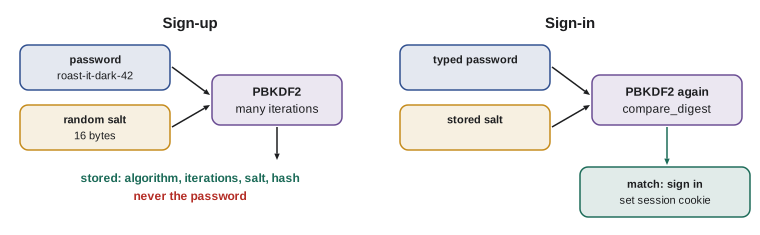
The first rule of accounts is that you never store a customer's password, not even encrypted. You store a password hash: the output of a one-way function that is easy to compute from the password but practically impossible to reverse. When the customer signs in, you hash what they typed and compare the result with the stored hash. If the database is ever stolen, the attacker gets hashes, not passwords, and because many people reuse passwords, that protects your customers' other accounts too.
Not just any hash will do. Fast hashes such as SHA-256 are designed for speed, and an attacker with a stolen database and a graphics card can try billions of guesses per second. Password hashing uses deliberately slow functions such as PBKDF2, scrypt, bcrypt or Argon2, tuned so each guess costs real time. Each password also gets its own random salt, mixed into the hash and stored beside it, so two customers with the same password get different hashes and precomputed tables of common passwords are useless. Python's hashlib provides PBKDF2 and scrypt.
import hashlib, hmac, secrets

ITERATIONS = 20_000          # small so this runs quickly here; real systems use far more

def hash_password(password, salt=None, iterations=ITERATIONS):
    salt = salt or secrets.token_bytes(16)
    digest = hashlib.pbkdf2_hmac("sha256", password.encode("utf-8"), salt, iterations)
    return f"pbkdf2_sha256:{iterations}:{salt.hex()}:{digest.hex()}"

def verify_password(password, stored):
    algorithm, iterations, salt_hex, digest_hex = stored.split(":")
    check = hashlib.pbkdf2_hmac("sha256", password.encode("utf-8"), bytes.fromhex(salt_hex), int(iterations))
    return hmac.compare_digest(check.hex(), digest_hex)

stored = hash_password("roast-it-dark-42")
algorithm, iterations, salt_hex, digest_hex = stored.split(":")
print(algorithm, iterations, "salt:", len(salt_hex) // 2, "bytes", "hash:", len(digest_hex) // 2, "bytes")
print(verify_password("roast-it-dark-42", stored))
print(verify_password("roast-it-dark-43", stored))
print(hash_password("same") == hash_password("same")) # different salts, different hashespbkdf2_sha256 20000 salt: 16 bytes hash: 32 bytes True False False
The stored string records the algorithm, the iteration count, the salt and the hash, separated by colons, so the format can change in future without breaking old accounts. Django uses the same idea with dollar signs as separators and, by default, PBKDF2 with hundreds of thousands of iterations, increased with each release. The example uses only 20,000 iterations so it runs quickly in your browser; production settings follow current guidance and are much higher. hmac.compare_digest compares in constant time, so an attacker cannot learn how many leading characters matched by measuring how long the comparison took.
Try it yourself
Hash and verify
Write make_hash(password, salt) that returns the hex string of hashlib.pbkdf2_hmac("sha256", password_bytes, salt, 5000), and check(password, salt, stored_hex) that recomputes it and compares with hmac.compare_digest.
salt is bytes. The checker also makes sure you are not storing the password itself.
def make_hash(password, salt):
    return password

def check(password, salt, stored_hex):
    return password == stored_hex

salt = b'0123456789abcdef'
h = make_hash('flat-white', salt)
print(h, check('flat-white', salt, h))
Sessions and cookies
HTTP is stateless, so after a successful sign-in the server needs a way to recognize the customer on the next request. The usual answer is a session. The server creates a long random session identifier, stores it with the customer's id on the server side, and sends it to the browser in a cookie. The browser sends the cookie back with every request, and the server looks up who it belongs to. The identifier must be unguessable, which means it comes from secrets, Python's module for security-grade randomness, never from random.
import secrets
from http.cookies import SimpleCookie

SESSIONS = {}

def start_session(user_id):
    sid = secrets.token_urlsafe(32)
    SESSIONS[sid] = {"user_id": user_id}
    cookie = SimpleCookie()
    cookie["session"] = sid
    cookie["session"]["httponly"] = True
    cookie["session"]["secure"] = True
    cookie["session"]["samesite"] = "Lax"
    cookie["session"]["path"] = "/"
    cookie["session"]["max-age"] = 60 * 60 * 24 * 14
    return sid, cookie.output(header="Set-Cookie:")

def user_from_cookie_header(header):
    cookie = SimpleCookie(header)
    if "session" not in cookie:
        return None
    return SESSIONS.get(cookie["session"].value, {}).get("user_id")

sid, set_cookie = start_session(user_id=7)
print(set_cookie.replace(sid, "<random id>"))
print(user_from_cookie_header(f"theme=dark; session={sid}"))
print(user_from_cookie_header("session=made-up-value"))Set-Cookie: session=<random id>; HttpOnly; Max-Age=1209600; Path=/; SameSite=Lax; Secure 7 None
The cookie flags are part of the defense. HttpOnly stops JavaScript in the page from reading the cookie, so a cross-site scripting bug cannot simply steal it. Secure means the browser only sends it over HTTPS. SameSite=Lax tells the browser not to send it with most requests that start on other websites, which helps against the cross-site request forgery attacks covered in lesson 11. Max-Age sets how long the cookie lasts; a shop might keep customers signed in for two weeks, while an admin session should expire much sooner.
Flask's built-in session works differently: it stores the data in the cookie itself, signed with the SECRET_KEY so it cannot be altered, but not encrypted, so it must never hold secrets. Django stores session data on the server by default and puts only the identifier in the cookie, as in the example. Either way, sign-in must issue a fresh session identifier, so an identifier an attacker planted before sign-in becomes worthless, and sign-out must delete the session on the server, not just the cookie.
Try it yourself
Read a session cookie
Write session_id(header) that takes the value of a Cookie request header, such as "theme=dark; session=abc123; lang=fr", and returns the value of the session cookie, or None if there is none or the header is empty. Use http.cookies.SimpleCookie.
def session_id(header):
    return header.split('session=')[1]

print(session_id('theme=dark; session=abc123; lang=fr'))
Signing in and out with a framework
Flask-Login and Django's django.contrib.auth package implement all of this for you: hashing with sensible defaults, session handling with the right cookie flags, rotating the session on sign-in, and helpers to require sign-in. In Django, authenticate checks a username and password, login attaches the user to the session and logout ends it. The login_required decorator, or LoginRequiredMixin for class-based views, sends visitors who are not signed in to the sign-in page. Every request then carries request.user.
# orders/views.py (Django)
from django.contrib.auth.decorators import login_required, permission_required
from django.shortcuts import get_object_or_404, render
from .models import Order

@login_required
def my_orders(request):
    orders = Order.objects.filter(email=request.user.email).order_by("-created")
    return render(request, "orders/my_orders.html", {"orders": orders})

@login_required
def order_detail(request, order_id):
    # authorization: only this customer's orders can be found
    order = get_object_or_404(Order, id=order_id, email=request.user.email)
    return render(request, "orders/order_detail.html", {"order": order})

@permission_required("orders.change_order")
def mark_ready(request, order_id):
    ...
Look carefully at order_detail. The query filters by the order id and by the signed-in customer's email. Without that second condition, any signed-in customer could read any order by changing the number in the URL, a bug known as an insecure direct object reference. Returning 404 rather than 403 for someone else's order also avoids confirming that the order exists. Checking ownership in every view that loads a customer's data is the single most important authorization habit.
Permissions and roles
Staff need different powers. Django gives every model four permissions, view, add, change and delete, and lets you group them into groups such as Cafe staff and Managers. Users get groups, and views check permissions with permission_required or user.has_perm. The principle of least privilege says each person gets only the permissions their job needs: Mei can edit menu items and mark orders ready, Theo can change stock, and only Rosa and Jordan can change prices or delete records.
ROLES = {
    "cafe": {"order.view", "order.mark_ready", "menu.change"},
    "warehouse": {"order.view", "coffee.change_stock"},
    "manager": {"order.view", "order.mark_ready", "menu.change", "coffee.change_stock", "coffee.change_price", "order.delete"},
}
USERS = {"mei": ["cafe"], "theo": ["warehouse"], "rosa": ["manager"]}

def has_perm(user, perm):
    return any(perm in ROLES[role] for role in USERS.get(user, []))

for user, perm in [("mei", "order.mark_ready"), ("mei", "coffee.change_price"), ("theo", "coffee.change_stock"),
                   ("rosa", "order.delete"), ("stranger", "order.view")]:
print(f"{user:<9} {perm:<20} {'allowed' if has_perm(user, perm) else 'denied'}")mei order.mark_ready allowed mei coffee.change_price denied theo coffee.change_stock allowed rosa order.delete allowed stranger order.view denied
Protecting the sign-in form
The sign-in form is the most attacked page on most websites. Attackers try lists of common passwords against many accounts, or use passwords leaked from other sites, hoping customers reused them. Defenses work in layers. Limit failed attempts per account and per network address over a time window. Give the same message for an unknown email and a wrong password, so the form does not reveal which emails have accounts. Offer two-factor authentication, such as a code from an authenticator app or a passkey, especially for staff. And check new passwords against lists of known breached passwords; Django ships validators that reject the most common ones.
from datetime import datetime, timedelta

WINDOW = timedelta(minutes=15)
LIMIT = 5

def allowed(failures, now):
    """failures: datetimes of recent failed sign-ins for one account."""
    recent = [t for t in failures if now - t < WINDOW]
    return len(recent) < LIMIT

now = datetime(2026, 11, 10, 9, 0)
fails = [now - timedelta(minutes=m) for m in (1, 3, 4, 8, 12)]
print("5 recent failures:", allowed(fails, now))
print("20 minutes later: ", allowed(fails, now + timedelta(minutes=20)))5 recent failures: False 20 minutes later: True
Password reset needs the same care. A reset link contains a single-use token that expires quickly, typically within an hour, and is generated with secrets. The reset request always shows the same reply, such as "If an account exists, we've sent an email", whether or not the address is registered. Django's built-in password reset views do all of this correctly, which is another reason to use the framework's version.
Try it yourself
Rate-limit sign-ins
Write can_try(failures, now, limit=5, window_minutes=15) that returns True if fewer than limit of the failure times in failures are within the last window_minutes minutes before now (a failure exactly window_minutes old no longer counts), and False otherwise. Times are datetime objects.
from datetime import datetime, timedelta

def can_try(failures, now, limit=5, window_minutes=15):
    return len(failures) < limit

now = datetime(2026, 11, 10, 9, 0)
print(can_try([now - timedelta(minutes=m) for m in (2, 20, 30, 40, 50)], now))
Two-factor codes, under the hood
Many authenticator apps produce six-digit codes that change every 30 seconds. They use TOTP, the time-based one-time password standard (RFC 6238). At set-up the site and the app share a random secret, usually shown as a QR code. Afterwards, both sides compute an HMAC of the current 30-second time step with that secret and turn part of the result into six digits. Because both know the secret and the time, both get the same code, and a code stolen from one sign-in is useless half a minute later. The standard library has everything needed to compute one.
import hmac, hashlib, struct

def totp(secret, unix_time, step=30, digits=6):
    counter = int(unix_time // step)
    mac = hmac.new(secret, struct.pack(">Q", counter), hashlib.sha1).digest()
    offset = mac[-1] & 0x0F
    number = struct.unpack(">I", mac[offset:offset + 4])[0] & 0x7FFFFFFF
    return str(number % 10 ** digits).zfill(digits)

secret = b"12345678901234567890"          # the test secret published in the standard
for t in (59, 1111111109, 1234567890):
    print(t, totp(secret, t, digits=8))
print("six digits at one moment:", totp(secret, 1_800_000_000))59 94287082 1111111109 07081804 1234567890 89005924 six digits at one moment: 768147
The first three results match the test values published in RFC 6238, which is how you check an implementation like this. In a real site you would use a maintained library such as pyotp or django-otp, accept codes from the time step just before and after to allow for clock drift, and refuse to accept the same code twice. Passkeys go further: the customer's device holds a private key and signs a challenge from the site, so there is no shared secret or password to steal at all. Offering them is the strongest protection you can give customers today.
Common mistakes
MistakeStoring passwords in plain text or encrypted with a reversible key.
InsteadStore only a salted hash from a slow algorithm such as PBKDF2, scrypt, bcrypt or Argon2.
MistakeHashing passwords with a fast hash such as SHA-256 alone.
InsteadUse a password-hashing function with many iterations and a per-user salt.
MistakeMaking session identifiers with random or a counter.
InsteadUse secrets.token_urlsafe or the framework's session system.
MistakeLeaving session cookies without HttpOnly, Secure and SameSite.
InsteadSet all three; frameworks do this when configured for production.
MistakeLoading an order by id without checking it belongs to the signed-in customer.
InsteadFilter by both the id and the owner, and return 404 for anyone else's records.
MistakeTelling visitors whether an email address has an account.
InsteadUse the same message for unknown emails and wrong passwords, and for reset requests.
Summary and key terms
- Authentication checks who someone is; authorization checks what they may do, and most real bugs are authorization bugs.
- Never store passwords: store a salted hash from a slow function, and compare with hmac.compare_digest.
- Sessions link requests to a signed-in user through an unguessable identifier in a cookie with HttpOnly, Secure and SameSite set.
- Rotate the session on sign-in and delete it on sign-out.
- Flask-Login and Django's auth provide login, logout, login_required and permissions; use them instead of writing your own.
- Check ownership in every view that loads a customer's data, and give staff only the permissions they need.
- Protect sign-in with rate limits, neutral error messages, two-factor authentication and breached-password checks.
- authentication
- Checking who a user is.
- authorization
- Checking what a user is allowed to do.
- password hash
- The output of a one-way, deliberately slow function stored instead of the password.
- salt
- Random data mixed into each password hash so equal passwords hash differently.
- session
- Server-side state linked to a browser by an identifier in a cookie.
- HttpOnly
- A cookie flag that hides the cookie from JavaScript.
- least privilege
- Giving each person only the permissions their job needs.
- insecure direct object reference
- A bug where changing an id in a request exposes someone else's data.
Practice problems
Work each problem on paper first, then reveal the answer to check.
Why does each password get its own salt?
Show answer
So equal passwords produce different hashes and precomputed tables are useless.
Which cookie flag stops a script injected into the page from reading the session cookie?
Show answer
HttpOnly.
A customer changes /orders/1042/ to /orders/1043/ and sees a stranger's order. What went wrong and how is it fixed?
Show answer
The view did not check ownership; filter the query by the signed-in customer as well as the id.
Why should the sign-in form say "Email or password is incorrect" rather than "No account with that email"?
Show answer
So it does not reveal which emails have accounts.
Which Python module should generate session identifiers and reset tokens?
Show answer
secrets.
Lesson quiz · 5 questions
Score 60% or more to complete this lesson.
Create a free account to save your progress, take quizzes and earn a certificate.