
PYTH-220 · Lesson 4 of 12 · 20 min
Templates
▶ Video coming soon A video version of this lesson is on the way.
By the end of lesson 3, Ridgeline's views were building HTML by gluing strings together inside Python: f"<h1>{COFFEES[sku]}</h1>". That works for a heading, but a real product page has a header, navigation, a photo, a description, a price, an Add to cart form and a footer, and every page shares most of that. HTML buried in Python strings is hard to read, impossible for a designer to edit and, as you will see, dangerously easy to get wrong. Templates solve all three problems. A template is an HTML file with placeholders and simple logic; the view supplies the data and the template engine fills it in.
Flask uses Jinja, and Django has its own template language with almost the same syntax, so what you learn here carries straight across. To see the ideas run in your browser, the lesson also uses two tools from the standard library: string.Template for simple substitution and html.escape for the safety rule every template engine follows.
Separating logic from presentation
The principle is simple: views decide what to show, templates decide how it looks. A view loads the coffee from the database, works out whether it is low on stock and passes those facts to a template. The template only arranges them in HTML. This separation means Mei can restyle the menu page without reading Python, and Jordan can change how stock is calculated without touching HTML. It also means the same data can feed several templates, such as a product page and a printable price list.
from string import Template

page = Template("""<h1>$name</h1>
<p class="price">$price</p>
<p>$bags bags in stock</p>""")

coffee = {"name": "Ethiopia Guji", "price": "22.00", "bags": 15}
print(page.substitute(coffee))<h1>Ethiopia Guji</h1> <p class="price">22.00</p> <p>15 bags in stock</p>
string.Template replaces each placeholder with the matching value. It is deliberately minimal: no loops, no conditions and, crucially, no automatic escaping. It is useful for small jobs such as email bodies, but web pages need more, which is why frameworks use Jinja or Django templates. The template has no idea where the data came from, which is the point.
Jinja in Flask
Flask's render_template function loads a file from the templates folder, fills it with the keyword arguments you pass and returns the HTML. In the template, double braces output a value, {{ coffee.name }}, and tags written with a brace and a % sign hold logic such as {% for %} loops and {% if %} conditions. Filters, written after a vertical bar, transform a value on the way out: {{ coffee.name|upper }}, {{ price|round(2) }} or {{ notes|truncate(80) }}. You can also register your own filters, which is how Ridgeline will format prices the same way everywhere.
{# templates/stock.html (Jinja) #}
<h1>Stock at {{ shop_name }}</h1>
<table>
  <tr><th>Code</th><th>Coffee</th><th>Bags</th></tr>
  {% for c in coffees %}
  <tr class="{{ 'low' if c.bags < reorder_point else '' }}">
    <td>{{ c.sku }}</td>
    <td>{{ c.name }}</td>
    <td>{{ c.bags }}</td>
  </tr>
  {% else %}
  <tr><td colspan="3">No coffees yet.</td></tr>
  {% endfor %}
</table># views.py (Flask, on your own computer)
from flask import Flask, render_template
app = Flask(__name__)
@app.get("/stock")
def stock():
coffees = [{"sku": "RC-101", "name": "Sunrise Blend", "bags": 42},
{"sku": "RC-104", "name": "Sumatra Dark", "bags": 9}]
return render_template("stock.html", shop_name="Ridgeline", coffees=coffees, reorder_point=10)Jinja's {% for %} loop has an optional {% else %} branch that runs when the list is empty, which saves a separate check, and inside a loop the variable loop gives loop.index, loop.first and loop.last for numbering and styling rows. Keep logic in templates to what presentation needs. If a template starts computing totals or querying data, move that work into the view or a helper function where it can be tested.
Escaping: the most important rule
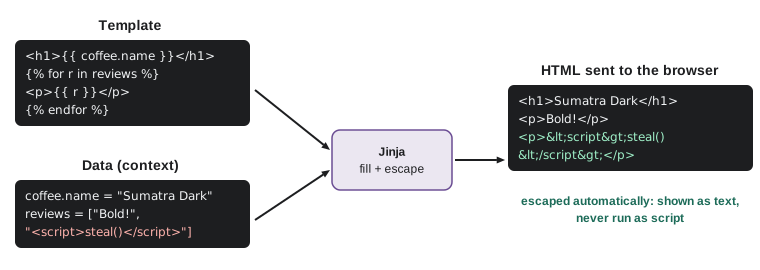
Suppose Ridgeline lets customers write reviews, and a customer types <script>steal()</script> as a review. If the product page inserts that text into the HTML as it is, every visitor's browser will run the script, which could read their session cookie or change the page. This attack is called cross-site scripting, or XSS, and it is one of the most common web vulnerabilities. The defense is escaping: before text goes into HTML, the characters that have special meaning (<, >, &, and quotes) are replaced by HTML entities such as < so the browser shows them as text instead of treating them as markup.
import html

review = 'Great coffee! <script>alert("got your cookie")</script>'
print("unsafe:", "<p>" + review + "</p>")
print("safe:  ", "<p>" + html.escape(review) + "</p>")
print(html.escape('Theo said "5 & 10 bags" isn\'t enough'))unsafe: <p>Great coffee! <script>alert("got your cookie")</script></p>
safe: <p>Great coffee! <script>alert("got your cookie")</script></p>
Theo said "5 & 10 bags" isn't enoughJinja in Flask escapes every value automatically in .html templates, and Django templates do the same. That autoescaping is a major reason to use a template engine instead of f-strings. You can switch it off for a value with the safe filter, {{ text|safe }}, or by wrapping text in Markup, but you should only do that for HTML you created yourself and trust completely, never for anything a user typed. Hand-built HTML in Python, like the f-strings from lesson 3, has no protection at all unless you call html.escape yourself every time.
Try it yourself
Escape a table row
Write coffee_row(coffee) that returns <tr><td>SKU</td><td>NAME</td><td>BAGS</td></tr> for a dictionary with keys sku, name and bags. Every value must be escaped with html.escape, because names come from the shop's admin screen and could contain markup.
For example, a name of Café <b>Bold</b> must appear as Café <b>Bold</b>.
def coffee_row(coffee):
    return f"<tr><td>{coffee['sku']}</td><td>{coffee['name']}</td><td>{coffee['bags']}</td></tr>"

print(coffee_row({'sku': 'RC-104', 'name': 'Sumatra <Dark>', 'bags': 9}))
Template inheritance
Every page of the shop shares a header with the logo and navigation, a footer with the cafe's address and hours, and the same style sheet. Copying that into every template would mean changing twenty files whenever Rosa updates the opening hours. Template inheritance solves this. A base template defines the shared layout and marks the parts that change as named blocks. Each page template extends the base and fills in only its blocks.
{# templates/base.html #}
<!doctype html>
<html lang="en">
<head>
  <meta charset="utf-8">
  <title>{% block title %}Ridgeline Coffee Roasters{% endblock %}</title>
  <link rel="stylesheet" href="{{ url_for('static', filename='site.css') }}">
</head>
<body>
  <header><a href="{{ url_for('home') }}">Ridgeline</a> <a href="{{ url_for('coffee_list') }}">Coffees</a></header>
  <main>{% block content %}{% endblock %}</main>
  <footer>Open daily 7 to 6</footer>
</body>
</html>

{# templates/coffee.html #}
{% extends "base.html" %}
{% block title %}{{ coffee.name }} | Ridgeline{% endblock %}
{% block content %}
  <h1>{{ coffee.name }}</h1>
  <p>{{ coffee.price|money }} for a 340 g bag</p>
{% endblock %}
url_for('static', filename='site.css') builds the address of a file in the static folder, so the link keeps working wherever the site is deployed. Templates can also include smaller pieces with {% include %} and define reusable fragments with macros, which act like functions for HTML, such as a macro for a coffee card used on the home page and the search results.
import html
from string import Template

BASE = Template("""<html><head><title>$title</title></head>
<body><header>Ridgeline</header>
<main>$content</main>
<footer>Open daily 7 to 6</footer></body></html>""")

def render_page(title, content_html):
    # title is plain text, so escape it; content_html was built by our own code and is already safe
    return BASE.substitute(title=html.escape(title), content=content_html)

content = "<h1>" + html.escape("Decaf Swiss Water") + "</h1><p>19.00 for a 340 g bag</p>"
print(render_page("Decaf Swiss Water | Ridgeline", content))<html><head><title>Decaf Swiss Water | Ridgeline</title></head> <body><header>Ridgeline</header> <main><h1>Decaf Swiss Water</h1><p>19.00 for a 340 g bag</p></main> <footer>Open daily 7 to 6</footer></body></html>
The comment in that code makes an important distinction. Text and HTML are different kinds of string. Text must be escaped before it goes into HTML; HTML built by your own code from escaped parts must not be escaped again, or the customer will see <h1> on the page. Jinja tracks this distinction for you with its Markup type. Without a template engine, you have to track it yourself, consistently, which is exactly the kind of discipline that fails under deadline pressure.
Custom filters for consistent formatting
Prices, dates and stock levels should look the same on every page. Rather than formatting them in each view, register a filter once. A filter in Jinja is just a Python function that takes the value and returns text, so it is easy to test on its own. Ridgeline's money filter will show 18.5 as 18.50 and 1234.5 as 1,234.50, matching the money format from the PYTH-102 package.
from decimal import Decimal, ROUND_HALF_UP

def money(value):
    amount = Decimal(str(value)).quantize(Decimal("0.01"), rounding=ROUND_HALF_UP)
    return f"{amount:,.2f}"

def stock_label(bags, reorder_point=10):
    if bags == 0:
        return "sold out"
    if bags < reorder_point:
        return f"only {bags} left"
    return "in stock"

for price in (18.5, 22, 1234.5, 0.125):
    print(price, "->", money(price))
for bags in (0, 9, 42):
    print(bags, "->", stock_label(bags))

# In Flask: app.add_template_filter(money) then in a template: {{ coffee.price|money }}18.5 -> 18.50 22 -> 22.00 1234.5 -> 1,234.50 0.125 -> 0.13 0 -> sold out 9 -> only 9 left 42 -> in stock
Try it yourself
A stock badge filter
Write a filter function badge(bags, reorder_point=10) that returns the HTML <span class="badge out">Sold out</span> when bags is 0, <span class="badge low">Only N left</span> when bags is below the reorder point (N is the number), and <span class="badge ok">In stock</span> otherwise.
def badge(bags, reorder_point=10):
    if bags < reorder_point:
        return f'<span class="badge low">Only {bags} left</span>'
    return '<span class="badge ok">In stock</span>'

print(badge(0))
A tiny loop-capable renderer
To finish, it helps to see how little a basic template engine really needs. The function below supports {{ name }} placeholders, which it always escapes, and a single list loop. Real engines compile templates into Python code for speed and support far more, but the core idea is the same: find placeholders, look up values, escape them and assemble the output.
import html
import re

def render(template, context):
    def value(m):
        return html.escape(str(context[m.group(1)]))
    return re.sub(r"\{\{\s*(\w+)\s*\}\}", value, template)

def render_list(row_template, items):
    return "".join(render(row_template, item) for item in items)

rows = render_list("<li>{{ name }}: {{ bags }}</li>\n", [
    {"name": "Sunrise Blend", "bags": 42},
    {"name": "Café <special>", "bags": 3},
])
print(render("<h2>{{ title }}</h2>\n", {"title": "Today's coffees"}) + "<ul>\n" + rows + "</ul>")<h2>Today's coffees</h2> <ul> <li>Sunrise Blend: 42</li> <li>Café <special>: 3</li> </ul>
Writing a renderer like this once is a good exercise; using it in production is not. Jinja and Django templates have been hardened by years of use, handle edge cases you have not thought of, and are fast. Use them, and keep your own code focused on the shop.
Try it yourself
Render a placeholder template
Complete render(template, context) so that every {{ name }} placeholder (spaces inside the braces are optional) is replaced by the matching value from context, converted to text and escaped with html.escape. A placeholder whose name is missing from the context should become an empty string.
import re

def render(template, context):
    return re.sub(r'\{\{\s*(\w+)\s*\}\}', lambda m: str(context[m.group(1)]), template)

print(render('<p>{{ name }}: {{bags}}</p>', {'name': 'Guji', 'bags': 15}))
Common mistakes
MistakeBuilding HTML with f-strings and forgetting to escape user text.
InsteadUse a template engine with autoescaping, or call html.escape on every value.
MistakeMarking user-supplied text as safe to get rid of visible entities.
InsteadUse the safe filter or Markup only for HTML your own code built.
MistakeEscaping HTML twice, so customers see <h1> on the page.
InsteadEscape text once, when it goes into HTML; do not escape trusted HTML fragments again.
MistakeCopying the header and footer into every template.
InsteadPut the shared layout in base.html and use {% extends %} with blocks.
MistakeDoing calculations and database work inside templates.
InsteadPrepare data in the view or helper functions; templates only present it.
MistakeFormatting prices differently on different pages.
InsteadWrite one filter function, test it, and use it everywhere.
Summary and key terms
- Templates keep HTML out of Python: views prepare data, templates present it.
- Jinja outputs values with {{ }}, runs logic with {% %} tags and transforms values with filters after a vertical bar.
- Escaping replaces <, >, & and quotes with entities so user text cannot become markup; this is the defense against cross-site scripting (XSS).
- Flask's Jinja and Django templates autoescape by default; |safe and Markup switch it off and are only for trusted HTML.
- Template inheritance puts the shared layout in a base template with blocks that page templates fill.
- Custom filters, such as money and stock labels, give consistent formatting and are plain functions you can test.
- template
- An HTML file with placeholders and simple logic that a template engine fills with data.
- Jinja
- The template engine Flask uses.
- filter
- A function applied to a value in a template, written after a vertical bar.
- escaping
- Replacing characters that have special meaning in HTML with entities.
- XSS (cross-site scripting)
- An attack that injects script into a page other people view.
- autoescaping
- Escaping every output value automatically.
- template inheritance
- Building pages by extending a base template and filling its blocks.
- block
- A named, replaceable section of a base template.
Practice problems
Work each problem on paper first, then reveal the answer to check.
What does html.escape turn the text 5 < 6 & 7 into?
Show answer
5 < 6 & 7.
A designer wants to change the footer on every page. Where should the change go?
Show answer
In base.html, the base template every page extends.
When is it acceptable to use {{ text|safe }}?
Show answer
Only when text is HTML your own code generated from trusted or already escaped parts, never user input.
Why write the money formatting as a filter function rather than in each template?
Show answer
So every page formats prices the same way and the function can be tested once.
What does {% else %} inside a {% for %} loop do in Jinja?
Show answer
It renders when the list is empty.
Lesson quiz · 5 questions
Score 60% or more to complete this lesson.
Create a free account to save your progress, take quizzes and earn a certificate.