
PYTH-220 · Lesson 11 of 12 · 24 min
Web security essentials
▶ Video coming soon A video version of this lesson is on the way.
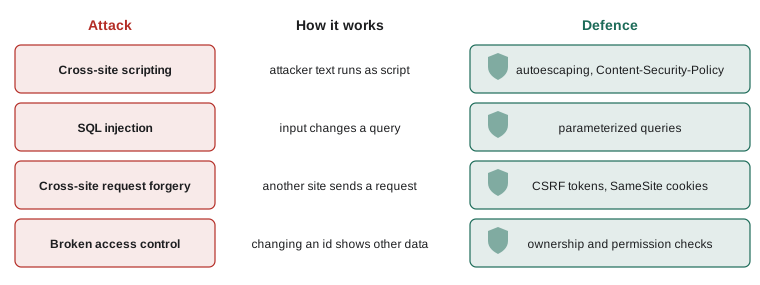
Earlier lessons met security one piece at a time: escaping templates against cross-site scripting, parameters against SQL injection, password hashing, session cookies and ownership checks. This lesson brings those pieces together, adds the defenses that remain, and gives you a checklist for every web application you build. A shop is a tempting target. It holds customer names, addresses and order histories, it takes payments, and it is reachable by anyone on the internet, including automated tools that scan millions of sites a day looking for known mistakes.
Everything here is about defense: understanding how common attacks work so that Ridgeline's code shuts them out. The good news is that modern frameworks do most of the work when you use them as intended. Most real breaches come from switching a protection off, skipping a check, or leaving software unpatched.
The OWASP Top 10
The Open Worldwide Application Security Project (OWASP) publishes the OWASP Top 10, a regularly updated list of the most serious categories of web application risk, based on data from real applications. It is the standard starting point for security reviews. Its recent editions put broken access control at the top, the authorization failures you met in lesson 9, and include injection, cryptographic failures, security misconfiguration, vulnerable and outdated components, authentication failures, and failures in logging and monitoring. Rather than memorizing the exact order, which changes between editions, learn what each category means and what defends against it.
CHECKLIST = {
    "access control":   "check ownership and permissions in every view; deny by default",
    "injection":        "parameterized queries; never build SQL or shell commands from input",
    "XSS":              "autoescaping templates; Content-Security-Policy header",
    "CSRF":             "CSRF tokens on every form; SameSite cookies",
    "authentication":   "slow salted hashes, rate limits, two-factor, framework sessions",
    "misconfiguration": "DEBUG off, secrets in the environment, security headers set",
    "components":       "keep Python packages updated; audit them for known flaws",
    "logging":          "log sign-ins, failures and admin actions; watch the logs",
}
for risk, defence in CHECKLIST.items():
print(f"{risk:<17} -> {defence}")access control -> check ownership and permissions in every view; deny by default injection -> parameterized queries; never build SQL or shell commands from input XSS -> autoescaping templates; Content-Security-Policy header CSRF -> CSRF tokens on every form; SameSite cookies authentication -> slow salted hashes, rate limits, two-factor, framework sessions misconfiguration -> DEBUG off, secrets in the environment, security headers set components -> keep Python packages updated; audit them for known flaws logging -> log sign-ins, failures and admin actions; watch the logs
Cross-site request forgery (CSRF)
Imagine Ridgeline's shop had a form that changes a customer's email address, and a customer who is signed in visits a malicious page on another site. That page can contain a hidden form that posts to shop.ridgeline.example/account/email, and the browser, following its normal rules, attaches the customer's Ridgeline session cookie. Without protection, the shop would see a valid request from a signed-in customer and change the email to the attacker's, who could then reset the password. This is cross-site request forgery: the attacker cannot read the response, but they can make the victim's browser send a request that changes something.
The main defense is a CSRF token. When the shop renders a form, it includes a hidden field with a secret value tied to the customer's session. When the form is posted, the server checks that the value is present and correct. The attacker's page cannot read Ridgeline's pages, so it cannot know the token, and its forged request fails. SameSite=Lax cookies, from lesson 9, add a second layer, because the browser does not send the cookie with most cross-site posts. Django checks CSRF tokens on every POST by default and you add {% csrf_token %} inside each form; in Flask, Flask-WTF provides the same protection.
import hmac, hashlib, secrets

SECRET_KEY = b"ridgeline-demo-key-not-for-production"

def csrf_token(session_id):
    nonce = secrets.token_hex(8)
    sig = hmac.new(SECRET_KEY, f"{session_id}:{nonce}".encode(), hashlib.sha256).hexdigest()
    return f"{nonce}.{sig}"

def csrf_ok(session_id, token):
    try:
        nonce, sig = token.split(".")
    except (AttributeError, ValueError):
        return False
    expected = hmac.new(SECRET_KEY, f"{session_id}:{nonce}".encode(), hashlib.sha256).hexdigest()
    return hmac.compare_digest(sig, expected)

token = csrf_token("session-7f3a9c")
print("token format:", len(token.split(".")[0]), "hex digits, a dot, then", len(token.split(".")[1]), "hex digits")
print("same session: ", csrf_ok("session-7f3a9c", token))
print("other session:", csrf_ok("session-attacker", token))
print("missing: ", csrf_ok("session-7f3a9c", None))token format: 16 hex digits, a dot, then 64 hex digits same session: True other session: False missing: False
The token is signed with the site's secret key using HMAC, so it cannot be forged without the key, and it includes the session identifier, so a token from one session is useless in another. This is the same idea frameworks use. CSRF protection matters for every request that changes something; that is one more reason GET requests must never change data, since they are not covered by these checks.
Try it yourself
Check a CSRF token
make_token(session_id) (in the setup) returns a token like "nonce.signature", signed with HMAC-SHA256 over "session_id:nonce" using SECRET_KEY. Write valid_token(session_id, token) that returns True only if the token has that form and its signature matches, using hmac.compare_digest. It must return False, never raise, for None, empty strings or tokens without a dot.
def valid_token(session_id, token):
    return token is not None

t = make_token('abc')
print(valid_token('abc', t), valid_token('xyz', t))
Security headers
Browsers support several response headers that switch on extra protections. Setting them is one of the cheapest security improvements available, because a few lines of configuration protect every page. Strict-Transport-Security (HSTS) tells the browser to use HTTPS for the site from now on, even if someone types http://. Content-Security-Policy (CSP) lists where scripts, styles and images may come from, so even if an attacker manages to inject a script tag, the browser refuses to run code from an unapproved source. X-Content-Type-Options: nosniff stops browsers from guessing a file's type, frame-ancestors in CSP (or the older X-Frame-Options) stops other sites from framing your pages to trick clicks, and Referrer-Policy limits what your URLs reveal to other sites.
SECURITY_HEADERS = {
    "Strict-Transport-Security": "max-age=31536000; includeSubDomains",
    "Content-Security-Policy": "default-src 'self'; img-src 'self' data:; frame-ancestors 'none'",
    "X-Content-Type-Options": "nosniff",
    "Referrer-Policy": "strict-origin-when-cross-origin",
}

def with_security_headers(headers):
    """Add each security header unless the view already set its own value."""
    have = {name.lower() for name, _ in headers}
    return headers + [(n, v) for n, v in SECURITY_HEADERS.items() if n.lower() not in have]

for name, value in with_security_headers([("Content-Type", "text/html; charset=utf-8"),
                                          ("content-security-policy", "default-src 'self'")]):
print(f"{name}: {value}")Content-Type: text/html; charset=utf-8 content-security-policy: default-src 'self' Strict-Transport-Security: max-age=31536000; includeSubDomains X-Content-Type-Options: nosniff Referrer-Policy: strict-origin-when-cross-origin
In a real application this runs once for every response, in Django middleware (SecurityMiddleware sets several of these from settings) or a Flask after_request function, or in the front web server's configuration. A strict CSP takes some care, because inline scripts and styles stop working until you move them to files or allow them explicitly, but it is the strongest defense against XSS after escaping.
Try it yourself
Add missing security headers
Write secure(headers) that takes a list of (name, value) pairs and returns a new list with these added at the end if not already present (compare names ignoring case): ("X-Content-Type-Options", "nosniff"), ("Referrer-Policy", "strict-origin-when-cross-origin") and ("Strict-Transport-Security", "max-age=31536000"). Headers already set must be kept unchanged, and the input list must not be modified.
def secure(headers):
    headers.append(('X-Content-Type-Options', 'nosniff'))
    return headers

print(secure([('Content-Type', 'text/html')]))
Open redirects
Sign-in pages often take a next parameter, /login?next=/orders/, so the customer returns to where they were after signing in. If the code redirects to whatever next says, an attacker can send customers a link such as /login?next=https://evil.example/fake-ridgeline, which starts on the real Ridgeline site, so it looks trustworthy, and ends on a look-alike page that asks for card details. This is an open redirect. The fix is to accept only relative paths on your own site, or full URLs whose host is your own.
from urllib.parse import urlsplit

def safe_next(target, host="shop.ridgeline.example", default="/"):
    if not target:
        return default
    parts = urlsplit(target)
    if parts.scheme and parts.scheme not in ("http", "https"):
        return default
    if parts.netloc and parts.netloc != host:
        return default
    if target.startswith("//") or target.startswith("/\\") or "\\" in target:
        return default                       # tricks that some browsers treat as another host
    return target

for t in ["/orders/", "https://shop.ridgeline.example/cart", "https://evil.example/x", "//evil.example",
          "javascript:alert(1)", "", "/\\evil.example"]:
print(f"{t!r:<40} -> {safe_next(t)}")'/orders/' -> /orders/ 'https://shop.ridgeline.example/cart' -> https://shop.ridgeline.example/cart 'https://evil.example/x' -> / '//evil.example' -> / 'javascript:alert(1)' -> / '' -> / '/\\evil.example' -> /
Django provides url_has_allowed_host_and_scheme for exactly this check, and its sign-in view uses it. As with escaping and CSRF, the safest course is to use the framework's tested helper rather than writing your own parser, because attackers know dozens of odd URL forms that browsers interpret differently.
Try it yourself
Safe redirect targets
Write is_safe(url, host) that returns True for a relative path on the site (starts with a single /, for example /orders/) or an http or https URL whose host equals host, and False for everything else, including empty values, URLs to other hosts, scheme-relative URLs starting with //, other schemes such as javascript:, and anything containing a backslash. Use urllib.parse.urlsplit.
def is_safe(url, host):
    return not url.startswith('http')

print(is_safe('//evil.example', 'shop.ridgeline.example'))
File uploads
Rosa wants staff to upload a photo for each coffee, and one day customers may attach a photo to a review. Uploads are a classic source of trouble because the file name, the type and the contents all come from the client. A name such as ../../settings.py could try to write outside the uploads folder, a file called photo.png might really be a script, and a huge file can fill the disk. The defenses are straightforward: limit the size, allow only the extensions you need, never use the uploaded name as it is, store files outside the code folders with a name your code generates, and serve them with the correct content type. Werkzeug, which Flask uses, provides secure_filename, and Django's file fields generate safe storage names.
import os, re, secrets

ALLOWED = {".jpg", ".jpeg", ".png", ".webp"}
MAX_BYTES = 2 * 1024 * 1024

def store_name(uploaded_name, size):
    """Check an upload and return the name to store it under, or raise ValueError."""
    if size > MAX_BYTES:
        raise ValueError("file is larger than 2 MB")
    base = os.path.basename(uploaded_name)
    ext = os.path.splitext(base)[1].lower()
    if ext not in ALLOWED:
        raise ValueError(f"{ext or 'no extension'} is not an allowed image type")
    stem = re.sub(r"[^a-z0-9]+", "-", os.path.splitext(base)[0].lower()).strip("-")[:40] or "image"
    return f"{stem}-{secrets.token_hex(4)}{ext}"

for name, size in [("Sumatra Dark.PNG", 480_000), ("../../settings.py", 900), ("huge.jpg", 9_000_000), ("guji.webp", 120_000)]:
    try:
        stored = store_name(name, size)
        stem, ext = os.path.splitext(stored)
        print(f"{name!r:<22} -> {stem.rsplit('-', 1)[0]}-<random>{ext}")
    except ValueError as err:
print(f"{name!r:<22} -> rejected: {err}")'Sumatra Dark.PNG' -> sumatra-dark-<random>.png '../../settings.py' -> rejected: .py is not an allowed image type 'huge.jpg' -> rejected: file is larger than 2 MB 'guji.webp' -> guji-<random>.webp
Checking the extension is a first filter, not proof. For images, a careful site also opens the file with an image library to confirm it really is an image, and may re-encode it, which strips anything hidden inside. Uploaded files should never be stored where the web server would run them as code.
Secrets, dependencies and logging
Three habits complete the picture. First, keep secrets out of code: the SECRET_KEY, database passwords and API keys live in environment variables or a secrets manager on the server, never in Git. If a secret is ever committed, assume it is compromised and change it, because Git history keeps it even after you delete the line. Tools can scan repositories for accidentally committed keys.
Second, keep dependencies current. Ridgeline's site depends on Flask or Django and dozens of other packages, and security flaws are found in popular packages regularly. Tools such as pip-audit check your installed packages against a database of known vulnerabilities, and services such as GitHub's Dependabot open pull requests when updates are available. Reading release notes and applying security updates promptly is part of running a website, not an optional extra.
Third, log security-relevant events and watch them: sign-ins, failed sign-ins, password changes, permission changes and admin actions, each with a time and the user. Never log passwords, full card numbers or session identifiers. Good logs let Jordan spot an attack in progress, such as hundreds of failed sign-ins from one address, and reconstruct what happened afterwards. Configure alerts for unusual patterns, because logs nobody reads protect nobody.
import logging, io

stream = io.StringIO()
log = logging.getLogger("ridgeline.security")
log.setLevel(logging.INFO)
handler = logging.StreamHandler(stream)
handler.setFormatter(logging.Formatter("%(levelname)s %(name)s %(message)s"))
log.addHandler(handler)

def record_sign_in(email, ok, address):
    if ok:
        log.info("sign-in ok user=%s ip=%s", email, address)
    else:
        log.warning("sign-in failed user=%s ip=%s", email, address)     # never log the password

record_sign_in("sam@example.com", True, "203.0.113.5")
for _ in range(3):
    record_sign_in("rosa@example.com", False, "198.51.100.77")
print(stream.getvalue())INFO ridgeline.security sign-in ok user=sam@example.com ip=203.0.113.5 WARNING ridgeline.security sign-in failed user=rosa@example.com ip=198.51.100.77 WARNING ridgeline.security sign-in failed user=rosa@example.com ip=198.51.100.77 WARNING ridgeline.security sign-in failed user=rosa@example.com ip=198.51.100.77
The example addresses come from ranges reserved for documentation, so they belong to no real network. Note the use of %s placeholders in the log calls rather than f-strings: the logging module fills them in only if the message is actually recorded, and log processing tools can group messages that share a format.
Common mistakes
MistakeTurning off CSRF protection because a form "didn't work".
InsteadAdd the token to the form ({% csrf_token %} or the Flask-WTF field) instead.
MistakeRedirecting to whatever URL a next parameter contains.
InsteadAllow only paths on your own site, using the framework's helper.
MistakeCommitting secrets and deleting them in a later commit.
InsteadKeep secrets in the environment; if one is committed, rotate it immediately.
MistakeNever updating packages once the site works.
InsteadAudit dependencies regularly and apply security updates promptly.
MistakeLogging passwords, tokens or full card numbers.
InsteadLog the event, user and time, never the secret values.
MistakeLeaving security headers unset because the site looks fine.
InsteadSet HSTS, CSP, nosniff and Referrer-Policy for every response.
Summary and key terms
- The OWASP Top 10 lists the most serious web risks; broken access control is at the top of recent editions.
- CSRF tricks a signed-in browser into sending a request; CSRF tokens tied to the session and SameSite cookies stop it.
- Security headers (HSTS, Content-Security-Policy, nosniff, frame-ancestors, Referrer-Policy) add browser-side protection to every page.
- Open redirects are prevented by allowing only redirect targets on your own site.
- Secrets live in the environment, never in Git; committed secrets must be rotated.
- Dependencies must be audited and updated, and security events logged without sensitive values and actually watched.
- OWASP Top 10
- A regularly updated list of the most serious web application security risks.
- CSRF (cross-site request forgery)
- An attack that makes a signed-in browser send an unwanted request.
- CSRF token
- A secret value in each form that proves the request came from the site's own page.
- Content-Security-Policy
- A header that limits where a page may load scripts and other resources from.
- HSTS
- Strict-Transport-Security, a header that makes browsers always use HTTPS for the site.
- open redirect
- A redirect to an attacker-chosen URL through a trusted site.
- dependency audit
- Checking installed packages against known vulnerabilities.
Practice problems
Work each problem on paper first, then reveal the answer to check.
Why can't the attacker's page in a CSRF attack simply include the right token?
Show answer
It cannot read pages from Ridgeline's site, so it cannot learn the token tied to the customer's session.
What does Content-Security-Policy add on top of escaping?
Show answer
Even if a script tag is injected, the browser refuses to run scripts from sources the policy does not allow.
Is /login?next=https://evil.example/ safe to follow after sign-in?
Show answer
No; redirect only to paths on your own site, or fall back to the home page.
A developer committed the database password last month and removed it today. Is the problem fixed?
Show answer
No; Git history still contains it, so the password must be changed.
Name two things that should never appear in logs.
Show answer
Passwords, session identifiers, API tokens or full card numbers.
Lesson quiz · 5 questions
Score 60% or more to complete this lesson.
Create a free account to save your progress, take quizzes and earn a certificate.